
Ayeway PD-S10K
Ayeway 10,000mAh Portable Power Bank User Manual
Model: PD-S10K
Introduction
Thank you for choosing the Ayeway 10,000mAh Portable Power Bank. This device is designed to provide reliable and fast charging for your electronic devices on the go. With its built-in cables and multiple output ports, it offers versatile charging solutions for various smartphones, tablets, and other USB-powered devices. Please read this manual carefully before use to ensure optimal performance and safety.
Safety Information
- Do not expose the power bank to extreme temperatures, direct sunlight, or fire.
- Do not immerse the power bank in water or other liquids.
- Avoid dropping, hitting, or disassembling the device.
- Keep out of reach of children.
- Use only certified charging cables and adapters.
- If the power bank swells, leaks, or emits an unusual odor, discontinue use immediately.
- Dispose of the power bank according to local regulations.
Product Overview
The Ayeway Portable Power Bank features a compact design with integrated charging solutions.

Figure 1: Front view of the Ayeway 10,000mAh Portable Power Bank, showing the digital display, USB-A output, USB-C input/output, and built-in Lightning and USB-C cables.
Key Features:
- 10,000mAh Capacity: Provides multiple charges for most smartphones.
- Built-in Cables: Includes integrated USB-C and Lightning cables for convenience.
- Multiple Outputs: Features 2 built-in cables, 1 USB-C port (PD 20W), and 1 USB-A port (22.5W) for simultaneous charging of up to 4 devices.
- Digital LED Display: Shows the exact remaining battery percentage.
- Compact and Lightweight: Easy to carry for travel and daily use.
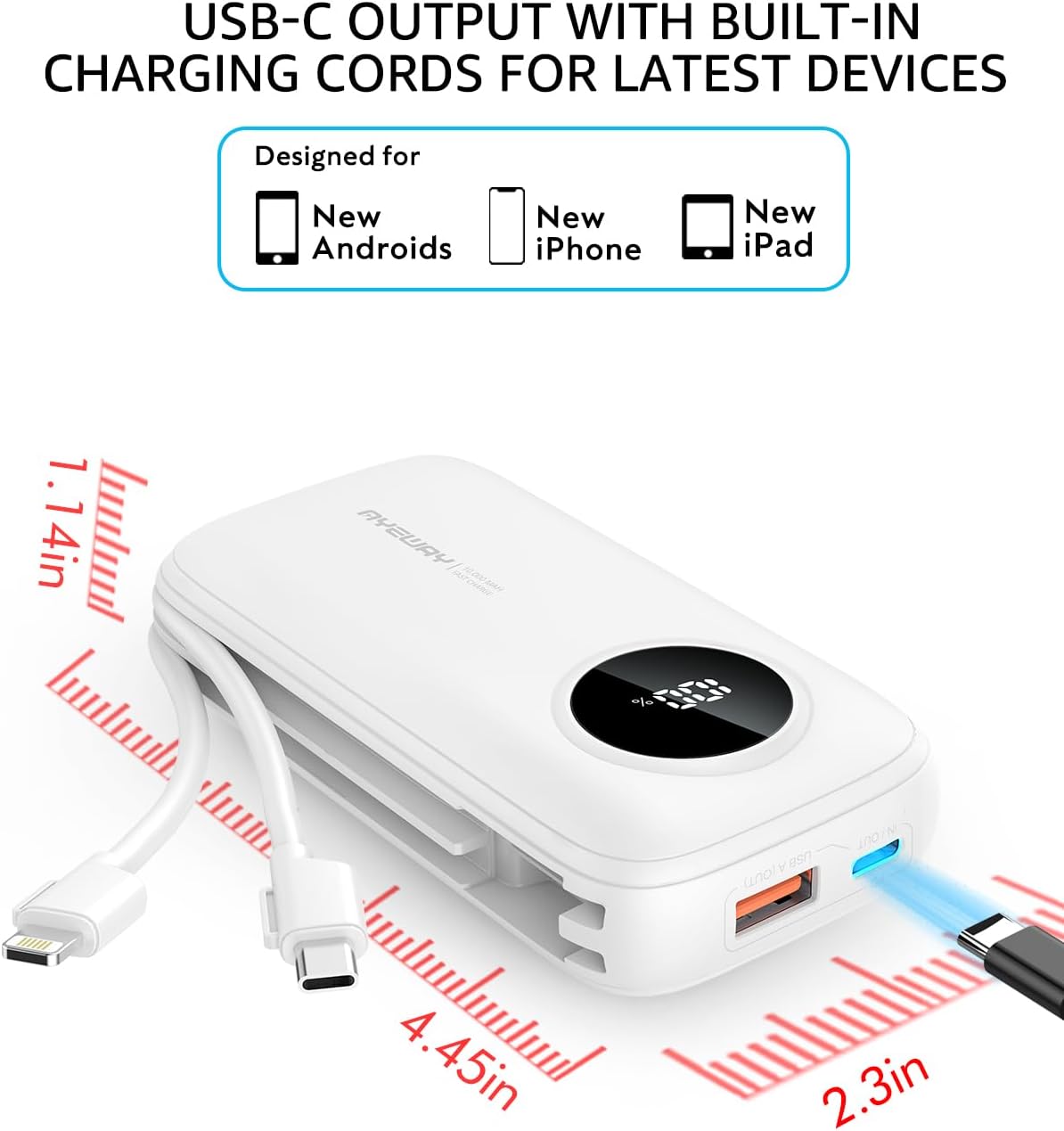
Figure 2: The power bank highlighting its USB-C output port and the two built-in charging cables (USB-C and Lightning) designed for compatibility with various modern devices.

Figure 3: Illustration of the power bank simultaneously charging a smartphone, tablet, wireless earbuds, and another smartphone, demonstrating its multi-device charging capability.
Setup
Charging the Power Bank:
Before first use, fully charge the power bank. A wall adapter is NOT included.
- Connect the included USB-A to USB-C recharging cord to the power bank's USB-C input port.
- Connect the other end of the cable to a USB wall adapter (5V/2A or PD 20W recommended).
- The LED digital display will show the charging progress. It will display "100%" when fully charged.

Figure 4: The power bank connected to a wall charger via its USB-C port, illustrating the recharging process. A Type-C 20W PD charger can fully recharge it in approximately 4 hours, while a standard 5V 2.1A charger takes about 6 hours.
Operating Instructions
Charging Your Devices:
The power bank can charge devices using its built-in cables or its USB-A/USB-C output ports.
- To begin charging, simply connect your device to one of the power bank's output options:
- Use the built-in Lightning cable for Apple devices.
- Use the built-in USB-C cable for USB-C compatible devices.
- Connect your own USB-A cable to the USB-A output port.
- Connect your own USB-C cable to the USB-C output port.
- The power bank will automatically detect the connected device and begin charging. The LED display will illuminate to show the remaining battery percentage.
- To check the battery level without a device connected, single-click the power button on the side of the item.

Figure 5: The power bank actively charging a laptop via its USB-C port and wireless earbuds, demonstrating its versatility for various devices in a typical use scenario.
Compatibility with 5V Heated Clothing:
This power bank is compatible with 5V USB heated vests and jackets. NOTICE: NOT for 7.4V DC Jack.

Figure 6: The power bank connected to a heated vest, illustrating its use as a power source for 5V USB heated clothing, providing warmth for approximately 3.5 to 7 hours depending on the heat setting.
Maintenance
- Clean the power bank with a soft, dry cloth. Do not use abrasive cleaners or solvents.
- Store the power bank in a cool, dry place away from direct sunlight and moisture.
- If not used for extended periods, charge the power bank at least once every three months to maintain battery health.
- Avoid storing the power bank in a fully discharged state for long periods.
Troubleshooting
| Problem | Possible Cause | Solution |
|---|---|---|
| Power bank not charging | Cable not connected properly; Wall adapter not working; Power bank fully discharged. | Ensure cables are securely connected; Try a different wall adapter and cable; Allow power bank to charge for a few minutes before checking display. |
| Device not charging from power bank | Power bank battery low; Device cable faulty; Device not compatible; Power bank in standby mode. | Recharge the power bank; Try a different charging cable; Ensure device is compatible with 5V USB charging; Single-click power button to activate output. |
| LED display not turning on | Power bank is off; Battery completely drained. | Single-click the power button; Connect to a power source to charge. |
Specifications
| Model Number | PD-S10K |
| Battery Capacity | 10,000 mAh |
| Product Dimensions | 4.45 x 2.33 x 1.13 inches |
| Item Weight | 6.8 ounces |
| Input (USB-C) | PD 20W (Max) |
| Output (USB-C) | PD 20W (Max) |
| Output (USB-A) | 22.5W (Max) |
| Built-in Cables | USB-C, Lightning |
| Battery Type | Lithium Ion |
Warranty and Support
For warranty information or technical support, please refer to the contact details provided with your purchase or visit the official Ayeway website. Please retain your proof of purchase for warranty claims.
Ask a question about this manual
Ask about setup, troubleshooting, compatibility, parts, safety, or missing instructions. Manuals+ will review the question and use this page’s manual context to help answer it.