
Introduction
This manual provides detailed instructions for the installation, configuration, and operation of the GeeekPi N07 PCIe M.2 NVMe SSD Peripheral Bottom Board. This board is designed to expand storage capabilities for your Raspberry Pi 5 by allowing the use of M.2 M-key NVMe SSDs.
Package Contents
Verify that all items listed below are included in your package:
- 1x N07 PCIe Peripheral Board
- 1x FPC Cable
- 1x Screw Pack (includes M2.5x6mm standoffs, M2.5*12+4mm standoffs, M2.5x4mm screws, hard drive copper pillars and screws, screwdriver)
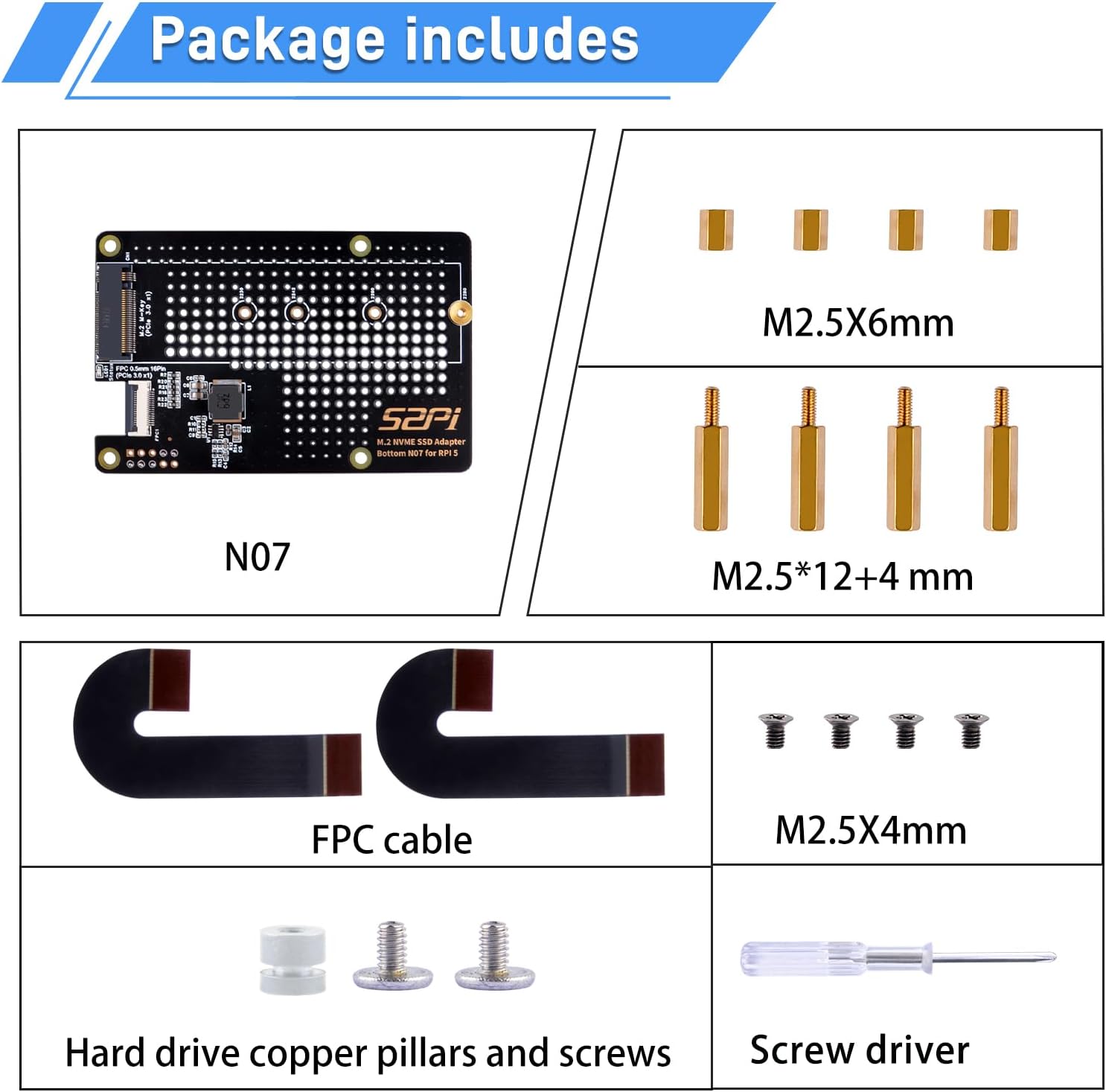
Image: Contents of the GeeekPi N07 package, including the N07 board, FPC cable, and various screws and standoffs.
Product Overview
The GeeekPi N07 board is a bottom-mounted adapter for the Raspberry Pi 5, designed to integrate M.2 NVMe SSDs. It features a ventilation hole design for improved cooling.
Key Components:

Image: Diagram of the N07 board highlighting its components: 1. LED indicator, 2. M.2 NVMe SSD slot (2230/2242/2260/2280), 3. GPIO Pins, 4. PCIe socket.
Dimensions:

Image: Front and back views of the N07 board with dimensions: 87mm (3.43 inches) length and 56mm (2.20 inches) width.
Compatibility
The N07 PCIe M.2 M-key NVMe SSD Peripheral Board is compatible only with Raspberry Pi 5 (8GB and 4GB models). It supports M.2 M-key NVMe SSDs of sizes 2230, 2242, 2260, and 2280.
Note: Raspberry Pi 5 board is not included.

Image: Visual guide indicating compatibility with M.2 NVMe SSD (M Key) and incompatibility with M.2 NVMe SSD (B Key) and M.2 SATA SSD.
Setup and Installation
Follow these steps to install the GeeekPi N07 board with your Raspberry Pi 5:
- Step 1: Prepare the N07 Board and NVMe SSD. Secure your M.2 NVMe SSD onto the N07 board using the provided screws and standoffs. Ensure the SSD is properly seated in the M.2 slot and secured at the other end.
- Step 2: Attach Standoffs to Raspberry Pi 5. Screw the longer standoffs (M2.5*12+4mm) into the mounting holes on the Raspberry Pi 5 board.
- Step 3: Mount the N07 Board to Raspberry Pi 5. Carefully align the N07 board (with SSD installed) with the standoffs on the Raspberry Pi 5. Ensure the GPIO pins and PCIe socket align correctly. Secure the N07 board to the standoffs using the remaining screws.
- Step 4: Connect the FPC Cable. Connect one end of the FPC cable to the PCIe slot on the Raspberry Pi 5 and the other end to the PCIe socket on the N07 board. Ensure the cable is inserted straight and the latches are closed securely.

Image: Installation of an M.2 NVMe SSD onto the N07 peripheral board, showing the use of a screw to secure the SSD.

Image: Attaching standoffs to the Raspberry Pi 5 board, preparing it for the N07 board.

Image: The N07 board being mounted underneath the Raspberry Pi 5, secured by standoffs and screws.

Image: Close-up view of the FPC cable connection between the Raspberry Pi 5 and the N07 board, showing proper insertion.
Installation Video:
Video: Official GeeekPi installation guide for the N07 PCIe M.2 2280 PCIe to NVMe Bottom Board for Raspberry Pi 5.
Configuration
After physical installation, you need to configure your Raspberry Pi 5 to recognize and boot from the NVMe SSD.
1. Enable PCIe x1 Lane:
Edit the /boot/firmware/config.txt file and add the following parameter:
dtparam=pciex1The connection is certified for Gen 2.0 speed (5 GT/sec). To force Gen 3.0 (10 GT/sec), add the following line after dtparam=pciex1:
dtparam=pciex1_gen=3Note: Running devices at PCIe Gen 3.0 speeds should be tested for stability.
2. Enable Auto-detection and NVMe Boot:
Open the EEPROM configuration for editing:
sudo rpi-eeprom-config --editAdd the following lines to the configuration:
PCIE_PROBE=1
BOOT_ORDER=0xf416
The BOOT_ORDER=0xf416 setting enables booting from NVMe. Reboot your Raspberry Pi 5. You can verify the PCIe device details using lsblk or lspci -vvv commands.
Operating Instructions
Once configured, your Raspberry Pi 5 will treat the NVMe SSD as a primary storage device. You can install your operating system or use it for data storage. Ensure your operating system supports booting from NVMe.
Troubleshooting
- NVMe Drive Not Recognized: Ensure the FPC cable is fully and correctly seated in both the Raspberry Pi 5 and the N07 board. A slight deviation or incomplete seating can prevent detection. Check that the SSD is properly installed and secured on the N07 board. For new drives, ensure they are formatted and partitioned.
- WiFi Interference: Some users have reported potential WiFi interference when using NVMe SSDs. If you experience issues with WiFi connectivity, consider using an Ethernet connection or adjusting the placement of your Raspberry Pi and its accessories to minimize interference.
- Loose Standoffs/Screws: Ensure all standoffs and screws are tightened appropriately to prevent instability or poor contact.
- Overheating: The N07 board features a ventilation design. Ensure adequate airflow around your Raspberry Pi 5 setup, especially if using a case.
Specifications
| Feature | Detail |
|---|---|
| Model Number | N07 |
| Compatibility | Raspberry Pi 5 (8GB, 4GB) |
| SSD Support | M.2 M-key NVMe SSD (2230/2242/2260/2280) |
| PCIe Interface | PCIe x1 (Gen 2.0, configurable to Gen 3.0) |
| Dimensions | Approx. 87mm x 56mm (3.43 x 2.20 inches) |
| Weight | Approx. 1.76 ounces |
| Manufacturer | GeeekPi |
Warranty and Support
For warranty information and technical support, please refer to the official GeeekPi website or contact your retailer. Additional resources and detailed information can be found on the GeeekPi Wiki.