
1. Introduction
The Dreaver S340 Treadmill is designed to help you maintain your fitness and walk at your own pace from the comfort of your home. This portable and foldable treadmill is ideal for both beginners and experienced users, offering support with its integrated handle. Its compact design allows for easy storage, making it suitable for any living space.
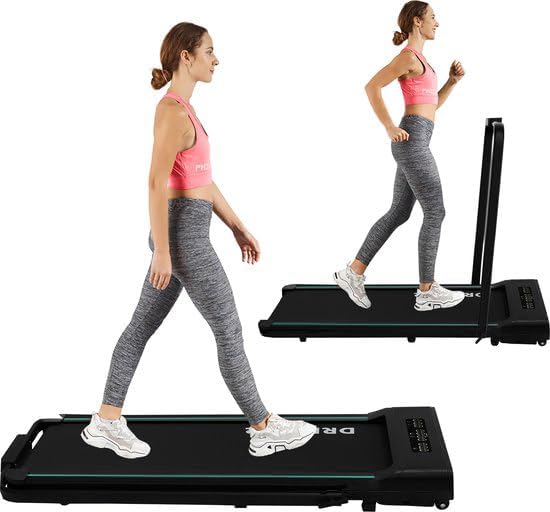
Figure 1.1: The Dreaver S340 Treadmill in its operational state, demonstrating its compact design and ease of use.
2. Important Safety Instructions
Please read all instructions carefully before using the Dreaver S340 Treadmill. Keep this manual for future reference.
- Always place the treadmill on a flat, stable surface.
- Ensure there is adequate clear space around the treadmill (at least 2 meters behind and 0.6 meters on each side).
- Safety Clip: Always attach the safety clip to your clothing before starting your workout. If the clip detaches, the treadmill will automatically stop, preventing potential injury.
- Do not allow children or pets near the treadmill while it is in operation.
- Do not use the treadmill if you feel dizzy, lightheaded, or experience any pain. Consult a physician before starting any new exercise program.
- Unplug the treadmill from the power outlet when not in use or before cleaning and maintenance.
- Keep hands and feet clear of all moving parts.
- The maximum user weight for this treadmill is 120 kg.
3. Package Contents
Verify that all items are present in the package before assembly and use.
- Dreaver S340 Treadmill Unit
- Remote Control
- User Manual (this document)
- Lubricant
- Safety Key
4. Setup and Assembly
The Dreaver S340 Treadmill comes largely pre-assembled. Follow these steps for initial setup.
- Unpacking: Carefully remove the treadmill from its packaging.
- Placement: Choose a flat, stable surface for the treadmill. Ensure sufficient space around the unit for safe operation.
- Unfolding the Treadmill:
- Gently lift the handle bar (if folded down) until it locks into the upright position.
- Ensure all locking mechanisms are securely engaged before use.
- Power Connection: Plug the power cord into a grounded electrical outlet.

Figure 4.1: The Dreaver S340 Treadmill fully unfolded and ready for operation.

Figure 4.2: The Dreaver S340 Treadmill can be easily stored under furniture due to its slim profile when folded.
5. Operating Instructions
The Dreaver S340 Treadmill is designed for intuitive operation.
5.1 Starting and Stopping
- Power On: Ensure the treadmill is plugged in. Press the "ON/OFF" button on the remote control or the main console to power on the unit.
- Safety Key: Attach the safety key clip to your clothing and insert the magnetic end into the designated slot on the treadmill console. The treadmill will not operate without the safety key in place.
- Start Workout: Press the "Start" button (or equivalent on remote) to begin the treadmill belt movement. The belt will typically start at a low speed and gradually increase.
- Stopping: Press the "Stop" button on the remote or console, or pull the safety key to immediately stop the treadmill.
5.2 Adjusting Speed
- Use the "+" button on the remote control to increase the speed.
- Use the "-" button on the remote control to decrease the speed.
- The speed range is 1-10 km/h.
5.3 Remote Control Functions
The included remote control provides convenient access to key functions.
- "+": Increase speed.
- "-": Decrease speed.
- "M": Mode/Display toggle. Switches between displayed information (Distance, Calories, Speed, Time).
- "ON/OFF": Power on/off the treadmill.

Figure 5.1: The Dreaver S340 Treadmill in use with the handle bar providing support.

Figure 5.2: The remote control and LED display, illustrating control buttons and performance metrics.
5.4 LED Display
The integrated LED display shows your workout data clearly.
- Time: Duration of your workout.
- Speed: Current walking/running speed in km/h.
- Distance: Total distance covered during the workout.
- Calories: Estimated calories burned.
5.5 Folding and Storage
The Dreaver S340 is designed for easy folding and compact storage.
- Ensure the treadmill is powered off and unplugged.
- Gently push the handle bar down until it folds flat against the main unit.
- The treadmill can then be slid under a bed or sofa, or stored upright against a wall.
- Integrated transport wheels make moving the folded treadmill very easy.
6. Maintenance
Regular maintenance ensures the longevity and optimal performance of your Dreaver S340 Treadmill.
- Cleaning: Wipe down the treadmill surfaces with a damp cloth after each use. Do not use abrasive cleaners or solvents.
- Lubrication: The running belt requires periodic lubrication to reduce friction and extend its lifespan. Use the provided lubricant or a silicone-based treadmill lubricant. Refer to the specific instructions for lubrication frequency (typically every few months depending on usage).
- Belt Tension and Alignment: Periodically check the running belt for proper tension and alignment. If the belt slips or drifts to one side, consult the troubleshooting section or contact support.
- Storage: When not in use for extended periods, store the treadmill in a clean, dry place, away from direct sunlight and extreme temperatures.
7. Troubleshooting
If you encounter issues with your Dreaver S340 Treadmill, refer to the common problems and solutions below.
| Problem | Possible Cause | Solution |
|---|---|---|
| Treadmill does not power on. | Not plugged in; power switch off; circuit breaker tripped. | Ensure power cord is securely plugged in. Check the main power switch. Reset the circuit breaker if necessary. |
| Treadmill belt does not move. | Safety key not inserted; emergency stop activated; motor issue. | Ensure the safety key is fully inserted. Check if the emergency stop button is pressed. If the issue persists, contact support. |
| Unusual noise during operation. | Belt needs lubrication; loose components; foreign object. | Lubricate the running belt. Check for any loose screws or components and tighten them. Inspect for any foreign objects under the belt. |
| Remote control not working. | Dead batteries; remote out of range; interference. | Replace batteries in the remote control. Ensure you are within range of the treadmill's receiver. Remove any potential sources of interference. |
8. Product Specifications
| Feature | Detail |
|---|---|
| Brand | DREAVER |
| Model | S340 |
| Color | Black |
| Maximum Speed | 10 km/h |
| Horsepower | 1 Horsepower |
| Maximum User Weight | 120 kg |
| Product Dimensions (L x W x H) | 132.5 x 56 x 13 cm |
| Item Weight | 25 kg |
| Display Type | LED |
| Features | Foldable, Shock-absorbing |
| Power Source | Corded Electric |
| Included Components | Remote Control, User Manual, Lubricant, Safety Key |
9. Warranty and Support
For warranty information or technical support, please contact the manufacturer or your point of purchase. Keep your purchase receipt as proof of purchase.
Manufacturer: JJ-Commerce B.V.