
1. Product Overview
The Philips Walita PerfectCare 6000 Series Steam Iron is designed to make ironing faster and safer. It features OptimalTEMP technology, which eliminates the need for temperature adjustments, preventing burns on all ironable fabrics. This compact and powerful steam generator iron delivers high-quality steam performance for efficient garment care.
- OptimalTEMP Technology: Guarantees no burns on any ironable fabric.
- Compact Design: Saves space without compromising steam performance.
- Powerful Performance: 1800W power, SteamGlide Plus soleplate, 6 Bar pressure.
- Large Water Tank: 1.8L capacity for extended ironing sessions.
- Vertical Steaming: Convenient for refreshing hanging garments.
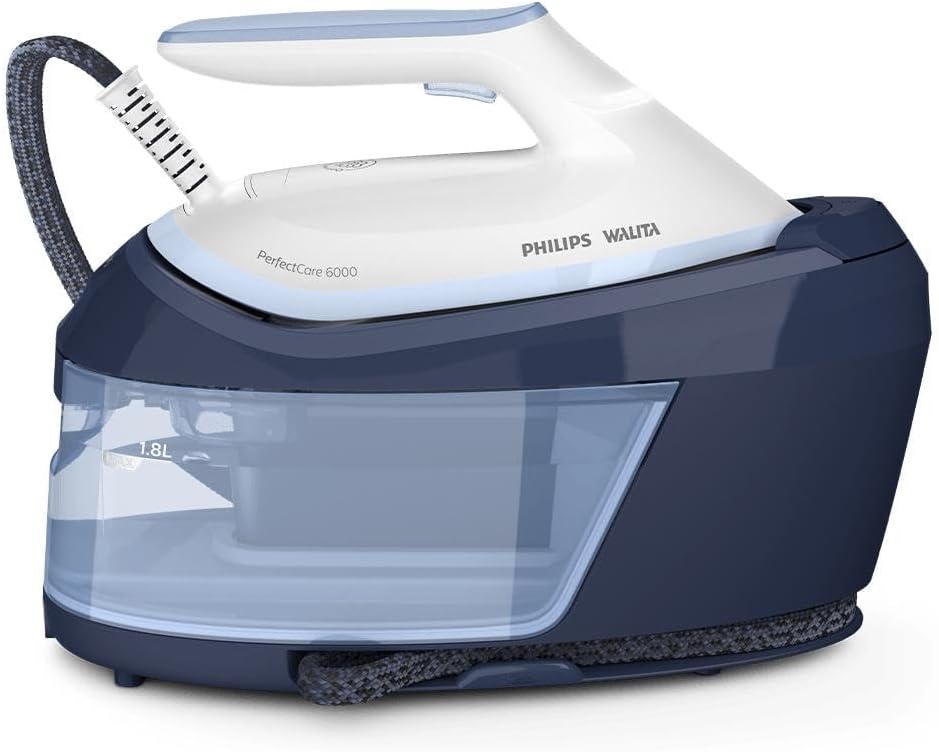
Figure 1.1: The Philips Walita PerfectCare 6000 Series Steam Iron, showcasing its compact design and separate 1.8L water reservoir.
2. Safety Information
Before using the appliance, please read this instruction manual carefully and keep it for future reference. Always observe basic safety precautions when using electrical appliances to reduce the risk of fire, electric shock, and personal injury.
- Ensure the voltage indicated on the appliance corresponds to your local mains voltage before connecting.
- Do not immerse the iron or the base unit in water or any other liquid.
- Always place the iron on a stable, heat-resistant surface when not in use.
- Keep the iron and its cord out of reach of children.
- Unplug the appliance from the mains socket before filling the water tank, cleaning, or performing maintenance.
- Do not use the appliance if the plug, the mains cord, or the appliance itself shows visible damage.
- The OptimalTEMP technology ensures no burns, but always exercise caution when handling hot surfaces and steam.
3. Setup
Follow these steps to set up your PerfectCare 6000 Series Steam Iron for first use.
3.1 Unboxing
Carefully remove all components from the packaging. Ensure you have the following items:
- Steam Iron unit
- Water tank base unit
- 1 Calc Clean container
- User Manual
- Warranty Certificate
3.2 Filling the Water Tank
- Ensure the appliance is unplugged from the power outlet.
- Remove the detachable water tank from the base unit.
- Fill the water tank with tap water up to the 'MAX' indication. For prolonged life and optimal performance, consider using demineralized or distilled water, especially in areas with hard water.
- Replace the water tank securely into the base unit.

Figure 3.1: Detaching the water tank for filling. Ensure the iron is unplugged before handling the water tank.
3.3 Initial Use
For the first use, or if the iron has not been used for a long time, it is recommended to iron a piece of old cloth to remove any residue from the soleplate.
- Place the iron on a stable ironing board.
- Plug the appliance into a grounded power outlet. The power light will illuminate.
- Wait for the 'iron ready' light to stop blinking and remain steady, indicating the iron has reached the optimal temperature. This usually takes a few minutes.
4. Operating Instructions
The PerfectCare 6000 Series is designed for ease of use with its advanced features.
4.1 Ironing with OptimalTEMP Technology
Thanks to OptimalTEMP technology, you do not need to adjust the temperature setting. The iron is safe to use on all ironable fabrics, from denim to silk, without the risk of burning.
- Place the garment on the ironing board.
- Press the steam trigger under the handle for continuous steam. Release the trigger to stop steaming.
- For stubborn creases, press the steam boost button (usually located on top of the handle) for an extra burst of steam.

Figure 4.1: Ironing a garment with continuous steam. The OptimalTEMP technology ensures safe use on all fabrics.
4.2 Vertical Steaming
The iron can also be used for vertical steaming to refresh hanging clothes, curtains, or delicate fabrics.
- Hang the garment on a hanger.
- Hold the iron in a vertical position, slightly away from the fabric.
- Press the steam trigger to release steam. Move the iron up and down along the fabric.

Figure 4.2: Demonstrating vertical steaming. This feature is ideal for quick touch-ups on hanging garments.
5. Maintenance
Regular maintenance ensures the longevity and optimal performance of your steam iron.
5.1 Cleaning the Soleplate
To keep the soleplate clean and gliding smoothly:
- Allow the iron to cool down completely.
- Wipe the soleplate with a damp cloth and a non-abrasive liquid cleaner.
- Do not use abrasive scouring pads or harsh cleaners as they can damage the soleplate.
5.2 Descaling (Calc-Clean Process)
The iron features an integrated descaling system. Regular descaling is crucial, especially in hard water areas, to prevent mineral buildup and maintain steam performance. The iron will indicate when descaling is needed (e.g., with a light or sound signal).
- Ensure the water tank is filled.
- Place the Calc Clean container on a stable surface.
- Place the iron on the Calc Clean container.
- Press and hold the Calc-Clean button (refer to your iron's specific button location) for 2 seconds until you hear short beeps.
- The iron will start the descaling process, which takes approximately 2 minutes. You will hear beeping sounds and see steam and hot water coming out of the soleplate.
- When the process is complete, the iron will stop beeping and the Calc-Clean light will turn off.
- Wipe the soleplate with a cloth.

Figure 5.1: The removable 1.8L water tank, which should be emptied after each use and removed for descaling.
5.3 Storage
After each use:
- Unplug the appliance and allow it to cool down completely.
- Empty the water tank to prevent limescale buildup.
- Store the iron and its base unit in a safe, dry place.
6. Troubleshooting
If you encounter issues with your Philips Walita PerfectCare 6000 Series Steam Iron, refer to the table below for common problems and solutions.
| Problem | Possible Cause | Solution |
|---|---|---|
| No steam is coming out. | Water tank is empty or low. Iron is not hot enough. | Fill the water tank. Wait for the 'iron ready' light to stop blinking. |
| Water droplets or dirty water coming from the soleplate. | First use or descaling needed. Mineral buildup. | Perform the Calc-Clean process. Iron on an old cloth first. |
| Iron is not heating up. | Not plugged in correctly. Power outlet issue. | Check power connection. Try a different outlet. |
| Calc-Clean light frequently illuminates (as reported by some users). | High mineral content in water. | Perform Calc-Clean process as indicated. Consider using demineralized or distilled water to reduce frequency. If issue persists, contact customer support. |
7. Specifications
- Model: PSG6026/22
- Brand: Walita (Philips Walita)
- Power: 1800 Watts
- Voltage: 127 Volts (This specific model)
- Water Tank Capacity: 1.8 Liters
- Steam Pressure: 6 Bar
- Soleplate: SteamGlide Plus
- Color: White and Blue
- Product Dimensions: Approximately 43 x 22.7 x 0.1 cm (Iron unit)
- Total Weight: Approximately 4.24 kg
- Special Features: OptimalTEMP Technology, Vertical Steaming, Anti-drip, Automatic cleaning (Calc-Clean)
8. Warranty and Support
Your Philips Walita PerfectCare 6000 Series Steam Iron comes with a manufacturer's warranty.
8.1 Warranty Information
This product is covered by a 2-year warranty against manufacturing defects. Please retain your proof of purchase for warranty claims. The warranty does not cover damage caused by misuse, neglect, or failure to follow the instructions in this manual.
8.2 Customer Support
For technical assistance, warranty claims, or to purchase accessories, please contact Philips Walita customer support. Refer to the contact information provided in your warranty certificate or visit the official Walita website for your region.
You can also visit the Walita Store on Amazon for more product information and support resources.