
1. Introduction
This manual provides detailed instructions for the installation, operation, and maintenance of your Generic MB-841 Dual Lens 6MP 2K Security Camera. Please read this manual thoroughly before using the product to ensure proper functionality and safety. This camera is designed for both indoor and outdoor use, offering advanced surveillance capabilities with dual lenses and AI detection.
2. Product Overview and Features
The MB-841 security camera features a unique dual-lens system for comprehensive coverage and enhanced security. It combines a fixed wide-angle lens with a rotatable lens, providing a 360-degree panoramic view without blind spots.
- Dual Lens System: Two cameras working in conjunction, offering 6MP (3MP*2) resolution and a main resolution of 2304*1296.
- Dual View Display: Simultaneously displays images from both lenses, providing a complete panoramic view.
- Pan & Tilt Functionality: The rotatable lens offers 90 degrees vertical and 355 degrees horizontal movement for flexible monitoring.
- AI Human Detection & Tracking: Intelligent detection activates tracking mode upon human movement.
- Enhanced Night Vision: Equipped with 21 LED units and 11 infrared lights for clear night images.
- Three Night Monitoring Modes: Black and white infrared, full-color, and intelligent AI color mode.
- Sound and Light Alarm: Features flashing red and blue alert lights and audible warnings to deter intruders.
- Two-Way Audio: Built-in microphone and speaker for direct communication.
- Connectivity: Supports Wi-Fi (2.4GHz only) and RJ45 network cable connection.
- Storage Options: Compatible with MicroSD cards (up to 256GB, Class 10 recommended) and optional cloud storage via the iCSee app.
- Durability: IP66 rated for water and dust resistance, suitable for outdoor installation.
- Compatibility: Works with iCSee system, Android, and iOS devices.

Figure 2.1: Key Features of the MB-841 Camera
3. Package Contents
Please verify that all items are present in the package before proceeding with installation:
- 1 x Dual-Lens Security Camera
- 1 x Mounting Base
- 1 x Power Adapter (Bivolt: 110V/220V compatible)
- 1 x Screw Pack for Installation
- 1 x User Manual (this document)

Figure 3.1: Package Contents and Camera Components
4. Setup
4.1 Installation Location
Choose a suitable location for installation. The camera is IP66 rated, making it resistant to sun and rain, ideal for outdoor use. It can also be installed indoors. Ensure the power adapter is protected from direct exposure to rain or moisture.
4.2 Mounting the Camera
- Attach the mounting base to the desired surface (wall or ceiling) using the provided screw pack.
- The camera's support bracket is removable and can be manually rotated to adjust the angle, allowing for flexible installation in suspended or wall-mounted configurations.
- Securely attach the camera to the mounting base.

Figure 4.1: Installation Flexibility
4.3 Power Connection
Connect the power adapter to the camera and plug it into a compatible power outlet (110V or 220V). Ensure the connection is secure.
4.4 App Download and Initial Setup
- Download the iCSee application from your device's app store (available for Android and iOS).
- Register an account or log in if you already have one.
- Follow the in-app instructions to add your new camera. The camera connects only to 2.4GHz Wi-Fi networks. Ensure your router is broadcasting a 2.4GHz signal.
- If Wi-Fi stability issues occur, consider connecting the camera via an RJ45 network cable for a more stable connection.

Figure 4.2: iCSee App Interface and Connectivity
5. Operating Instructions
5.1 Live View and Dual Display
Once connected, open the iCSee app to access the live feed. The app will display both camera views simultaneously, providing a comprehensive overview of the monitored area.
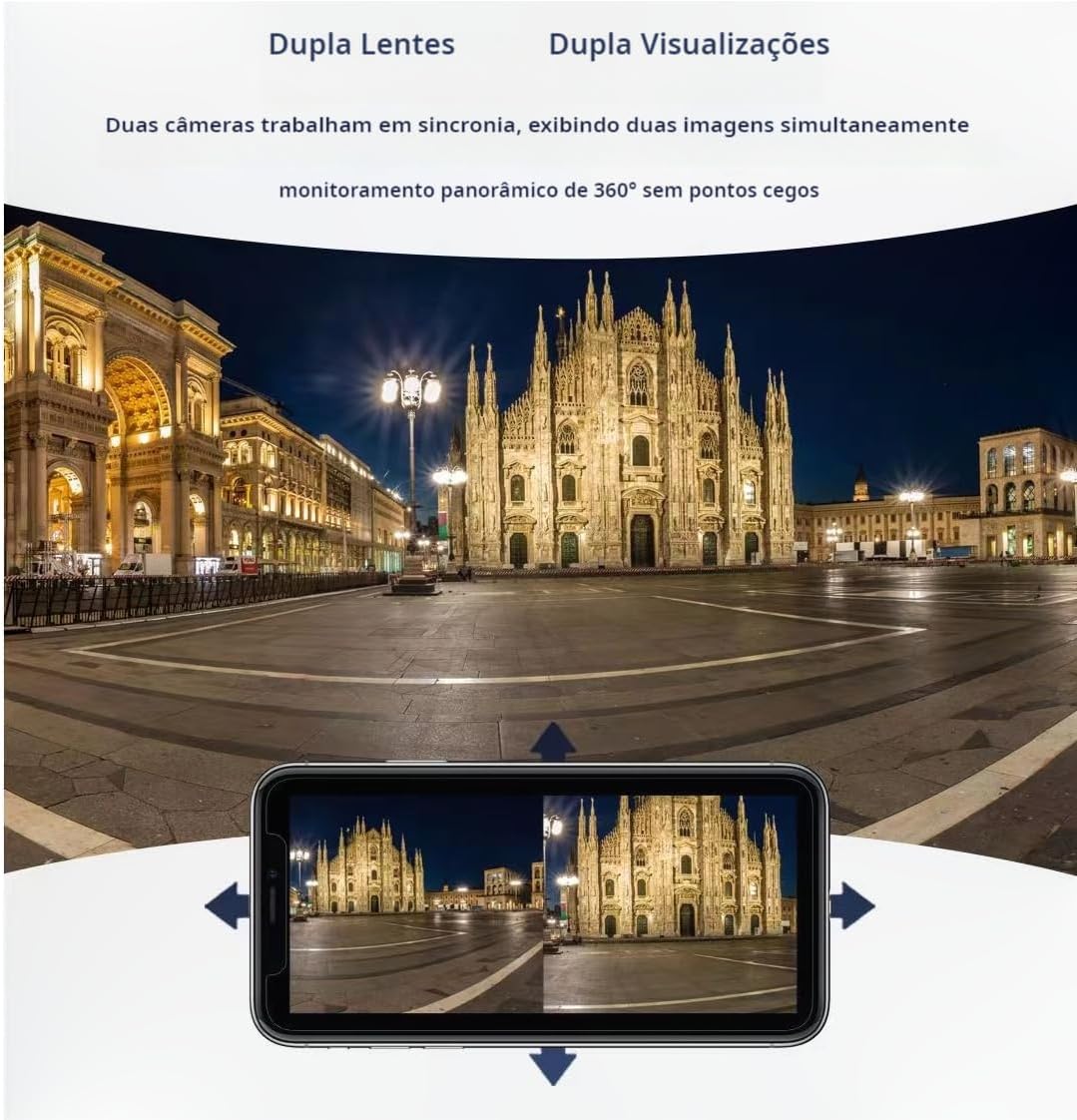
Figure 5.1: Dual Lens, Dual View Functionality
5.2 Pan and Tilt Control
Use the controls within the iCSee app to remotely adjust the viewing angle of the rotatable lens. This allows you to pan horizontally (355 degrees) and tilt vertically (90 degrees) to cover specific areas of interest.
5.3 Digital Zoom
The camera supports 4x digital zoom. While viewing the live feed in the app, use a two-finger pinch gesture on your screen to zoom in or out.
5.4 Two-Way Audio
Activate the microphone and speaker functions in the app to engage in two-way communication. This allows you to speak through the camera and hear audio from the camera's location.
6. Night Vision Modes
The MB-841 camera offers three distinct night vision modes to suit various monitoring needs:
- Black and White Infrared Mode: The standard infrared mode provides clear black and white images in low-light or no-light conditions. This mode is automatically activated at night.
- Full-Color Night Vision: By activating the camera's white lights, you can achieve full-color images even at night. This can be configured remotely via the iCSee app.
- Intelligent AI Night Monitoring: This mode automatically switches the image from black and white to color when human activity is detected, providing detailed color footage when it matters most.

Figure 6.1: Night Vision Mode Options
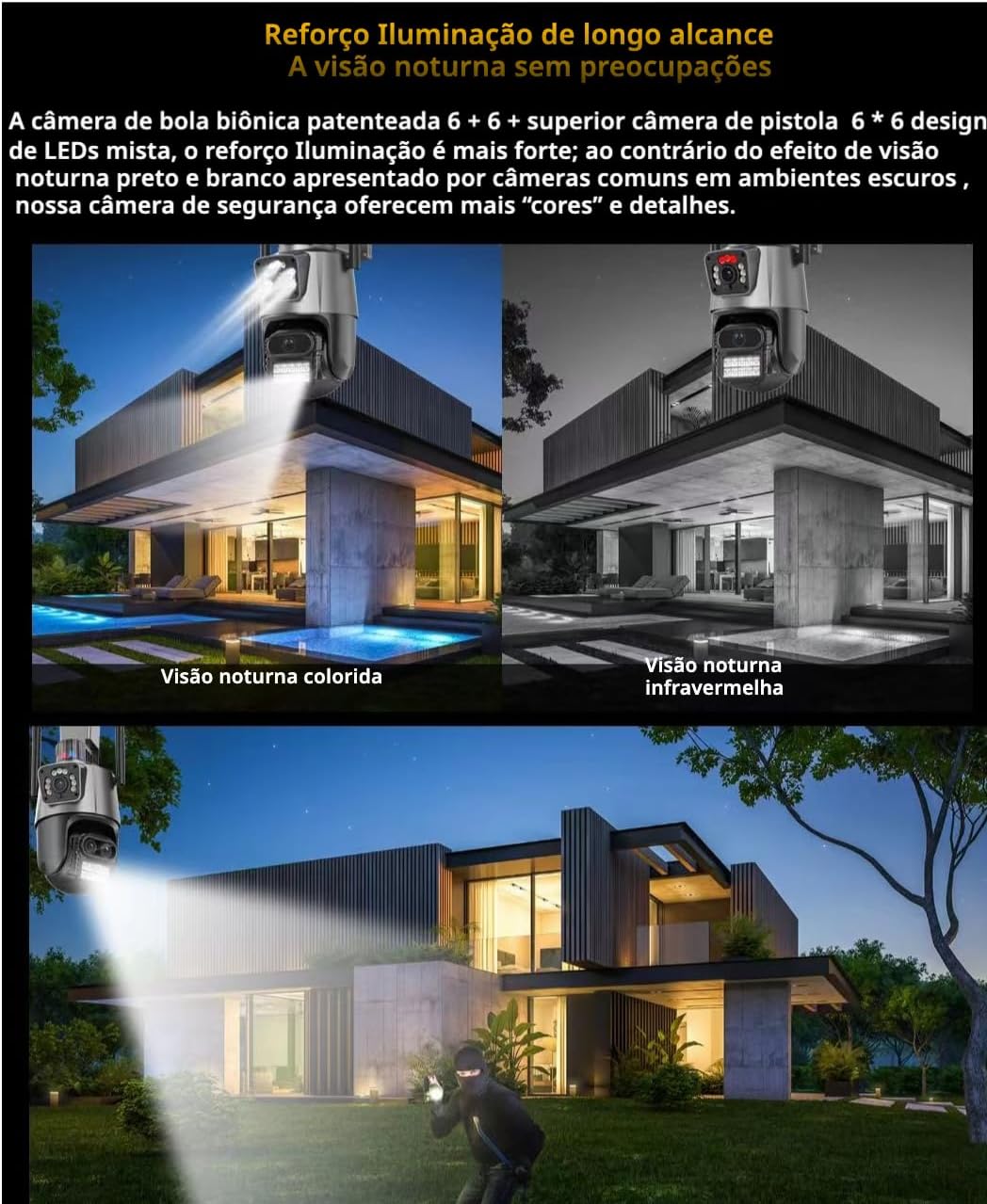
Figure 6.2: Enhanced Night Vision Clarity
7. AI Detection and Alerts
The camera incorporates advanced AI technology for human detection and intelligent tracking. When motion is detected, the camera can automatically track the subject.
7.1 Motion Detection and Notifications
Configure motion detection zones and schedules within the iCSee app. You will receive notifications on your mobile device whenever movement is detected in the monitored area.
7.2 Sound and Light Alarm
Upon detecting suspicious activity, the camera can activate its flashing red and blue alert lights and emit audible warnings. This feature is designed to deter intruders and can be configured in the app.

Figure 7.1: Sound and Light Alarm in Action
8. Storage
8.1 MicroSD Card Storage
The camera supports MicroSD (TF) cards up to 256GB. A Class 10 MicroSD card is highly recommended for optimal recording performance. The camera features an automatic overwrite function, meaning older footage will be replaced by new recordings once the memory card is full. A 256GB card can typically store 20 to 30 days of continuous recording, depending on image quality settings.
8.2 Cloud Storage
Optional cloud storage services are available through the iCSee application. This is a paid subscription service and provides an additional backup for your recordings.
9. Maintenance
To ensure the longevity and optimal performance of your security camera, follow these maintenance guidelines:
- Regular Cleaning: Periodically clean the camera lenses with a soft, dry cloth to remove dust and smudges that may affect image clarity.
- Power Adapter Protection: Ensure the power adapter is always protected from direct exposure to water or extreme weather conditions, even though the camera itself is waterproof.
- Firmware Updates: Check the iCSee app regularly for any available firmware updates for your camera. Keeping the firmware updated ensures you have the latest features and security enhancements.
- Connectivity Check: Periodically verify the Wi-Fi signal strength to the camera. If signal instability occurs, consider relocating your router or using a wired RJ45 connection.
10. Troubleshooting
This section addresses common issues you might encounter with your security camera.
- Camera Not Connecting to Wi-Fi:
- Ensure your Wi-Fi network is 2.4GHz. The camera does not support 5GHz networks.
- Check the distance between the camera and your router. Walls or obstacles can significantly reduce signal strength. Consider using an RJ45 cable for a more stable connection if Wi-Fi is consistently unstable.
- Verify your Wi-Fi password is entered correctly in the iCSee app. - No Recording to MicroSD Card:
- Ensure the MicroSD card is Class 10 and formatted correctly within the iCSee app.
- Check if the card is inserted properly.
- The camera does not come with a memory card; it must be purchased separately. - Poor Image Quality at Night:
- Ensure the camera lenses are clean.
- Check if the night vision mode is set correctly in the app (infrared, color, or intelligent AI). - App Notifications Not Received:
- Check your phone's notification settings for the iCSee app to ensure they are enabled.
- Verify that motion detection settings are configured correctly within the app. - Camera Not Functioning:
- Ensure the power adapter is securely connected and receiving power.
- If the issue persists, try restarting the camera by unplugging and re-plugging the power.
11. Specifications
| Feature | Specification |
|---|---|
| Model | MB-841 |
| Video Capture Resolution | 2K (2304*1296) |
| Number of Lenses | 2 (Dual Lens) |
| Megapixels | 6MP (3MP*2) |
| Pan Range | 355 degrees |
| Tilt Range | 90 degrees |
| Wireless Communication Technology | Wi-Fi (2.4GHz only) |
| Wired Connectivity | RJ45 Network Cable |
| Controller Type | Android, iOS (iCSee App) |
| Mounting Type | Wall Mount |
| Water Resistance Level | IP66 (Waterproof) |
| Material | Metal |
| Voltage | 110 Volts, 220 Volts (Bivolt) |
| Dimensions (L x W x H) | 15 x 14 x 25 cm |
| Light Source Type | Infrared, LED |
| Power Source | AC/DC |
| Manufacturer | Akibaba |
12. Warranty and Support
This product comes with a worry-free after-sales service, including a return or exchange service for three months from the date of receipt. This service covers functional defects not caused by misuse.
For technical support or warranty claims, please contact your retailer or the manufacturer, Akibaba. Please note that installation services are not provided by the manufacturer; it is recommended to consult a qualified technician for installation if needed.


