
Introduction
Thank you for choosing the Ankuka Portable Karaoke Machine, Model 1. This device is designed to provide high-quality audio entertainment with versatile connectivity options and portable convenience. Please read this manual carefully before operating the product to ensure proper use and to maximize its performance and lifespan.

The Ankuka Portable Karaoke Machine, designed for versatile entertainment.
Package Contents
Please check the package for the following items:
- 1 x Ankuka Portable Karaoke Machine (Main Unit)
- 2 x Wireless Microphones
- 1 x Shoulder Strap
- 1 x USB Charging Cable
- 1 x User Manual
Note: Each wireless microphone requires 2 AA batteries, which are not included in the package. Please purchase them separately.
Product Features
- High-Definition Stereo Sound: Equipped with 15W, 6.5-inch speakers and advanced bass/treble separation technology for clear and powerful audio.
- Bluetooth 5.0 Connectivity: Ensures instant pairing, stable transmission, and an extended range for wireless audio streaming.
- Dual Wireless Microphones: Includes two wireless microphones for duet performances.
- Multi-functional Inputs: Supports Micro TF cards, USB flash drives, and AUX-in connections.
- Wide Compatibility: Connects with smartphones, TVs, iPads, tablets, and PCs.
- Dynamic LED Lights: Features six colorful disco light modes to enhance the atmosphere.
- TWS (True Wireless Stereo) Function: Allows two identical speakers to connect wirelessly for synchronized stereo sound.
- Portable Design: Compact (16 x 27 x 35 cm) and lightweight (2.13 kg) with an included shoulder strap for easy transport.
- Long Battery Life: High-performance battery provides 6-8 hours of continuous music playback on a full charge.

Immersive HD Stereo Sound: Experience clear and powerful audio.
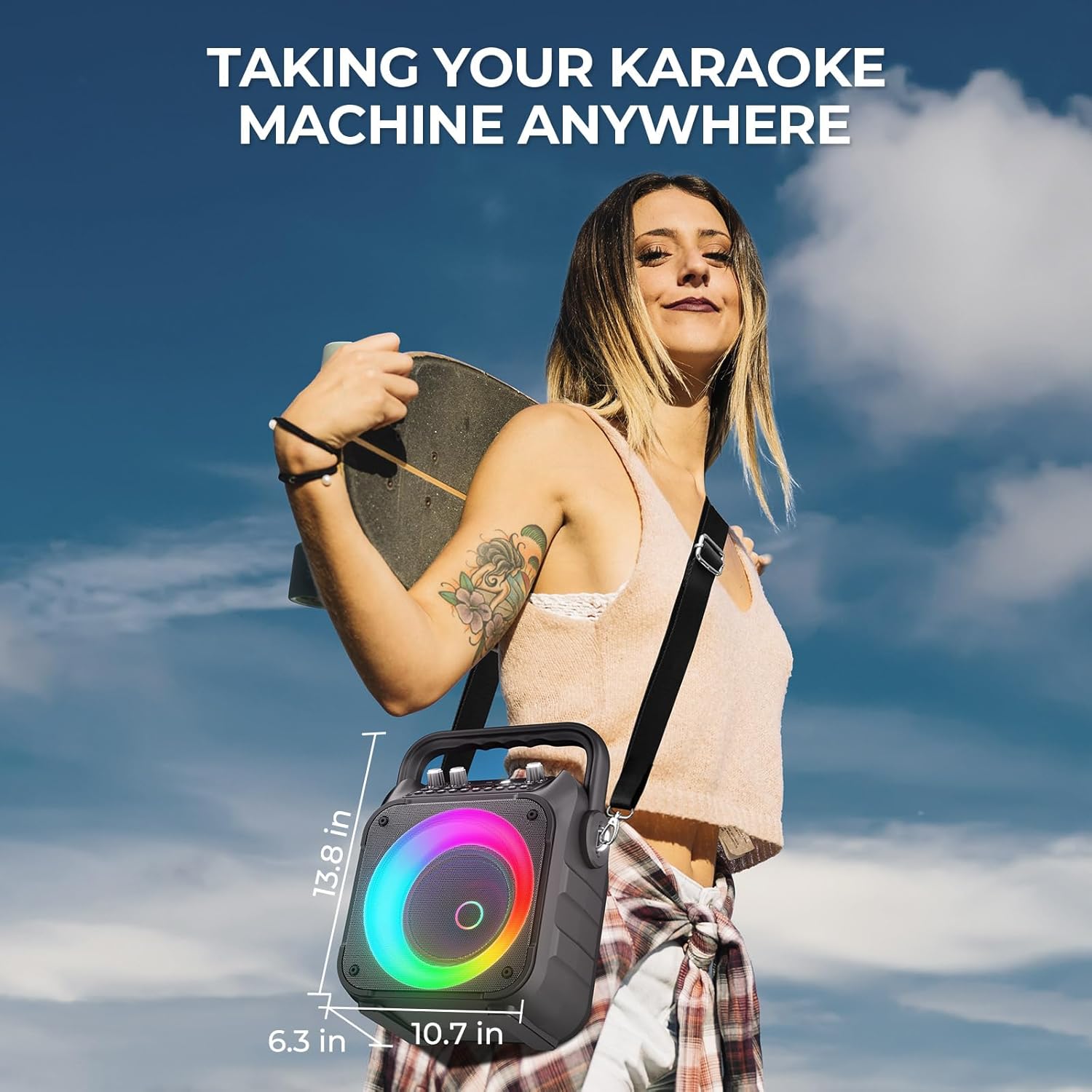
Portability: Easily carry your karaoke machine anywhere with the included shoulder strap.
Controls and Ports

Detailed view of the control panel for easy operation.
The control panel features intuitive buttons and knobs for managing audio input, microphone settings, and power:
- MIC VOL: Adjusts the volume of the microphones.
- MIC ECHO: Adjusts the echo effect for the microphones.
- AUX: 3.5mm audio input port for external devices.
- USB: USB port for playing music from a USB flash drive.
- TF: TF card slot for playing music from a TF (Micro SD) card.
- DC 5V: Charging port for the unit.
- ON/OFF: Power switch for the unit.
- VOL: Main volume control for the speaker.
- Priority Mic: Microphone priority function.
- LED Mode: Button to cycle through LED light modes.
- Playback Controls: Buttons for Play/Pause, Next Track, Previous Track, and Mode selection.
Setup
1. Charging the Karaoke Machine
- Connect the provided USB charging cable to the DC 5V port on the karaoke machine.
- Plug the other end of the USB cable into a compatible USB power adapter (not included) or a computer USB port.
- The charging indicator will illuminate. Allow 3-4 hours for a full charge. The indicator will change or turn off once fully charged.
2. Installing Microphone Batteries
- Unscrew the bottom part of each wireless microphone.
- Insert 2 AA batteries into each microphone, ensuring correct polarity (+/-).
- Screw the bottom part back on securely.
3. Powering On/Off
- To power on, slide the ON/OFF switch to the 'ON' position. The display will light up.
- To power off, slide the ON/OFF switch to the 'OFF' position.
Operating Instructions
1. Bluetooth Pairing
- Power on the karaoke machine. It will automatically enter Bluetooth mode, indicated by a 'BLUE' message on the display and a blinking Bluetooth icon.
- Enable Bluetooth on your smartphone, tablet, or other device.
- Search for 'Ankuka' in the list of available Bluetooth devices.
- Select 'Ankuka' to pair. A confirmation sound will indicate successful pairing.
- You can now play audio from your device through the karaoke machine.
2. TWS (True Wireless Stereo) Connection
The TWS function allows you to connect two identical Ankuka karaoke machines for a true stereo sound experience.

TWS Connection: Pair two speakers for enhanced stereo sound.
- Ensure both Ankuka karaoke machines are powered on and in Bluetooth mode, but not yet paired with any device.
- On one of the machines (this will be the primary unit), press and hold the 'Mode' button (or a dedicated TWS button if available, refer to your unit's specific controls) for a few seconds until you hear a pairing sound.
- The two speakers will automatically connect to each other. A confirmation sound will indicate successful TWS pairing.
- Now, connect your smartphone or other device to the primary unit via Bluetooth as described in step 1.
- Audio will now play synchronously through both speakers, creating a stereo effect.
3. FM Radio Mode
- Power on the karaoke machine.
- Press the 'Mode' button repeatedly until 'FM' appears on the display.
- Press the Play/Pause button to automatically scan and save available FM radio stations.
- Use the Previous/Next track buttons to navigate between saved stations.
4. AUX Input
- Power on the karaoke machine.
- Press the 'Mode' button repeatedly until 'AUX' appears on the display.
- Connect one end of a 3.5mm audio cable (not included) to the AUX port on the karaoke machine.
- Connect the other end of the cable to the audio output (headphone jack) of your external device (e.g., MP3 player, computer).
- Audio from your external device will now play through the karaoke machine.
5. USB/TF Card Playback
- Power on the karaoke machine.
- Insert a USB flash drive into the USB port or a TF (Micro SD) card into the TF card slot.
- The machine will automatically detect the storage device and switch to USB or TF mode, beginning playback of audio files.
- Use the Play/Pause, Previous, and Next track buttons to control playback.
6. Microphone Operation
- Ensure batteries are installed in the wireless microphones.
- Turn on the microphones using their respective power switches. They will automatically connect to the karaoke machine.
- Adjust microphone volume using the 'MIC VOL' knob on the main unit.
- Adjust the echo effect using the 'MIC ECHO' knob.
- The 'Priority Mic' function, if activated, will lower the background music volume when someone speaks into the microphone.
7. LED Light Modes

Multi-color flashing LED lights create a dynamic atmosphere.
- Press the 'LED Mode' button on the control panel to cycle through the six available colorful disco light modes.
- Press the button again to change to the next mode.
- To turn off the LED lights, cycle through all modes until they are off, or refer to specific instructions for your unit if a dedicated off function exists.
Maintenance
- Cleaning: Use a soft, dry cloth to clean the surface of the karaoke machine. Do not use abrasive cleaners or solvents.
- Storage: Store the device in a cool, dry place away from direct sunlight and extreme temperatures.
- Battery Care: If the device will not be used for an extended period, fully charge it and then store it. For microphones, remove AA batteries if not used for a long time to prevent leakage.
- Water Exposure: This device is not waterproof. Avoid exposure to water or excessive moisture.
Troubleshooting
| Problem | Possible Cause | Solution |
|---|---|---|
| No power | Battery is depleted. Power switch is off. | Charge the unit. Ensure the power switch is in the 'ON' position. |
| No sound from speaker | Volume is too low. Incorrect input mode. Device not paired. | Increase main volume (VOL knob). Select the correct input mode (Bluetooth, AUX, USB, TF). Re-pair Bluetooth device. |
| Microphones not working | Microphone batteries are dead or incorrectly inserted. Microphone power is off. MIC VOL is too low. | Replace AA batteries in microphones, ensuring correct polarity. Turn on microphone power. Increase MIC VOL knob. |
| Bluetooth connection unstable | Device is too far from the speaker. Obstructions between devices. Interference. | Move the device closer to the speaker. Remove any obstructions. Avoid strong electromagnetic interference. |
| TWS pairing fails | Speakers are already paired to another device. Not in TWS pairing mode. | Ensure both speakers are disconnected from other Bluetooth devices. Follow TWS pairing instructions carefully. |
Specifications
| Feature | Specification |
|---|---|
| Brand | Ankuka |
| Model Number | 1 |
| Color | Black |
| Speaker Output Power | 15W |
| Speaker Size | 6.5 inches |
| Connectivity Technology | Bluetooth 5.0, AUX, USB, TF Card, FM Radio |
| Compatible Devices | Smartphone, TV, Tablet, PC |
| Microphone Type | Wireless (2 included) |
| Microphone Battery Requirement | 2 x AA batteries per microphone (not included) |
| Power Source | Battery Powered (Rechargeable internal battery) |
| Battery Life | 6-8 hours (approximate, varies with usage) |
| Dimensions (L x W x H) | 16 x 27 x 35 cm (approx. 6.3 x 10.7 x 13.8 inches) |
| Weight | 2.13 kg (approx. 4.7 lbs) |
Warranty and Support
Ankuka products are manufactured to high-quality standards. This product comes with a standard manufacturer's warranty against defects in materials and workmanship. Please refer to the warranty card included in your package for specific terms and conditions, including the warranty period.
For technical support, troubleshooting assistance, or any questions regarding your Ankuka Portable Karaoke Machine, please contact our customer service team. Contact information can typically be found on the product packaging or on the official Ankuka website.
If you are not satisfied with this product or have other questions, please do not hesitate to contact us. We will respond within 24 hours.
