Product Overview
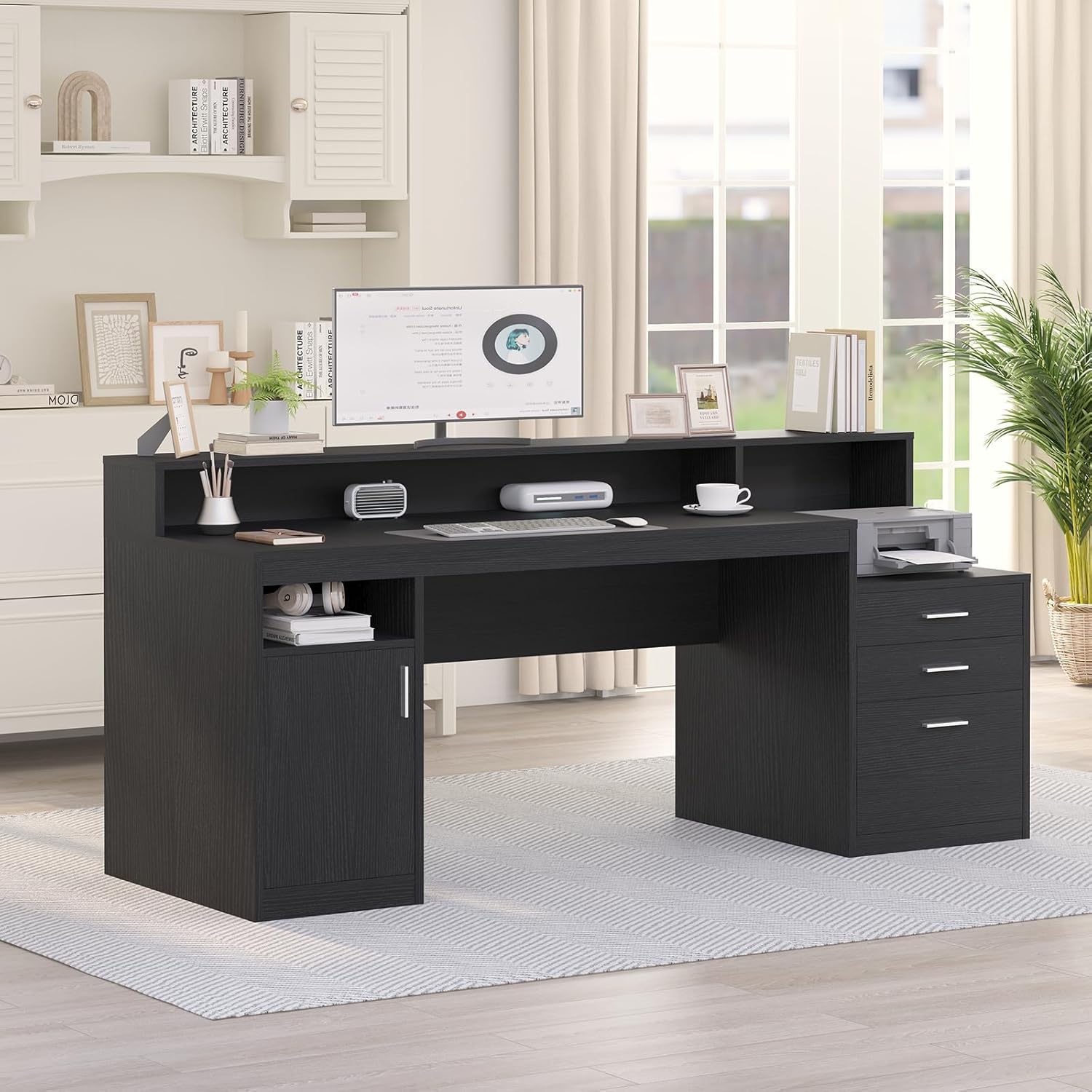
The YOMILUVE 65 Inch Black Computer Desk is designed for home office environments, offering a comprehensive workstation solution. It integrates a spacious desk surface with a multi-functional file cabinet and versatile storage shelves, topped with a full monitor stand for ergonomic comfort and maximized space utilization.

An overview of the YOMILUVE 65 Inch Black Computer Desk, showcasing its integrated design with a spacious desktop, monitor stand, and side storage units including drawers and shelves.
Setup and Assembly
This section provides guidance for the assembly of your YOMILUVE Computer Desk. It is recommended to have two people for assembly to ensure stability and ease of construction. All necessary parts, tools, and detailed instructions are included in the package. Please follow the numbered steps carefully.
Official assembly video for the YOMILUVE Computer Desk with 3 Drawers & Storage Shelves. This video demonstrates the step-by-step process for putting together the desk components.
Assembly Tips:
- Identify all parts and hardware using the provided list before starting.
- Ensure all cam locks and screws are securely tightened for stability.
- For larger sections, such as attaching the desktop, it is advisable to have a second person assist.
- Do not overtighten screws to avoid damaging the MDF board.

An exploded diagram showing all individual components of the desk with their respective dimensions, aiding in part identification during assembly.
Operating Instructions
Your YOMILUVE Computer Desk is designed for versatile use in your home office. Familiarize yourself with its features to optimize your workspace.
Monitor Stand Usage:
The full-length monitor stand provides an elevated surface for your monitors or laptops, promoting an ergonomic viewing angle. This helps reduce eye strain and neck fatigue during prolonged use. The space beneath the monitor stand can be used for keyboard, mouse, or other desk accessories.
This image demonstrates the ergonomic advantages of the integrated monitor stand, showing correct posture with elevated screens compared to incorrect posture.
Drawer and Storage Cabinet Functionality:
The desk features a versatile file cabinet with three drawers and a separate storage cabinet with adjustable shelves. The bottom drawer of the file cabinet is equipped with sliding hanging rods, suitable for organizing legal, letter, A4, and F4 size files. The top surface of the file cabinet can also serve as a convenient printer shelf.
- File Drawers: Utilize the two smaller drawers for office supplies and the larger bottom drawer for hanging files.
- Storage Cabinet: The left-side cabinet includes two tiers of shelves, with the middle shelf being adjustable to accommodate items of various heights.

A detailed view of the multi-functional file drawer, highlighting its capacity for various file sizes (Letter/A4, Legal) and general storage.

This image shows the interior of the storage cabinet, illustrating the adjustable middle shelf feature with red arrows indicating vertical movement.
Maintenance
To ensure the longevity and appearance of your YOMILUVE Computer Desk, follow these simple maintenance guidelines:
- Cleaning: Wipe surfaces regularly with a soft, damp cloth. For stubborn marks, a mild soap solution can be used, followed by drying with a clean cloth. Avoid abrasive cleaners or harsh chemicals, as these can damage the finish.
- Spills: Immediately wipe up any spills to prevent moisture absorption and potential damage to the engineered wood.
- Protection: Use coasters for drinks and desk pads for writing or heavy objects to protect the surface from scratches and heat.
- Hardware: Periodically check all screws and fasteners to ensure they remain tight. Retighten if necessary to maintain the desk's stability.
Troubleshooting
This section addresses common issues you might encounter with your computer desk.
| Problem | Possible Cause | Solution |
|---|---|---|
| Desk feels wobbly or unstable. | Loose fasteners or uneven assembly. | Check all screws, cam locks, and dowels. Ensure they are fully tightened. Verify that the desk is on a level surface. |
| Drawers do not slide smoothly. | Drawer slides are not properly aligned or installed. | Ensure the drawer slides are correctly attached to both the drawer and the desk frame, following the assembly instructions. Lubricate slides if necessary. |
| Parts damaged during shipping. | External factors during transit. | Inspect all parts upon arrival. If any components are damaged, contact the seller or manufacturer for replacement parts. |
| Difficulty with assembly steps. | Complex instructions or lack of assistance. | Review the assembly video and detailed manual. Consider having a second person assist with larger or more complex steps. A power drill with appropriate settings can expedite screw installation. |
Important Safety Note: Always assemble according to the instructions. Do not exceed the maximum weight recommendation of 100 kg (220 lbs) for the desktop. Adult supervision is required when children are near or using this desk.
Specifications
- Brand: YOMILUVE
- Model: 65 Inch Desk Black
- Product Dimensions (D x W x H): 21.7"D x 65"W x 35.4"H
- Color: Black
- Style: Modern
- Base Material: Engineered Wood
- Finish Type: Painted
- Special Features: Ergonomic, Monitor Stand, Scratch Resistant
- Mounting Type: Floor Mount
- Furniture Leg Material: Metal
- Included Components: Full Monitor Stand, 3 Drawers
- Number of Drawers: 3 (2 standard, 1 file)
- Number of Shelves: 4 (including internal cabinet shelves)
- Maximum Weight Recommendation: 100 Kilograms (220 lbs)
- Assembly Required: Yes
- Includes All Assembly Tools: Yes

A top-down view of the desk highlighting key dimensions such as overall width and depth of the main desktop area.
Warranty and Support
For specific warranty details and to register your product, please refer to the documentation included in your product packaging or visit the official YOMILUVE website. If you require technical assistance, have questions about parts, or need to report a damaged item, please contact the seller, Diana design, through the platform where you made your purchase. Provide your order number and a detailed description of the issue for prompt support.
Seller: Diana design


