
Introduction
The Riworal DI-48 is an active direct injection (DI) box designed to convert high-impedance, unbalanced instrument signals into low-impedance, balanced signals suitable for professional audio equipment such as mixing consoles and audio interfaces. This unit features dual 1/4-inch stereo inputs and both 1/4-inch thru and XLR stereo outputs, making it ideal for connecting guitars, basses, keyboards, and other instruments in live sound, studio recording, and practice environments. Its robust design and versatile power options ensure clean and pure audio signal transmission.
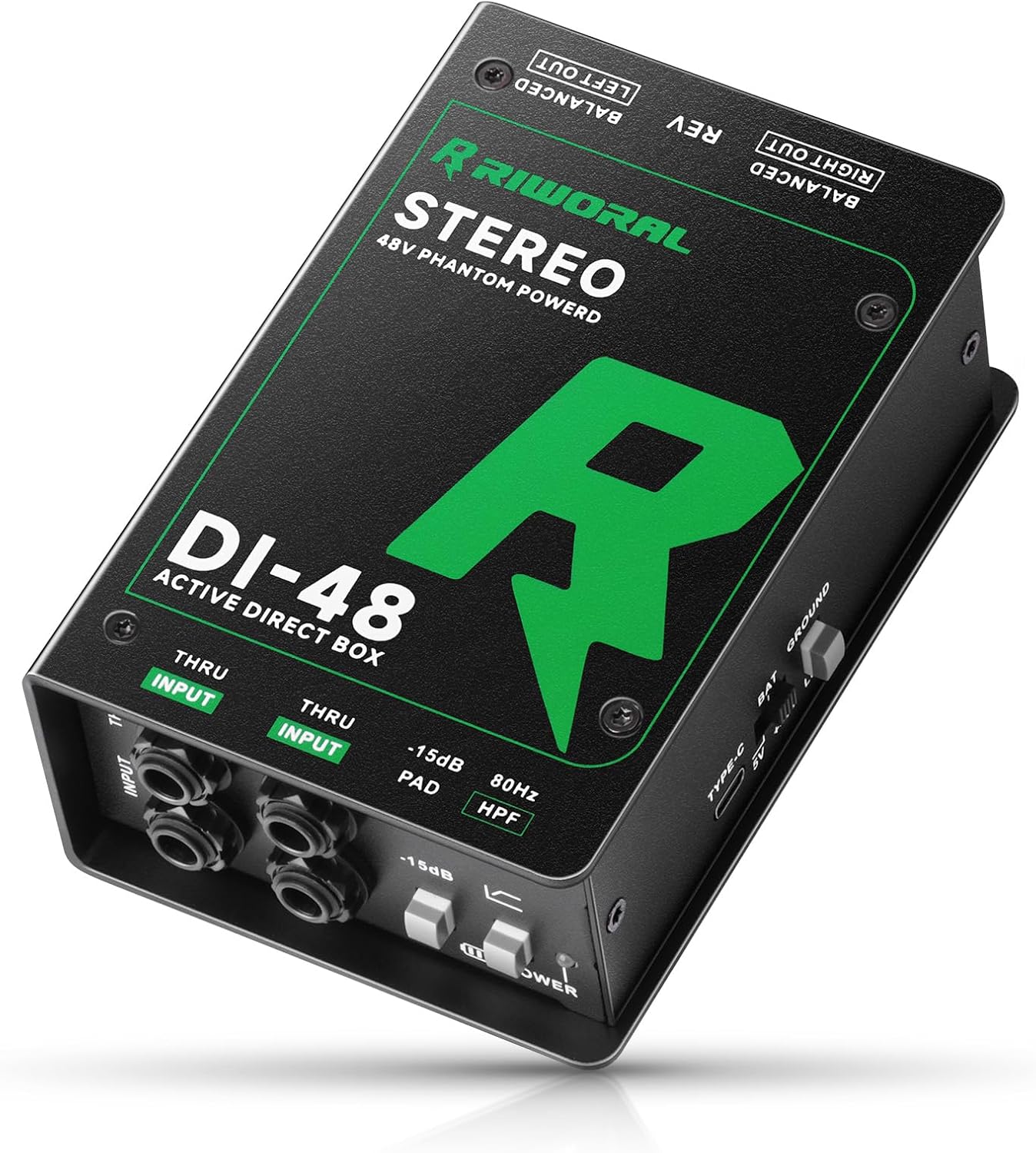
Image: The Riworal DI-48 Dual Stereo Active Direct Box, showcasing its compact design and various input/output jacks.
Key Features
- Dual 1/4-inch Inputs: Supports stereo input or mixed mono input audio.
- Dual 1/4-inch Thru Outputs: Allows direct signal pass-through to instrument amplifiers.
- XLR Stereo Outputs: Provides balanced, low-impedance outputs for mixers or PA systems.
- Multiple Power Options: Can be powered via 48V phantom power, 9V battery (not included), or 5V Type-C USB.
- Ground Lift: Eliminates hum and buzz caused by ground loops.
- -15dB PAD Switch: Attenuates high-level input signals to prevent clipping.
- 80Hz HPF (High-Pass Filter): Reduces unwanted low-frequency rumble.
- Robust Construction: Durable metal casing suitable for road use.
Package Contents
Please verify that all items are present in the package:
- Riworal DI-48 Dual Stereo Active Direct Box
- 5V USB Type-C Charge Cable
- Instruction Manual

Image: The Riworal DI-48 Direct Box, a 5V USB charge cable, and the instruction manual, illustrating the items included in the package.
Product Overview: Controls and Connectors
Familiarize yourself with the various inputs, outputs, and controls on your DI-48 unit.
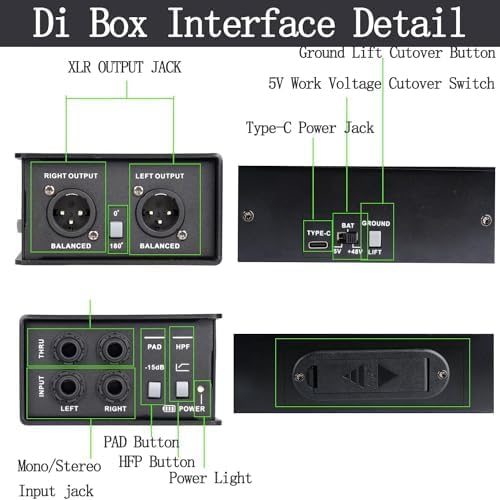
Image: A detailed diagram labeling the XLR output jacks, 5V work voltage cutover switch, Type-C power jack, Ground Lift cutover button, PAD button, HPF button, Power light, and Mono/Stereo input jacks on the Riworal DI-48.

Image: A close-up diagram highlighting the unbalanced 1/4-inch input and thru jacks, the PAD and HPF buttons, the power indicator, XLR output connectors, and the 180° polarity reversal switch.
Front Panel
- INPUT (L/R) 1/4" Jacks: Connect your instrument(s) here. Supports mono or stereo signals.
- THRU (L/R) 1/4" Jacks: Provides an unprocessed signal output to connect to an instrument amplifier or monitor.
- PAD Button (-15dB): Engages a -15dB attenuation pad for high-level input signals to prevent distortion.
- HPF Button (80Hz): Activates an 80Hz high-pass filter to remove unwanted low-frequency rumble.
- POWER Light: Indicates the unit is powered on.
Rear Panel
- BALANCED RIGHT OUT / LEFT OUT (XLR): Provides balanced, low-impedance outputs for connecting to a mixer or PA system.
- REV (180°) Switch: Reverses the polarity of the signal, useful for phase correction.
Side Panel
- TYPE-C Jack: For 5V USB power input.
- BAT / 5V / +48V Switch: Selects the power source (Battery, 5V USB, or 48V Phantom Power).
- GROUND Lift Switch: Disconnects the ground connection between the input and output to eliminate hum.
- 9V Battery Compartment: Houses a 9V GF22 battery for portable operation (battery not included).
Power Supply Options
The DI-48 offers flexible power options to suit various setups:

Image: A diagram showing the 9V battery mounting interface and the three power supply methods: 48V Phantom power, battery powered, and adapter powered (5V Type-C).
- 48V Phantom Power: If your mixer or audio interface provides 48V phantom power via the XLR cable, the DI-48 can be powered directly through the XLR output. Set the side switch to +48V.
- 9V Battery: For standalone or portable use, insert a 9V GF22 battery into the battery compartment. Ensure correct polarity. Set the side switch to BAT. A 9V battery can provide power for over 2 hours.
- 5V Type-C USB: Connect a 5V USB power source (e.g., computer, USB charger) to the Type-C port using the provided cable. Set the side switch to 5V.
Important: Select only one power source at a time using the power switch on the side panel to avoid potential damage or malfunction.

Image: The Riworal DI-48 Direct Box in a studio setting, illustrating its use with 48V phantom power from a mixer, connected to a microphone and headphones.
Setup and Operation
Basic Connection
- Connect Instrument: Plug your instrument (guitar, bass, keyboard, etc.) into one or both 1/4-inch INPUT jacks on the front panel. For stereo instruments, use both L and R inputs. For mono instruments, you can use either input.
- Connect to Amplifier (Optional): If you wish to monitor your instrument through an amplifier, connect the 1/4-inch THRU output(s) to your amplifier's input.
- Connect to Mixer/PA: Connect the XLR BALANCED RIGHT OUT and/or LEFT OUT to the microphone inputs of your mixing console or audio interface using XLR cables.
- Power On: Select your desired power source (48V, BAT, or 5V) using the side switch. The POWER light on the front panel will illuminate.

Image: Connection diagrams illustrating how to use the DI-48 for stereo instruments (e.g., two basses) and for two separate instruments (e.g., keyboard and guitar), showing signal flow to a mixer.
Using Controls
- PAD (-15dB): If your instrument's output is very strong and causes distortion (clipping) at the mixer input, press the PAD button to reduce the signal level by 15dB.
- HPF (80Hz): Engage the HPF button to cut frequencies below 80Hz. This is useful for removing unwanted low-end rumble, stage noise, or excessive bass from certain instruments, resulting in a cleaner mix.
- GROUND Lift: If you hear a persistent hum or buzz in your audio signal, press the GROUND Lift switch. This can break a ground loop, which is a common cause of noise.
- REV (180° Polarity Reversal): In multi-microphone or multi-instrument setups, phase issues can occur, leading to a thin or hollow sound. Use the REV switch to invert the phase of the signal, which can correct these issues.

Image: The Riworal DI-48 Direct Box connected to an acoustic guitar, illustrating its role in providing a clean and pure signal for recording or live performance.
Applications
The Riworal DI-48 is versatile and can be used with a wide range of instruments and audio setups:
- Guitars and Basses: Connect electric guitars and basses directly to a mixer without needing an amplifier.
- Keyboards and Synthesizers: Ideal for sending stereo keyboard signals to a PA system or recording interface.
- Acoustic Instruments with Pickups: Provides a clean, balanced signal for acoustic guitars, violins, and other instruments.
- DJ Systems and Media Players: Connect unbalanced line-level outputs from DJ mixers or consumer stereo systems to professional balanced inputs.
- Live Sound: Ensures reliable signal transmission over long cable runs to front-of-house (FOH) mixers.
- Studio Recording: Captures the direct sound of instruments with minimal noise.

Image: The Riworal DI-48 Direct Box shown alongside various musicians playing guitars, violins, keyboards, and using DJ equipment, illustrating its compatibility with multiple instruments and audio systems.
Specifications
Technical specifications for the Riworal DI-48 Dual Stereo Active Direct Box:

Image: A detailed chart outlining the parameter specifications of the Riworal DI-48, including input/output impedance, maximum input, frequency response, dynamic range, total harmonic distortion, intermodulation distortion, phase deviation, equivalent input noise, and background noise.
| Parameter | Value |
|---|---|
| Input Impedance | 220kΩ-1/4" input |
| Maximum Input | +10dBu |
| Output Impedance | 600Ω-XLR output |
| Output Channel | 4 Channel (2x XLR + 2x 6.35mm (1/4")) |
| Frequency Response | 20Hz-20kHz |
| Dynamic Range | 109dBu |
| Total Harmonic Distortion | 0.002% @ -5dBu |
| Intermodulation Distortion | 0.003% @ -3dBu |
| Phase Deviation | +10° at 20Hz | 0° at 1kHz | -1° at 20kHz |
| Equivalent Input Noise | -103dBu |
| Background Noise | -99dB below OdBu |
| Item Weight | 2.01 pounds |
| Product Dimensions | 5.77 x 8.66 x 3.14 inches |
Maintenance
To ensure the longevity and optimal performance of your Riworal DI-48, follow these maintenance guidelines:
- Cleaning: Use a soft, dry cloth to clean the exterior of the unit. Avoid using abrasive cleaners, solvents, or waxes, as they may damage the finish or internal components.
- Storage: Store the DI box in a cool, dry place away from direct sunlight and extreme temperatures.
- Handling: While the unit is built with a heavy-duty metal casing, avoid dropping or subjecting it to severe impacts.
- Battery Replacement: If using battery power, replace the 9V battery when the power indicator dims or the audio signal becomes weak or distorted. Remove the battery if the unit will not be used for an extended period to prevent leakage.
- Cable Management: Ensure all cables are connected securely and are not under undue strain. Avoid kinking or bending cables sharply.

Image: Close-up views of the Riworal DI-48 Direct Box highlighting its protective and anti-slip sponge feet, heavy-duty and robust circuit design, and the battery-powered option, emphasizing its durability and construction.
Troubleshooting
If you encounter issues with your Riworal DI-48, refer to the following common problems and solutions:
- No Sound Output:
- Ensure the DI box is powered on and the power light is illuminated.
- Check all cable connections (instrument to input, thru to amp, XLR to mixer).
- Verify the correct power source is selected (48V, BAT, or 5V). If using battery, check battery level.
- Ensure the input level on your mixer/interface is appropriately set.
- Hum or Buzzing Noise:
- Engage the GROUND Lift switch to break potential ground loops.
- Check for faulty cables or connections.
- Ensure all equipment is properly grounded.

Image: The Riworal DI-48 Direct Box, illustrating its internal transformer's ability to eliminate hum and buzz caused by ground loops, with a 'before' and 'after' waveform comparison.
- Distorted Sound:
- Press the PAD (-15dB) button if your instrument's output is too hot.
- Reduce the output level of your instrument or the input gain on your mixer/interface.
- Check for damaged cables.
- Thin or Hollow Sound (Phase Issues):
- Engage the REV (180°) switch on the rear panel to invert the signal phase.
Warranty and Support
Riworal products are manufactured to high-quality standards. For warranty information, technical support, or service inquiries, please refer to the contact information provided with your purchase documentation or visit the official Riworal website. Please retain your proof of purchase for any warranty claims.