
1. Introduction
This user manual provides detailed instructions for the AULCMEET YKR-P/002E Replacement Remote Control, designed for AUX A/C Air Conditioners. This remote is a direct replacement for your original or broken remote control, requiring no programming for immediate use. Simply insert the batteries, and it will function correctly with compatible AUX A/C units.
2. Product Overview
The AULCMEET YKR-P/002E remote control features an ergonomic design with clearly labeled buttons for easy operation of your air conditioner. Below are images illustrating the remote's appearance and dimensions.

Figure 2.1: Front view of the remote control, showing the display screen and all function buttons including Power, Mode, Speed, Turbo, Timer, Ionizer, Sleep, iClean, and Display.
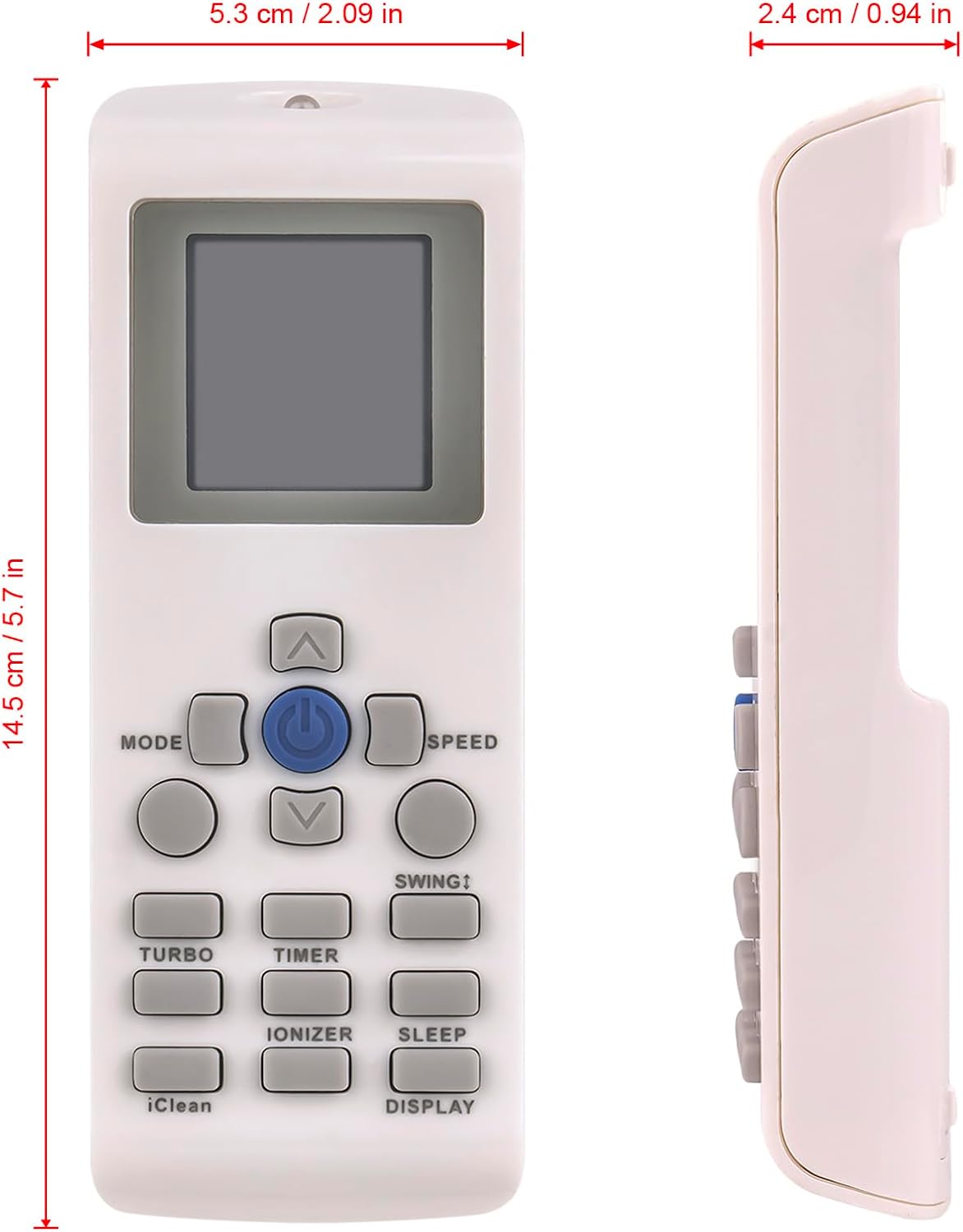
Figure 2.2: Front and side views of the remote control, illustrating its approximate dimensions: 14.5 cm (5.7 inches) in length, 5.3 cm (2.09 inches) in width, and 2.4 cm (0.94 inches) in thickness.

Figure 2.3: An angled perspective of the remote control, highlighting the ergonomic shape and button layout.

Figure 2.4: Rear view of the remote control with the battery compartment cover removed, showing the slots for two AAA batteries.
3. Setup
3.1 Battery Installation
The AULCMEET YKR-P/002E remote control requires two (2) AAA alkaline batteries (not included) for operation. Follow these steps to install the batteries:
- Locate the battery compartment on the back of the remote control.
- Slide the battery compartment cover downwards to open it.
- Insert two AAA batteries, ensuring the positive (+) and negative (-) terminals align correctly with the markings inside the compartment.
- Slide the battery compartment cover back into place until it clicks securely.
Once batteries are installed, the remote is ready for use. No programming or pairing is required.
4. Operating Instructions
This remote control provides full functionality for compatible AUX A/C Air Conditioners. Familiarize yourself with the buttons and their functions:
| Button | Function |
|---|---|
| Power Button (Central Blue Button) | Turns the air conditioner ON or OFF. |
| MODE | Cycles through operating modes such as Auto, Cool, Dry, Fan, and Heat (if supported by your AC unit). |
| SPEED | Adjusts the fan speed (e.g., Low, Medium, High, Auto). |
| Up/Down Arrows (Temperature/Setting Adjustment) | Increases or decreases the temperature setting, or navigates menu options. |
| SWING | Controls the vertical louver swing function of the air conditioner. |
| TURBO | Activates rapid cooling or heating for a quick temperature change. |
| TIMER | Sets the timer for automatic ON/OFF operation. Refer to your AC unit's manual for specific timer settings. |
| IONIZER | Activates the air ionizer function (if available on your AC unit) to improve air quality. |
| SLEEP | Activates sleep mode, which adjusts temperature and fan speed for comfortable sleep and energy saving. |
| iClean | Initiates the self-cleaning function of the indoor unit (if available on your AC unit). |
| DISPLAY | Toggles the display on the air conditioner unit or remote, or adjusts display brightness. |
Note: The availability and specific functionality of certain features (e.g., Heat mode, Ionizer, iClean) depend on the capabilities of your specific AUX A/C Air Conditioner model.
5. Maintenance
5.1 Battery Replacement
Replace batteries when the remote's response becomes sluggish or the display fades. Always replace both batteries simultaneously with new AAA alkaline batteries. Do not mix old and new batteries, or different types of batteries.
5.2 Cleaning
To clean the remote control, gently wipe its surface with a soft, dry cloth. Do not use liquid cleaners, sprays, or abrasive materials, as these can damage the remote's finish or internal components.
6. Troubleshooting
- Remote not responding:
- Check if the batteries are inserted correctly with the correct polarity (+/-).
- Replace old batteries with new AAA alkaline batteries.
- Ensure there are no obstructions between the remote control and the air conditioner's receiver.
- Confirm you are within the effective operating range of the air conditioner.
- Display on remote is dim or blank:
- This indicates low battery power. Replace the batteries.
- Certain functions do not work:
- Verify that your specific AUX A/C Air Conditioner model supports the function you are trying to use (e.g., Ionizer, iClean, Heat mode). This remote is a replacement and will only operate functions present on your original unit.
7. Specifications
| Feature | Detail |
|---|---|
| Model | YKR-P/002E, YK-P002E, YK-P/002E |
| Brand | AULCMEET |
| Compatible Devices | AUX A/C Air Conditioner |
| Power Supply | 2 x AAA Alkaline Batteries (Not Included) |
| Color | White |
| Special Feature | Ergonomic |
| Max Number of Supported Devices | 1 |
| Item Weight | 2.38 ounces |
| Package Dimensions | 5.71 x 4.97 x 0.6 inches |
| Manufacturer | AULCMEET |
| Country of Origin | China |
| Date First Available | February 23, 2024 |
8. Support
If you encounter any issues or cannot find the correct remote you need, please do not hesitate to contact AULCMEET customer support. We are committed to assisting you and will provide feedback within 24 hours.
For further assistance, please refer to the contact information provided with your purchase or visit the official AULCMEET website.