
1. Introduction
The Waytronic WT588F02BP-14S is a high-power voice chip designed for various embedded audio applications. It features PWM audio output and an integrated Class D audio power amplifier, enabling direct drive of a 4-ohm 3W speaker. This chip supports both high-quality 170-second voice and lower-quality 340-second voice playback. Its programmable nature allows users to easily update internal voice content using dedicated programming tools.
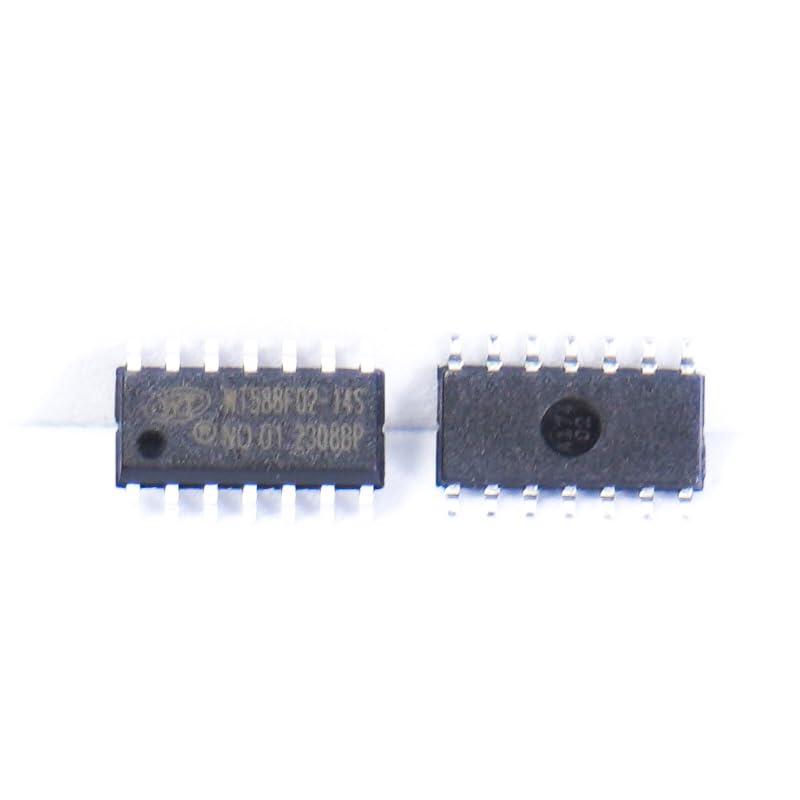
Image 1.1: Two WT588F02BP-14S voice chips. These are small, black integrated circuits with multiple pins on each side, typically used for embedded audio applications.
2. Key Features
- High-Power Audio Output: Integrated Class D audio power amplifier capable of directly driving a 4-ohm 3W speaker.
- Voice Storage Capacity: Supports 170 seconds of high-quality voice or 340 seconds of lower-quality voice.
- 16-bit DAC Output: Provides high-fidelity digital-to-analog conversion for audio playback.
- Programmable Content: Voice content can be easily changed online using the accompanying programmer (WT588 Programming and Testing Tools).
- Flexible Control Modes: Supports single-line, double-line, and button control methods.
- Wide Operating Voltage: Operates within a voltage range of 2.5V to 5.5V.
- Compact Design: 14-pin package suitable for various embedded systems.
3. Specifications
| Feature | Specification |
|---|---|
| Model Number | WT588F02BP-14S |
| Audio Output | 16-bit PWM/DAC output, direct drive for 4R 3W speakers |
| Voice Storage | High quality 170s, Low quality 340s |
| Operating Voltage | 2.5V - 5.5V |
| Control Modes | Single-line, double-lines, buttons |
| Dimensions | 0.39 x 0.39 x 0.12 inches (approximate) |
| Weight | 0.71 ounces (approximate) |

Image 3.1: Diagram illustrating various IC package styles. This image shows different integrated circuit packages, including SOP-8S, SOP-16S, SOP-20S, SOP-24SS, DIP-8, QFN-32N, QFN-52N, QFP-48L, and SOP-28S, with their respective sizes. The WT588F02BP-14S is a 14-pin chip, likely in a similar package type.
4. Setup and Integration
Integrating the WT588F02BP-14S voice chip into a circuit requires careful attention to power supply, audio output, and control signal connections. It is recommended to consult the detailed datasheet for specific pin configurations and electrical characteristics.
4.1 Power Supply
- Connect the VCC pin to a stable power source within the 2.5V to 5.5V range.
- Ensure proper grounding by connecting the GND pin to the circuit's ground.
- Decoupling capacitors (e.g., 0.1uF and 10uF) should be placed close to the VCC pin to filter power supply noise.
4.2 Audio Output
The chip can directly drive a 4-ohm 3W speaker. Connect the speaker terminals to the designated audio output pins (e.g., SPK+ and SPK-). If an external amplifier is required, the DAC output pins can be used.
4.3 Control Signals
Depending on the chosen control mode (single-line, double-line, or button), connect the appropriate control pins to your microcontroller or input switches. Refer to the programming guide for specific control protocols.
5. Operating Instructions
Once the WT588F02BP-14S chip is correctly integrated and programmed with desired voice content, its operation is straightforward based on the configured control mode.
5.1 Voice Playback
Triggering voice playback depends on the programmed control method:
- Button Control: Pressing a connected button will initiate playback of the assigned voice segment. Multiple buttons can be configured for different sounds.
- Single-Line/Double-Line Control: Sending specific digital signals (high/low pulses or patterns) to the control pins will trigger corresponding voice playback. This is typically managed by a microcontroller.
5.2 Volume Control
Volume adjustment may be implemented through external circuitry or, if supported by the programmed firmware, through specific control commands.
5.3 Status Indication
The chip may provide a BUSY status indication, signaling when a voice segment is actively playing. This can be used to synchronize other actions in your system.
6. Programming Tools
The WT588F02BP-14S chip's voice content and control logic are customizable through dedicated programming tools provided by Waytronic. These tools allow for online modification of the chip's internal data.
6.1 WT588 Programming and Testing Tools
This suite of tools facilitates the uploading of new voice files and configuration settings to the chip. It typically includes hardware programmers and software interfaces.

Image 6.1: WTVXXX/WT588 Series Programming Test Tool. This image displays a circuit board labeled 'WTVXXX-VSB V1.00' and another labeled 'WT588 SERIES V3.04', which are used for programming and testing various voice chips, including support for PWM output and DAC output.
6.2 Vliced Sample / USB Programming Test Tool
This tool, including the Voiced Sample Box V4.05 and USB Downloader V1.00, supports programming and testing for various WT588FXXA-8S, WT588FXXB-8S, and WTN6 series chips. The USB Downloader allows programming of WT588F02A/08A/02B chips.

Image 6.2: Vliced Sample / USB Programming Test Tool. This image shows a 'Voiced Sample Box V4.05' circuit board and a 'USB Downloader V1.00' module, used for programming and testing voice chips, supporting various series and offering features like power-on default non-playback and BUSY status indication.
6.3 WTVXXX/WT2003H Series Programming Test Tool
The WT2003HM16 Test Board and WTVXXX/WT2003H Series Downloader are designed for testing and programming M series modules and supporting online/offline voice updates. They offer various communication interfaces like SPI, single-line, two-line, and UART serial port functions.
Image 6.3: WTVXXX/WT2003H Series Programming Test Tool. This image displays a 'WT2003HM16 Test Board' and a 'WTVXXX/WT2003H Series Downloader', which are programming and testing tools for voice chips, supporting USB, TF card functions, recording, and various communication protocols for voice updates.
7. Application Scenarios
The WT588F02BP-14S voice chip is versatile and suitable for a wide range of applications requiring embedded voice prompts, alarms, or interactive audio. Common application areas include:
- Automotive Electronics: Warning sounds, navigation prompts.
- Security Alarms: Intruder alerts, system status notifications.
- Medical Equipment: Operational instructions, patient alerts.
- Smart Home Systems: Device status, voice assistants.
- Household Appliances: Operational feedback (e.g., rice cookers, microwaves).
- Entertainment Equipment: Game consoles, interactive toys.
- Learning Models: Early education machines, children's audio books.
- Intelligent Transportation: Toll booths, parking systems.
- Communication Equipment: Telephone exchanges, telephones.
- Industrial Control: Elevators, industrial machinery.
- Shared Economy Devices: Shared bicycles, umbrellas, mobile power machines.
- GPS Guidance Sticks and Sound/Light Warning Lights.

Image 7.1: Diagram illustrating various product application fields. This image shows examples of where the voice chip can be used, including smart door locks, smart appliances, vehicle electronics, medical equipment, security access control, measuring instruments, consumer electronics, kids' toys, and sports equipment.
8. Troubleshooting
This section provides general guidance for common issues encountered during the use of the WT588F02BP-14S voice chip.
8.1 No Sound Output
- Check Power Supply: Ensure the chip is receiving stable power within the 2.5V-5.5V range. Verify VCC and GND connections.
- Speaker Connection: Confirm the speaker is correctly wired to the audio output pins and is not damaged. Check speaker impedance (should be 4 ohms).
- Voice Content: Verify that voice content has been successfully programmed onto the chip. Use the programming tools to re-check or re-upload.
- Control Signals: Ensure the correct control signals are being sent to trigger playback. Use a multimeter or oscilloscope to verify signal integrity.
- Volume Level: If external volume control is used, ensure it is not set to minimum.
8.2 Distorted or Low-Quality Sound
- Power Supply Noise: Add or check decoupling capacitors near the VCC pin to reduce power supply ripple.
- Speaker Issues: A damaged or incorrect impedance speaker can cause distortion.
- Voice File Quality: Ensure the uploaded voice files are of sufficient quality and correctly formatted for the chip.
- Over-driving Speaker: If using an external amplifier, ensure it is not over-driving the speaker.
8.3 Chip Not Responding to Control Inputs
- Wiring: Double-check all control signal connections for continuity and correct pin assignment.
- Firmware Configuration: Verify that the chip's firmware is configured for the intended control mode (e.g., button, single-line).
- Input Signal Levels: Ensure input signals meet the chip's logic level requirements (e.g., 3.3V or 5V logic).
9. Warranty and Support
For specific warranty information and technical support regarding the Waytronic WT588F02BP-14S voice chip, please refer to the official Waytronic website or contact their customer service directly. Keep your purchase receipt for warranty claims.
Manufacturer: Waytronic
Date First Available: February 23, 2024


