
DUDAO U17PRO
DUDAO U17PRO Open Ear Wireless Bluetooth Headphones User Manual
Model: U17PRO | Brand: DUDAO
Introduction
The DUDAO U17PRO Open Ear Wireless Bluetooth Headphones are designed to provide a comfortable and immersive audio experience while keeping you aware of your surroundings. Featuring a unique open-ear design, 13mm large drivers for HiFi stereo sound, AI noise cancellation, Bluetooth V5.3 connectivity, and long battery life, these headphones are ideal for daily use, workouts, and outdoor activities. This manual provides detailed instructions on how to set up, operate, and maintain your new headphones.
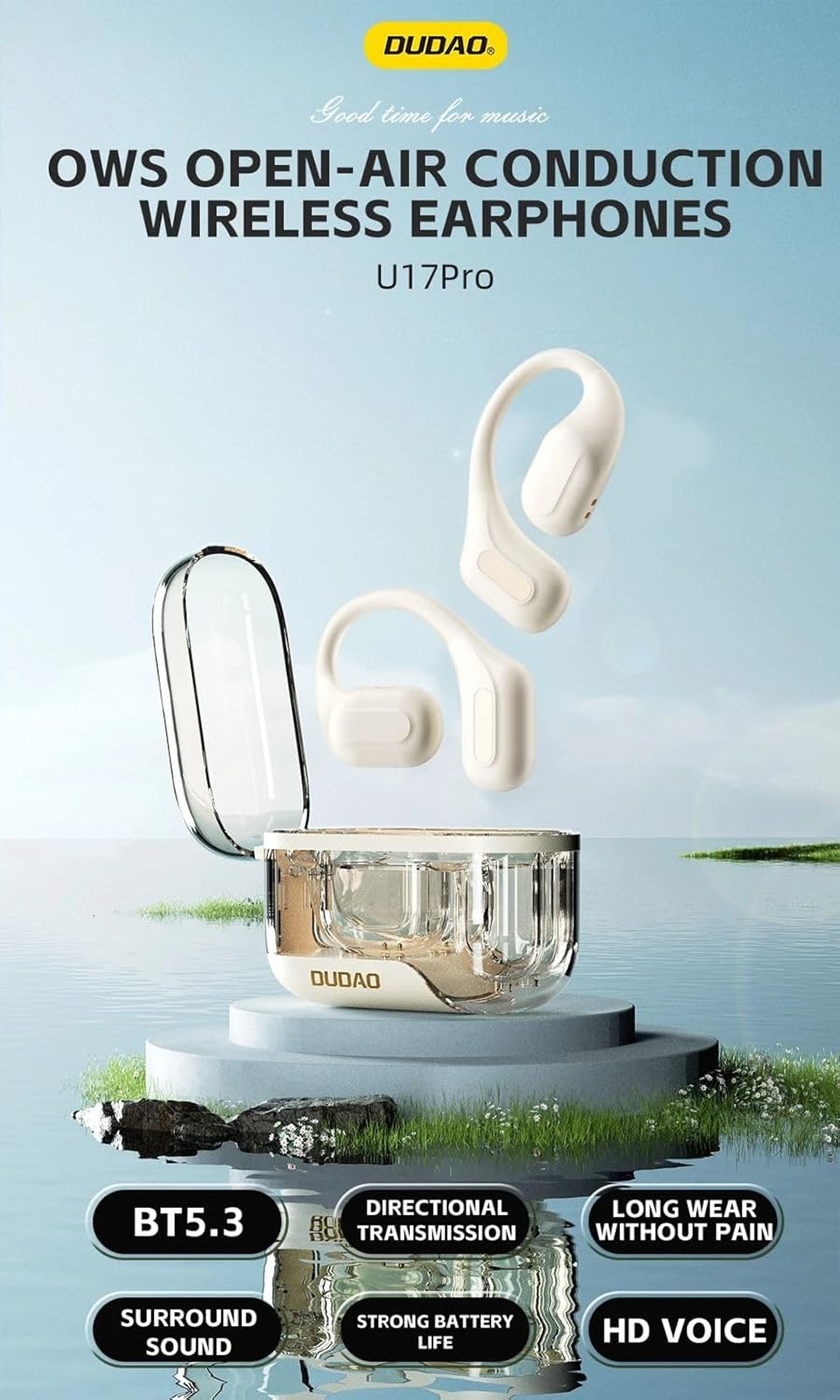
Image: Overview of DUDAO U17PRO Open Ear Wireless Earphones, highlighting features such as Bluetooth 5.3, surround sound, long wear comfort, and strong battery life.
Safety Information
Please read all safety instructions carefully before using this product. Failure to follow these instructions may result in electric shock, fire, or other hazards.
- Do not expose the headphones or charging case to extreme temperatures, humidity, or liquids.
- Avoid dropping, impacting, or disassembling the device.
- Use only the provided charging cable and a compatible power adapter.
- Keep out of reach of children and pets.
- Do not use the headphones at excessively high volumes for extended periods to prevent hearing damage.
- Be aware of your surroundings when using open-ear headphones, especially in traffic or hazardous environments.
Package Contents
Ensure all items are present in the package:
- DUDAO U17PRO Open Ear Wireless Headphones (Left & Right)
- Charging Case
- USB Charging Cable
- User Manual (this document)

Image: The DUDAO U17PRO headphones in beige, resting inside their transparent charging case.
Product Overview
The DUDAO U17PRO headphones feature an ergonomic open-ear design for comfort and situational awareness. Key components include the ear hooks, touch control areas, and the charging contacts.

Image: Detailed view of the headphones, highlighting the RGB ambient light feature on the charging case and the soft, skin-friendly silicone material of the earbud body, designed for comfort.

Image: A person wearing the DUDAO U17PRO headphones, demonstrating the secure ear loop design that ensures stability and a pain-free wearing experience due to its lightweight nature (6 grams).
Setup
1. Charging the Headphones and Case
Before first use, fully charge the headphones and the charging case.
- Connect the USB charging cable to the charging port on the case and to a USB power source.
- The indicator lights on the case will show charging status.
- Place the headphones into the charging case. They will automatically begin charging.
- A full charge takes approximately 1.5 hours for the case and headphones.

Image: This image highlights the battery endurance of the DUDAO U17PRO, showing the headphones and charging case. The headphones have a 40mAh battery, and the charging compartment has a 200mAh capacity, capable of charging the headphones 3-4 times, providing up to 24 hours of total playtime.
2. Pairing with a Bluetooth Device
- Open the charging case. The headphones will automatically power on and enter pairing mode. The indicator lights on the headphones will flash.
- On your device (smartphone, tablet, etc.), enable Bluetooth.
- Search for "DUDAO U17PRO" in the list of available Bluetooth devices.
- Select "DUDAO U17PRO" to connect. Once connected, a voice prompt will confirm the successful pairing, and the indicator lights will turn off.
- The headphones will automatically reconnect to the last paired device when taken out of the case, if Bluetooth is enabled on the device.
Operating Instructions
The DUDAO U17PRO headphones feature intuitive touch controls on each earbud.
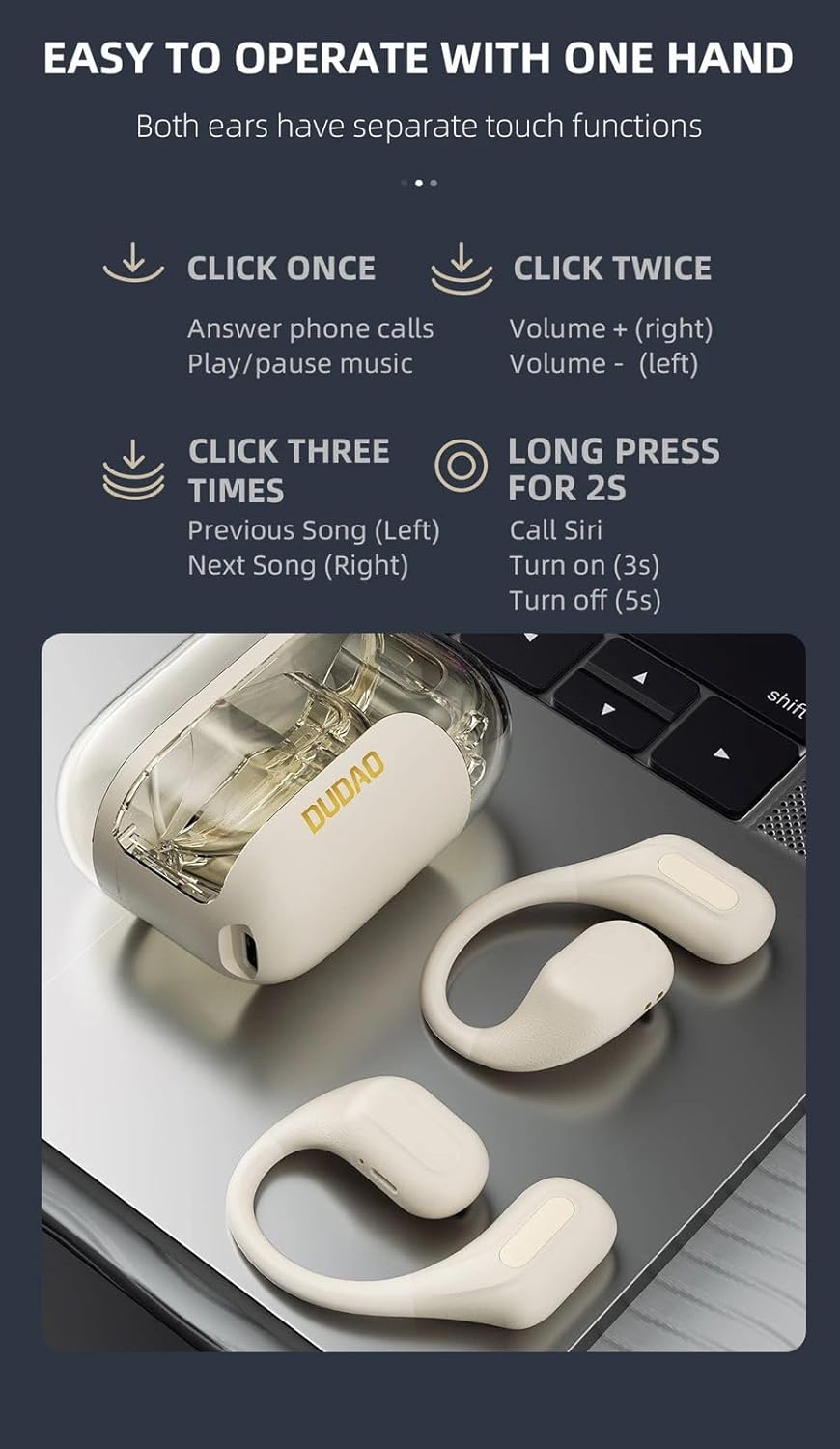
Image: A visual guide to the touch controls on the DUDAO U17PRO headphones, detailing single, double, triple clicks, and long presses for various functions like call answering, music playback, volume control, and voice assistant activation.
| Action | Function |
|---|---|
| Power On | Open the charging case or long press for 3 seconds. |
| Power Off | Place back into charging case or long press for 5 seconds. |
| Click Once (Either Earbud) | Answer Phone Calls / Play/Pause Music |
| Click Twice (Right Earbud) | Volume + |
| Click Twice (Left Earbud) | Volume - |
| Click Three Times (Left Earbud) | Previous Song |
| Click Three Times (Right Earbud) | Next Song |
| Long Press for 2 Seconds (Either Earbud) | Call Voice Assistant (Siri, Google Assistant, etc.) |
Audio Quality and Features
The U17PRO headphones are equipped with 13mm dynamic drivers and directional sound transmission technology for a rich audio experience.
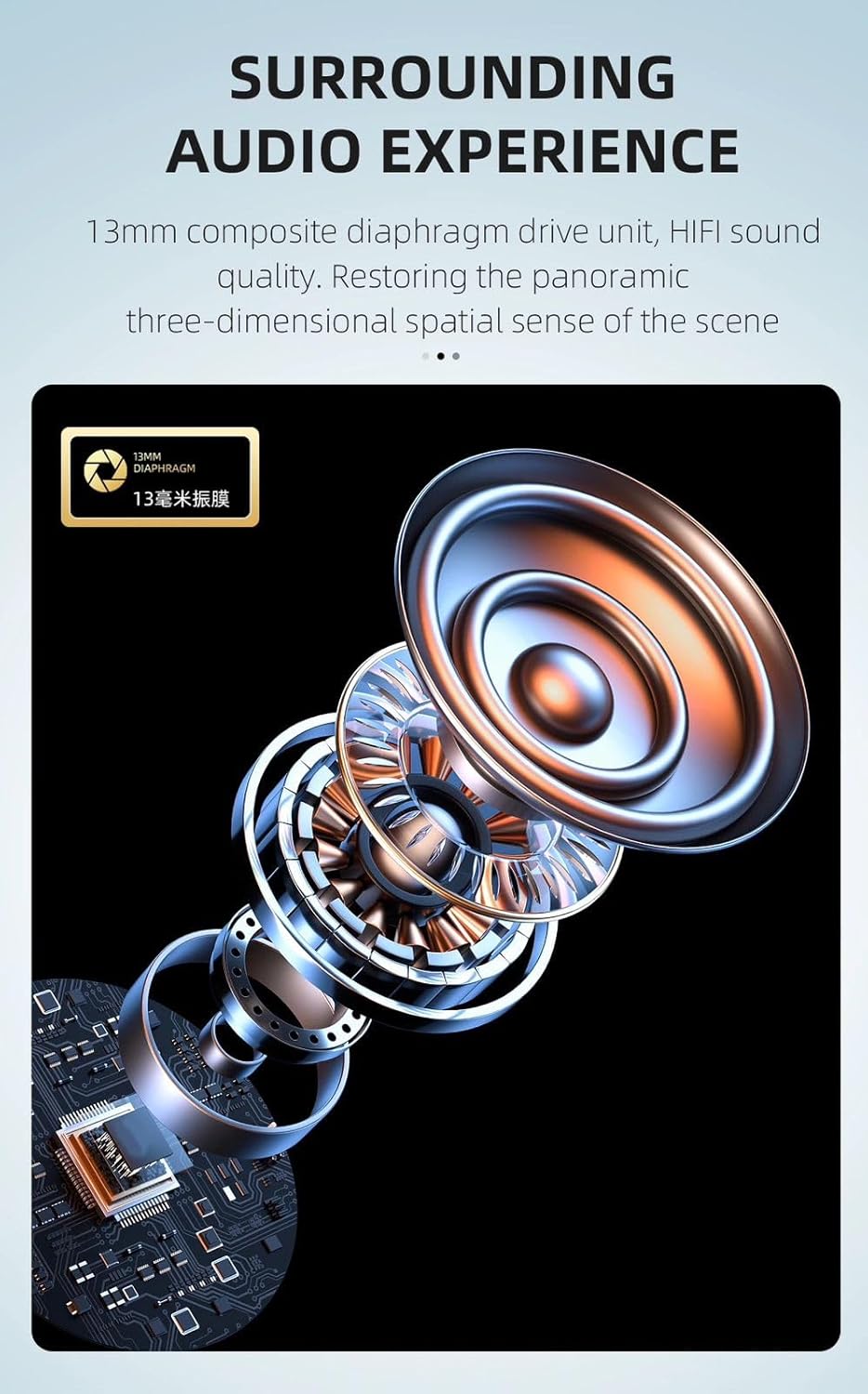
Image: An exploded view diagram illustrating the internal components of the 13mm composite diaphragm drive unit, emphasizing its role in delivering a surrounding audio experience with HiFi sound quality.
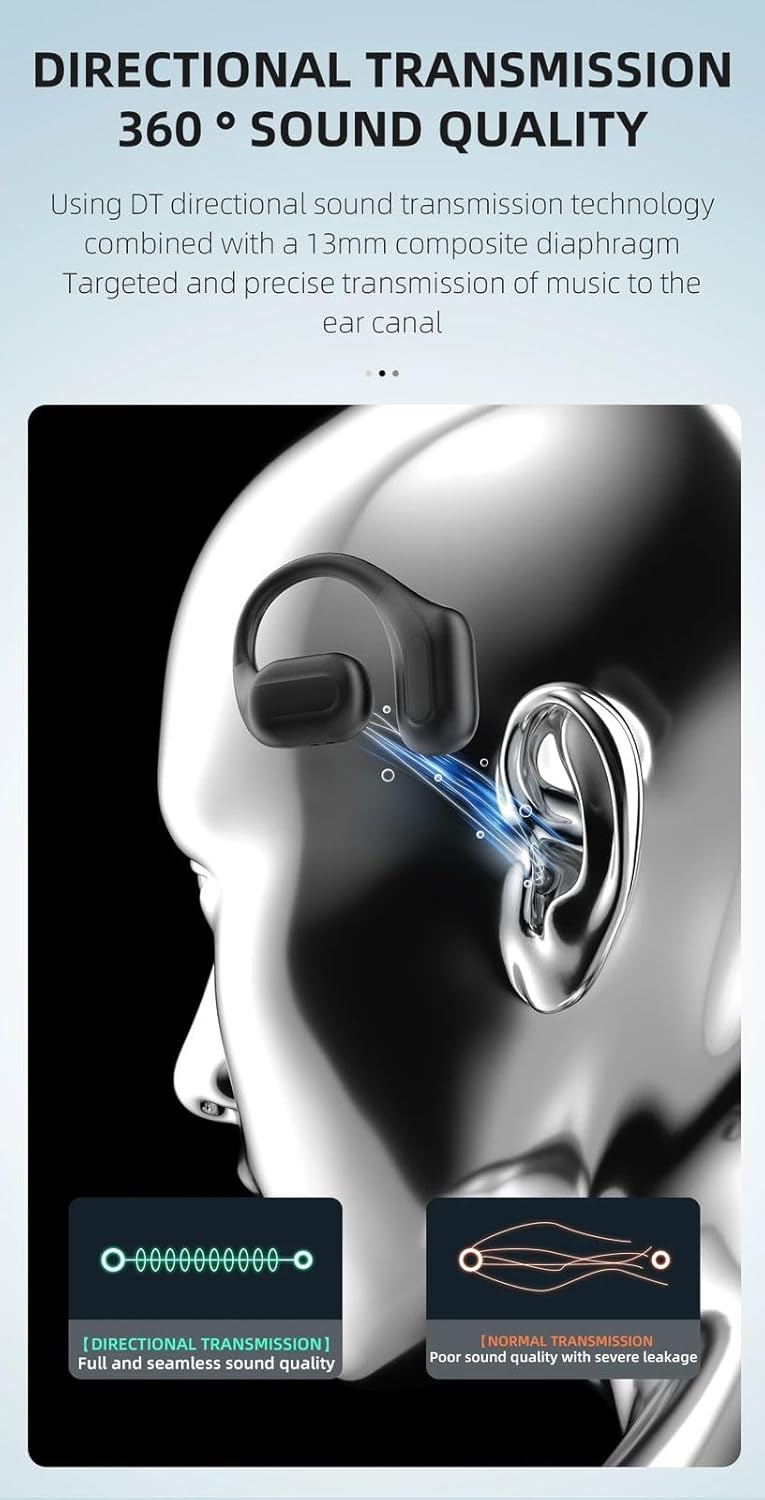
Image: A comparison diagram illustrating the difference between directional sound transmission (DT) and normal transmission. DT technology, combined with the 13mm diaphragm, ensures targeted and precise delivery of music to the ear canal, resulting in full and seamless sound quality without leakage.
AI Noise Reduction for Calls
The headphones feature AI noise reduction technology to filter out environmental noise during calls, ensuring clear voice pickup.

Image: A visual representation of AI noise reduction technology in action, showing a graph that compares sound levels before and after noise reduction, indicating a significant reduction in ambient noise for clearer calls.
Maintenance
- Cleaning: Use a soft, dry, lint-free cloth to clean the headphones and charging case. Do not use harsh chemicals or abrasive materials.
- Storage: When not in use, store the headphones in their charging case to protect them from dust and damage. Store in a cool, dry place.
- Water Resistance: The headphones are IPX5 water-resistant, meaning they can withstand sweat and light splashes. Do not submerge them in water or expose them to heavy rain. Ensure they are dry before placing them back in the charging case.
Troubleshooting
| Problem | Possible Cause | Solution |
|---|---|---|
| Headphones not powering on. | Low battery. | Charge the headphones and charging case fully. |
| Cannot pair with device. | Bluetooth is off on device; headphones not in pairing mode; interference. | Ensure Bluetooth is enabled. Place headphones in case, close, then open to re-enter pairing mode. Move closer to device. |
| No sound or low volume. | Volume too low; not connected; dirty earbud mesh. | Increase volume on headphones and device. Reconnect Bluetooth. Clean earbud mesh gently. |
| Intermittent connection. | Too far from device; interference; low battery. | Move closer to device (within 10 meters). Avoid strong electromagnetic interference. Charge headphones. |
| Headphones not charging. | Charging cable or adapter faulty; dirty charging contacts. | Try a different cable/adapter. Clean charging contacts on headphones and case with a dry cotton swab. |
Specifications
| Feature | Detail |
|---|---|
| Model | U17PRO |
| Bluetooth Version | 5.3 |
| Connectivity Technology | Wireless (Bluetooth) |
| Audio Driver Type | 13mm Dynamic Driver |
| Noise Control | AI Noise Cancellation (for calls) |
| Battery Life (Headphones) | Up to 20 hours (continuous play at 60% volume) |
| Total Playtime (with Charging Case) | Up to 24 hours |
| Charging Time | Approx. 1.5 hours |
| Water Resistance Level | IPX5 (Sweatproof, Water Resistant) |
| Control Method | Touch |
| Item Weight | 30 Grams |
| Product Dimensions | 10 x 15 x 5 cm |
| Maximum Operating Distance | 10 Metres |
| Included Components | Cable, Charging Station |
| Material | Rubber (Silicone earhooks) |
| Impedance | 140 Ohm |
| Country of Origin | China |
Warranty and Support
DUDAO products are designed and manufactured to the highest quality standards. For warranty information and customer support, please refer to the details below:
- Warranty: Please retain your proof of purchase for warranty claims. Specific warranty terms and duration may vary by region.
- Customer Support: For technical assistance, troubleshooting, or warranty inquiries, please contact DUDAO customer service.
- Manufacturer Contact: DUDAO INDIA, 101 Mall Road, Kingsway Camp, GTB Nagar Metro Station Gate No 1, NEW DELHI, DELHI 110009. Mobile No: 9310681651.
- You may also visit the official DUDAO store on Amazon for more information: DUDAO Amazon Store