
1. Introduction
Thank you for purchasing the Kimiso QS-7811 8-inch 1200W Bluetooth Karaoke Speaker. This manual provides important information regarding the safe operation, setup, and maintenance of your new speaker. Please read it thoroughly before using the product and retain it for future reference.
2. Safety Instructions
- Do not expose the speaker to water, moisture, or extreme temperatures.
- Avoid placing the speaker near heat sources or in direct sunlight.
- Do not attempt to disassemble, repair, or modify the unit yourself. Refer all servicing to qualified personnel.
- Use only the specified charging cable and power adapter.
- Keep the speaker away from children and pets.
- Ensure proper ventilation around the speaker during use.
3. Package Contents
Please check the package for the following items:
- Kimiso QS-7811 Bluetooth Karaoke Speaker
- Wired Microphone
- USB Charging Cable
- User Manual
4. Product Overview
Familiarize yourself with the speaker's components and controls.
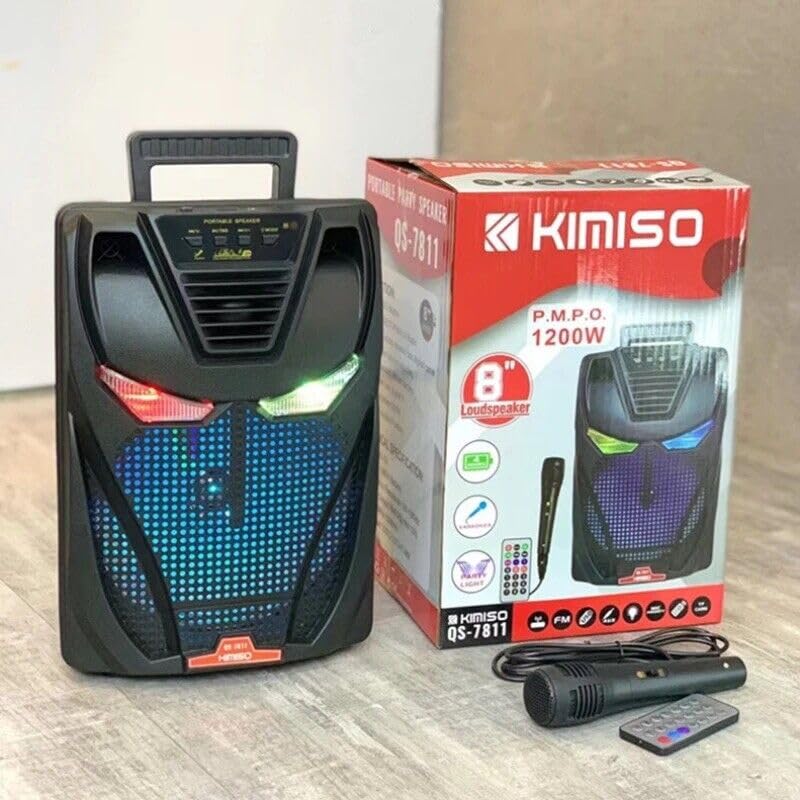
Figure 1: Front view of the Kimiso QS-7811 speaker, showing the main grille and control panel.
Control Panel and Ports
Figure 2: Detailed view of the control panel and various input/output ports.
- Power Button: Turns the speaker on/off.
- Mode Button: Switches between Bluetooth, USB, TF Card, and FM Radio modes.
- Play/Pause Button: Plays or pauses audio playback.
- Previous/Volume Down Button: Short press for previous track, long press to decrease volume.
- Next/Volume Up Button: Short press for next track, long press to increase volume.
- USB Port: For USB flash drive playback.
- TF Card Slot: For TF (MicroSD) card playback.
- Microphone Input: Connect the wired microphone.
- Charging Port: Connect the USB charging cable.
- LED Light Button: Controls the integrated LED lights.
5. Setup
5.1 Charging the Speaker
- Connect the small end of the USB charging cable to the speaker's charging port.
- Connect the larger end of the USB cable to a USB power adapter (not included) or a computer's USB port.
- The charging indicator light will illuminate. It will turn off or change color when fully charged.
- A full charge typically takes 3-4 hours.
5.2 Powering On/Off
- To power on, press and hold the Power Button for a few seconds until you hear an audible prompt.
- To power off, press and hold the Power Button again until the speaker shuts down.
6. Operating Instructions
6.1 Bluetooth Pairing
- Turn on the speaker. It will automatically enter Bluetooth pairing mode, indicated by a flashing LED light and an audible prompt.
- Enable Bluetooth on your smartphone, tablet, or other Bluetooth-enabled device.
- Search for available devices and select "QS-7811" from the list.
- Once connected, you will hear a confirmation sound, and the LED light will stop flashing.
- You can now play audio from your device through the speaker.
6.2 USB/TF Card Playback
- Insert a USB flash drive or TF (MicroSD) card into the corresponding port on the speaker.
- The speaker will automatically switch to USB/TF mode and begin playing audio files. If not, press the Mode Button to select the correct mode.
- Use the Play/Pause, Previous, and Next buttons to control playback.
6.3 FM Radio
- Press the Mode Button repeatedly until you enter FM Radio mode.
- Press and hold the Play/Pause button to automatically scan and save available FM radio stations.
- Use the Previous and Next buttons to navigate between saved stations.
6.4 Using the Microphone for Karaoke
- Connect the wired microphone to the Microphone Input port on the speaker.
- Ensure the speaker is powered on and playing music (e.g., via Bluetooth or USB/TF).
- Adjust the microphone volume using the dedicated knob (if available) or the main volume controls.
- Speak or sing into the microphone.
6.5 Controlling LED Lights
- Press the LED Light Button to cycle through different light modes or to turn the lights off.
7. Maintenance
- Cleaning: Use a soft, dry cloth to clean the speaker's exterior. Do not use liquid cleaners or abrasive materials.
- Storage: When not in use for extended periods, store the speaker in a cool, dry place, away from direct sunlight and extreme temperatures.
- Battery Care: To prolong battery life, fully charge the speaker before first use and recharge it at least once every three months if not used regularly. Avoid completely draining the battery frequently.
8. Troubleshooting
| Problem | Possible Cause | Solution |
|---|---|---|
| Speaker does not power on. | Low battery. | Charge the speaker fully. |
| No sound. | Volume too low; incorrect mode; device not connected. | Increase volume; press Mode button to select correct input; ensure Bluetooth device is paired. |
| Bluetooth not connecting. | Speaker not in pairing mode; device Bluetooth off; too far from speaker. | Ensure speaker is in Bluetooth mode and flashing; turn on device Bluetooth; move device closer (within 10m). |
| FM radio reception is poor. | Weak signal; environmental interference. | Relocate the speaker; extend the antenna (if applicable). |
9. Specifications
- Model: QS-7811
- Speaker Size: 8 inch
- Maximum Speaker Power: 1200 Watts
- Output Wattage: 1200 Watts
- Battery Capacity: 1800 mAh
- Connectivity: Bluetooth, USB, TF Card
- Audio Input: Microphone, USB, Bluetooth
- Power Source: Battery
- Product Dimensions (L x W x H): 20 x 10 x 20 cm
- Special Features: Portable, Integrated Microphone, LED Lights, FM Radio
10. Warranty and Support
This product comes with a standard manufacturer's warranty. For detailed warranty information, please refer to the warranty card included in your package or contact your point of purchase. For technical support or service inquiries, please contact the retailer or manufacturer directly.