
1. Introduction
Thank you for choosing the JUJIANG PKM-C01 Automatic Dual Swing Gate Opener with Electric Lock. This system is designed to provide convenient and secure access control for your dual swing gates. It is suitable for light-duty applications, supporting gates up to 440 lbs (200 kg) in weight or 12 feet (3.6 meters) in length per leaf. This manual provides detailed instructions for proper installation, operation, and maintenance to ensure optimal performance and longevity of your gate opener system. Please read this manual thoroughly before installation and use.
2. Important Safety Information
WARNING: Failure to follow these safety instructions may result in serious injury or death, and may damage the product.
- Read and understand all instructions before installing and using the gate opener.
- This product is designed for gates. Do not use it for any other purpose.
- Installation must be performed by qualified personnel.
- Ensure all electrical connections comply with local codes and regulations.
- Disconnect power before performing any service or maintenance.
- Keep children and pets away from the gate area, especially during operation.
- Never attempt to stop a moving gate.
- Regularly inspect the gate opener and gate for signs of wear, damage, or misalignment.
- Do not operate the gate opener if any part is damaged or malfunctioning.
- The manual release key should be kept in a safe, accessible location away from the gate.
- Install warning signs in visible locations near the gate.
3. Package Contents
Verify that all components listed below are present in your package. If any items are missing or damaged, please contact customer support.
- 2 x Gate Opener Arms (Actuators)
- 1 x Control Box
- 2 x Remote Controls
- 1 x DS-02 Automatic Electric Gate Lock
- 2 x Manual Release Keys
- Mounting Hardware (brackets, bolts, screws, etc.)
- Warning Signs
- User Manual
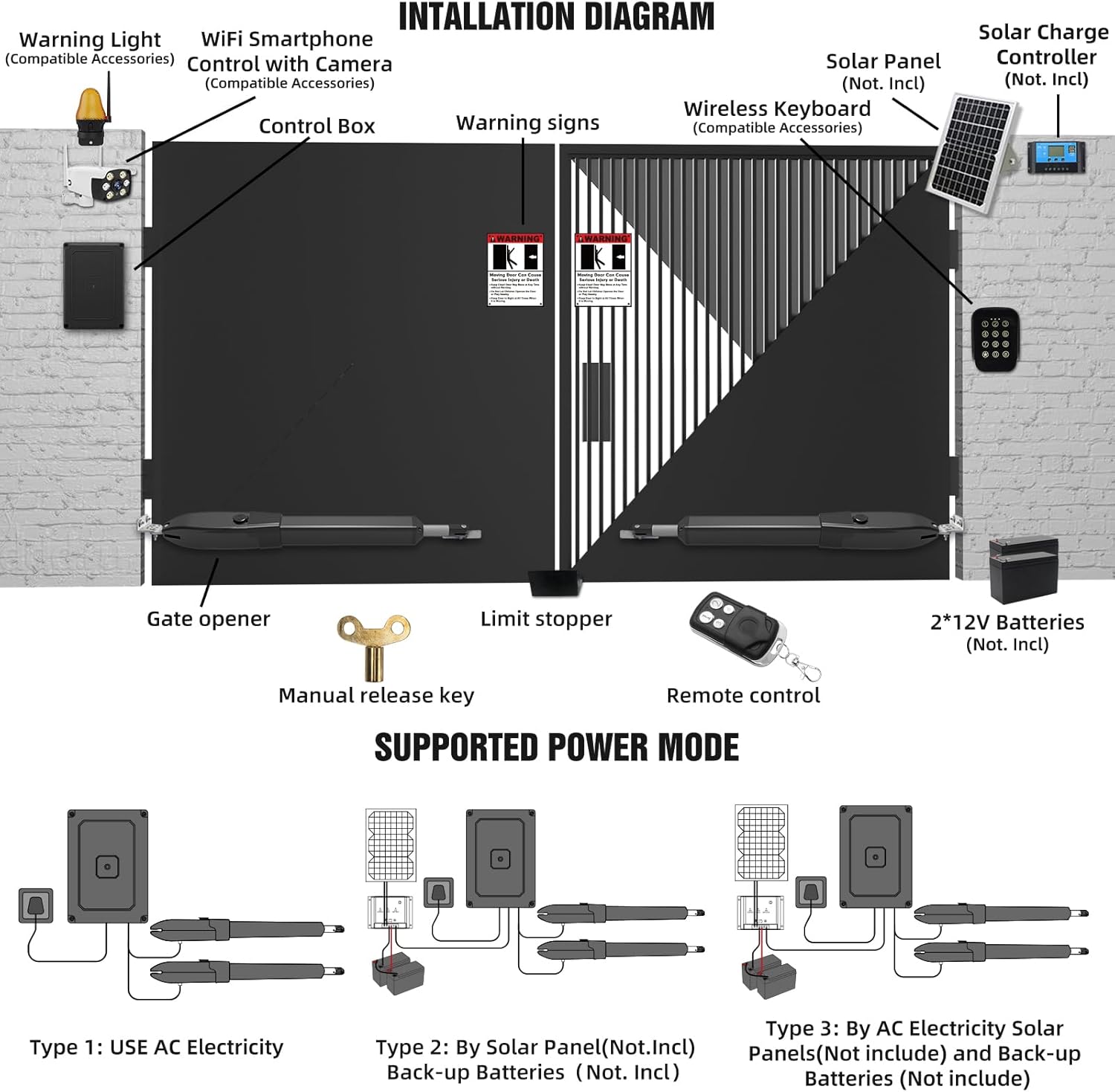
Image: Overview of the gate opener system components, including the gate opener arms, control box, remote, and optional accessories like solar panels and batteries.
4. Product Specifications
| Feature | Specification |
|---|---|
| Model | PKM-C01 |
| Gate Type | Dual Swing Gate |
| Max. Gate Weight (per leaf) | 440 lbs (200 kg) |
| Max. Gate Length (per leaf) | 12 ft (3.6 m) |
| Motor Power | 40W per motor |
| Power Supply Options | 110V AC (main), 24V DC Battery (backup, not included), Solar Panel (not included) |
| Remote Control Frequency | Standard (details not specified, but typical for gate openers) |
| Remote Control Range | Up to 100 ft (30 m) |
| Max. Remotes Supported | Up to 120 |
| Electric Lock Model | DS-02 |
| Electric Lock Weather Rating | IP55 (Dust & Water Resistant) |
| Operating Temperature | 0°F to 120°F (-17°C to 49°C) |
| Gate Opening Styles | Push-to-Open / Pull-to-Open |

Image: Gate weight and length compatibility chart, illustrating various gate sizes and their suitability for Push-to-Open and Pull-to-Open installations.

Image: The gate opener system demonstrating its resilience in extreme weather conditions, including dust, rain, snow, and its insect-proof design.
5. Setup & Installation
The installation process requires basic tools and electrical knowledge. Refer to the detailed installation diagram and follow these general steps. For gates longer than 7 feet (1.5 meters), the DS-02 electric lock is highly recommended for added security and stability.
5.1 Site Preparation
- Ensure the gate operates smoothly manually and is properly balanced.
- Clear any obstructions from the gate's path.
- Identify suitable mounting points on the gate and posts for the opener arms and control box.
5.2 Mounting the Gate Opener Arms
- Determine whether a Push-to-Open or Pull-to-Open configuration is required for your gate.
- Attach the mounting brackets securely to the gate posts and gate frames using the provided hardware.
- Mount the gate opener arms to the brackets, ensuring they are level and aligned with the gate's pivot points.
5.3 Installing the Electric Gate Lock (DS-02)
- Mount the DS-02 electric lock to the gate and gate post according to the instructions, ensuring proper alignment for automatic locking.
- Connect the lock's wiring to the control box as specified in the wiring diagram.

Image: Detailed view of the DS-02 electric gate lock, highlighting its robust construction with three rolling teeth for smooth operation and a plastic-spraying surface for enhanced durability and corrosion resistance.
5.4 Wiring and Power Connection
- Mount the control box in a protected location near the gate.
- Connect the motor wires, electric lock wires, and power supply wires to the control board inside the control box.
- The system supports three power modes:
- Type 1: AC Electricity: Connect directly to a 110V AC municipal electricity supply.
- Type 2: Solar Panel with Batteries: Connect a solar panel (not included) and 24V backup batteries (not included) via a solar charge controller (not included).
- Type 3: AC Electricity with Backup Batteries: Connect to 110V AC and integrate 24V backup batteries (not included) for uninterrupted operation during power outages.
- Ensure all connections are secure and insulated.
Image: Installation diagram showing the control box, gate opener, and various power supply configurations, including AC power, solar power with batteries, and AC power with battery backup.
5.5 Limit Switch Adjustment
- Adjust the reliable electromagnetism limit switches on each opener arm to define the fully open and fully closed positions of the gate.
- Follow the specific instructions in the control board manual for precise limit setting.
6. Operation
6.1 Remote Control Operation
- The system comes with two remote controls, capable of operating the gate from up to 100 feet away.
- Press button "1" to control motor 1 (typically for a single leaf operation or specific sequence).
- Press button "2" to control both motor 1 and motor 2 for dual gate operation.
- The system supports up to 120 remote controls. Refer to the control box manual for programming additional remotes.

Image: A user demonstrating the automatic gate opening function using a remote control from inside a vehicle, highlighting the 100-foot operating range.
6.2 Automatic Electric Gate Lock (DS-02)
- The DS-02 electric lock automatically engages when the gate is fully closed and disengages before the gate opens.
- This provides an additional layer of security, especially during strong winds or attempted forced entries.

Image: A dual swing gate secured by the DS-02 electric lock, illustrating its robust protection against weather and unauthorized access.
6.3 Manual Release
- In case of a power outage or remote control malfunction, use the provided manual release key to disengage the gate opener arms.
- Insert the key into the lock on the opener arm and turn it to release the mechanism, allowing manual operation of the gate.
- Keep the manual release keys in a secure and easily accessible location, but away from the gate itself.

Image: A detailed view of the manual release mechanism on the gate opener arm, showing the key slot for emergency manual operation.
7. Maintenance
Regular maintenance ensures the longevity and reliable operation of your JUJIANG gate opener system.
- Monthly:
- Inspect the gate and hinges for smooth manual operation. Lubricate if necessary.
- Check all mounting hardware for tightness.
- Examine the gate opener arms for any signs of damage or wear.
- Clean any debris from the gate's path and around the opener arms.
- Quarterly:
- Inspect electrical wiring for fraying or damage.
- Test the manual release mechanism.
- If using solar power, clean the solar panel surface.
- Annually:
- Have a qualified technician inspect the entire system.
- Check the condition of backup batteries, if installed.
8. Troubleshooting
If you encounter issues with your gate opener, refer to the following common problems and solutions.
| Problem | Possible Cause | Solution |
|---|---|---|
| Gate does not respond to remote. |
|
|
| Gate opens partially or stops unexpectedly. |
|
|
| Electric lock does not engage/disengage. |
|
|
| Gate operates slowly or with difficulty. |
|
|
9. Warranty & Customer Support
JUJIANG stands behind the quality of its products.
- 30-Day Return Policy: Enjoy a worry-free exchange and return period within 30 days of purchase.
- 12-Month Warranty: Your gate opener system is covered by a 12-month warranty from the date of purchase, covering manufacturing defects.
- Lifelong Technical Assistance: JUJIANG provides lifelong technical support for your product.
For any questions, technical assistance, or warranty claims, please contact us via email. Our professional and timely solutions are available to assist you.
Contact Email: support@jujiang.com (Note: This is a placeholder email. Please refer to your product packaging or official website for the correct contact information.)


