
LOBKIN X11
LOBKIN Kids Open Ear Bluetooth Headphones
Model: X11
Introduction
Thank you for choosing LOBKIN Kids Open Ear Bluetooth Headphones. These headphones are designed with your child's safety and comfort in mind, featuring air conduction technology, a lightweight build, and IPX5 waterproofing. This manual provides essential information for setting up, operating, maintaining, and troubleshooting your new headphones to ensure a safe and enjoyable listening experience.

Image: LOBKIN Kids Open Ear Bluetooth Headphones (Pink) with a child. These headphones are designed for comfort and safety, sitting outside the ear canal.
What's Included
Please check the package contents to ensure all items are present:
- LOBKIN Kids Open Ear Bluetooth Headphones
- USB Type-C Charging Cable
- User Manual (this document)
- Eartips (if applicable, for alternative fit)
Product Features
- Open-Ear Design: Unlike traditional in-ear headphones, these headphones sit outside the ear canal, preventing discomfort and potential ear pain from prolonged use. This design is suitable for children from elementary school age and up.
- Lightweight & Comfortable: Weighing approximately 26g (equivalent to three US coins), the headphones are made from ultra-light materials, ensuring comfort for extended wear and easy portability.
- Stable without Shaking: Ergonomically designed to stay secure during active play, running, or biking, without pressing on the head or falling off.
- Safer Design: The air conduction technology allows children to hear their surroundings while listening to audio, enhancing safety, especially outdoors.
- IPX5 Waterproof: The entire body of the headphones is IPX5 rated, providing effective protection against sweat and rain, making them suitable for various activities.
- Bluetooth 5.3 Connectivity: Features Bluetooth 5.3 EDR technology for stable audio streaming, lower power consumption, and improved data transfer rates.
- Type-C Fast Charging: Equipped with a universal Type-C charging port for faster charging and convenience, allowing shared cables with other devices.

Image: Benefits of Open-Ear Design. This design protects children's ear health by avoiding insertion into the ear canal, preventing long-term discomfort, and allowing awareness of surroundings.
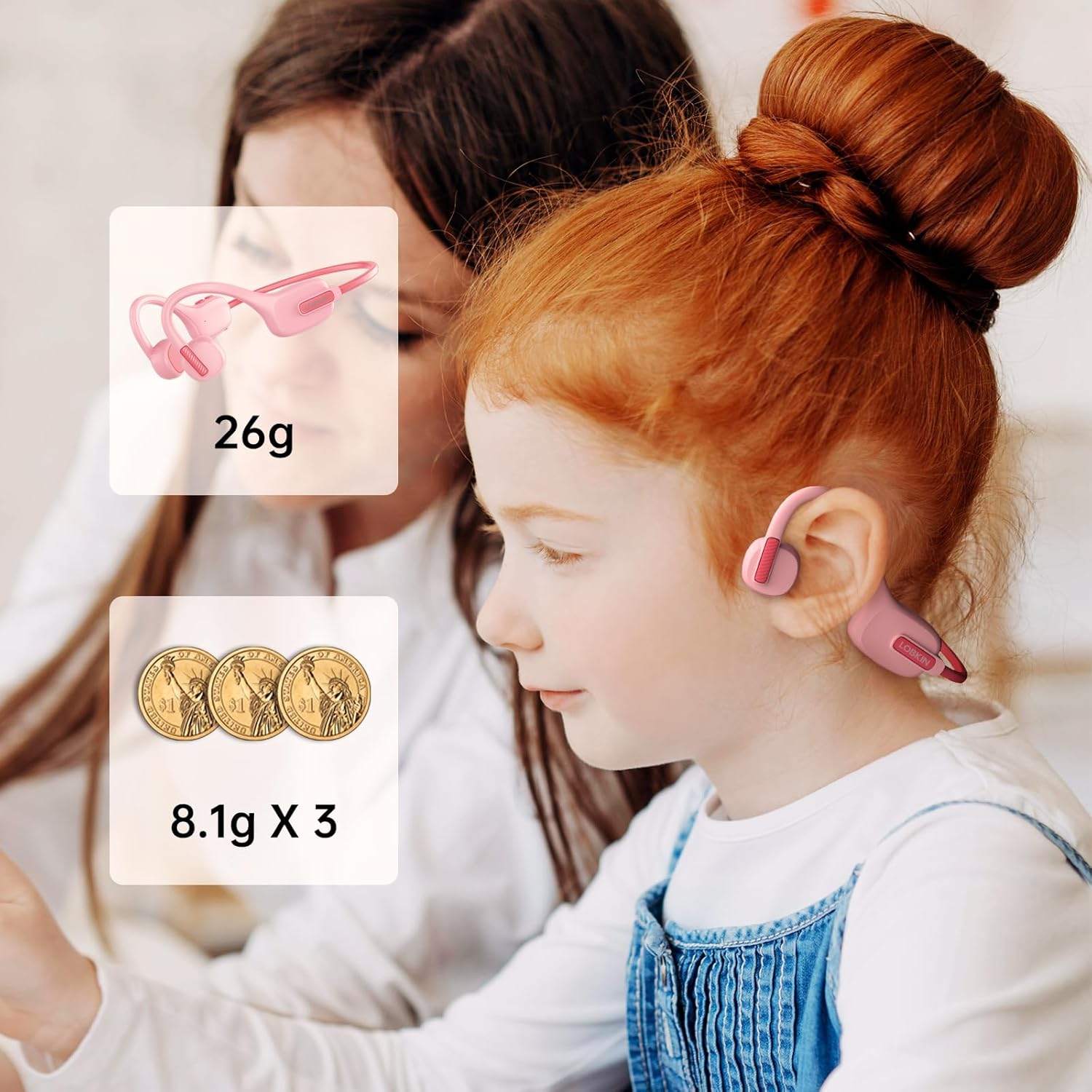
Image: Lightweight design. The headphones weigh approximately 26 grams, making them comfortable for children to wear for extended periods.
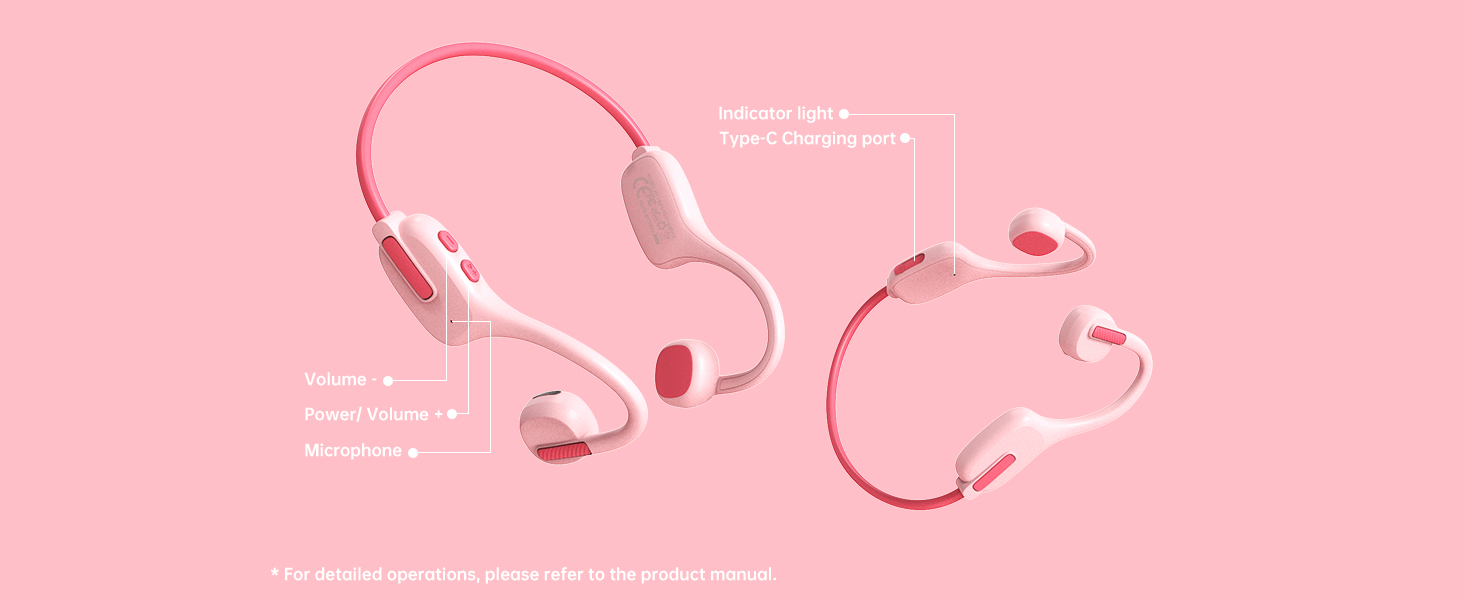
Image: IPX5 Waterproof. The headphones are sweatproof and rainproof, suitable for active use and light water exposure.
Product Diagram
Familiarize yourself with the different parts of your LOBKIN Kids Open Ear Bluetooth Headphones:

Image: Labeled diagram of the headphones showing the indicator light, Type-C charging port, volume controls, power button, and microphone.
- Indicator Light: Shows power status, pairing mode, and charging status.
- Type-C Charging Port: For connecting the charging cable.
- Volume Up/Down Buttons: Adjusts audio volume.
- Power/Multi-function Button: Powers on/off, plays/pauses music, answers/ends calls.
- Microphone: For voice calls.
Setup Guide
1. Charging the Headphones
Before first use, fully charge the headphones. Use the provided USB Type-C cable.
- Connect the Type-C end of the charging cable to the headphone's charging port.
- Connect the USB-A end to a compatible USB power adapter (not included) or a computer's USB port.
- The indicator light will show charging status (e.g., red while charging, blue/off when fully charged).
- A full charge takes approximately 1.5 hours and provides up to 10 hours of usage time.

Image: Type-C Fast Charging. The headphones utilize a universal Type-C port for efficient and convenient charging.

Image: Battery performance details. The headphones offer 10 hours of use on a 1.5-hour charge with a 200mAh battery.
2. Bluetooth Pairing
Follow these steps to connect your headphones to a Bluetooth-enabled device:
- Ensure the headphones are charged and turned off.
- Press and hold the Power/Multi-function button until the indicator light flashes rapidly (e.g., blue and red alternately), indicating pairing mode.
- On your device (smartphone, tablet, laptop), go to Bluetooth settings and turn Bluetooth on.
- Search for available devices. The headphones will appear as "X-11".
- Select "X-11" from the list to connect. Once connected, the indicator light will stop flashing and remain solid blue or turn off, and you may hear a confirmation tone.
- If prompted for a password, enter "0000".
Operating Instructions
Basic Functions:
- Power On: Press and hold the Power/Multi-function button for 3 seconds.
- Power Off: Press and hold the Power/Multi-function button for 5 seconds.
- Play/Pause Music: Press the Power/Multi-function button once.
- Volume Up: Press the Volume Up button.
- Volume Down: Press the Volume Down button.
- Next Track: Press and hold the Volume Up button.
- Previous Track: Press and hold the Volume Down button.
- Answer/End Call: Press the Power/Multi-function button once.
- Reject Call: Press and hold the Power/Multi-function button for 2 seconds.
- Activate Voice Assistant: Double-press the Power/Multi-function button.
Maintenance
- Cleaning: Wipe the headphones with a soft, damp cloth. Do not use harsh chemicals or abrasive cleaners.
- Storage: Store the headphones in a cool, dry place away from direct sunlight and extreme temperatures.
- Water Resistance: While IPX5 waterproof, avoid submerging the headphones in water. Dry them thoroughly if they get wet from sweat or rain.
- Durability: The memory steel wire design allows for 360° bending without deformation, but avoid excessive force or twisting.
Troubleshooting
| Problem | Possible Cause | Solution |
|---|---|---|
| Headphones won't turn on. | Low battery. | Charge the headphones fully. |
| Cannot pair with device. | Headphones not in pairing mode; Bluetooth off on device; incorrect device name. | Ensure headphones are in pairing mode (flashing indicator light). Turn on Bluetooth on your device. Search for and select "X-11". If prompted, enter "0000". Try turning both devices off and on again. |
| No sound or low volume. | Volume too low; not connected; audio source issue. | Increase volume on both headphones and connected device. Ensure headphones are properly paired. Check if the audio is playing on the connected device. |
| Bluetooth connection is unstable. | Distance from device; interference. | Keep headphones within 10 meters (33 feet) of the connected device. Avoid obstacles or strong electromagnetic interference. Re-pair the devices. |
Specifications
| Feature | Detail |
|---|---|
| Model Name | X11 |
| Connectivity Technology | Wireless (Bluetooth) |
| Bluetooth Version | 5.3 |
| Bluetooth Range | 10 Meters |
| Ear Placement | Open Ear |
| Water Resistance Level | IPX5 |
| Item Weight | 27 Grams (0.952 ounces) |
| Product Dimensions | 4.33 x 4.06 x 1.77 inches |
| Charging Time | Approx. 1.5 Hours |
| Battery Life | Up to 10 Hours (usage time) |
| Headphones Jack | USB Type-C |
| Material | Polycarbonate (PC), Silicone, Acrylonitrile Butadiene Styrene (ABS) |
| Included Components | Cable, User Manual, Eartip |
Warranty and Support
LOBKIN provides an 18-month product quality service for these headphones, exceeding the standard 12-month warranty offered by many other brands. If you encounter any product-related issues within this period, LOBKIN offers free repair or replacement services.
For further assistance or inquiries, please contact LOBKIN customer support through the retailer where you purchased the product or visit the official LOBKIN brand store online.
Ask a question about this manual
Ask about setup, troubleshooting, compatibility, parts, safety, or missing instructions. Manuals+ will review the question and use this page’s manual context to help answer it.