
Introduction
Thank you for purchasing the XDOBO KING MAX 140W Portable Wireless Speaker. This manual provides essential information for setting up, operating, maintaining, and troubleshooting your speaker. Please read this manual thoroughly before use to ensure optimal performance and longevity of your device.
Safety Information
- Do not expose the speaker to extreme temperatures, direct sunlight, or high humidity.
- Keep the speaker away from water and liquids, despite its IPX5 rating, to prevent damage.
- Do not disassemble, repair, or modify the device yourself. Refer all servicing to qualified personnel.
- Use only the specified charging cable and power supply (Type C 5V3A) to avoid damage or fire.
- Avoid listening at high volume levels for extended periods to prevent hearing damage.
- Keep out of reach of children.
Package Contents
Please check the package for the following items:
- 1 x XDOBO KING MAX Speaker
- 1 x Charging Cable (Type-C)
- 1 x Audio Cable
- 1 x Instruction Manual
- 1 x Strap
- 2 x Microphones

Image: The XDOBO KING MAX speaker shown with its two accompanying wireless microphones, illustrating the complete product package.
Product Overview
Controls and Ports
Familiarize yourself with the various input and control options available on your speaker:
- BT (Bluetooth): For wireless audio streaming.
- TF Card Slot: For playing audio directly from a MicroSD card.
- USB Flash Disk Port: For playing audio directly from a USB drive.
- 3.5mm AUX Line Input: For wired audio connection from external devices.
- 6.5mm Audio Cable Input: For connecting additional audio sources or instruments.
- Microphone Inputs: Dedicated ports for the wireless microphones.
- Power Button: To turn the speaker on/off.
- Volume Controls: To adjust the speaker's output volume.
- Mode Button: To switch between different playback modes.
- TWS Button (Key III): For connecting two speakers in True Wireless Stereo mode.
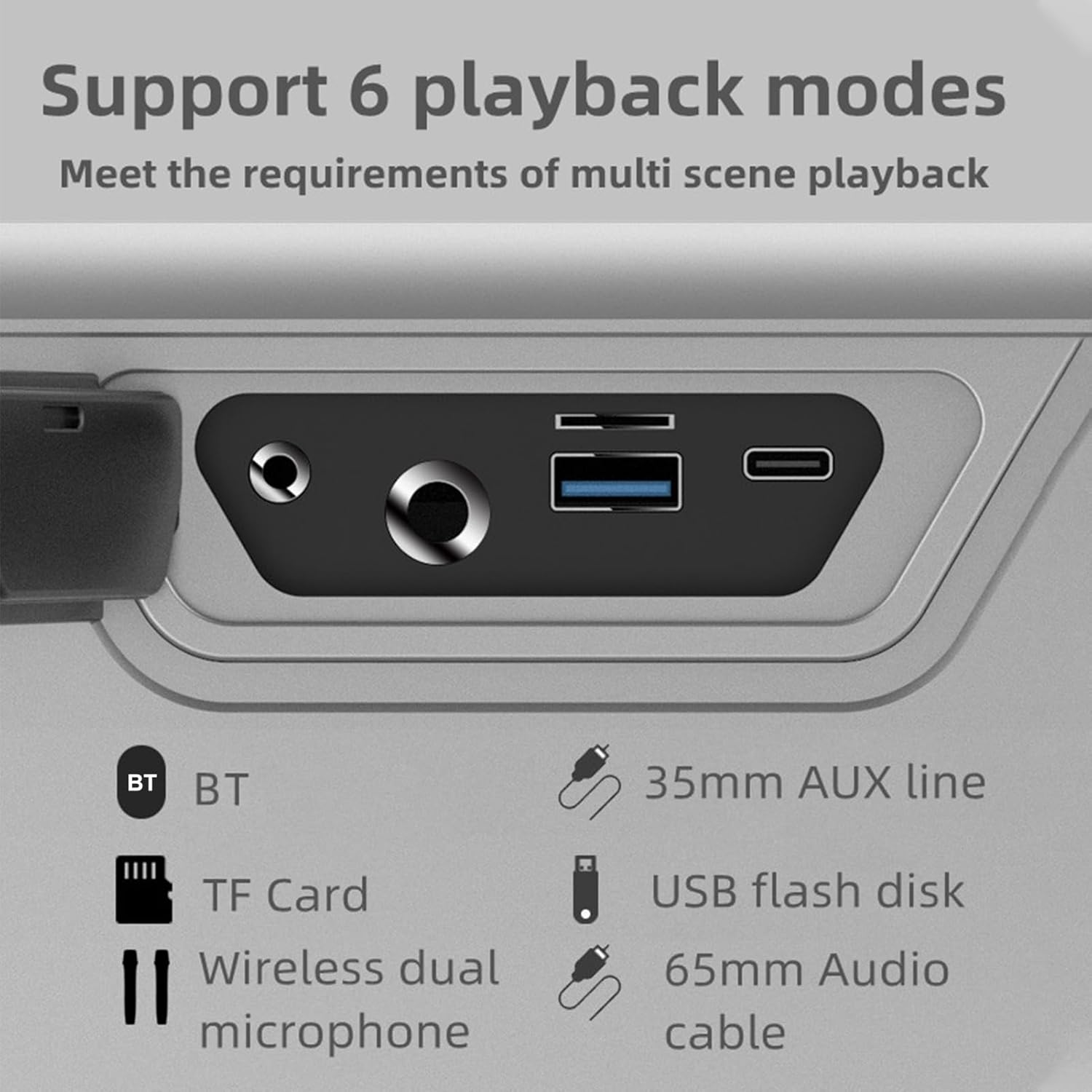
Image: A close-up view of the speaker's rear panel, highlighting the BT, TF Card, Wireless Dual Microphone, 3.5mm AUX line, USB flash disk, and 6.5mm Audio cable input ports.
Setup
1. Charging the Speaker
Before first use, fully charge the speaker. Connect the provided Type-C charging cable to the speaker's charging port and the other end to a 5V/3A power adapter (not included). The charging time is approximately 9 hours for a full charge. The battery capacity is 36000mAh (7.4V).
2. Microphone Setup
The speaker comes with two UHF wireless karaoke microphones. To use them, ensure they are charged (if applicable) and powered on. They should automatically connect to the speaker when both devices are on and within range. Refer to the microphone's individual instructions for specific pairing details if needed.

Image: The XDOBO KING MAX speaker and its two wireless microphones are displayed on a wooden table, ready for use in a home setting.
Operating Instructions
1. Power On/Off
Press and hold the Power button to turn the speaker on or off.
2. Bluetooth Pairing (BT Mode)
- Turn on the speaker. It will automatically enter Bluetooth pairing mode.
- Enable Bluetooth on your device (smartphone, tablet, etc.).
- Search for "XDOBO KING MAX" (or similar name) in your device's Bluetooth list and select it to connect.
- Once connected, the speaker will indicate successful pairing. The effective Bluetooth distance is up to 18 meters in open areas.
3. TWS (True Wireless Stereo) Mode
If you have two XDOBO KING MAX speakers, you can connect them for a stereo sound experience. TWS mode is supported only in Bluetooth mode.
- Ensure both speakers are powered on and not connected to any other Bluetooth device.
- On either speaker, click the TWS button (often labeled as 'III' or a dedicated TWS icon).
- The speakers will automatically search and pair with each other. Once connected, they will function as a stereo pair.
- Now, connect your device to one of the speakers via Bluetooth as described above. Audio will play through both speakers in stereo.

Image: A visual representation of two XDOBO KING MAX speakers wirelessly connected to create a stereo sound system, emphasizing the TWS (True Wireless Stereo) functionality.
4. Switching Playback Modes
Press the Mode button to cycle through the available playback modes:
- Bluetooth (BT)
- TF Card
- USB Flash Disk
- AUX Input (3.5mm or 6.5mm)
- Karaoke Mode (with microphones)
Supported audio formats include APE, FLAC, WAV, and MP3.
5. Microphone Usage (Karaoke)
Turn on the wireless microphones. They will automatically connect to the speaker. Adjust the microphone volume and echo effects (if available on the speaker or microphone) for your karaoke experience. The speaker supports full frequency, voice, and subwoofer sound effect modes, enhancing your audio and vocal performance.
6. Output Phone Charging
The speaker supports output phone charging. You can use the USB port to charge your mobile device while the speaker is on, utilizing its large battery capacity.
Maintenance
- Cleaning: Use a soft, dry cloth to clean the speaker's surface. Do not use abrasive cleaners or solvents.
- Storage: Store the speaker in a cool, dry place when not in use. Avoid extreme temperatures.
- Battery Care: To prolong battery life, charge the speaker fully at least once every three months if not used regularly. Avoid completely draining the battery frequently.
- Water Resistance: The IPX5 rating means it can resist a sustained, low-pressure water jet spray. Do not submerge the speaker in water. Ensure all port covers are securely closed before exposure to water.
Troubleshooting
| Problem | Possible Cause | Solution |
|---|---|---|
| Speaker does not turn on | Low battery; Power button not pressed correctly | Charge the speaker; Press and hold the Power button for a few seconds |
| No sound | Volume too low; Incorrect mode; Device not connected | Increase volume; Switch to correct playback mode (BT, AUX, TF, USB); Reconnect device |
| Bluetooth connection unstable | Too far from device; Obstacles; Interference | Move speaker closer to device (within 18M); Remove obstacles; Avoid strong electromagnetic interference |
| Microphone not working | Microphone off; Low microphone battery; Not paired | Turn on microphone; Charge microphone; Re-pair microphone with speaker |
| TWS pairing failed | Speakers already connected to other devices; Not in BT mode | Disconnect speakers from other devices; Ensure both are in BT mode before TWS pairing |
Specifications

Image: A graphic detailing the technical specifications and parameters of the XDOBO KING MAX speaker, including BT version, power, waterproof rating, and battery life.
| Feature | Specification |
|---|---|
| BT Version | V5.2 |
| Rated Power | 140W |
| Waterproof Rating | IPX5 |
| Signal-to-Noise Ratio | 75dB |
| Frequency Response Range | 20Hz - 20kHz |
| Distortion | ≤1% |
| Effective Distance (BT) | 18M (open area) |
| Input Power Supply | Type C 5V3A |
| Playing Time | 4-12 hours (varies by volume and content) |
| Charging Time | About 9 hours |
| Battery Capacity | 36000mAh 7.4V (Built-in lithium battery) |
| TWS Connection | BT |
| Sound Effect Modes | Full frequency, Voice, Subwoofer |
| Output Phone Charging | Supported |
| Supported Formats | APE, FLAC, WAV, MP3 |
| Working Modes | BT, TF card, USB flash disk, AUX cable, Karaoke |
| Product Size | 255 x 125 x 255mm |
| Product Weight | 4476g |
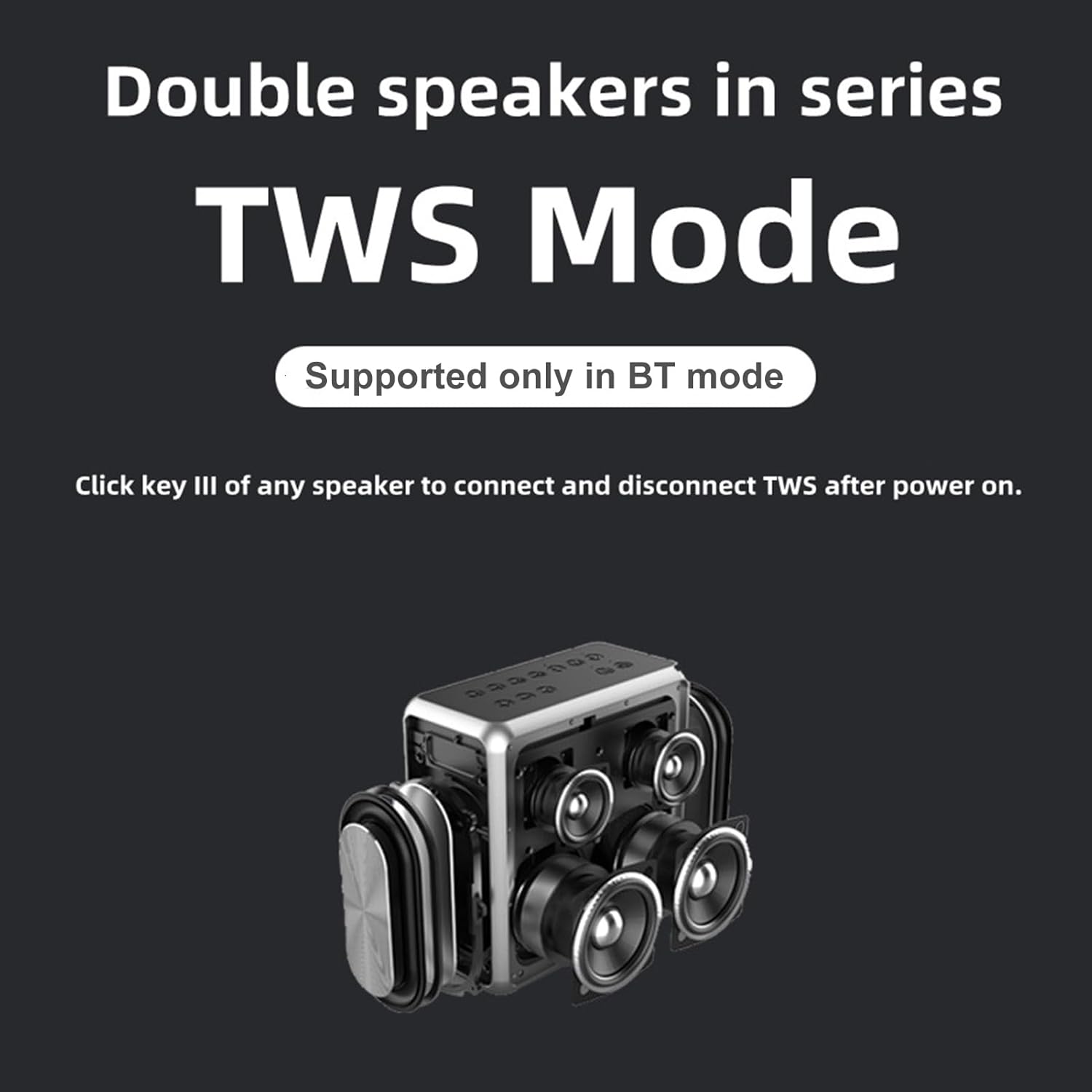
Image: A technical drawing illustrating the length, width, and height measurements of the XDOBO KING MAX speaker.
Warranty and Support
This product comes with a standard manufacturer's warranty. Please refer to the warranty card included in your package for specific terms and conditions. For technical support, troubleshooting assistance, or warranty claims, please contact the retailer or manufacturer's customer service. Keep your purchase receipt as proof of purchase.


