
Ultrasport Electronic Dartboard with Doors - Instruction Manual
Model: 331100000416 | Brand: Ultrasport
Introduction
This manual provides detailed instructions for the setup, operation, maintenance, and troubleshooting of your Ultrasport Electronic Dartboard. Please read this manual thoroughly before using the product to ensure correct assembly and safe operation. Retain this manual for future reference.
The Ultrasport Electronic Dartboard is designed for 1 to 8 players and offers a wide variety of games and variants for an engaging dart experience.
Package Contents
Before beginning assembly, ensure all components listed below are present:
- 1 x Ultrasport Electronic Dartboard with Doors
- 12 x Soft Tip Darts
- 100 x Replacement Soft Tips
- 1 x Power Adapter
- 3 x Adhesive Throw Line Tapes
- 1 x Mounting Kit (2 x screws, 2 x wall plugs)
- 1 x Instruction Manual

Image: Overview of the Ultrasport Electronic Dartboard and included accessories.
Setup Instructions
1. Mounting the Dartboard
- Select a suitable wall location. Ensure there is enough clear space around the dartboard for safe play. The recommended height for the center of the bullseye is 1.73 meters (5 feet 8 inches) from the floor.
- Use the provided mounting kit (screws and wall plugs) to securely attach the dartboard to the wall. Mark the drilling points, drill holes, insert wall plugs, and then fasten the dartboard using the screws.
- Ensure the dartboard is level and firmly secured before proceeding.
2. Dart Assembly
Assemble the soft tip darts by screwing the tips onto the barrels and attaching the flights to the shafts. Ensure all parts are securely fastened.
3. Power Connection
Connect the provided power adapter to the dartboard's power input jack and then plug it into a standard electrical outlet.
4. Throw Line Placement
Measure the official throwing distance of 2.37 meters (7 feet 9.25 inches) from the face of the dartboard to the floor. Use one of the adhesive throw line tapes to mark this distance on the floor. Additional throw lines can be placed for different player preferences or game types.
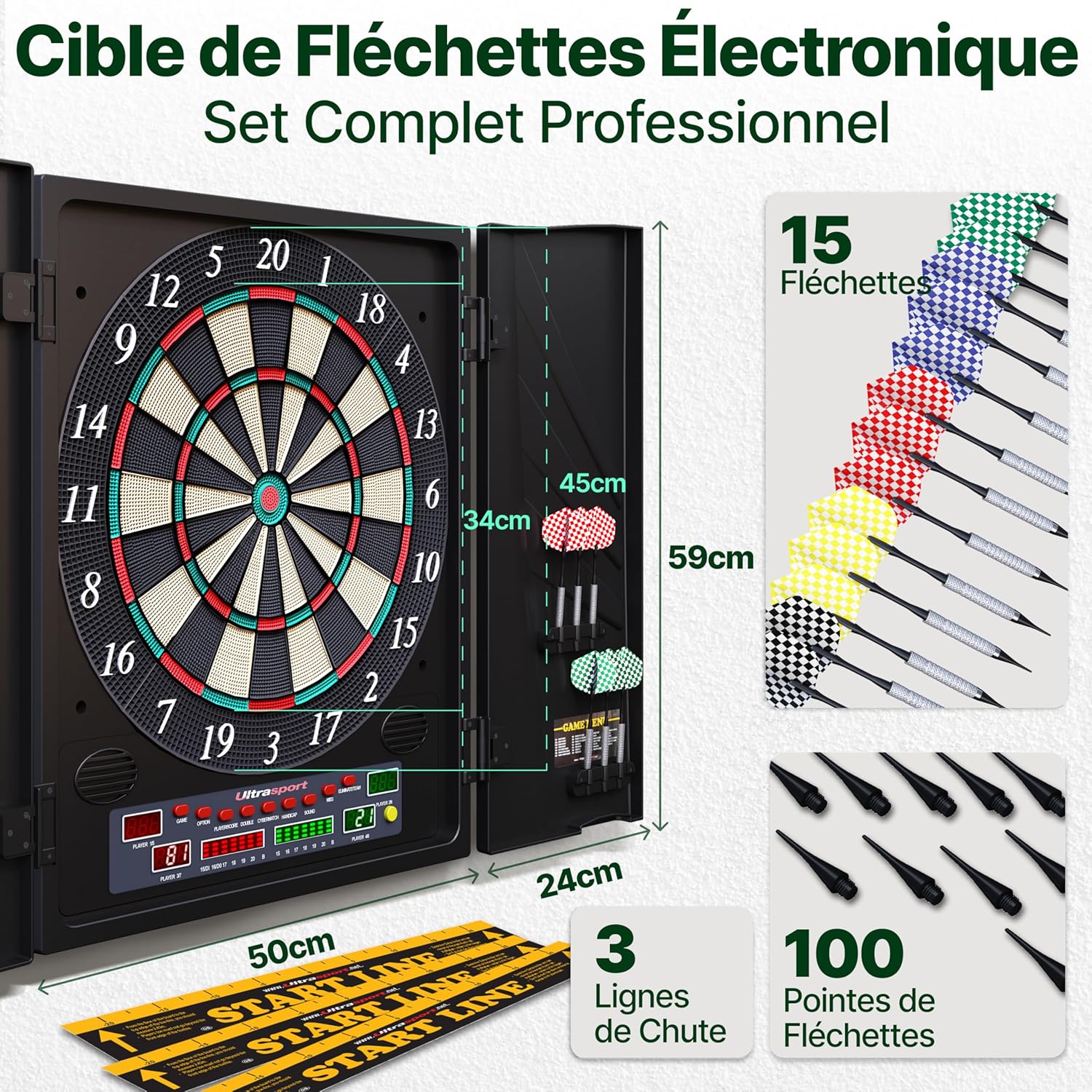
Image: Dartboard dimensions and included accessories, including 15 darts and 100 tips. Note: The product specifications list 12 darts.
Operating Instructions
1. Powering On/Off
Press the 'POWER' button to turn the dartboard on or off. The dartboard features an automatic shut-off function after a period of inactivity to conserve energy.
2. Game Selection
The dartboard offers 27 distinct games with 202 variants. Use the 'GAME' button to cycle through the available games. Once a game is selected, use the 'OPTION' button to choose specific variants or settings for that game.
3. Player Selection
The dartboard supports 1 to 8 players. Use the 'PLAYER' button to select the number of players for your game. The LED display will show the current player's score and turn.
4. Volume Control and Sound Effects
The dartboard features realistic sound effects and integrated speakers. Use the 'VOLUME' buttons to adjust the sound level. A mute function is also available for silent play.

Image: Control panel detailing sound features including adjustable volume and mute function.
5. Cybermatch Function
Engage in a game against the computer using the 'CYBERMATCH' function. This feature allows solo players to practice and compete against an artificial intelligence opponent.

Image: Players enjoying the dartboard, illustrating the variety of games and Cybermatch feature.
6. LED Display
The dartboard features a luminous LED display for high-contrast score and game information visibility. This display provides clear feedback during gameplay.

Image: The dartboard's luminous LED display in action, providing clear scoring.
Maintenance
1. Cleaning
Wipe the dartboard's surface and cabinet with a soft, dry cloth. For stubborn marks, a slightly damp cloth can be used, followed by immediate drying. Avoid abrasive cleaners or solvents, as these can damage the plastic material and electronic components.
2. Dart Tip Replacement
Regularly inspect dart tips for wear or damage. Replace worn or broken soft tips with the provided replacement tips to ensure proper dart registration and prevent damage to the dartboard segments.
3. General Care
Store the dartboard in a dry environment. When not in use, close the cabinet doors to protect the dartboard surface from dust and potential damage. Avoid exposing the dartboard to extreme temperatures or direct sunlight.

Image: Detail of the dartboard's segments and a dart, illustrating the design for reduced bounce-outs.
Troubleshooting
- Darts Not Registering or Sticking: Ensure soft tips are not worn or broken. Replace if necessary. Check that darts are thrown with sufficient force to fully enter the segment holes. If segments are stuck, gently press them to release.
- Incorrect Scoring: Verify that darts are fully inserted into the segments. If a dart hits a segment but does not register, remove it and re-throw. If the issue persists, ensure the dartboard is securely mounted and not vibrating excessively.
- Power Issues: Check that the power adapter is securely connected to both the dartboard and the electrical outlet. Ensure the outlet is functional. If the dartboard does not power on, try a different outlet.
- Sound Problems: Check the volume settings using the 'VOLUME' buttons. Ensure the mute function is not activated.
- Dartboard Shuts Off Automatically: This is a normal feature designed to save power. The dartboard will enter sleep mode after a period of inactivity. Press any button or throw a dart to reactivate it.
Specifications
| Attribute | Detail |
|---|---|
| Brand | Ultrasport |
| Model Number | 331100000416 |
| Material | Plastic |
| Color | Black |
| Dimensions (L x W x H) | 51 x 7 x 60 cm |
| Item Weight | 4.35 Kilograms |
| Player Capacity | 1 to 8 players |
| Games / Variants | 27 Games with 202 Variants |
| Display Type | Luminous LED Display |
| Sound Features | 2 Integrated Speakers, Adjustable Volume, Mute Function, Realistic Sound Effects |
| Special Features | Cybermatch Function (play against computer), 20% thinner segments for reduced bounce-outs |
Warranty and Support
Warranty Information
The Ultrasport Electronic Dartboard comes with a 2-year warranty from the date of purchase. This warranty covers manufacturing defects under normal use. Please retain your proof of purchase for warranty claims.
Customer Support
For any questions, technical assistance, or support inquiries, please contact Ultrasport customer service. Support is available 24 hours a day. Refer to the Ultrasport website or your purchase documentation for specific contact details.