
1. Product Overview
This manual provides instructions for the Dtirszxy N2QAYB000984 replacement remote control. It is designed to operate various Panasonic audio systems, offering direct functionality without complex setup procedures.
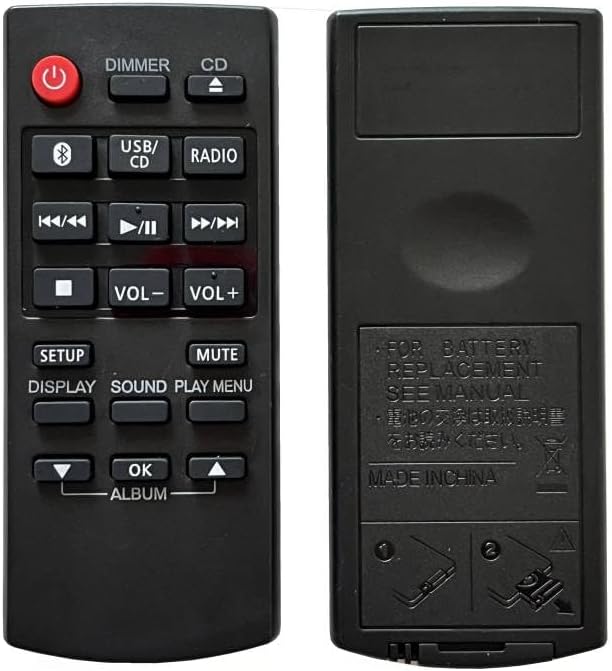
Image 1: Front and back view of the Dtirszxy N2QAYB000984 remote control, showing the button layout on the front and the battery compartment on the back.
2. Setup Instructions
2.1 Battery Installation
- Locate the battery compartment on the back of the remote control.
- Slide the battery cover downwards or press the latch and lift to open.
- Insert two (2) AAA batteries, ensuring the positive (+) and negative (-) terminals align correctly with the markings inside the compartment.
- Close the battery cover securely.
Important: Do not mix old and new batteries, or different types of batteries. Remove batteries if the remote control will not be used for an extended period.
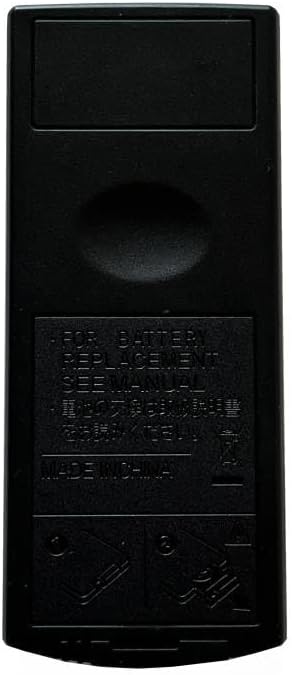
Image 2: Back view of the remote control, highlighting the battery compartment area and instructions for battery replacement.
2.2 Initial Setup
This remote control requires no programming or setup. It is ready for use immediately after battery installation. Simply point the remote control towards the signal receiving window of your Panasonic audio system for operation.
3. Operating Instructions
To operate your audio system, point the remote control directly at the system's infrared receiver. Ensure there are no obstructions between the remote and the audio system.
3.1 Button Functions

Image 3: Close-up view of the remote control's buttons, detailing their labels and layout.
- Power (Red Button): Turns the audio system on or off.
- DIMMER: Adjusts the display brightness of the audio system.
- CD: Selects the CD function.
- USB/CD: Toggles between USB and CD input sources.
- RADIO: Selects the radio tuner function.
- Playback Controls (◀◀ / ▶‖ / ▶▶): Control track skipping (previous/next) and play/pause functions.
- Stop (■): Stops playback.
- VOL- / VOL+: Adjusts the volume level down or up.
- MUTE: Mutes or unmutes the audio output.
- SETUP: Accesses the system setup menu.
- DISPLAY: Changes the information displayed on the audio system's screen.
- SOUND: Accesses sound settings or equalizer presets.
- PLAY MENU: Opens the playback menu for selected media.
- Navigation Buttons (▼ / ▲ / ◄ / ►): Used for navigating menus and lists.
- OK: Confirms selections in menus.
- ALBUM: Likely used for navigating albums or folders on USB/CD.
4. Maintenance
4.1 Battery Care
- Always use fresh AAA batteries.
- Replace all batteries at the same time.
- If the remote control is not used for an extended period (e.g., one month or more), remove the batteries to prevent leakage and damage.
- Dispose of used batteries responsibly according to local regulations.
4.2 Cleaning
Wipe the remote control with a soft, dry cloth. Do not use liquid cleaners, abrasive pads, or chemical solvents, as these may damage the surface or internal components.
5. Troubleshooting
- Remote not responding:
- Ensure fresh AAA batteries are correctly installed.
- Check for any obstructions between the remote control and the audio system's sensor.
- Make sure you are pointing the remote directly at the audio system.
- Verify that the audio system is powered on.
- Intermittent response:
- Batteries may be low; replace them.
- Ensure the remote control is within the effective operating range of the audio system.
6. Specifications
| Model Number: | N2QAYB000984 |
| Brand: | Dtirszxy |
| Compatible Devices: | Panasonic SC-PM250, SC-HC200, SCHC200GN, SC-UX102, SC-UX104, SA-AKX200, SA-AKX220, SA-UX100, SA-PM600, SC-PM600, SC-UX100 Audio Systems |
| Battery Type: | 2 x AAA batteries (not included) |
| Color: | Black |
| Max Supported Devices: | 1 |
7. Warranty Information
This Dtirszxy N2QAYB000984 remote control comes with a 90-day warranty from the date of purchase. This warranty covers manufacturing defects. Please note that batteries are not included in the warranty.
For warranty claims or further details, please refer to your purchase documentation or contact the seller directly.
8. Customer Support
If you encounter any issues or have questions regarding the Dtirszxy N2QAYB000984 remote control that are not addressed in this manual, please contact the seller or retailer from whom you purchased the product. They will be able to provide further assistance.