1. Introduction
This manual provides comprehensive instructions for the installation, operation, and maintenance of your DSTMLOCKFTY Smart Lock Electronic Cylinder, Model 5B01. This advanced door lock offers multiple unlocking methods including fingerprint, IC card, TTLOCK app, and password, providing a secure and convenient keyless entry solution for your home.
Please read this manual thoroughly before installation and use to ensure proper functionality and to avoid any damage to the product or property.
2. Product Overview
The DSTMLOCKFTY Smart Lock Electronic Cylinder is designed for enhanced security and ease of use. It replaces traditional euro profile cylinders without requiring complex wiring or drilling.

Figure 2.1: Overview of the Smart Lock Electronic Cylinder, showing its interaction with a smartphone via the TTLOCK app and included IC cards.
Key Features:
- 4-in-1 Unlocking Methods: Fingerprint, IC Card (3 included), TTLOCK App, and Password.
- Easy Installation: No wiring or drilling required; designed to replace existing euro profile cylinders.
- Durable Design: IP67 rated waterproof for outdoor use.
- Enhanced Security: Features anti-drill, anti-freely rotating, anti-breaking, and anti-high frequency resonance protection.
- App Control: Manage users, generate temporary passwords, and view access records via the TTLOCK app.
3. Installation
The smart lock cylinder is designed for straightforward installation, replacing your existing euro profile cylinder. Ensure your door is compatible with a euro profile mortise lock.
3.1 Compatibility Check

Figure 3.1: This diagram illustrates the correct type of euro profile mortise lock required for installation (top image, marked with a green circle) and incompatible types (bottom two images, marked with red crosses). The smart cylinder is only compatible with euro profile mortise locks.
3.2 Installation Steps
- Remove Old Cylinder: Unscrew the retaining screw on the side of your door that holds the existing euro profile cylinder in place.
- Insert Smart Cylinder: Carefully slide the DSTMLOCKFTY Smart Lock Electronic Cylinder into the mortise lock opening.
- Secure Cylinder: Reinsert and tighten the retaining screw to secure the new smart cylinder.
- Test Functionality: Before closing the door, test the lock's mechanism to ensure smooth operation.

Figure 3.2: The smart lock cylinder installed in a door, illustrating the 'inside' and 'outside' components. The diagram also shows the 65mm length measurement for compatibility.
4. Operating Instructions
The smart lock offers multiple convenient ways to unlock your door.
4.1 TTLOCK App Control
The TTLOCK app is the primary interface for managing your smart lock. Download it from your device's app store.

Figure 4.1: A smartphone displaying the TTLOCK app interface, which allows control over various smart home devices. Key features like remote unlocking, fingerprint management, electronic keys, authorized administration, and record viewing are visible.
- Pairing: Follow the in-app instructions to pair your smart lock with your smartphone via Bluetooth.
- Unlocking: Tap the unlock icon in the app to unlock the door.
- User Management: Add or remove users, assign temporary passwords, and manage fingerprint access.
- Access Records: View a history of who entered and when.
4.2 Fingerprint Unlocking
Register your fingerprints through the TTLOCK app for quick and secure access.
- Open the TTLOCK app and navigate to the fingerprint management section.
- Follow the prompts to register your fingerprint by placing your finger on the sensor multiple times.
- To unlock, simply place your registered finger on the fingerprint sensor on the smart cylinder.
4.3 IC Card Unlocking
The smart lock comes with three IC cards for convenient tap-to-unlock access.

Figure 4.2: A hand holding an IC card near the smart lock cylinder, demonstrating the ease of entry with just one step. This highlights the safety and intelligence of the IC card unlock feature.
- Register the IC cards through the TTLOCK app.
- To unlock, simply tap the registered IC card against the IC card detection area on the smart cylinder.
4.4 Password Unlocking
Generate and manage passwords via the TTLOCK app for keypad entry (if applicable to your model, or for remote password generation).
Note: This model primarily uses the app for password generation for remote access or temporary guest access. Direct keypad entry is not a feature of this specific cylinder design.
5. Maintenance
Regular maintenance ensures the longevity and optimal performance of your smart lock.
5.1 Cleaning
- Wipe the surface of the lock with a soft, damp cloth.
- Do not use abrasive cleaners, solvents, or harsh chemicals, as these can damage the finish and internal components.
5.2 Battery Replacement
The smart lock is powered by batteries (not included). Replace them when the low battery indicator appears in the app or on the lock itself.
- Locate the battery compartment on the inside part of the cylinder.
- Replace with new, high-quality batteries of the specified type (refer to product packaging or app for battery type).
- Ensure correct polarity when inserting batteries.
5.3 Environmental Protection

Figure 5.1: The smart lock cylinder with water droplets on its surface, visually representing its IP67 waterproof rating, which allows for reliable outdoor use.
The lock is IP67 rated for water resistance, making it suitable for outdoor use. However, avoid submerging the lock in water or exposing it to extreme conditions beyond its rating.
6. Troubleshooting
If you encounter issues with your smart lock, refer to the following common problems and solutions.
| Problem | Possible Cause | Solution |
|---|---|---|
| Lock does not respond. | Low or dead batteries. | Replace batteries. |
| Fingerprint not recognized. | Finger wet/dirty, or not properly registered. | Clean finger and sensor. Re-register fingerprint if necessary. |
| IC card not working. | Card not registered or damaged. | Register card via app. Try another card. |
| Cannot connect to TTLOCK app. | Bluetooth off, app not updated, or lock too far. | Ensure Bluetooth is on. Update app. Move closer to lock. Restart phone/app. |
| Lock mechanism is stiff. | Improper installation or debris. | Check installation alignment. Clean around the cylinder. |
If the problem persists, please contact customer support.
7. Specifications
| Feature | Detail |
|---|---|
| Model Number | 5B01 (also referred to as 5C01) |
| Brand | DSTMLOCKFTY |
| Unlocking Methods | Fingerprint, IC Card, TTLOCK App, Password |
| Included Components | IC cards (3), Lock cylinder |
| Dimensions (L x W x H) | 15 x 4 x 4 cm |
| Color | Silver |
| Waterproof Rating | IP67 |
| UPC | 767700463466 |
| First Available Date | February 21, 2024 |
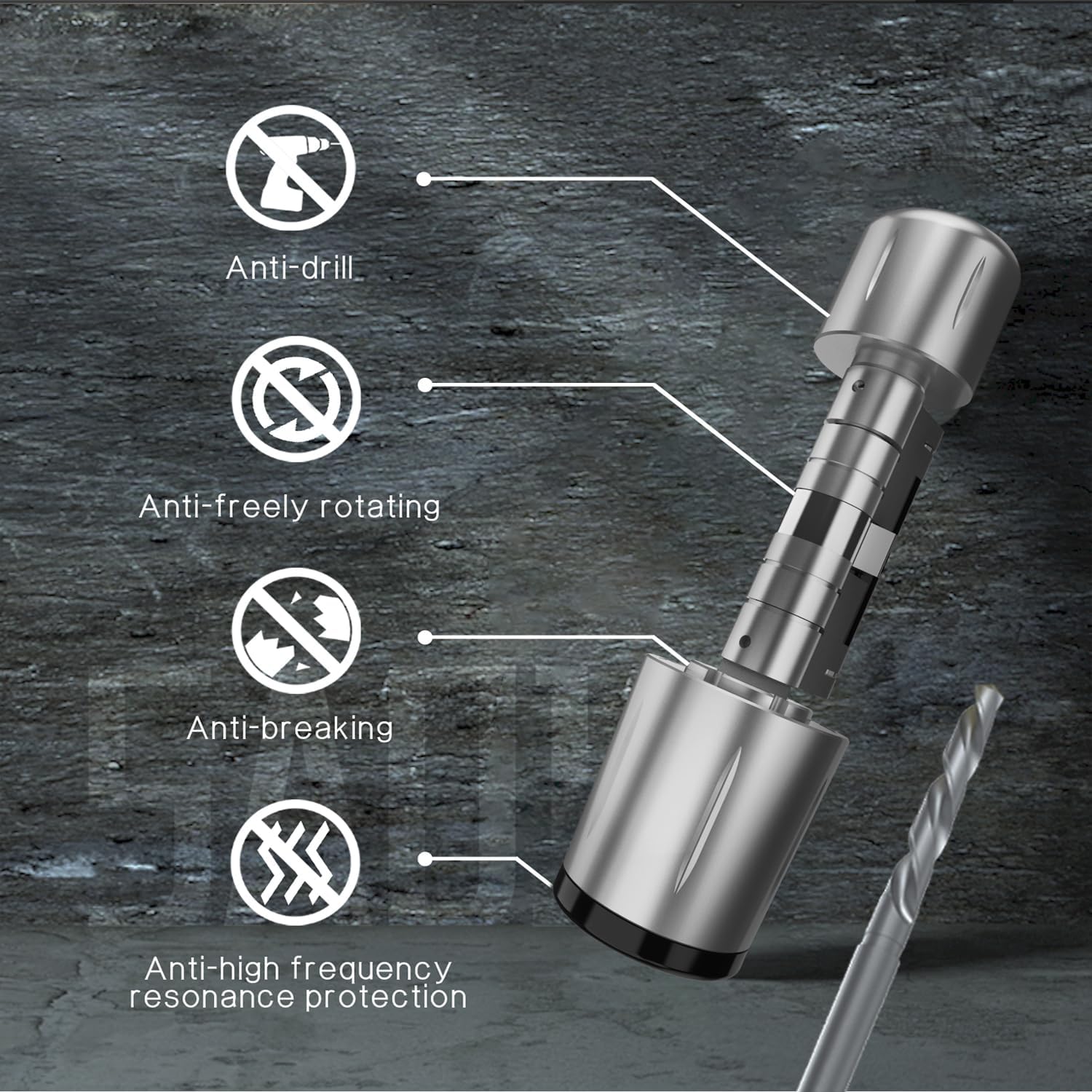
Figure 7.1: An exploded view of the smart lock cylinder highlighting its robust security features: anti-drill, anti-freely rotating, anti-breaking, and anti-high frequency resonance protection.
8. Warranty and Support
For warranty information and customer support, please refer to the product packaging or contact DSTMLOCKFTY directly through their official website or the contact information provided at the point of purchase.
Please have your model number (5B01) and purchase details ready when contacting support.