
iSpring WCS15KG-E
iSpring WCS15KG-E Whole House Water Softener
Model: WCS15KG-E
User Manual
1. Introduction
The iSpring WCS15KG-E Whole House Water Softener is designed to provide soft water throughout your home, protecting appliances, plumbing, and improving the quality of water for bathing and cleaning. This compact, high-capacity system features automatic backwash and media regeneration for hassle-free maintenance and reliable performance.

Figure 1: iSpring WCS15KG-E Whole House Water Softener. This image shows the compact, modern design of the water softener unit.
Key benefits include:
- Compact Design: Space-saving single-tank design for easy indoor installation.
- Automatic Regeneration: Self-cleaning function with automatic backwash and media regeneration, extending resin life.
- High-Quality Components: Features pre-filled ion exchange resin, corrosion-resistant fiberglass tank, and a durable automatic control valve.
- Enhanced User Experience: Adjustable hardness levels, multi-language support, salt shortage reminder, and holiday mode.

Figure 2: Whole House Protection. This diagram illustrates how the water softener provides soft water to various parts of the home, including laundry, bathrooms, and kitchen, preventing scale buildup and improving water quality.
2. Product Overview and Components
The iSpring WCS15KG-E is engineered for reliable and efficient water softening. Understanding its main components and how it functions is crucial for proper installation and maintenance.
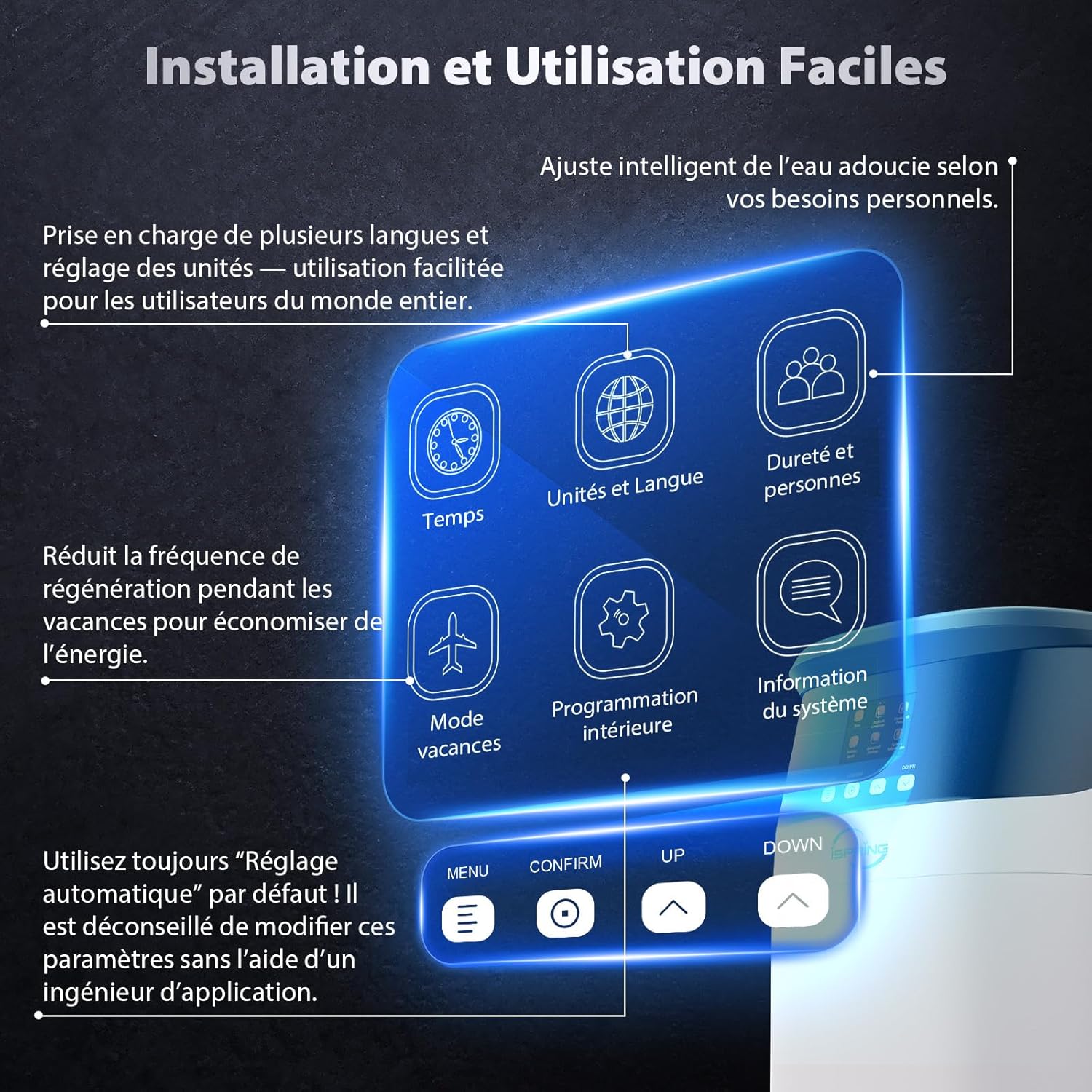
Figure 3: Internal Components. This image provides a cutaway view of the water softener, highlighting key internal components such as the control panel, corrosion-resistant fiberglass tank, brine float valve, brine screen filter, pre-filled ion exchange resin, and the brine tank.
Main Components:
- Control Panel: User interface for settings and monitoring.
- Corrosion-Resistant Fiberglass Tank: Durable and rust-free.
- Brine Float Valve: Prevents brine overflow.
- Brine Screen Filter: Prevents obstructions.
- Ion Exchange Resin: 9L pre-filled high-quality resin for softening.
- Brine Tank: Holds up to 13 kg of salt for regeneration.
- Bypass Valve: Allows for easy switching to unsoftened water for maintenance or emergencies.

Figure 4: Practical Bypass Valve. This image shows the bypass valve assembly, indicating the 3/4" BSP pipe size, which allows users to easily switch between softened and unsoftened water.
How it Works:
The iSpring WCS15KG-E uses an ion exchange process to remove hardness minerals from your water. Hard water, containing positively charged calcium (Ca²⁺) and magnesium (Mg²⁺) ions, enters the softener. Inside the resin tank, these hard mineral ions are attracted to negatively charged resin beads, which release sodium (Na⁺) ions in exchange. This process effectively softens the water.
Over time, the resin beads become saturated with hardness minerals. The system then initiates a regeneration cycle using a brine (saltwater) solution from the brine tank. The concentrated salt solution flushes the hardness minerals off the resin beads and down the drain, recharging the resin with sodium ions and preparing it for the next softening cycle.

Figure 5: Ion Exchange Process. This diagram illustrates the water softening process, showing hard water entering the system, ion exchange with resin beads, expulsion of hard minerals during regeneration, and the regenerative brine cycle.
What's in the Box:
- Water Softener Unit
- Stainless Steel Clamps
- Allen Key
- Silicone Lubricant
- BSP 3/8" Adapter
- BSP 3/4" Connection Screws
- Power Adapter
- Drain and Overflow Tube
3. Setup and Installation
The iSpring WCS15KG-E is designed for straightforward indoor installation, specifically for cold water supply lines. Its compact size makes it suitable for restricted spaces.

Figure 6: Compact Dimensions. This image illustrates the compact dimensions of the water softener (30 cm L x 50.5 cm W x 49.5 cm H), demonstrating its suitability for installation in small spaces, such as next to a washing machine.
Installation Guidelines:
- Location: Choose an indoor location with access to a cold water supply, a drain, and a power outlet. Ensure adequate space for maintenance and salt replenishment.
- Pre-installation Check: Verify all components listed in "What's in the Box" are present and undamaged.
- Plumbing Connection: Connect the softener to your main cold water line using the provided BSP 3/4" connection screws. Ensure all connections are secure and leak-free.
- Drain Connection: Connect the drain tube to a suitable drain point, ensuring proper slope for gravity drainage.
- Overflow Connection: Connect the overflow tube to prevent water damage in case of overfilling.
- Power Connection: Plug the power adapter into a grounded electrical outlet.
- Initial Setup: Follow the on-screen prompts on the control panel to configure initial settings, including water hardness and number of residents.

Figure 7: Installation Overview. This image provides a visual guide to the installation process, showing the connections for water inlet/outlet, drain, and overflow, along with the included accessories.
4. Operating Instructions
The iSpring WCS15KG-E features an intuitive control panel for easy operation and customization.

Figure 8: Control Panel Interface. This image displays the user-friendly control panel with icons for Time, Units and Language, Hardness and People, Holiday Mode, Internal Programming, and System Information. It also shows the Menu, Confirm, Up, and Down buttons for navigation.
Control Panel Functions:
- Menu: Access main settings.
- Confirm: Select options and confirm settings.
- Up/Down: Navigate through menus and adjust values.
- Time: Set current time for regeneration scheduling.
- Units and Language: Customize measurement units and display language.
- Hardness and People: Adjust water hardness levels and input the number of residents for optimized regeneration cycles.
- Holiday Mode: Reduces regeneration frequency to save energy during extended absences.
- Internal Programming: Advanced settings for regeneration cycles. It is recommended to use "Automatic Setting" by default and consult an application engineer before making manual adjustments.
- System Information: View system status and diagnostic data.
Automatic Regeneration:
The system automatically performs backwash and media regeneration based on your water hardness settings and water consumption. This ensures consistent soft water supply and prolongs the life of the resin.

Figure 9: Automatic Regeneration. This image illustrates the automatic regeneration process, showing the control panel settings for time, units, hardness, holiday mode, and internal programming, and highlighting the four regeneration modes: Chronometric, Volumetric, Delayed Volumetric, and Mixed Volumetric.
The system supports various regeneration modes to optimize salt and water usage:
- Chronometric: Regeneration based on a set time interval.
- Volumetric: Regeneration based on the volume of water processed.
- Delayed Volumetric: Regeneration based on volume, but initiated at a specific time (e.g., overnight).
- Mixed Volumetric: A combination of volumetric and time-based regeneration.
Always use the "Automatic Setting" by default. Adjustments to these parameters are not recommended without the advice of an application engineer.
5. Maintenance
Proper maintenance ensures the longevity and optimal performance of your iSpring water softener. The system is designed for low maintenance with its automatic features.
Salt Replenishment:
- The system will provide a salt shortage reminder.
- Regularly check the salt level in the brine tank. It should always be above the water level.
- Use high-quality water softener salt (e.g., pellets or crystals) to prevent issues. Avoid using cheap or impure salt, as this can lead to system malfunctions.
- Refill the brine tank when the salt level is low, ensuring it does not fall below one-quarter full.
Automatic Backwash and Media Regeneration:
The system automatically performs backwash and regeneration cycles. No manual intervention is typically required for these processes. Ensure the drain line is clear and unobstructed for proper operation.
Cleaning:
- Wipe the exterior of the unit with a soft, damp cloth as needed.
- Periodically inspect the brine tank for any salt bridging (a hard crust of salt that forms in the tank). If bridging occurs, carefully break it up with a blunt object to allow salt to dissolve properly.
6. Troubleshooting
This section provides solutions to common issues you might encounter with your iSpring WCS15KG-E water softener.
| Problem | Possible Cause | Solution |
|---|---|---|
| Water is not soft (hard water symptoms persist). |
|
|
| System not regenerating. |
|
|
| Excessive water in brine tank. |
|
|
| Salt consumption is too high. |
|
|

Figure 10: Before and After Soft Water. This image visually demonstrates the common problems associated with hard water (e.g., limescale on showerheads, faucets, and heating elements, dull laundry, skin irritation) and how soft water resolves these issues.
If you encounter issues not listed here or require further assistance, please contact iSpring customer support.
7. Specifications
Detailed technical specifications for the iSpring WCS15KG-E Whole House Water Softener.
| Specification | Value |
|---|---|
| Package Dimensions | 67 x 57 x 39.5 cm; 22.7 kilograms |
| First Available on Amazon.fr | November 15, 2023 |
| Manufacturer | iSpring |
| ASIN | B0CNCN6MVR |
| Item Model Number | WCS15KG |
| Country of Origin | China |
| Spare Parts Availability | Information unavailable on spare parts |
| Brand | iSpring |
| Product Dimensions | 30L x 50.5W x 49.5H centimeters |
| Installation Type | Under Sink |
| Purification Method | Ion Exchange |
| Power Source | Electric Cord |
| Model Name | WCS15KG-E |
| Upper Rated Temperature | 60 Degrees Celsius |
| Max TDS Level Supported (PPM) | 360 |
| UPC | 662425514908 |
| Capacity (Grains) | 15,000 grains (Softens up to 2,000 L of water per cycle at 20°dH) |
| Operating Pressure | 1.45-4.41 bar |
| Water Temperature | 5-40°C |
| Inlet / Outlet Connector | 3/4" BSP |
| Resin Volume | 9 L |
| Salt Tank Capacity | 13 kg |

Figure 11: Key Specifications. This image summarizes the main technical specifications of the iSpring WCS15KG-E, including capacity, operating pressure, water temperature, connector size, resin volume, and salt tank capacity.
8. Warranty and Support
iSpring is committed to providing high-quality products and exceptional customer service.
Warranty Information:
The iSpring WCS15KG-E Whole House Water Softener comes with a 3-Year Warranty, ensuring peace of mind regarding product defects and performance issues.
Technical Support:
iSpring offers Lifetime Technical Support. Our dedicated team is available to assist you with any inquiries, concerns, or assistance needed during installation, operation, or after-sales support. Please refer to the contact information provided with your product or visit the official iSpring website for support details.
For further assistance, you can visit the iSpring store on Amazon: iSpring Store.
Related documentsWCS15KG-E


Ask a question about this manual
Ask about setup, troubleshooting, compatibility, parts, safety, or missing instructions. Manuals+ will review the question and use this page’s manual context to help answer it.