
EC-HB3D
User Manual: Ergonomic Office Chair
Model: EC-HB3D
Introduction
Thank you for purchasing the Ergonomic Office Chair. This manual provides important information regarding the assembly, operation, maintenance, and troubleshooting of your new chair. Please read this manual thoroughly before assembly and use to ensure proper function and longevity of the product. This chair is designed to provide comfort and support for extended periods of sitting, featuring a high back, tilt function, 3D armrests, and a retractable footrest.

Image: The Ergonomic Office Chair in its standard upright position, with a subtle visual indication of its tilt capability.
Safety Information
- Ensure all parts are present and undamaged before assembly. Do not use if any parts are missing or broken.
- Assemble the chair on a soft, clean surface to prevent scratches.
- Do not overtighten screws during assembly, as this may damage the components.
- Keep children and pets away during assembly. Small parts may be a choking hazard.
- Do not stand on the chair or use it as a step stool.
- The maximum weight capacity for this chair is 330 pounds (approximately 150 kg). Do not exceed this limit.
- Regularly check all bolts and screws to ensure they remain tight. Retighten if necessary.
- Avoid exposing the chair to direct sunlight or extreme temperatures to prevent material degradation.
Package Contents
Before beginning assembly, please verify that all components listed below are included in your package:
- Backrest Assembly
- Seat Cushion Assembly with Armrests
- Gas Lift Cylinder
- Star Base (5-star)
- Casters (5 pieces)
- Retractable Footrest
- Mounting Hardware (screws, washers, Allen wrench)
- Instruction Manual (this document)
Setup and Assembly
Assembly of the Ergonomic Office Chair is straightforward and can typically be completed within 15 minutes. Follow these steps carefully:
- Attach Casters to Base: Insert each of the five casters into the holes at the end of each leg of the star base. Push firmly until they click into place.
- Install Gas Lift: Place the gas lift cylinder into the center hole of the assembled star base. Ensure it is seated securely.
- Attach Mechanism to Seat: Align the chair mechanism (pre-attached to the seat cushion assembly) with the pre-drilled holes on the underside of the seat cushion. Secure it using the provided screws and Allen wrench. Ensure the front of the mechanism faces the front of the seat.
- Connect Seat to Base: Carefully place the assembled seat cushion onto the gas lift cylinder, ensuring the tapered end of the gas lift fits into the mechanism's opening. Press down firmly to secure.
- Attach Backrest: Align the backrest with the mounting plates on the seat cushion assembly. Secure it using the provided screws. Do not overtighten initially; tighten fully once both sides are aligned.
- Install Footrest: Slide the retractable footrest into its designated slots beneath the seat. Ensure it moves smoothly.
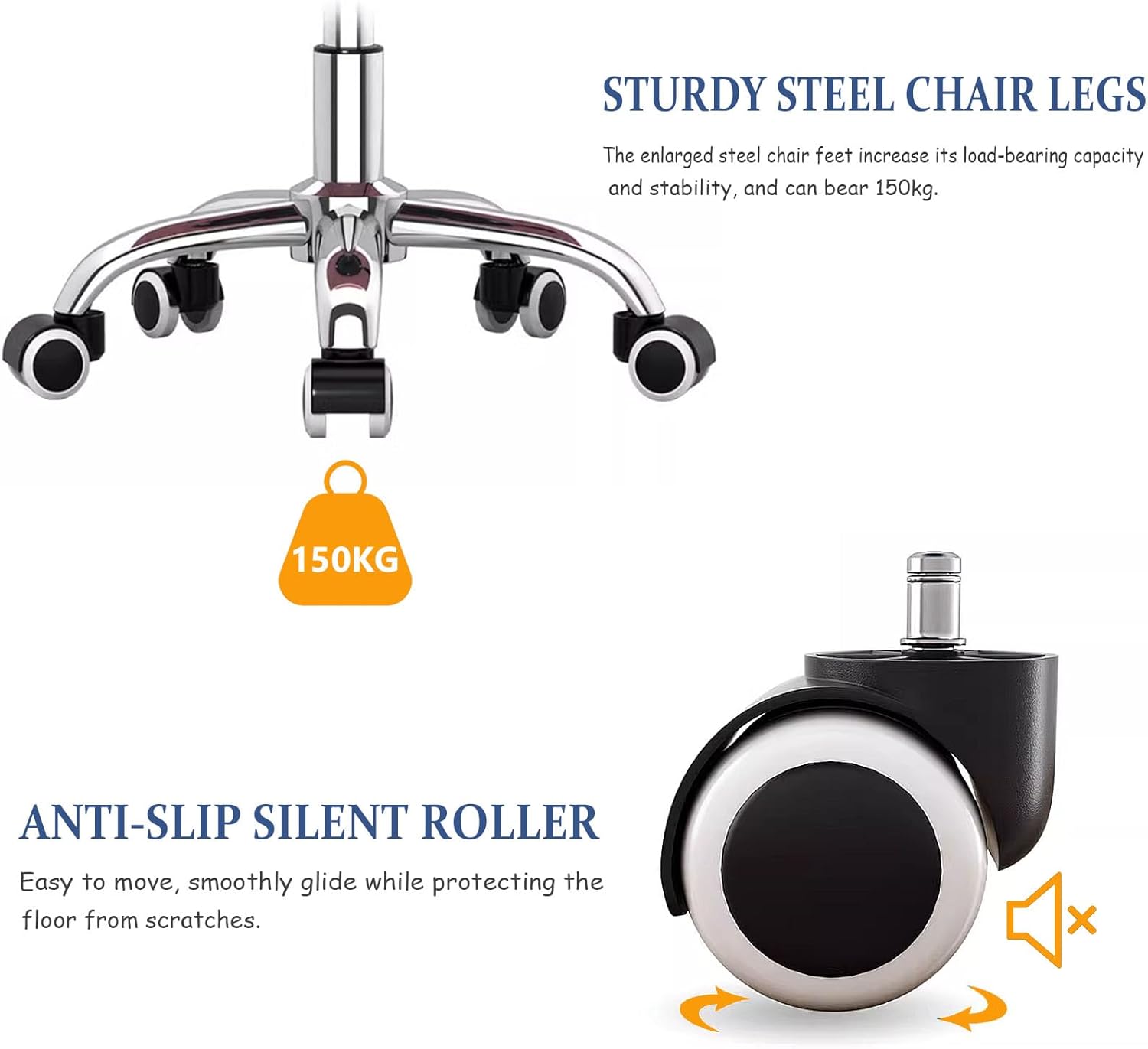
Image: Close-up view of the chair's sturdy steel base and anti-slip silent casters, highlighting the robust construction for stability and smooth movement.
Operating Instructions
Your Ergonomic Office Chair offers several adjustable features to customize your seating experience:
1. Height Adjustment
- To raise the seat height: While seated, lift the lever located on the right side of the chair. The seat will rise. Release the lever at your desired height.
- To lower the seat height: While seated, lift the lever located on the right side of the chair. Apply slight pressure to the seat. The seat will lower. Release the lever at your desired height.
2. Tilt Function and Rocking
- To enable rocking: Pull out the lever located on the left side of the chair. The chair will now allow rocking motion.
- To lock the rocking position: Push in the lever located on the left side of the chair. The chair will lock in its current upright position.
- To recline the backrest (90°~165°): Use the separate lever on the right side of the chair (often a paddle-style lever). Pull the lever up, lean back to your desired angle, and release the lever to lock the backrest in place.

Image: Visual guide demonstrating the chair's rocking capability between 90° and 165°, along with close-ups of the height adjustment and tilt control levers.
3. Retractable Footrest
- To extend the footrest: Pull the footrest out from underneath the seat.
- To retract the footrest: Push the footrest back underneath the seat until it is fully stored.
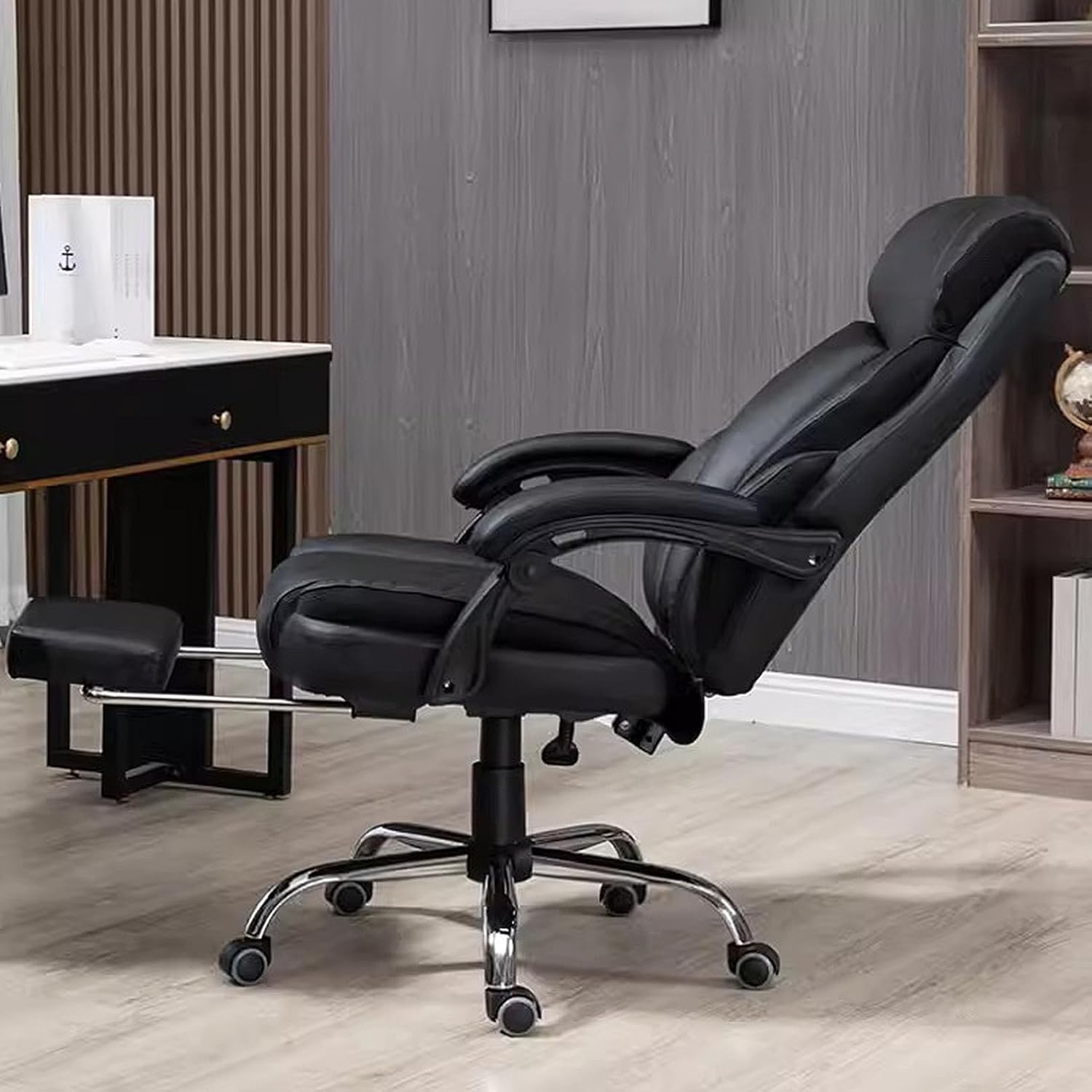
Image: The Ergonomic Office Chair shown in a fully reclined position with the retractable footrest extended, illustrating its relaxation capabilities.
4. 3D Armrests
The armrests are designed to provide ergonomic support. While specific 3D adjustments (height, pivot, depth) are not detailed in the product description, the armrests are curved for comfort.

Image: Detailed view of the chair's materials, including the wear-resistant PU leather fabric, high-density sponge padding in the cushion, and the ergonomic design of the curved armrests.
Maintenance
Proper care and maintenance will extend the life of your office chair:
- Cleaning: For general cleaning, wipe the PU leather and plastic parts with a soft, damp cloth. For stubborn stains, use a mild soap solution and wipe dry immediately. Avoid harsh chemicals or abrasive cleaners.
- Inspection: Periodically inspect all bolts, screws, and connections to ensure they are tight. Retighten any loose fasteners to maintain stability and safety.
- Casters: Keep the casters clean from hair, dust, and debris to ensure smooth rolling. You may occasionally need to remove the casters and clean the axles.
- Avoid Direct Sunlight: Prolonged exposure to direct sunlight can cause the PU leather to fade or crack. Position the chair away from direct sunlight if possible.
Troubleshooting
If you encounter any issues with your chair, refer to the following common problems and solutions:
| Problem | Possible Cause | Solution |
|---|---|---|
| Chair wobbles or is unstable. | Loose screws or uneven assembly. | Check and tighten all assembly screws, especially those connecting the backrest to the seat and the mechanism to the seat. Ensure the base is flat on the floor. |
| Chair does not adjust height. | Gas lift issue or lever malfunction. | Ensure the height adjustment lever is fully engaged. If the issue persists, the gas lift cylinder may need replacement. Contact customer support. |
| Casters do not roll smoothly. | Debris in casters or damaged casters. | Remove any hair or debris from the caster wheels. If damaged, casters may need replacement. |
| Backrest does not recline or lock. | Tilt mechanism locked or damaged. | Ensure the tilt lock lever is disengaged. If the mechanism is damaged, contact customer support. |
Specifications
| Feature | Detail |
|---|---|
| Brand | Generic |
| Model | EC-HB3D |
| Color | Black |
| Product Dimensions | 25.35"D x 25.35"W x 46.8"H (Adjustable height: 44.5" to 47.2") |
| Back Style | Solid Back |
| Special Feature | Ergonomic, Tilt Function (90°~165°), 3D Armrest, Retractable Footrest |
| Unit Count | 1.0 Count |
| Seat Material Type | High-density Foam, PU Leather |
| Recommended Uses | Office, Gaming, Study, Home |
| Maximum Weight Capacity | 330 pounds (approx. 150 kg) |
| Base Material | Thickened Steel |
| Casters | 360° Swivel, Anti-slip Silent Roller |
| Country of Origin | China |
| First Available | February 21, 2024 |
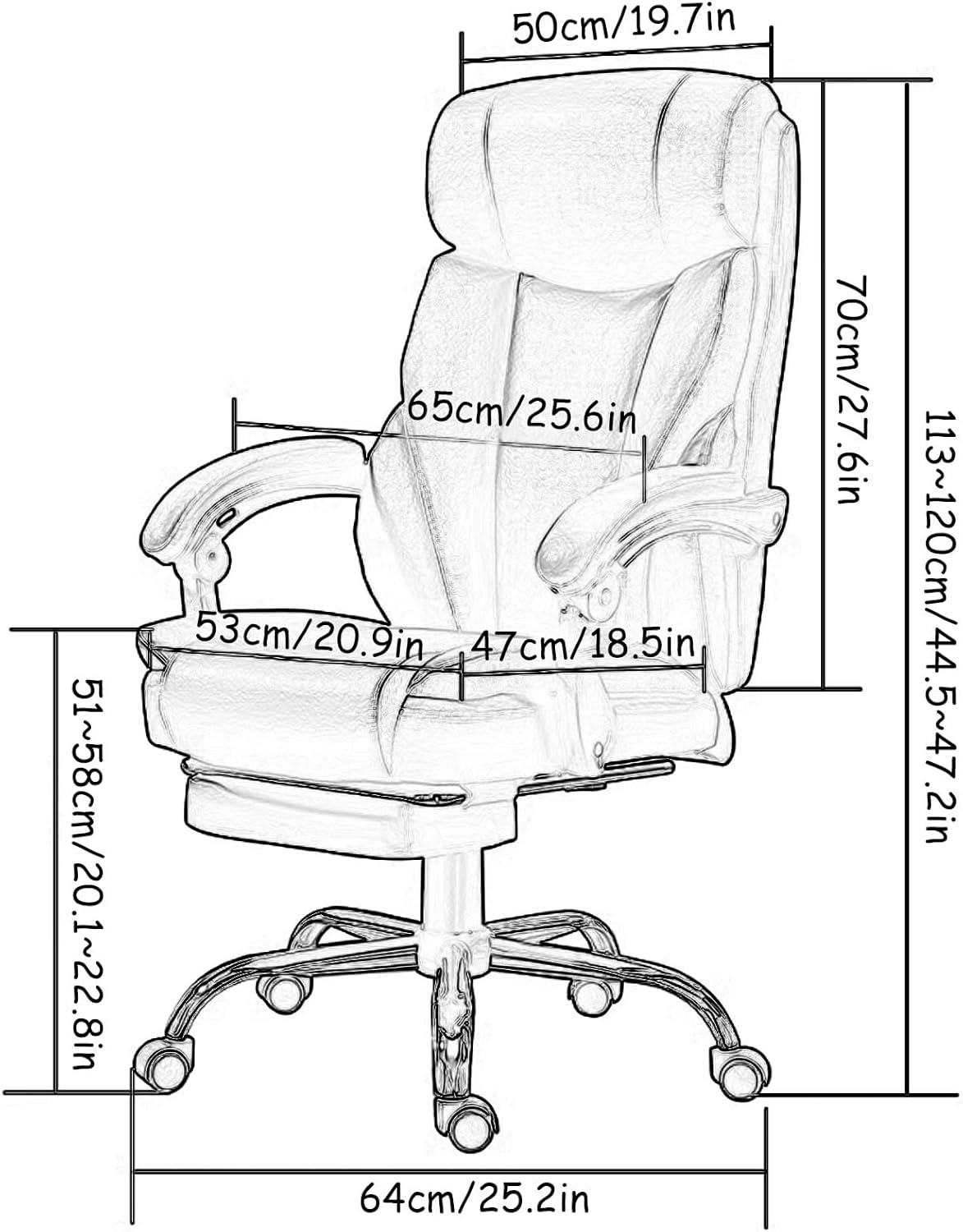
Image: Technical diagram illustrating the key dimensions of the Ergonomic Office Chair in both centimeters and inches.
Warranty and Support
This product comes with a standard manufacturer's warranty. For specific warranty details, please refer to the documentation included with your purchase or contact the seller directly. If you have any questions, require assistance with assembly, or need to report a missing/damaged part, please do not hesitate to contact our professional customer service team. We are committed to providing a solution within 24 hours.
Contact Information: Please refer to your purchase receipt or the seller's information on the platform where you purchased the product for direct contact methods.