
SIMOE AMSE171MOWTN-3
SIMOE Retro Microwave Oven User Manual
Model: AMSE171MOWTN-3
1. Important Safety Information
Please read all instructions carefully before using this appliance to ensure safe and efficient operation. Keep this manual for future reference.
- General Safety: Do not attempt to operate this oven with the door open as this can result in harmful exposure to microwave energy.
- Child Safety Lock: This microwave oven is equipped with a child lock feature for added safety. Refer to the "Operating Instructions" section for activation and deactivation.
- Proper Placement: Ensure adequate ventilation around the microwave. Do not block any ventilation openings.
- Materials to Avoid: Do not use metal containers or foil in the microwave, as this can cause arcing and damage the oven.
- Power Cord: The power cord is UL approved. Ensure it is not damaged or pinched.
- Burn Hazard: Use caution when removing hot items from the microwave.
2. Product Overview
The SIMOE Retro Microwave Oven combines a vintage aesthetic with modern functionality, designed for compact spaces.
2.1 Components
- Control Panel: Features buttons for various functions and a rotary knob for time/weight selection.
- Door Handle: Stylish and insulated for safe opening.
- Viewing Window: Allows monitoring of food during cooking.
- Removable Glass Turntable: Ensures even heating and is easy to clean.
- Interior Light: Illuminates the oven cavity during operation.
2.2 Key Features
- Compact Design: 0.7 cubic feet capacity, ideal for small kitchens, offices, or dorms.
- Power Output: 700 Watts for efficient heating.
- 5 Micro Power Levels: Allows precise control over cooking intensity (20P~100P).
- 8 Auto-Cooking Programs: Pre-set options for common foods like popcorn, pizza, vegetables, and more.
- Defrost Function: One-touch defrosting by weight or time.
- Timer: Adjustable cooking time from 1 to 60 minutes.
- LED Display: Shows time and countdown.
- Child Lock: Enhances safety by preventing unintended operation.
- 360° Rotational Heating: Ensures food is heated evenly.

Figure 2.1: Front view of the SIMOE Retro Microwave Oven.

Figure 2.2: Dimensions of the microwave oven (14"D x 18"W x 10"H).
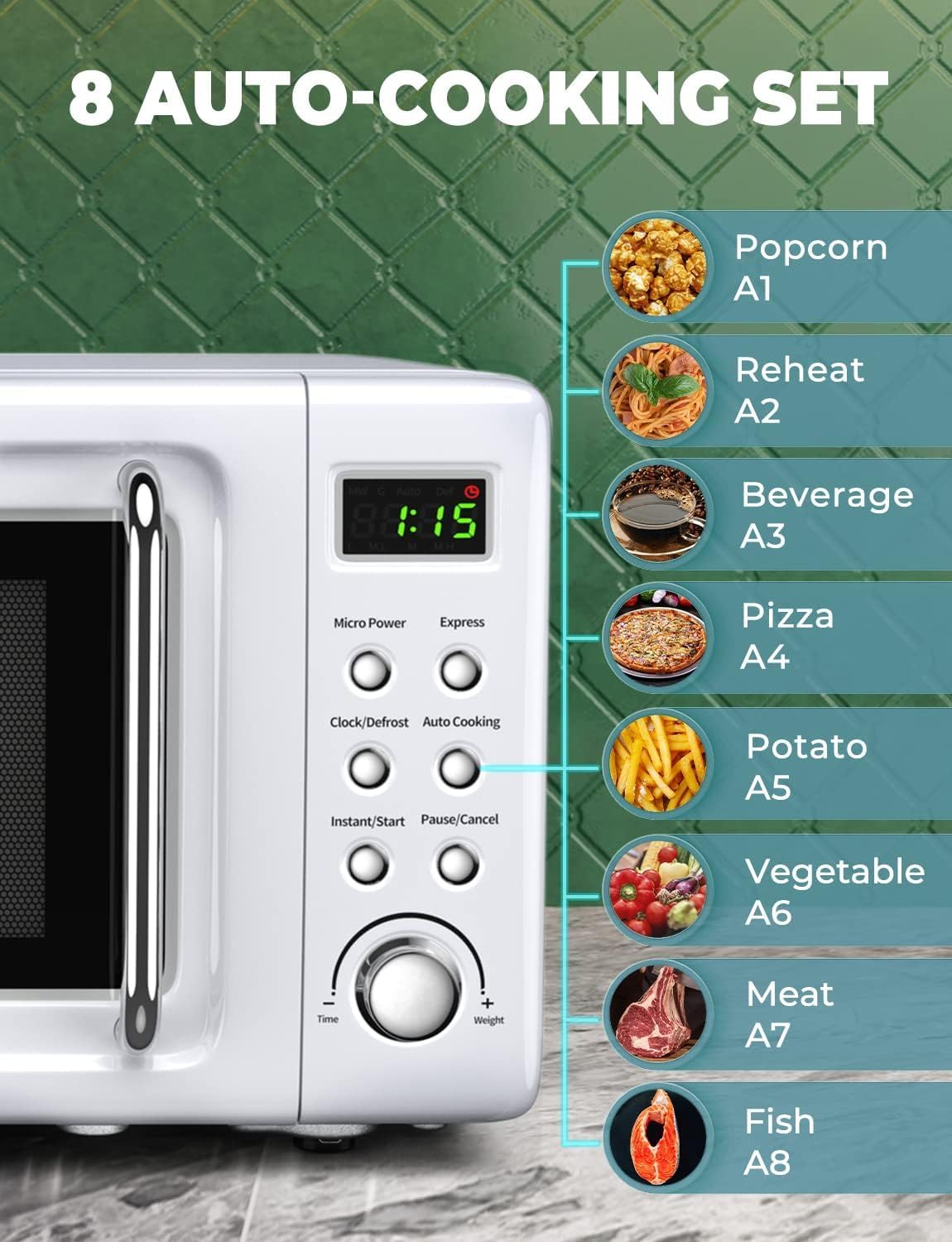
Figure 2.3: Detailed view of the control panel highlighting the 8 auto-cooking settings.
3. Setup and Installation
- Unpacking: Carefully remove the microwave oven and all packing materials from the carton.
- Placement: Place the oven on a flat, stable surface that can withstand the weight of the oven and the heaviest food item likely to be cooked in it. Ensure there is at least 3 inches of clearance on the back and sides, and 12 inches above the oven for proper ventilation.
- Power Connection: Plug the power cord into a grounded electrical outlet. Ensure the voltage matches the specifications of the microwave.
- Turntable Installation: Place the roller ring in the center of the oven cavity. Place the glass turntable securely on top of the roller ring.
4. Operating Instructions
4.1 Basic Heating
- Place food in a microwave-safe container on the glass turntable.
- Close the oven door securely.
- Press the "Micro Power" button to select the desired power level (e.g., 100P for full power).
- Turn the "Time/Weight" knob to set the desired cooking time.
- Press the "Instant/Start" button to begin cooking.
4.2 Auto-Cooking Programs
The microwave features 8 pre-set auto-cooking programs for convenience:
- A1: Popcorn
- A2: Reheat
- A3: Beverage
- A4: Pizza
- A5: Potato
- A6: Vegetable
- A7: Meat
- A8: Fish
To use an auto-cooking program:
- Place food in the oven.
- Press the "Auto Cooking" button repeatedly to cycle through the programs (A1-A8) until the desired program is displayed.
- Turn the "Time/Weight" knob to select the appropriate weight or quantity for the selected program.
- Press the "Instant/Start" button to begin.
4.3 Defrost Function
The defrost function allows you to defrost food by weight or time.
- Place frozen food in the oven.
- Press the "Clock/Defrost" button once for defrost by time, or twice for defrost by weight.
- Turn the "Time/Weight" knob to set the defrost time or weight.
- Press the "Instant/Start" button to begin defrosting.
4.4 Child Lock
To activate the child lock, press and hold the "Pause/Cancel" button for 3 seconds. The display will show "LOCK" or a lock icon. To deactivate, press and hold the "Pause/Cancel" button again for 3 seconds.
Important Note: Always press the "Pause/Cancel" button before opening the door, whether the heating program is running or has completed. This ensures safe operation and prevents accidental microwave energy exposure.
Video 4.1: Official product video demonstrating the features and operation of the SIMOE Retro Microwave Oven.
5. Maintenance and Cleaning
Regular cleaning will help maintain the performance and appearance of your microwave oven.
- Interior: Wipe the inside of the oven with a damp cloth after each use. For stubborn stains, a mild detergent can be used. Do not use abrasive cleaners or scouring pads.
- Exterior: Clean the exterior surface with a soft, damp cloth. Avoid using harsh chemicals.
- Turntable: The glass turntable and roller ring can be removed and washed in warm, soapy water or in the dishwasher. Ensure they are completely dry before placing them back in the oven.
- Door Seal: Keep the door seal clean to ensure proper closure and prevent microwave leakage.
6. Troubleshooting
If you encounter issues with your microwave oven, refer to the following common problems and solutions:
| Problem | Possible Cause | Solution |
|---|---|---|
| Oven will not start. | Power cord not securely plugged in; Door not closed properly; Fuse blown or circuit breaker tripped. | Ensure plug is firmly in outlet; Close door completely; Check household fuse/circuit breaker. |
| Food not heating. | Incorrect cooking time or power level selected; Door not closed properly. | Adjust time/power; Ensure door is fully latched. |
| Turntable not rotating. | Turntable or roller ring not positioned correctly; Food too large or heavy. | Reposition turntable and roller ring; Use a smaller dish or reduce food quantity. |
| Unusual noise during operation. | Turntable components are dirty or misaligned. | Clean and properly align the turntable and roller ring. |
If the problem persists after trying these solutions, please contact customer support.
7. Specifications
| Feature | Detail |
|---|---|
| Brand | SIMOE |
| Model Number | AMSE171MOWTN-3 |
| Capacity | 0.7 Cubic Feet |
| Wattage | 700 Watts |
| Product Dimensions (D x W x H) | 14 x 18 x 10 inches |
| Item Weight | 23 pounds |
| Material | Stainless Steel |
| Color | White |
| Special Features | Auto Cook, Timer, Child Safety Lock, Defrost, Turntable |
| Certifications | ETL, UL Certified |
8. Warranty and Support
This SIMOE Retro Microwave Oven comes with a 1-year warranty from the date of purchase. We also offer a 30-day return policy for your peace of mind.
For technical assistance, troubleshooting, or warranty claims, please contact SIMOE Customer Support:
- Website: Visit the SIMOE Store on Amazon
- Email: support@simoe.com (example email, replace with actual if available)
- Phone: 1-800-XXX-XXXX (example phone, replace with actual if available)
Please have your model number (AMSE171MOWTN-3) and purchase date ready when contacting support.
Ask a question about this manual
Ask about setup, troubleshooting, compatibility, parts, safety, or missing instructions. Manuals+ will review the question and use this page’s manual context to help answer it.