
YESIDO Yesido TWS23
YESIDO TWS23 Wireless Bluetooth Earphones User Manual
Model: TWS23
Introduction
Thank you for choosing the YESIDO TWS23 Wireless Bluetooth Earphones. These earphones are designed to provide a high-quality audio experience with features such as Active Noise Cancellation (ANC), an LED display for battery status, and intuitive touch controls. This manual will guide you through the setup, operation, and maintenance of your new earphones.

Image: The YESIDO TWS23 earphones are shown inside their open charging case. The case features a prominent LED digital display on the front, indicating battery levels for both the left and right earbuds, as well as the charging case itself. The earbuds are black with metallic accents.
Setup
1. Initial Charging
Before first use, fully charge the earphones and the charging case. Connect the provided USB-C cable to the charging port on the case and a compatible USB power source.
- The LED display on the charging case will show the charging progress.
- A full charge typically takes about 1.5 hours.

Image: The black charging case for the YESIDO TWS23 earphones is depicted with a USB-C cable plugged into its charging port. The LED display on the case is illuminated, showing battery percentage and charging indicators for both the case and the individual earbuds. Text overlays indicate "Type-fast charge" and "Comprehensive battery life 30h".
2. Pairing with Your Device
The earphones support automatic pairing for convenience.
- Open the lid of the charging case. The earphones will automatically enter pairing mode.
- On your device (smartphone, tablet, etc.), enable Bluetooth.
- Search for "Yesido TWS23" in the list of available Bluetooth devices and select it to connect.
- Once connected, the earphones will automatically pair with your device whenever you open the case and Bluetooth is enabled on your device.
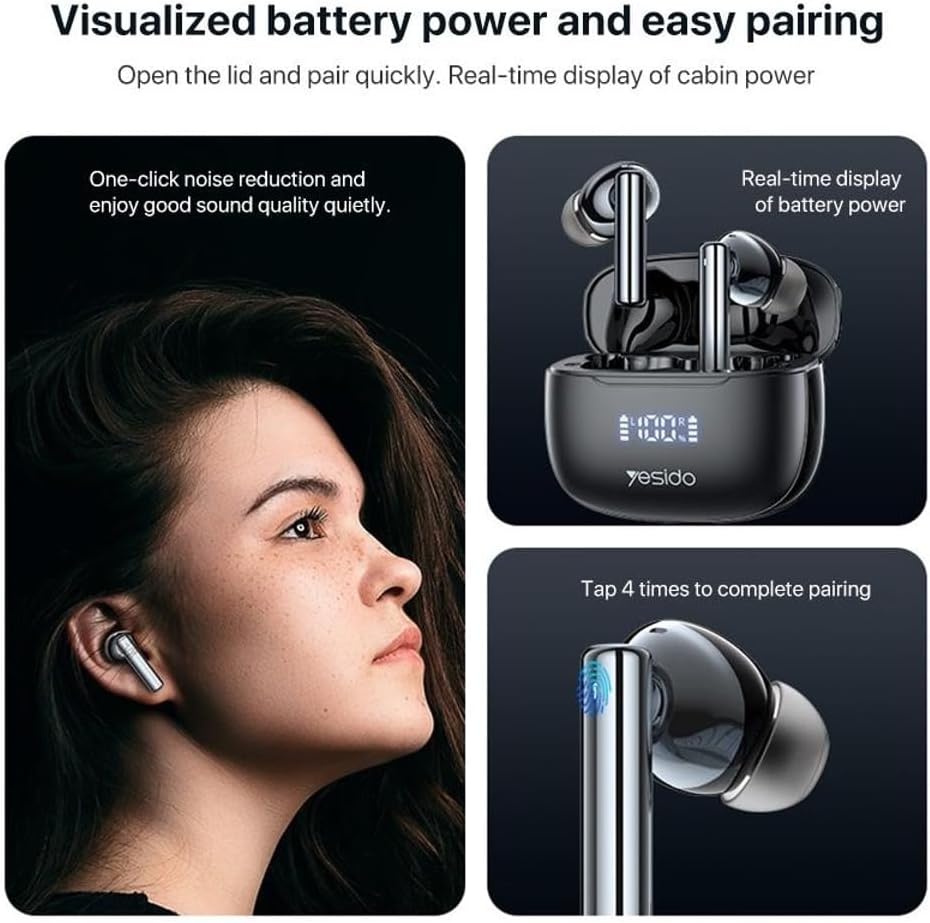
Image: A composite image illustrating the pairing process and battery display. The top right shows the earbuds in their open charging case with the LED display. The bottom right shows a close-up of an earbud with a finger tapping it, indicating "Tap 4 times to complete pairing". The left side shows a person wearing an earbud, with text "One-click noise reduction and enjoy good sound quality quietly."
Operating Instructions
Touch Controls
The YESIDO TWS23 earphones feature intuitive touch controls on each earbud for easy management of music playback, calls, and other functions.
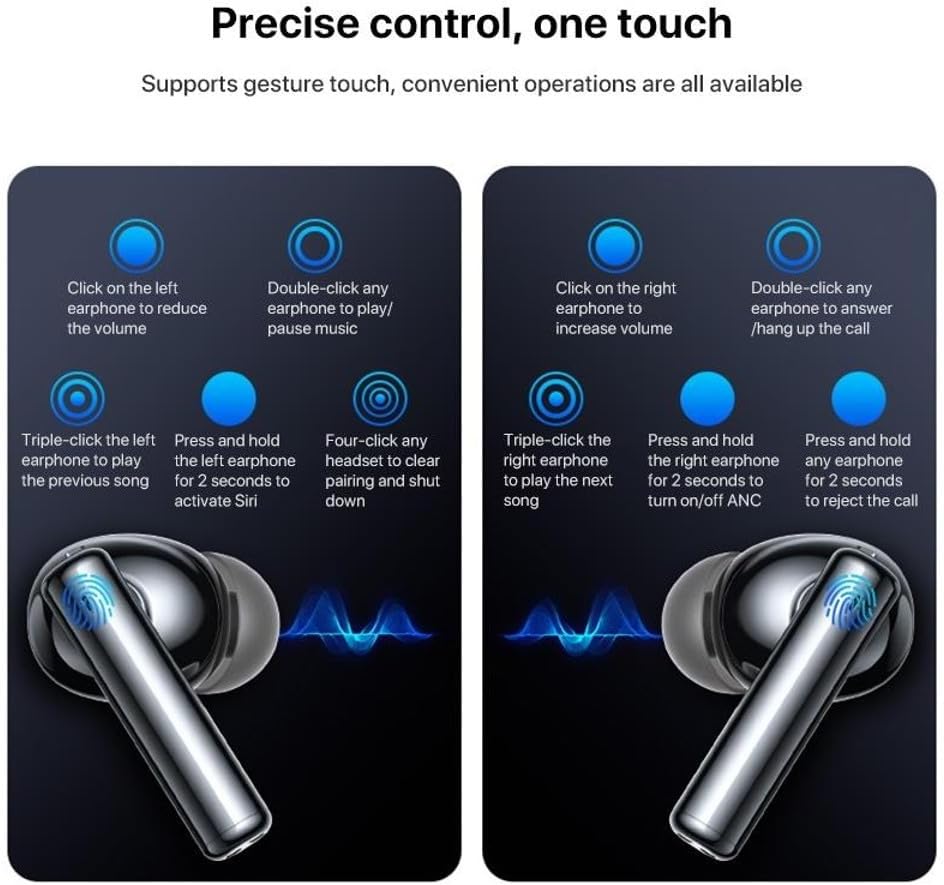
Image: A detailed diagram illustrating the touch control functions for both the left and right YESIDO TWS23 earphones. It shows:
- Left Earphone:
- Single click: Reduce volume
- Triple click: Play previous song
- Press and hold for 2 seconds: Activate Siri (Voice Assistant)
- Right Earphone:
- Single click: Increase volume
- Triple click: Play next song
- Press and hold for 2 seconds: Turn on/off ANC (Active Noise Cancellation)
- Both Earphones:
- Double click any earphone: Play/Pause music
- Double click any earphone: Answer/Hang up call
- Four-click any headset: Clear pairing and shut down
- Press and hold any earphone for 2 seconds: Reject call
Active Noise Cancellation (ANC)
The earphones are equipped with ANC technology, which accurately emits reverse sound waves to reduce ambient noise by up to 28dB, providing a more immersive listening experience.
- To activate or deactivate ANC, press and hold the right earphone for 2 seconds.

Image: A close-up of the YESIDO TWS23 earphone, with sound waves emanating from it, illustrating the Active Noise Cancellation feature. Text indicates "ANC active noise reduction, one-click 'turn off the mic'" and "Captures noise inside and outside the ear canal within milliseconds, and accurately emits reverse sound waves to achieve flagship-level 28dB noise reduction." A smaller inset image shows a finger pressing the earbud, with text "Press and hold the right earphone for 2 seconds to turn on/off ANC".

Image: The YESIDO TWS23 earphones are shown, one in the charging case and one outside, with the charging case open. The image emphasizes the ANC (Active Noise Reduction) feature, stating "ANC active noise reduction True wireless Bluetooth headphones".
Battery Life and Charging
- Playback Time: Approximately 5 hours on a single charge.
- Talk Time: Approximately 4 hours.
- Standby Time: 30 hours.
- Total Battery Life (with charging case): Up to 30 hours.
- The LED digital display on the charging case provides real-time power usage, showing the battery level of both earbuds and the case.
Maintenance
General Care
- Store the earphones in their charging case when not in use to protect them and keep them charged.
- Avoid exposing the earphones to extreme temperatures, humidity, or dust.
- The earphones are sweat and water-resistant, but not waterproof. Avoid submerging them in water.
- Do not attempt to disassemble or modify the earphones or charging case, as this will void the warranty.
Cleaning
- Gently wipe the earphones and charging case with a soft, dry, lint-free cloth.
- For ear tips, remove them from the earphones and clean with a damp cloth, then ensure they are completely dry before reattaching.
- Do not use abrasive cleaners, alcohol, or chemical solvents.
Troubleshooting
| Problem | Possible Cause | Solution |
|---|---|---|
| Earphones not pairing | Bluetooth off on device; earphones not in pairing mode; interference. | Ensure Bluetooth is on. Open case lid to enter pairing mode. Move closer to device. Try "Four-click any headset to clear pairing and shut down" then re-pair. |
| No sound from one earbud | Low battery; earbud not properly connected; pairing issue. | Place both earbuds back in the case, close the lid, then open again. Ensure both are charged. Re-pair if necessary. |
| Charging case not charging | Faulty cable/adapter; dirty charging port. | Try a different USB-C cable and power adapter. Clean the charging port gently. |
| ANC not working | ANC is off; earbud fit. | Press and hold the right earphone for 2 seconds to toggle ANC. Ensure earbuds fit snugly in your ears. |
Specifications
Detailed technical specifications for the YESIDO TWS23 Wireless Bluetooth Earphones:
- Model: Yesido TWS23
- Chip: AC7003A8 (ANC)
- Bluetooth Version: 5.3
- Playback Time: Approximately 5 hours
- Standby Time: 30 hours
- Talk Time: 4 hours
- Charging Time: Approximately 1.5 hours
- Headphone Battery: 30mAh
- Charging Box Battery: 300 mAh
- Speaker Size: 13mm
- Impedance: 32 ohms
- Power: 3mW
- ANC Noise Reduction: 28dB
- Material: PC + ABS
- Control Type: Touch Control
- Connectivity Technology: Wireless Bluetooth
- Special Features: Digital Display, Microphone Included, Noise Reduction, Sweatproof
- Included Components: Power Cable, User Manual, Yesido TWS23 Bluetooth 5.3 LED Digital Display TWS ANC Noise Reduction Wireless Bluetooth Earphone

Image: An exploded view diagram of the YESIDO TWS23 earphone, showcasing its internal components. Key parts labeled include: Electroplated mirror, Sound unit, 13mm polymer diaphragm, Metal dust screen, Glossy black mirror, and Silicone ear caps. Text highlights "13mm polymer diaphragm" and describes it as a breakthrough acoustic design providing full low frequency and clear mid/high frequencies.

Image: A close-up shot of the AC7003A8 Bluetooth 5.3 chip, emphasizing its role in the YESIDO TWS23 earphones. Text states "New Bluetooth 5.3, the wireless future" and "Using Jerry Bluetooth 5.3 chip technology, the anti-interference ability is greatly improved, the power consumption is lower, and the stability is stronger."
Warranty and Support
The YESIDO TWS23 Wireless Bluetooth Earphones come with a manufacturer's warranty of 1 year.
For technical support, warranty claims, or further assistance, please refer to the contact information provided with your purchase or visit the official YESIDO website.
Related Documents - Yesido TWS23
 |
Yesido IO44 Smart Glasses User Manual User manual and operating instructions for the Yesido IO44 Smart Glasses, covering pairing, charging, and feature controls. |
 |
Yesido KB43 Keyboard & Mouse User Manual User manual and technical specifications for the Yesido KB43 wireless keyboard and mouse combo. Includes setup instructions, battery replacement, and product parameters. |
 |
Yesido YSP28 OWS Headset User Manual Comprehensive user manual for the Yesido YSP28 OWS Headset, covering setup, operation, troubleshooting, product specifications, and safety guidelines. |
 |
Yesido EP08 Wireless Headset User Manual and Specifications Comprehensive user manual and technical specifications for the Yesido EP08 Wireless Headset, covering setup, usage, controls, safety, and product details. |
 |
Yesido KM21 Car Dash Cam User Guide | Installation & Features User guide for the Yesido KM21 Car Dash Cam. Learn about installation, app connection, product features, parameters, and safety instructions for this driving recorder. |
 |
Yesido YC142 & YC95 GaN Charger User Manual User manual for the Yesido YC142 and YC95 GaN charger, detailing product specifications, safety instructions, and package contents. Learn about its 100W fast charging capabilities for laptops and mobile devices. |
Ask a question about this manual
Ask about setup, troubleshooting, compatibility, parts, safety, or missing instructions. Manuals+ will review the question and use this page’s manual context to help answer it.