
Introduction
This manual provides essential information for the proper setup, operation, and maintenance of your DWVO Corner Makeup Vanity Desk with Lights and Mirror. Please read these instructions carefully before assembly and use to ensure safe and efficient operation of the product.

Figure 1: DWVO Corner Makeup Vanity Desk with Lights and Mirror and Stool.
The DWVO Corner Makeup Vanity Desk is designed to optimize space with its L-shaped configuration, offering ample storage and integrated lighting for a comprehensive beauty station. It features a large mirror with adjustable LED lights, multiple drawers with acrylic visualization panels, and a comfortable stool.
Safety Information
WARNING: To reduce the risk of injury, fire, or electric shock, please adhere to the following safety guidelines:
- Assembly may require tools and safety precautions. Always follow the assembly instructions provided.
- Keep electrical components, such as the power cord and light strip, away from water and moisture.
- Do not exceed the weight limit of the vanity desk (up to 300 lbs) and the stool (up to 200 lbs). Overloading can cause damage or injury.
- Keep sharp objects away from the vanity surface to prevent scratches or damage.
- Always unplug the vanity from the power outlet when not in use, during cleaning, or before performing any maintenance.
- Ensure all connections are secure before use.
Product Specifications
| Feature | Specification |
|---|---|
| Brand | DWVO |
| Model Number | MADWVwlsd0 |
| Product Dimensions (L x W x H) | 48"W x 32"D x 53"H (121.9 cm W x 81.3 cm D x 134.6 cm H) |
| Item Weight | 88 pounds (39.9 kg) |
| Color | Black |
| Frame Material | Engineered Wood, Steel (for frame and stool) |
| Number of Drawers | 5 (with acrylic visualization panels) |
| Mirror Size | 30" x 15" (76.2 cm x 38.1 cm) |
| Lighting Modes | 3 adjustable colors (6000K white, 4500K beige, 3000K yellow) |
| Stool Dimensions (L x W x H) | 15.7"W x 11.8"D x 15.7"H (39.9 cm W x 30 cm D x 39.9 cm H) |
| Stool Weight Capacity | Up to 200 lbs (90.7 kg) |
| Assembly Required | Yes |
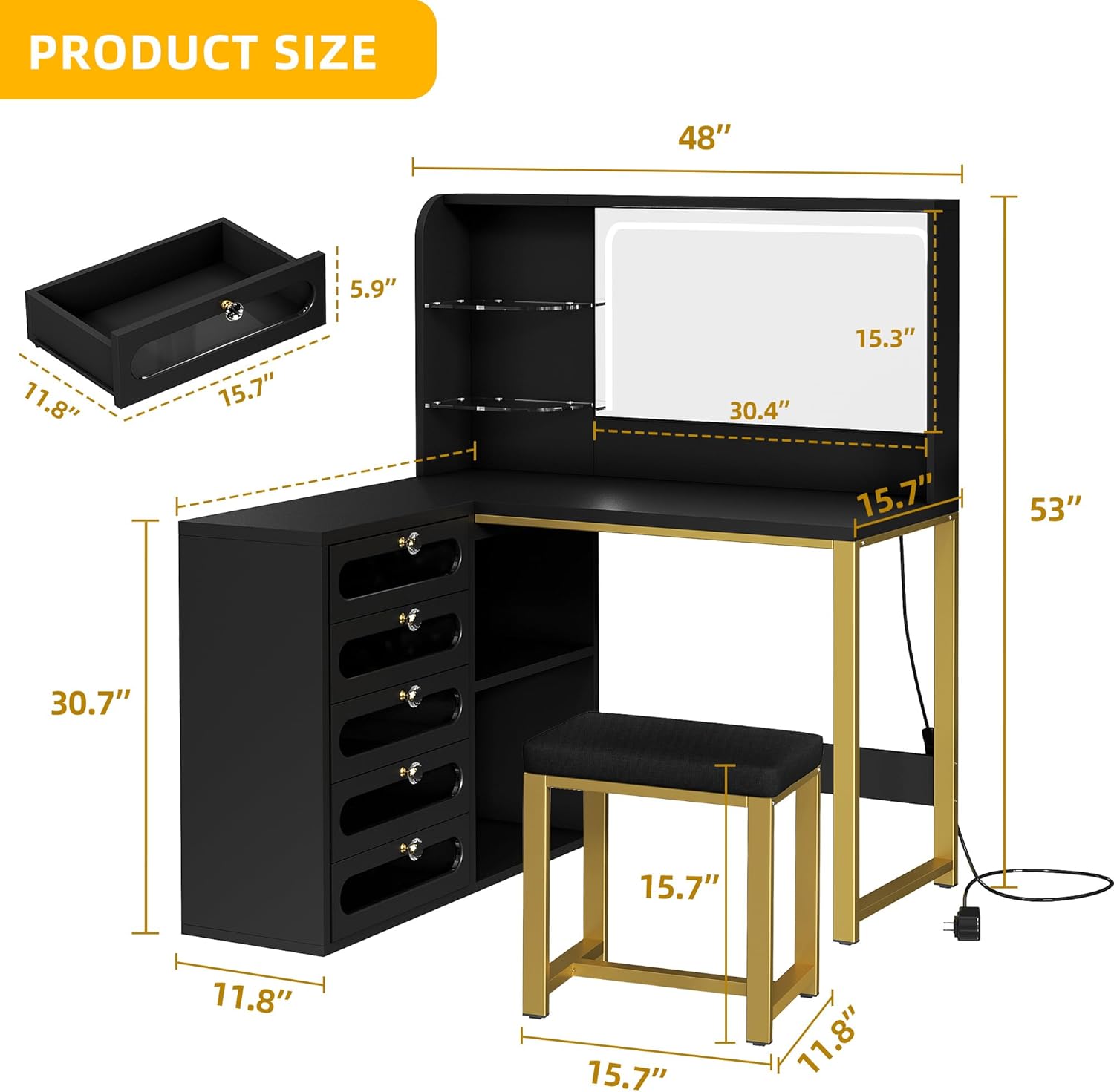
Figure 2: Product dimensions for the DWVO Corner Makeup Vanity Desk and stool.
Setup and Assembly
The DWVO Corner Makeup Vanity Desk requires assembly. Detailed step-by-step instructions, including diagrams and a list of all parts and hardware, are provided in the official Installation Manual PDF. It is highly recommended to refer to this document for a smooth assembly process.
Key Assembly Points:
- Ensure you have all components and hardware as listed in the manual before beginning.
- Use appropriate tools as specified in the manual.
- Assemble on a soft, clean surface to prevent scratching the furniture.
- Follow the numerical or alphabetical order of steps carefully.
- Do not overtighten screws unless instructed, as this can damage the engineered wood.
- For detailed assembly instructions, please download the Installation Manual (PDF).

Figure 3: Top-down view of the vanity, illustrating its L-shaped design and storage compartments.
Operating Instructions
Adjustable LED Mirror Lights
The vanity mirror features a built-in LED light strip with three adjustable color modes to suit your lighting needs for makeup application or general illumination.
- Power On/Off: Locate the touch sensor switch on the mirror surface. Tap once to turn the lights on or off.
- Change Light Color: With the lights on, tap the touch sensor switch repeatedly to cycle through the three color modes: 6000K white light, 4500K beige light, and 3000K yellow light.
- Adjust Brightness: Press and hold the touch sensor switch to gradually increase or decrease the brightness of the selected light color. Release when the desired brightness is achieved.

Figure 4: Illustration of the three adjustable lighting modes.
Drawer and Storage Use
The vanity desk is equipped with five acrylic visualized drawers and additional storage compartments to help organize your items.
- Drawers: Gently pull the crystal handle to open each drawer. Push firmly to close. The acrylic panels allow for easy visibility of contents.
- Adjustable Shelves: The open storage compartments include adjustable or removable wooden shelves. Adjust their height by repositioning the shelf pegs into the desired holes.
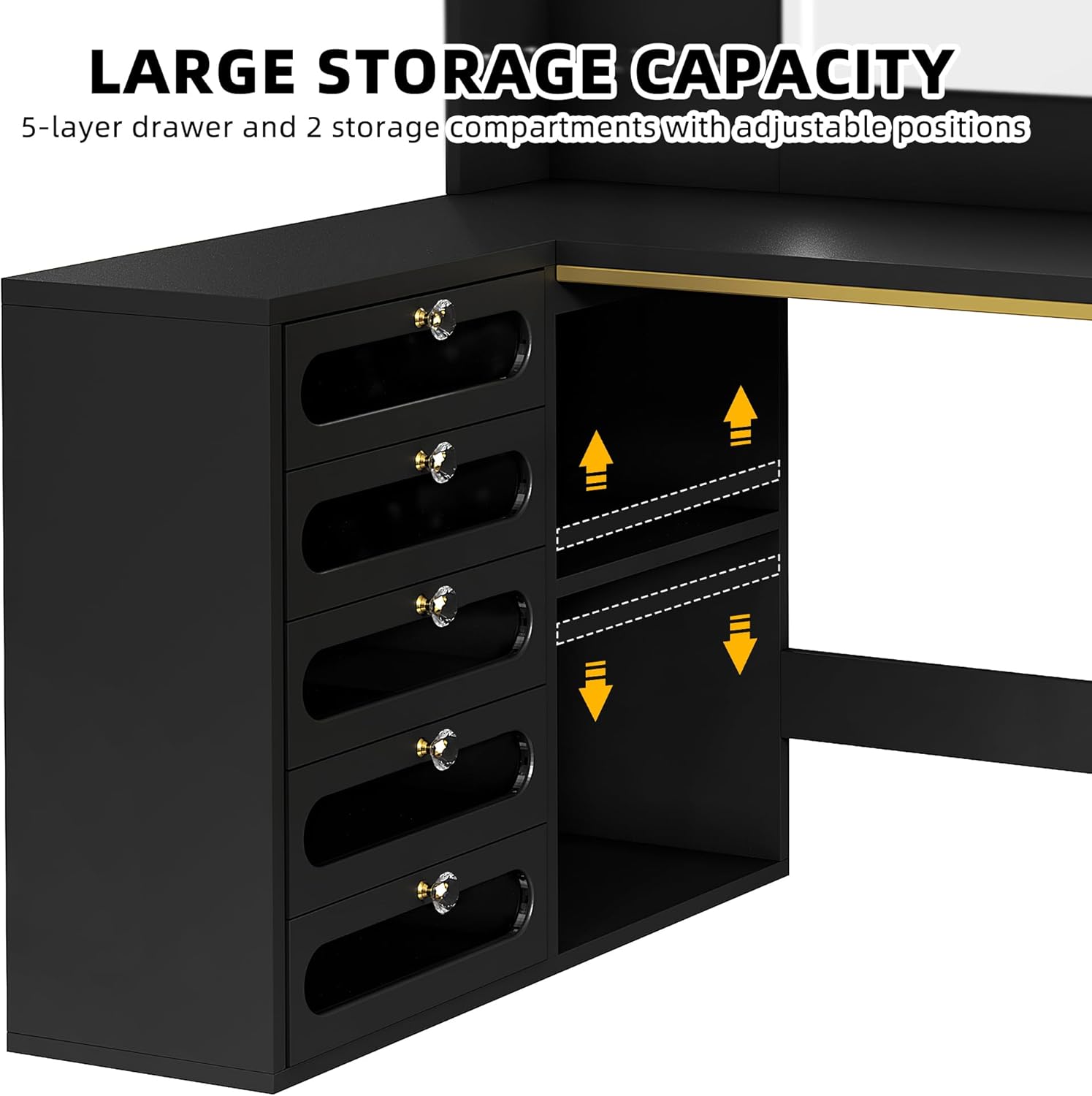
Figure 5: Close-up of the vanity's storage features, including drawers and adjustable shelves.

Figure 6: Key features of the DWVO Vanity Desk, including acrylic partitions, crystal handle drawers, and the stool.
Maintenance
Regular maintenance will help preserve the appearance and functionality of your vanity desk.
- Cleaning the Surface: Wipe the engineered wood surfaces with a dry, soft cloth. For stubborn marks, a slightly damp cloth can be used, followed immediately by a dry cloth. Avoid abrasive cleaners or harsh chemicals.
- Mirror Care: Clean the mirror with a glass cleaner and a lint-free cloth. Do not spray cleaner directly onto the mirror, especially near the LED strip; spray onto the cloth first.
- Drawer Maintenance: Periodically check that drawer slides are clean and free of debris to ensure smooth operation.
- Electrical Components: Ensure the power cord and LED light connections are not pinched or damaged. If any damage is observed, discontinue use and contact customer support.
- Stool Care: The stool cushion can be spot cleaned with a mild fabric cleaner. The metal frame can be wiped with a dry cloth.
Troubleshooting
This section addresses common issues you might encounter with your vanity desk.
| Problem | Possible Cause | Solution |
|---|---|---|
| LED lights flicker or do not turn on. | Loose power connection, faulty power adapter, or internal wiring issue. | 1. Ensure the power cord is securely plugged into the vanity and the wall outlet. 2. Try plugging into a different outlet. 3. If the issue persists, contact customer support for assistance. Do not attempt to repair electrical components yourself. |
| Drawers do not slide smoothly or come off tracks. | Improper assembly of drawer slides, debris in tracks, or misaligned tracks. | 1. Verify that the drawer slides are installed correctly and securely according to the assembly manual. 2. Clean the drawer tracks to remove any dust or debris. 3. Ensure the vanity is on a level surface. 4. If necessary, re-align the drawer slides or contact customer support. |
| Screws do not align or fit during assembly. | Incorrect part orientation, manufacturing tolerance, or user error. | 1. Double-check the assembly manual to ensure parts are oriented correctly. 2. Do not force screws; if a hole seems misaligned, gently try to adjust the component. 3. If a part is clearly defective, contact customer support for a replacement. |
| Vanity feels unstable or wobbly. | Loose connections, uneven floor, or missing balance adjustable buttons. | 1. Ensure all screws and bolts are tightened securely. 2. Verify the vanity is placed on a flat, level surface. 3. Adjust the balance adjustable buttons on the bottom of the steel frame to stabilize the unit. |
Warranty and Support
For any product-related inquiries, technical support, or warranty claims, please contact DWVO customer service. Keep your purchase receipt and model number (MADWVwlsd0) handy when contacting support.
While specific warranty details are not provided in this manual, most manufacturers offer a limited warranty against defects in materials and workmanship. Please refer to your purchase documentation or the seller's website for detailed warranty information.
You can often find support contact information on the product packaging, the seller's website, or through your purchase platform.