
Intendvision HT605 & HT633
Intendvision HT605 Digital Anemometer & HT633 Wood Moisture Meter User Manual
Comprehensive Guide for Operation and Maintenance
1. Introduction
Thank you for choosing the Intendvision HT605 Digital Anemometer and HT633 Wood Moisture Meter. This combined set provides essential tools for various applications, from assessing air flow in HVAC systems to measuring moisture content in wood and building materials. This manual will guide you through the proper setup, operation, maintenance, and troubleshooting to ensure optimal performance and longevity of your devices.

Figure 1.1: The Intendvision HT605 Digital Anemometer (left) and HT633 Wood Moisture Meter (right).
2. Product Overview
2.1 HT605 Digital Anemometer
The HT605 is a compact, handheld device designed for accurate measurement of air velocity and temperature. It features an 8-blade fan and bearing sensor for quick response and reliable data acquisition, making it suitable for HVAC, outdoor sports, and environmental monitoring.

Figure 2.1: The HT605 Anemometer's internal fan and bearing sensor for precise measurements.
2.2 HT633 Wood Moisture Meter
The HT633 is a versatile moisture meter equipped with dual probes for measuring moisture content in various wood types and building materials. It features a large LCD with a tricolor backlight alarm system (green for dry, orange for moist, red for wet) and 7 calibrated scales for different material densities, ensuring high accuracy.
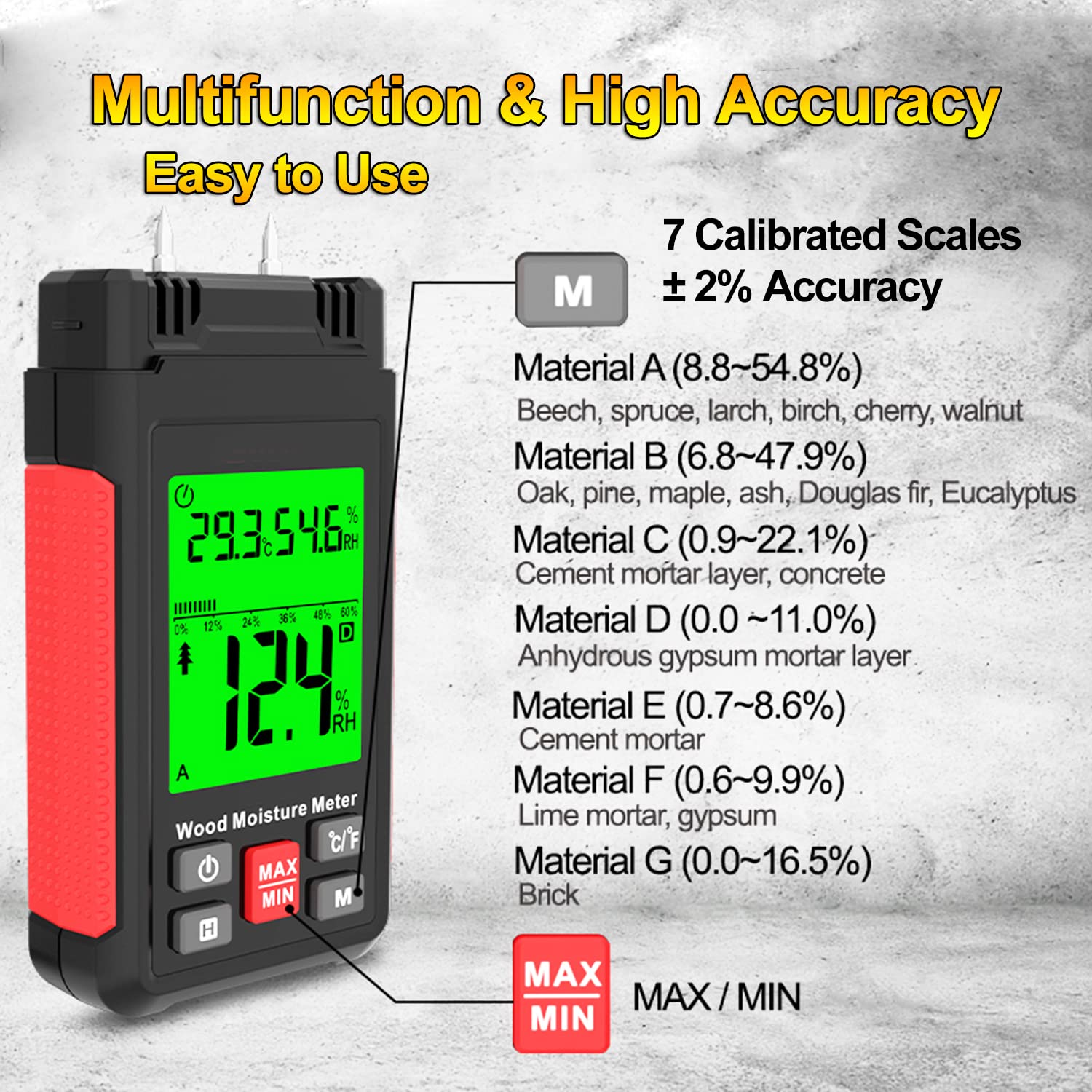
Figure 2.2: The HT633 Wood Moisture Meter showing its display with calibrated scales.
3. Setup
3.1 Battery Installation
Both the HT605 Anemometer and HT633 Wood Moisture Meter require batteries for operation. Locate the battery compartment on the back of each device. Insert the specified batteries, ensuring correct polarity (+/-). Securely close the battery compartment cover.
3.2 Powering On/Off
Press and hold the Power button (usually marked with a power symbol) on each device to turn it on. The display will illuminate. To turn off, press and hold the Power button again until the display shuts down. Both devices may feature an auto-off function to conserve battery life.
4. Operating Instructions
4.1 HT605 Digital Anemometer Operation
- Measuring Wind Speed: Turn on the device. Hold the anemometer so that the fan is facing the airflow. The current wind speed will be displayed on the screen.
- Unit Selection: Press the UNIT button to cycle through the available wind speed units: meters per second (m/s), feet per minute (ft/m), feet per second (ft/s), miles per hour (mil/h), kilometers per hour (km/h), and knots.
- Temperature Measurement: The device automatically displays ambient temperature. Press the °C/°F button to switch between Celsius and Fahrenheit.
- MAX/MIN Function: Press the MAX/MIN button to view the maximum or minimum wind speed recorded during the current measurement session. Press again to cycle through MAX, MIN, and current readings.

Figure 4.1: The HT605 Anemometer showing different wind speed units.
4.2 HT633 Wood Moisture Meter Operation
- Material Selection (Calibration Scales): Turn on the device. Press the M button to select the appropriate material group (A, B, C, D, E, F, G) that matches the material you are testing. Refer to the table below for material types.
- Measuring Moisture Content: Carefully push the two probes into the material to be tested. Ensure both probes are fully inserted and making good contact. The moisture content percentage will be displayed.
- Interpreting Backlight Alarm: The screen backlight color indicates the moisture level:
- Green: Low moisture content (Dry)
- Orange: Moderate moisture content (Moist)
- Red: High moisture content (Wet)
- Ambient Temperature and Humidity: The device automatically measures and displays ambient temperature and relative humidity. Press the °C/°F button to switch temperature units.
- MAX/MIN Function: Press the MAX/MIN button to view the maximum or minimum moisture reading recorded.

Figure 4.2: The HT633 Wood Moisture Meter's tricolor backlight indicating moisture levels.
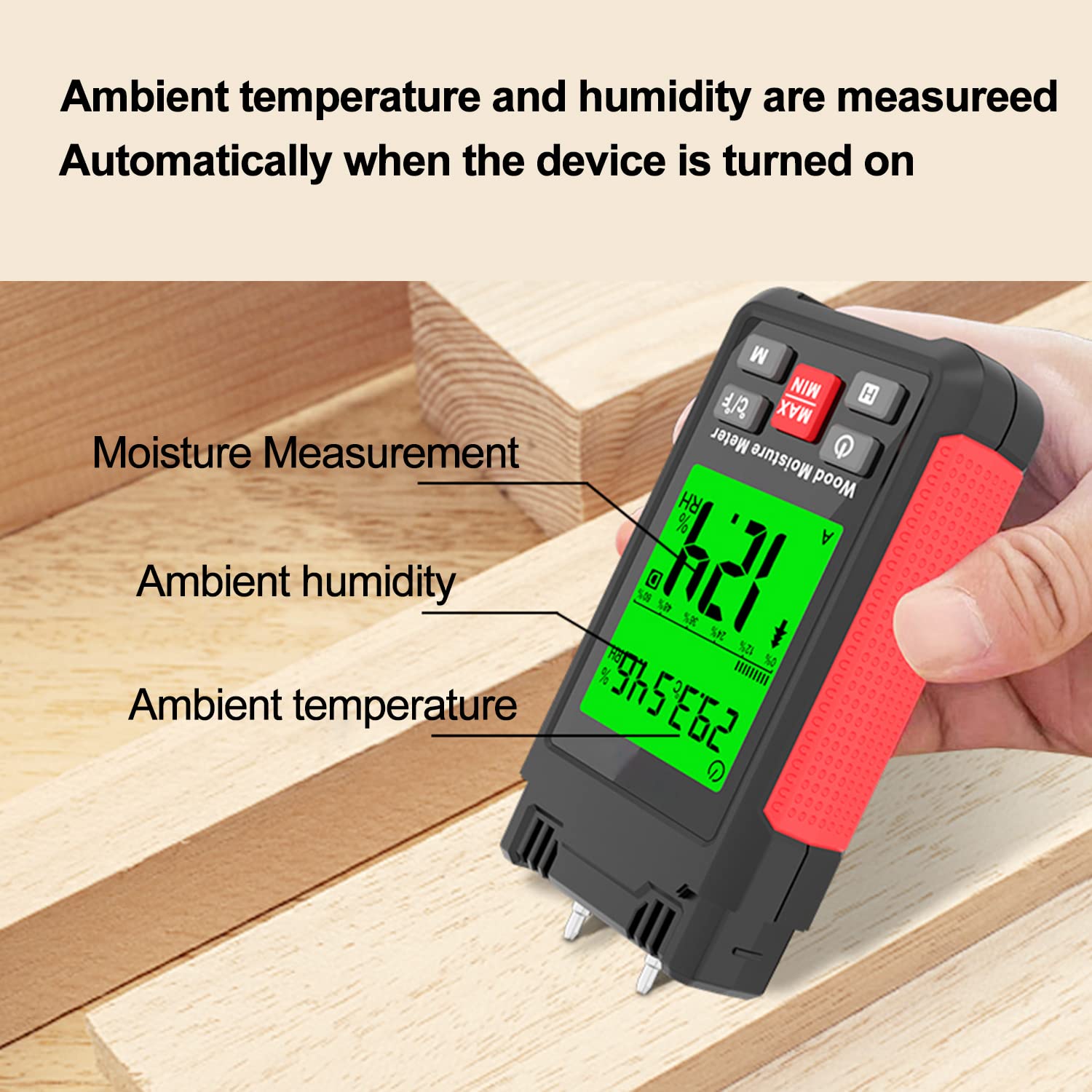
Figure 4.3: The HT633 Wood Moisture Meter displaying ambient conditions and moisture measurement.
Material Calibration Scales (HT633)
| Scale | Material Type | Moisture Range (%) |
|---|---|---|
| A | Beech, spruce, larch, birch, cherry, walnut | 8.8–54.8% |
| B | Oak, pine, maple, ash, Douglas fir, Eucalyptus | 6.8–47.9% |
| C | Cement mortar layer, concrete | 0.9–22.1% |
| D | Anhydrous gypsum mortar layer | 0.0–11.0% |
| E | Cement mortar | 0.7–8.6% |
| F | Lime mortar, gypsum | 0.6–9.9% |
| G | Brick | 0.0–16.5% |
5. Maintenance
5.1 Cleaning
Wipe the exterior of both devices with a soft, dry cloth. Do not use abrasive cleaners or solvents. Ensure no liquid enters the device openings, especially the anemometer fan or moisture meter probe area.
5.2 Storage
When not in use for extended periods, remove the batteries from both devices to prevent leakage. Store the meters in a cool, dry place, away from direct sunlight and extreme temperatures. Keep the moisture meter probes clean and protected.
5.3 Probe Care (HT633)
After each use, especially when measuring damp materials, clean the probes of the HT633 with a dry cloth to remove any residue. Ensure the probes are not bent or damaged. If probes become dull or damaged, contact customer support for replacement options.
6. Troubleshooting
- Device does not power on: Check battery installation and ensure batteries are fresh. Replace if necessary.
- Inaccurate readings (Anemometer): Ensure the fan is unobstructed and facing the airflow directly. Avoid strong electromagnetic interference.
- Inaccurate readings (Moisture Meter): Ensure probes are fully inserted and making good contact with the material. Verify that the correct material calibration scale is selected. Clean probes if dirty.
- Display is dim or flickering: Batteries may be low. Replace with new batteries.
7. Specifications
7.1 HT605 Digital Anemometer
- Wind Speed Range: 0.3 - 30 m/s (approx.)
- Wind Speed Units: m/s, ft/m, ft/s, mil/h, km/h, knots
- Temperature Range: -10°C to 50°C (14°F to 122°F)
- Accuracy: Wind Speed: ±5% of reading; Temperature: ±2°C (±3.6°F)
- Display: LCD with backlight
- Power: [Assumed: AAA batteries, e.g., 3 x AAA]
7.2 HT633 Wood Moisture Meter
- Moisture Measurement Range: Varies by material scale (e.g., Wood: 6.8-54.8%, Building Materials: 0.0-22.1%)
- Accuracy: ±2% (for wood)
- Material Groups: 7 calibrated scales (A-G)
- Ambient Temperature Range: -10°C to 50°C (14°F to 122°F)
- Ambient Humidity Range: 0% - 99% RH
- Display: LCD with tricolor backlight (Green, Orange, Red)
- Power: [Assumed: AAA batteries, e.g., 3 x AAA]
8. Warranty and Support
Intendvision products are designed for reliability and performance. For warranty information, technical support, or service inquiries, please refer to the contact information provided with your purchase or visit the official Intendvision website. Please have your product model number (HT605, HT633) and purchase date ready when contacting support.
For further assistance, you may visit the Intendvision Store on Amazon.
Ask a question about this manual
Ask about setup, troubleshooting, compatibility, parts, safety, or missing instructions. Manuals+ will review the question and use this page’s manual context to help answer it.