
1. Introduction and Overview
The QUASIO MK960 Ergonomic Wireless Keyboard Mouse Combo is designed to provide a comfortable and efficient typing experience. This combo features an ergonomic split layout keyboard with a curved palm rest and a multi-level DPI adjustable wireless mouse. It supports multiple connectivity options and is rechargeable for extended use.

Image: The QUASIO MK960 Ergonomic Wireless Keyboard Mouse Combo, highlighting its split design and included mouse.
2. Setup
2.1 Connectivity
The MK960 combo supports both Bluetooth and 2.4G USB connections, allowing you to connect up to three devices simultaneously. You can quickly switch between connected devices with a single button press.
- 2.4G USB Connection: Insert the USB receiver (found in the mouse's battery compartment) into your device's USB port. The keyboard and mouse will automatically connect.
- Bluetooth Connection: The combo supports two Bluetooth channels (BT1 and BT2). Activate Bluetooth on your device and select the MK960 keyboard or mouse from the list of available devices to pair.
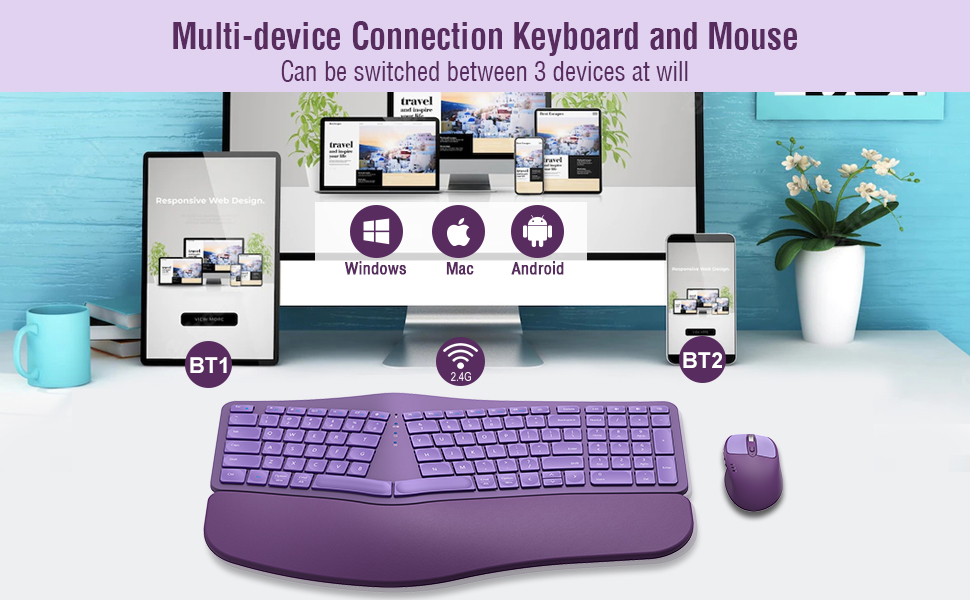
Image: Multi-device connection setup for the keyboard and mouse, illustrating 2.4G and Bluetooth connections to various devices.
2.2 Ergonomic Adjustments
The keyboard is designed with four foldable stands at the bottom, allowing you to adjust the typing angle for optimal comfort. Experiment with different angles to find what best suits your posture and reduces wrist strain.

Image: The keyboard's adjustable foldable stands, providing various tilt options for ergonomic comfort.
3. Operating Instructions
3.1 Multi-Device Switching
To switch between connected devices, simply press the corresponding button on the keyboard or mouse:
- For 2.4G USB connection: Press the 2.4G button.
- For Bluetooth connections: Press the BT1 or BT2 button.
3.2 Multimedia Hotkeys
The keyboard features 12 multimedia hotkeys for quick access to functions. To use them:
- Press "Fn" + "F1~F12" to activate multimedia functions.
- To directly use F1~F12 as multimedia functions without pressing Fn, lock the Fn key function by pressing "Fn + Esc".
3.3 Mouse DPI Adjustment
The wireless mouse offers 4 levels of DPI (Dots Per Inch) adjustment: 800, 1200, 1600, and 2000. This allows you to customize the mouse's sensitivity and tracking speed to your preference. Use the dedicated DPI button on the mouse to cycle through the settings.

Image: The rechargeable Bluetooth optical mouse, illustrating its features including the DPI adjustment button.
4. Maintenance
4.1 Charging
Both the keyboard and mouse are rechargeable via a Type-C cable. A single full charge can last up to 2-3 months, depending on daily usage. Connect the provided Type-C cable to the charging port on each device and a power source.

Image: Charging illustration for the wireless keyboard and mouse, showing Type-C ports and battery indicators.
4.2 Power Saving
The devices feature an intelligent power-saving function, automatically entering sleep mode after 30 minutes of inactivity to conserve battery life. On/off switches are also provided on both the keyboard and mouse, allowing you to manually power them down when not in use for extended periods.
5. Troubleshooting
If you encounter any issues with your QUASIO MK960 combo, please consider the following:
- Connectivity Issues: Ensure both devices are fully charged. Re-pair the devices via Bluetooth or re-insert the 2.4G USB receiver.
- Unresponsive Keys/Mouse: Check battery levels and recharge if necessary. Ensure the devices are powered on and within range of your connected device.
- Lag or Delay: Reduce interference by moving other wireless devices away. Ensure a clear line of sight between the devices and the receiver/Bluetooth antenna.
For further assistance, please refer to the Warranty and Support section below.

Image: A visual guide encouraging users to contact seller support directly for assistance.
6. Specifications
| Feature | Detail |
|---|---|
| Brand | QUASIO |
| Model | MK960 |
| Color | Purple |
| Connectivity Technology | Bluetooth, USB (2.4G) |
| Special Feature | Ergonomic |
| Compatible Devices | Laptop, Personal Computer, Smartphone, Tablet |
| Operating System | Windows 8 (and above), Mac, Android, Linux |
| Hand Orientation | Ambidextrous |
| Power Source | Battery Powered (1 Lithium Polymer battery included) |
| Number of Keys | 104 |
| Keyboard Layout | QWERTY |
| Mouse DPI Levels | 800/1200/1600/2000 |
7. Warranty and Support
The QUASIO MK960 Ergonomic Wireless Keyboard Mouse Combo comes with a 12-month warranty. If you experience any issues or have questions, please contact our customer support team directly via the after-sales email provided in your product packaging or on the product listing. We are committed to providing satisfactory solutions even after the standard return period.