
PETHEY F900
PETHEY F900 Wireless Dog Fence System User Manual
Model: F900
1. Introduction
The PETHEY F900 Wireless Dog Fence System provides a safe and effective way to contain your dog within a defined area, both indoors and outdoors. This system utilizes advanced radar technology to establish a circular boundary, offering real-time monitoring and progressive warnings to help train your pet. It is designed for medium to large breed dogs with neck sizes from 9 to 26 inches and weights from 15 to 110 lbs.
This manual will guide you through the setup, operation, and maintenance of your F900 system to ensure optimal performance and the safety of your pet.
2. Package Contents
Before beginning, please verify that all items are present in your package:
- F900 Transmitter x 1
- Receiver Collar x 1 (for single dog system) or x 2 (for two-dog system)
- Boundary Flags x 10
- Static Stimulation Test Light x 1
- Magnetic Charging Cable x 1
- Contact Points x 2 pairs (short and long)
- User Manual x 1
- Training Manual x 1
- Remote Holder x 1

3. Safety Information
- Read all instructions before using this product.
- Not for aggressive dogs: Do not use this product if your dog is aggressive or prone to aggressive behavior.
- Supervision: Always supervise your dog during the initial training phase and until you are confident they understand the system.
- Collar fit: Ensure the receiver collar fits properly. It should be snug enough for the contact points to touch the skin, but not so tight as to cause discomfort or skin irritation.
- Collar duration: Do not leave the collar on your dog for more than 12 consecutive hours to prevent pressure necrosis.
- Children: Keep the system components, especially the transmitter and collars, out of reach of children.
- Transmitter placement: The transmitter is not waterproof. Protect it from rain and moisture when used outdoors.
4. Setup Guide
4.1 Charging the Devices
Before first use, fully charge the transmitter and receiver collars. The receiver collar has a 1000mAh battery and takes approximately 3 hours to fully charge, providing up to 20 hours of operation. The transmitter battery lasts over 48 hours on a single charge, while receiver collars last over 24 hours.
- Connect the magnetic charging cable to the charging port on the receiver collar and the transmitter.
- Plug the USB end into a suitable power adapter (not included).
- The indicator light on the collar will show charging status (refer to the device's specific indicator guide).
4.2 Transmitter Placement
The transmitter creates a circular boundary. For optimal performance, place the transmitter in a central location within the desired containment area. Avoid placing it near large metal objects, dense foliage, or structures that may interfere with the signal.

Important: The transmitter is not waterproof. If used outdoors, ensure it is protected from rain and moisture, for example, by placing it under a cover or in a sheltered area.
4.3 Adjusting the Boundary Range
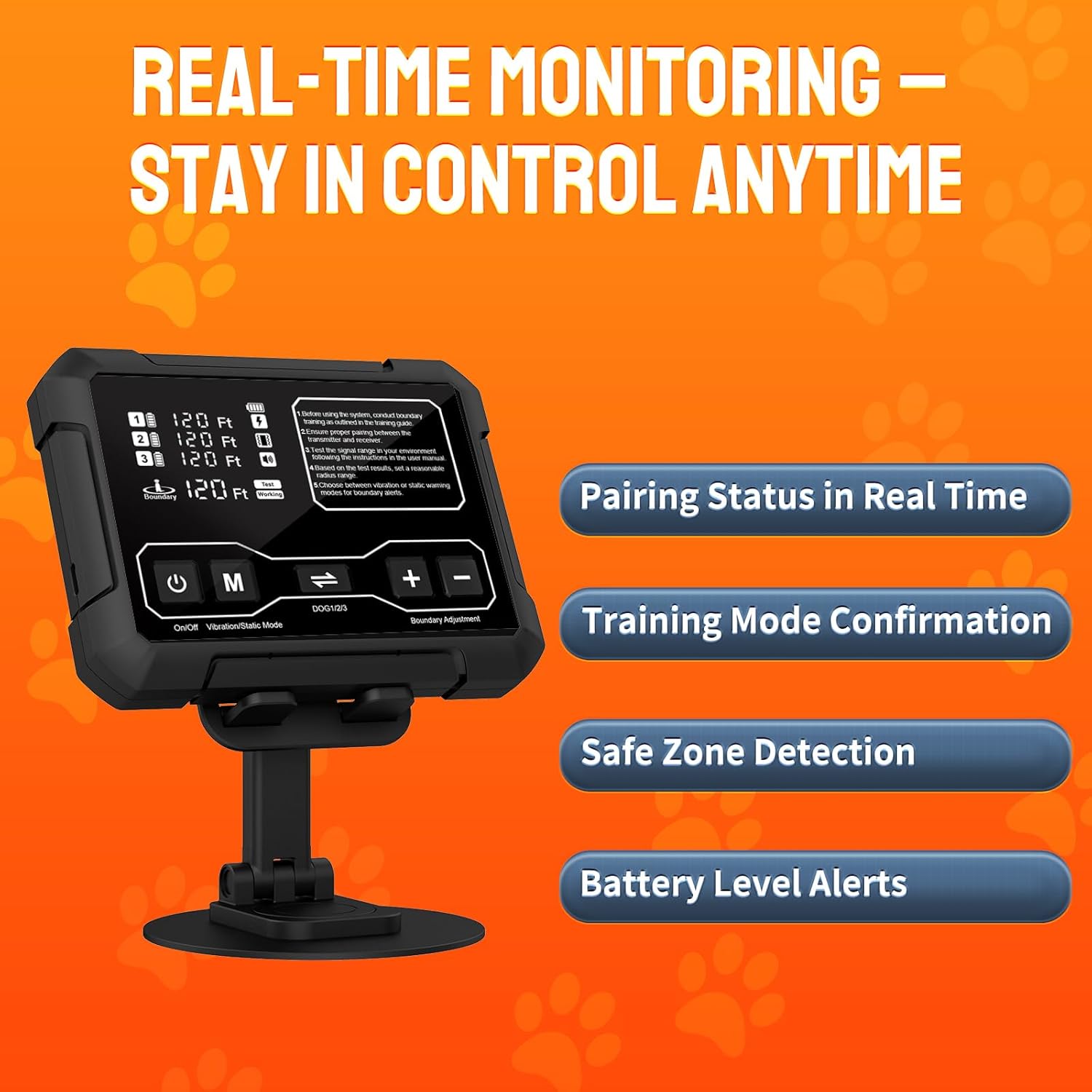
The system allows for an adjustable boundary range from 10 to 120 feet (approximately 1 acre in clear space). Use the '+' and '-' buttons on the transmitter to set the desired radius.

4.4 Fitting the Receiver Collar
Proper fit of the receiver collar is crucial for effective operation and your dog's comfort. The collar should be snug, allowing two fingers to fit comfortably between the strap and your dog's neck. The contact points must touch your dog's skin.
- Select the appropriate length contact points for your dog's coat type (shorter for short coats, longer for thick coats).
- Thread the collar strap through the receiver.
- Place the collar on your dog's neck, ensuring the receiver is positioned centrally under the chin.
- Adjust the strap for a snug fit.

The receiver collar is IPX7 waterproof, allowing your dog to wear it in wet conditions.
4.5 Connecting Collars with the Transmitter
The F900 system can support up to three receiver collars. Follow these steps to pair each collar:
- Turn on the transmitter and the receiver collar.
- On the transmitter, press the 'M' button to select the collar number you wish to pair (1, 2, or 3).
- Confirm the selection by pressing the 'M' button again.
- Move the collar to see the 'FT' data change on the transmitter display. This indicates the collar's connection status and distance from the transmitter.

5. Operating Instructions
5.1 Understanding the Boundary
The system creates a "Safe Zone" around the transmitter. When your dog approaches the edge of this zone, they enter the "Correction Zone."
- Safe Zone: The receiver collar is inactive. Your dog can roam freely.
- Correction Zone: When your dog crosses the set boundary, the receiver collar activates with progressive warnings (beeps, vibration, or static stimulation).

5.2 Selecting Training Mode
The F900 system offers two training modes: Vibration Mode and Static Mode. It is recommended to start with Vibration Mode during initial training.
- Press the 'M' button on the transmitter to cycle through the available modes.
- Select the Vibration Mode for a gentle warning.
- Select the Static Mode for a stronger correction, if necessary, after your dog understands the boundary with vibration.

5.3 Real-time Monitoring
The transmitter provides real-time information about your pet's location and the system's status.
- Pairing Status: Confirms active connections with receiver collars.
- Training Mode Confirmation: Displays the currently selected correction mode.
- Safe Zone Detection: Indicates if your pet is within the safe zone.
- Battery Level Alerts: Notifies you of low battery on both the transmitter and collars.

5.4 Training Your Dog
Effective training is essential for your dog to understand and respect the boundary. Refer to the included Training Manual for a detailed 21-day training guide. Key steps include:
- Introduce the collar: Allow your dog to wear the collar without activation for a few days.
- Mark the boundary: Use the provided boundary flags to visually mark the edge of the safe zone.
- Leash training: On a leash, walk your dog towards the boundary. When the collar activates, gently guide them back into the safe zone.
- Positive reinforcement: Praise and reward your dog when they stay within the boundary or return to the safe zone.
- Gradual independence: Gradually reduce reliance on the leash and flags as your dog learns.

6. Maintenance
6.1 Cleaning the Collar
Regularly clean the receiver collar and contact points to ensure proper function and prevent skin irritation. Use a damp cloth to wipe down the collar and contact points. Ensure the collar is dry before recharging.
6.2 Battery Care
- Charge the devices fully before long periods of inactivity.
- Avoid overcharging or completely draining the battery frequently to prolong its lifespan.
- Store the devices in a cool, dry place.

6.3 Checking Contact Points
Periodically check the contact points for wear or damage. Replace them if necessary to maintain effective stimulation.
7. Troubleshooting
| Problem | Possible Cause | Solution |
|---|---|---|
| Collar not activating at boundary. |
|
|
| Inconsistent boundary or false corrections. |
|
|
| Collar not holding a charge. |
|
|

8. Specifications
- Model: F900
- Brand: PETHEY
- Boundary Range: 10 - 120 feet (adjustable)
- Coverage: Up to 1 acre (in clear, open space)
- Receiver Collar Waterproof Rating: IPX7
- Transmitter Waterproof Rating: Not waterproof (requires protection outdoors)
- Dog Neck Size: 9 - 26 inches
- Dog Weight: 15 - 110 lbs
- Receiver Collar Battery: 1000mAh, 3-hour charge time, up to 20 hours operation (24+ hours with less movement)
- Transmitter Battery: Lasts over 48 hours on a single charge
- Correction Modes: Vibration, Static Stimulation
- System Type: Radar-based, no GPS, Wi-Fi, or app required
- Item Weight: 2.4 pounds (entire package)
- Package Dimensions: 10.16 x 6.42 x 2.83 inches
9. Warranty and Support
The PETHEY F900 Wireless Dog Fence System comes with a 1-year product warranty from the date of purchase. This warranty covers manufacturing defects and malfunctions under normal use.
For technical support, warranty claims, or any questions regarding your product, please contact PETHEY customer service through the retailer where you purchased the product or visit the official PETHEY store on Amazon: PETHEY Store.
Important: Keep away from Children.