
Fameill Full Size
Fameill Full Size Bed Frame Instruction Manual
Model: Full Size
Product Overview
This manual provides detailed instructions for the assembly, operation, and maintenance of your Fameill Full Size Bed Frame. This upholstered platform bed features a storage headboard with a built-in charging station, three room-saving storage drawers, and RGB LED lights for enhanced ambiance. Designed with a sturdy metal and durable wooden slat structure, it offers comfort and durability for a good night's sleep.

Image: The Fameill Full Size Bed Frame in beige, showcasing its upholstered headboard with LED lighting and open storage drawers.
Safety Information
WARNING: Failure to follow these instructions may result in injury or damage to the product.
- Always assemble the bed frame on a soft, clean surface to prevent scratches.
- Ensure all bolts and screws are securely tightened before use. Periodically check and re-tighten as necessary.
- Do not exceed the maximum weight capacity of 1100 LBS (approximately 499 kg).
- Keep small parts and packaging materials away from children to prevent choking hazards.
- Do not stand or jump on the bed frame.
- Use only the provided hardware or manufacturer-approved replacements.
- If any parts are missing or damaged, do not attempt to assemble. Contact customer support immediately.
Package Contents
Before assembly, verify that all components and hardware are present. Refer to the diagrams below for visual identification.
Hardware List

Video Preview: A visual representation of all hardware components included in the package.
- A: M6*12 Bolts (x4)
- B: M6*15 Bolts (x12)
- C: M8*15 Bolts (various quantities per step)
- D: M8*25 Bolts (various quantities per step)
- E: M8*35 Bolts (x10)
- F: M8*40 Bolts (x16)
- G: M8*48 Bolts (x10)
- H: M8*22 Washers (x8)
- I: Small L-shaped Brackets
- J: Large L-shaped Brackets
- K: Allen Wrench
- L: Flat Plates (x3)
- M: Flat Plates (x2)
- N: M3*15 Screws (various quantities per step)
- O: Drawer Wheels (x2)
- P: LED Light Power Cable
- Q: Remote Control for LED Lights
Main Components List
Video Preview: A visual representation of all main bed frame components included in the package.
- 1: Upholstered Headboard Panel
- 2, 3: Headboard Side Panels (Left & Right)
- 4, 5: Headboard Support Bars (Top & Bottom)
- 7: Headboard Back Panel
- 8, 9: Bed Side Rails (Left & Right)
- 10: Center Support Beam
- 11, 12: Wooden Slats (Short & Long)
- 13: Drawer Front Panel
- 14, 15: Drawer Side Panels (Left & Right)
- 16: Drawer Back Panel
- 17: Drawer Bottom Panel
- 18: Wire Drawer Baskets
- 21: Drawer Wheels
- 26: LED Strip
- 27: Power Strip Housing
- 28: Power Strip Cover
- 29: USB/Type-C Charging Module
- 30: Power Cord
- 31, 32: Upholstered Side Rails (Left & Right)
- 33: Upholstered Footboard
- 34, 35: Metal Support Legs (Short & Long)
- 36: Adjustable Center Support Leg
- 37, 38: Slats Support Bars (Left & Right)
- 39: Slats Connectors
- 40: Slats End Caps
Assembly Instructions
Follow these steps carefully for proper assembly. It is recommended to have two people for assembly.
Video: Comprehensive assembly guide for the Fameill Full Size Bed Frame.
Step 1: Assemble the Headboard Frame
- Attach the headboard side panels (2, 3) to the headboard top and bottom support bars (4, 5) using appropriate bolts (e.g., C, F) and the Allen wrench (K).
- Secure the headboard back panel (7) to the assembled frame using screws (N).
- Ensure all connections are firm.
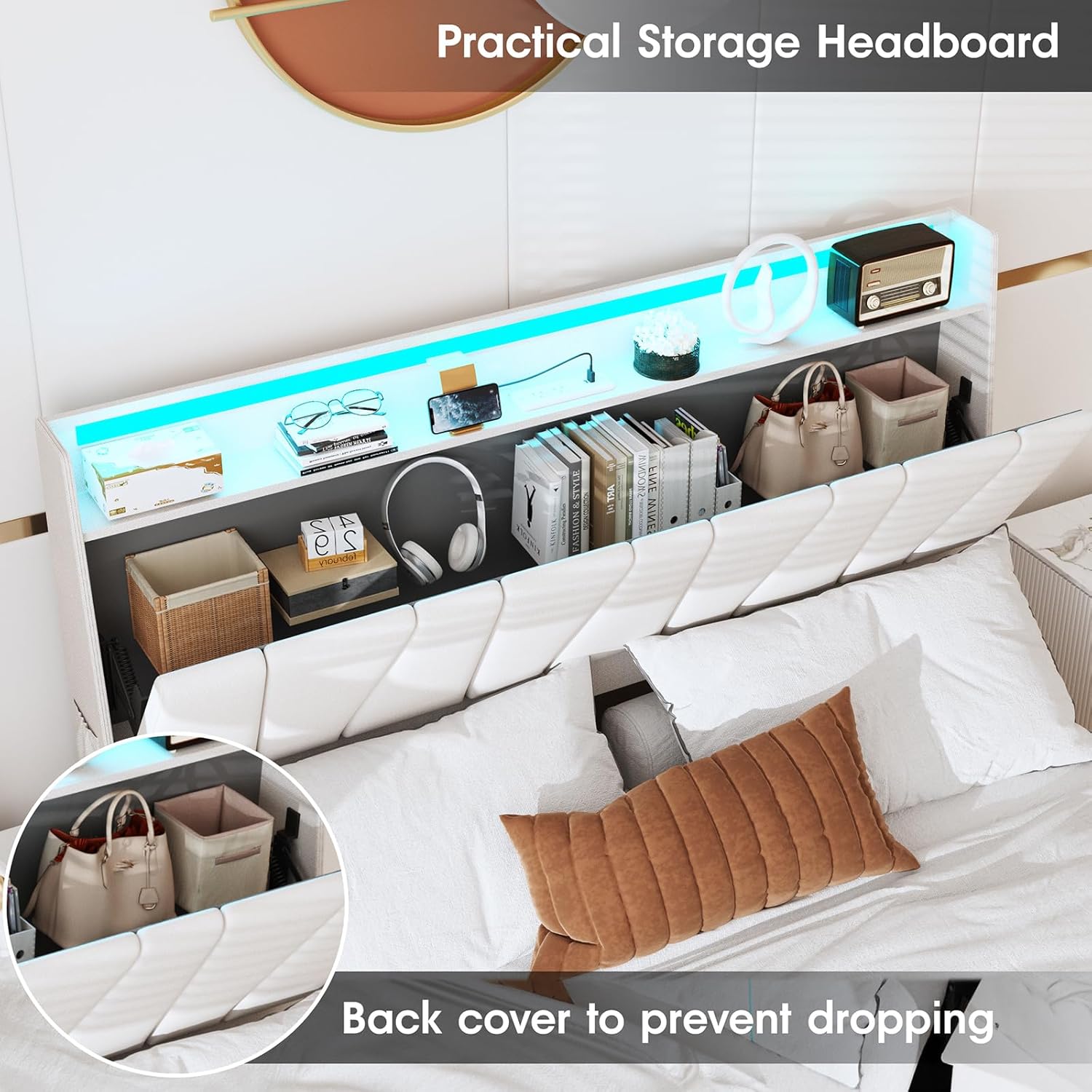
Image: Close-up of the headboard frame, showing the internal storage and charging station area.
Step 2: Attach Upholstered Headboard and Crossbar
- Carefully attach the upholstered headboard panel (1) to the headboard frame, ensuring the LED strip (26) and charging station module (29) are correctly aligned and secured.
- Connect the power strip housing (27) and cover (28) to the headboard.
- Attach the lower crossbar to the headboard legs using bolts (e.g., B, C).

Image: Detailed view of the headboard's built-in charging station with USB and AC outlets.
Step 3: Assemble the Drawer Baskets
- Attach the drawer wheels (21) to the bottom of the wire drawer baskets (18).
- Assemble the drawer front (13), side (14, 15), back (16), and bottom (17) panels to form the drawer unit.
- Secure the wire basket (18) inside the assembled drawer unit. Repeat for all three drawers.

Image: The bed frame with its three storage drawers fully extended, showing ample storage space.
Step 4: Assemble the Bed Frame and Slats
- Connect the upholstered side rails (31, 32) and upholstered footboard (33) to the headboard assembly using bolts (e.g., D, E, G) and washers (H).
- Install the center support beam (10) and attach the adjustable center support leg (36).
- Place the wooden slats (11, 12) onto the bed frame, securing them with slats connectors (39) and end caps (40) as indicated. Ensure slats are evenly spaced and firmly in place.
- Insert the assembled drawers into their designated slots under the bed frame.

Image: A detailed diagram illustrating the dimensions and various components of the Fameill Full Size Bed Frame.
Operating Instructions
LED Light Operation
The RGB LED light belt integrated into the headboard can be controlled via the included remote control or a mobile application.
- Remote Control: Use the provided remote (Q) to turn the lights on/off, change colors, adjust brightness, and select various lighting modes.
- Mobile APP Control: Download the compatible mobile application (refer to the QR code or instructions on the packaging for the specific app). With the app, you can access over 60,000 colors, music mode, microphone mode, and set timing functions for the LED lights.

Image: Visual representation of the LED light features, including remote and mobile app control options with various colors and modes.
Charging Station Usage
The headboard features a built-in power strip for convenient charging of your electronic devices.
- The charging station includes 2 standard AC plug outlets, 1 Type-C port, and 1 USB port.
- Connect the bed frame's power cord (30) to a standard wall outlet.
- Plug in your mobile phone, tablet, or other electronic devices into the available ports for charging.
Image: A close-up view of the charging station, highlighting the AC outlets, USB, and Type-C ports.
Storage Drawers
The three steel drawers under the platform bed provide additional storage space.
- The drawers are equipped with rolling wheels for easy access. Simply pull them out to store items like bedding, clothes, or other essentials.
- A special lock design ensures the drawers remain securely in place when pushed in.
Maintenance
- Cleaning: For the upholstered parts, use a soft, damp cloth and mild detergent if necessary. Avoid harsh chemicals. For metal parts, wipe with a dry cloth.
- Tightening: Periodically check all bolts and screws to ensure they remain tight. Re-tighten as needed to maintain stability and prevent squeaking.
- Drawer Care: Keep the drawer tracks clean and free of debris to ensure smooth operation.
- LED Lights: If the LED lights malfunction, check the power connection. Do not attempt to repair the LED strip or charging station yourself. Contact customer support.
Troubleshooting
| Problem | Possible Cause | Solution |
|---|---|---|
| Bed frame is wobbly or squeaks. | Loose bolts or screws. | Check and tighten all assembly hardware. Ensure all connections are secure. |
| LED lights are not working. | Power cable disconnected, remote battery low, or LED strip malfunction. | Ensure the power cable is securely plugged into the headboard and wall outlet. Replace remote control batteries. If issues persist, contact customer support. |
| Charging station is not providing power. | Power cable disconnected, or power outlet issue. | Verify the bed frame's power cord is fully inserted into a working wall outlet. Test the outlet with another device. |
| Drawers are difficult to open/close. | Debris in tracks, misaligned, or overloaded. | Clear any obstructions from the drawer tracks. Ensure drawers are properly aligned. Do not overload drawers beyond their capacity. |
Specifications
- Size: Full
- Product Dimensions: 83.8"L x 55.7"W x 44.1"H
- Special Feature: Charging Station, RGB LED Lights, Storage Drawers
- Color: Beige
- Finish Type: Wood (frame components)
- Included Components: Headboard, Bed Frame, Slats, Drawers, Charging Station, LED Lights
- Compatible Mattress Size: Full
- Brand: Fameill
- Maximum Weight Recommendation: 1100 LBS (approx. 499 kg)
- Assembly Required: Yes
- Manufacturer: Fameill
- Item Model Number: Full Size
Image: A detailed diagram showing the precise dimensions of the Fameill Full Size Bed Frame.
Warranty & Support
Fameill products are manufactured with quality and durability in mind. For specific warranty details, please refer to the warranty card included with your product or visit the official Fameill website.
If you encounter any issues or have questions regarding your Fameill Full Size Bed Frame, please contact our customer support team:
- Email: support@fameill.com (Example email, replace if actual is known)
- Phone: 1-800-XXX-XXXX (Example phone, replace if actual is known)
- Online Support: Visit the Fameill Store on Amazon for FAQs and additional resources.
Please have your model number and purchase date ready when contacting support.
Ask a question about this manual
Ask about setup, troubleshooting, compatibility, parts, safety, or missing instructions. Manuals+ will review the question and use this page’s manual context to help answer it.