
1. Introduction
Thank you for purchasing the Generic AK301 G-Shape Wireless Charging Speaker. This device combines a Bluetooth speaker, a wireless charging pad, and multicolor LED lighting effects into a single, stylish unit. Please read this manual carefully to ensure proper use and to maximize the product's performance and longevity.
2. Safety Instructions
- Do not expose the device to water, moisture, or extreme temperatures.
- Avoid dropping or subjecting the device to strong impacts.
- Do not attempt to disassemble or repair the device yourself. Contact qualified service personnel.
- Keep the device away from heat sources and direct sunlight.
- Use only the provided charging cable or a certified equivalent.
- Ensure proper ventilation when using the wireless charging function.
3. Package Contents
Please check the package for the following items:
- 1 x G-Shape Wireless Charging Speaker (AK301)
- 1 x Charging Cable
4. Product Overview
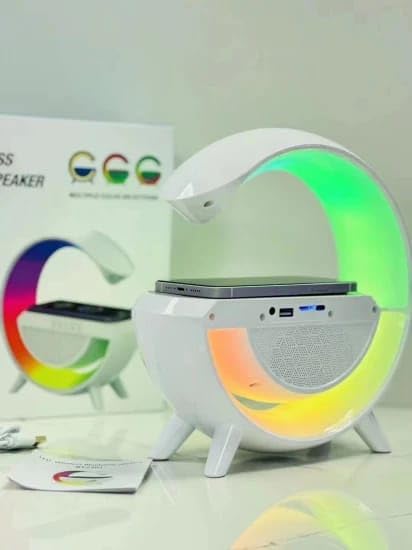
The AK301 features a unique G-shape design with integrated LED lighting. The top surface includes a wireless charging pad, and the front houses the speaker grille and control buttons (touch control). The rear panel typically contains the charging port and possibly other input ports.

5. Setup
5.1 Initial Charging
- Connect the provided charging cable to the charging port on the AK301 speaker.
- Plug the other end of the charging cable into a compatible USB power adapter (not included) or a USB port.
- Allow the device to fully charge before first use. The LED indicator (if present) will typically change color or turn off when charging is complete.
5.2 Powering On/Off
- To power on, press and hold the power button (or touch control area) for a few seconds until the LED lights illuminate and an audible prompt is heard.
- To power off, press and hold the power button (or touch control area) again for a few seconds until the LED lights turn off and an audible prompt is heard.
6. Operating Instructions
6.1 Bluetooth Pairing
- Ensure the AK301 speaker is powered on and in Bluetooth pairing mode (indicated by a flashing LED or audible prompt).
- On your Android device, go to Settings > Bluetooth.
- Enable Bluetooth and search for available devices.
- Select "AK301" (or similar name) from the list of devices.
- Once paired, the speaker will emit an audible confirmation, and the LED indicator will typically become solid.
6.2 Wireless Charging
- Place your Qi-compatible smartphone or device on the designated wireless charging pad located on the top surface of the AK301 speaker.
- Ensure the device is centered on the charging pad for optimal contact.
- The charging indicator on your phone will confirm that charging has begun.
- Remove any metal objects or thick cases from your phone that may interfere with wireless charging.
6.3 Multicolor LED Effects
The AK301 features dynamic multicolor LED lighting. Control is typically managed via touch controls on the device:
- Short Touch: Cycle through different light modes or colors.
- Long Touch: Turn the LED lights on or off.
Refer to the specific touch control icons on your device for precise operation.

6.4 FM Radio
To use the FM radio function:
- Switch the speaker to FM radio mode (usually by pressing a mode button or specific touch control).
- Press the play/pause button to initiate an automatic scan for available FM stations.
- Use the volume/track skip buttons to navigate between saved stations.
6.5 Basic Audio Controls
- Play/Pause: Short press the play/pause button.
- Volume Up: Short press the '+' button.
- Volume Down: Short press the '-' button.
- Next Track: Long press the '+' button.
- Previous Track: Long press the '-' button.
7. Maintenance
- Clean the device with a soft, dry cloth. Do not use abrasive cleaners or solvents.
- Keep the charging port and speaker grille free from dust and debris.
- Store the speaker in a cool, dry place when not in use for extended periods.
8. Troubleshooting
| Problem | Possible Solution |
|---|---|
| Device does not power on. | Ensure the device is fully charged. Connect to a power source and try again. |
| Bluetooth not connecting. | Make sure Bluetooth is enabled on your device and the speaker is in pairing mode. Move closer to the speaker. Forget the device on your phone and re-pair. |
| Wireless charging not working. | Ensure your device is Qi-compatible and properly centered on the charging pad. Remove any thick phone cases or metal objects. |
| No sound from speaker. | Check the volume level on both the speaker and your connected device. Ensure the speaker is correctly paired via Bluetooth. |
9. Specifications
| Feature | Detail |
|---|---|
| Model Name | AK301 |
| Brand | Generic |
| Wireless Communication Technology | Bluetooth |
| Connectivity Technology | USB |
| Compatible Devices | Android |
| Control Method | Touch |
| Speaker Size | 1 Inch |
| Power Source | Battery Powered |
| Product Dimensions | 9D x 24W x 25H Centimeters |
| Item Weight | 200 g |
| Included Components | G Shape Speaker, Charging Cable |
| Manufacturer | ShenZHEN |
10. Warranty and Support
This product comes with a 1 Month Warranty from the date of purchase. Please retain your proof of purchase for warranty claims.
For technical support, troubleshooting assistance, or warranty inquiries, please contact your retailer or the manufacturer directly. Refer to the product packaging or purchase documentation for contact information.