
1. Introduction
Thank you for choosing the LATEC Digital Travel Alarm Clock E0544. This compact and versatile alarm clock is designed for convenience, offering multiple functions including time display, alarm, temperature, calendar, and backlight. Please read this manual carefully to ensure proper use and to fully utilize all features.
Key Features:
- Multifunction Display: Time, alarm, room temperature (°F/°C), 12/24H format, day of the week (7 languages), and date.
- Compact and Portable: Ideal for travel, bedside tables, or office desks.
- Easy Operation: Intuitive button layout for straightforward settings.
- Snooze Function: Provides an additional 5 minutes of sleep.
- Backlight: Illuminates the display for 8 seconds with a button press for night viewing.
- Adjustable Alarm Volume: Three levels (Low, Medium, High) to suit your preference.
- Battery Powered: Operates on 2 AA batteries (included).
2. Setup
2.1 Unpacking and Contents Check
Carefully remove the alarm clock from its packaging. Verify that all components are present:
- LATEC Digital Travel Alarm Clock E0544
- 2 x AA Batteries
- User Manual

Image: Contents of the LATEC Digital Alarm Clock package, showing the clock, two AA batteries, and the user manual.
2.2 Battery Installation
The LATEC Digital Travel Alarm Clock is powered by two AA batteries. Follow these steps to install them:
- Locate the battery compartment cover on the back of the alarm clock.
- Slide the cover downwards or in the direction indicated by an arrow to open it.
- Insert two AA batteries, ensuring the positive (+) and negative (-) terminals match the markings inside the compartment.
- Replace the battery compartment cover, sliding it back into place until it clicks securely.

Image: The back of the LATEC alarm clock with the battery cover removed, showing the empty battery slots and two AA batteries ready for insertion.
The clock will power on automatically once batteries are installed. The display will show default settings or begin flashing, indicating it's ready for initial setup.
3. Operating Instructions
3.1 Button Overview
The alarm clock features five control buttons for easy operation:
- SET Button (Left Side): Used to enter setting modes for time, date, and alarm.
- SNOOZE/LIGHT Button (Top): Activates the snooze function during an alarm and illuminates the display backlight.
- + Button (Right Side): Increases values during setting modes.
- - Button (Right Side): Decreases values during setting modes.
- Alarm ON/OFF Button (Left Side, Bell Icon): Toggles the alarm function on or off.

Image: Two LATEC alarm clocks, highlighting the 'SET' and 'Alarm ON/OFF' buttons on the left side, and the '+' and '-' buttons on the right side.
3.2 Setting Time and Date
- Press and hold the SET button for 3 seconds to enter time setting mode. The hour digits will flash.
- Use the + or - buttons to adjust the hour.
- Press SET again to confirm the hour and move to minute setting. The minute digits will flash.
- Use the + or - buttons to adjust the minutes.
- Continue pressing SET to cycle through and set the year, month, and day using the + or - buttons.
- After setting the day, press SET one last time to exit the setting mode.
3.3 Setting the Alarm
- In normal time display mode, press the SET button once briefly. The alarm time will be displayed, and the hour digits will flash.
- Use the + or - buttons to adjust the alarm hour.
- Press SET again to confirm the alarm hour and move to alarm minute setting. The minute digits will flash.
- Use the + or - buttons to adjust the alarm minutes.
- Press SET one last time to exit alarm setting mode.
- To activate the alarm, press the Alarm ON/OFF button (bell icon) on the left side. A bell icon will appear on the display, indicating the alarm is active. Press it again to deactivate.
3.4 Snooze Function
When the alarm sounds, press the large SNOOZE/LIGHT button on the top of the clock. The alarm will pause for 5 minutes and then sound again. You can repeat this process multiple times.

Image: A hand reaching to press the SNOOZE/LIGHT button on the top of the alarm clock, demonstrating the snooze function.
To stop the alarm completely before the snooze cycle ends, press any other button on the side of the clock. If no button is pressed, the alarm will automatically stop after two minutes of sounding.
3.5 Backlight Function
To view the display in low light conditions or at night, press the SNOOZE/LIGHT button on the top of the clock. The display will illuminate for 8 seconds.

Image: The LATEC alarm clock on a bedside table in a dark room, with its display illuminated by the backlight, showing the time clearly.
3.6 Temperature Display (°F/°C)
The clock displays the ambient room temperature. To switch between Celsius (°C) and Fahrenheit (°F), press the - button briefly in normal time display mode.
3.7 12/24 Hour Format
To switch between 12-hour (with AM/PM indicator) and 24-hour time formats, press the + button briefly in normal time display mode.
3.8 Alarm Volume Adjustment
On the back of the alarm clock, there is a slide switch labeled 'VOLUME' with settings L (Low), M (Medium), and H (High). Adjust this switch to select your preferred alarm volume level.
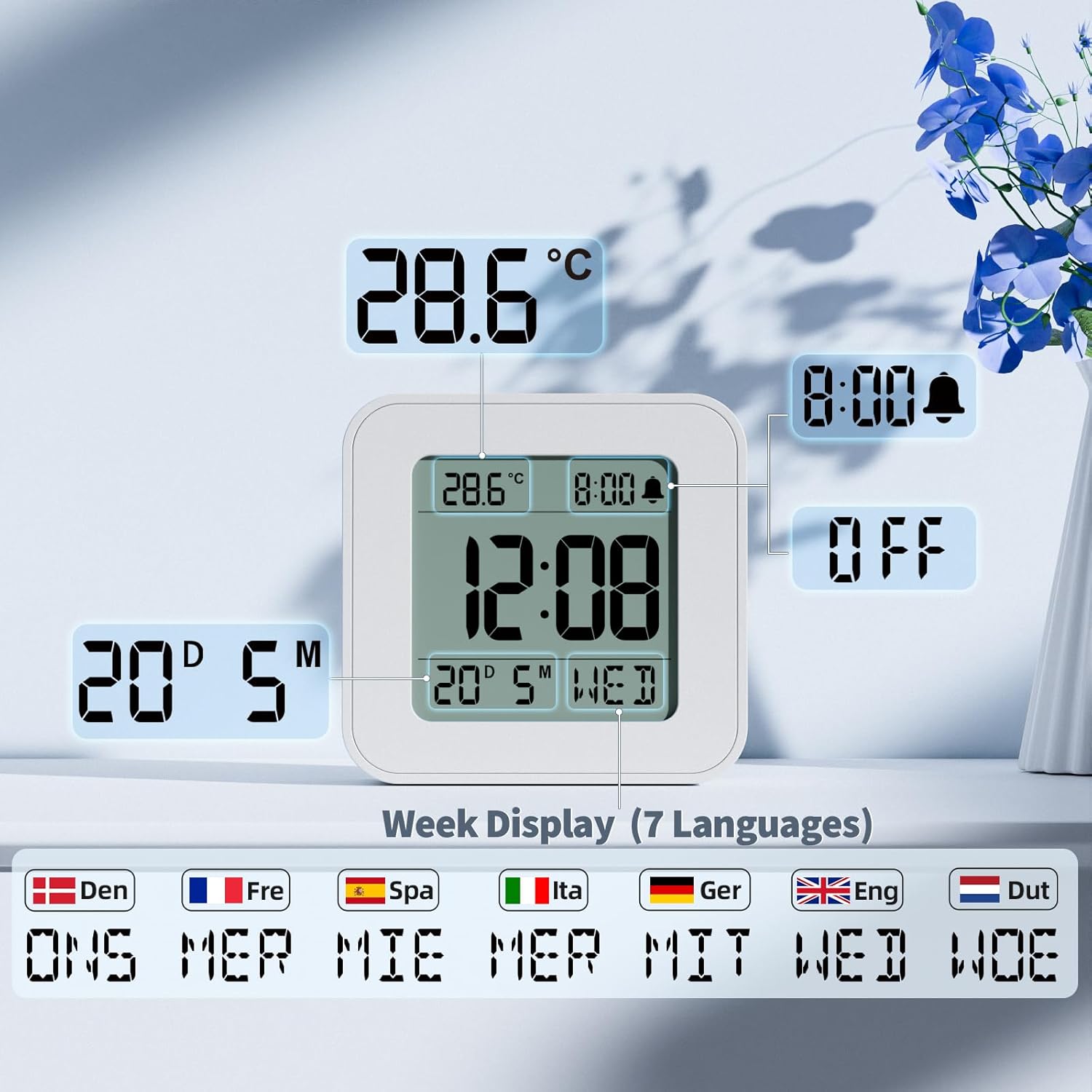
Image: The rear view of the LATEC alarm clock, highlighting the three-level volume switch (L, M, H) for the alarm sound.
3.9 Day of Week Language Selection
The day of the week can be displayed in 7 different languages. During the initial time/date setting process, after setting the day, you will be prompted to select the language for the day of the week. Use the + or - buttons to cycle through the available languages (e.g., English, German, French, Italian, Spanish, Dutch, Danish).

Image: The LATEC alarm clock display, illustrating how the day of the week can be shown in seven different languages, including English, German, and French.
4. Maintenance
4.1 Cleaning
To clean the alarm clock, gently wipe the surface with a soft, dry cloth. Do not use abrasive cleaners, solvents, or chemical sprays, as these may damage the device or its display.
4.2 Battery Replacement
When the display becomes dim or the clock functions erratically, it is time to replace the batteries. Follow the battery installation steps in Section 2.2. Always replace both AA batteries at the same time with new ones. Dispose of used batteries responsibly according to local regulations.
5. Troubleshooting
- Display is blank or dim:
Check if the batteries are correctly installed. Replace with fresh AA batteries if necessary. - Alarm does not sound:
Ensure the alarm is activated (bell icon visible on display). Check the alarm time setting. Verify the volume switch on the back is not set to 'L' if you expect a louder sound, or if the sound is too low to hear. - Time or date is incorrect:
Re-enter the time and date settings as described in Section 3.2. - Snooze function not working:
Ensure you are pressing the SNOOZE/LIGHT button on the top of the clock when the alarm is sounding. - Temperature reading seems inaccurate:
Ensure the clock is placed in a location away from direct sunlight, heat sources, or air conditioning vents, which could affect the sensor.
6. Specifications
| Feature | Specification |
|---|---|
| Brand | LATEC |
| Model | E0544 |
| Color | White |
| Product Dimensions | 8 x 3.81 x 7.8 cm |
| Item Weight | 170 grams |
| Material | Plastic |
| Display Type | Digital |
| Power Source | Battery Powered (2 x AA batteries) |
| Special Features | Alarm, Snooze, Calendar Display, Temperature Display, Adjustable Volume, Backlight |
| Room Type | Bedroom |
| Shape | Square |
| Indoor/Outdoor Use | Indoor |
7. Warranty and Support
7.1 Warranty Information
The LATEC Digital Travel Alarm Clock E0544 comes with a two-year warranty from the date of purchase. This warranty covers manufacturing defects and ensures the product functions as intended under normal use. Please retain your proof of purchase for warranty claims.
7.2 Customer Support
If you have any questions, encounter issues, or require assistance with your LATEC Digital Travel Alarm Clock, please do not hesitate to contact our customer support team. We are committed to resolving any problems within 24 hours.
Contact Email: support@latec.com.cn