
1. Introduction
This manual provides detailed instructions for the installation, operation, and maintenance of your Kenntsh B5310 7-inch Portable Car MP5 Video Player. Please read this manual thoroughly before using the product to ensure proper function and safety. Keep this manual for future reference.
2. Package Contents
Carefully unpack the box and ensure all items are present. If any items are missing or damaged, contact your retailer.
- Kenntsh B5310 7-Inch Portable Car MP5 Video Player
- Suction Cup Mount
- Power Cable (Car Charger)
- Steering Wheel Remote Control
- Reversing Video Input Cable (2.5mm to RCA)
- User Manual (this document)

3. Product Features
The Kenntsh B5310 offers a range of features designed to enhance your in-car entertainment and connectivity:
- 7-Inch HD Display: 1024x600 resolution for clear visuals.
- Portable Design: Easy to install and remove with a detachable stand and 360-degree rotation.
- Wireless & Wired CarPlay: Seamless integration with Apple iPhones for navigation, music, calls, and more.
- Wireless & Wired Android Auto: Connect your Android phone for access to Google Maps, Spotify, and other apps.
- Mirrorlink: Mobile phone screen mirroring functionality.
- FM Transmitter: Broadcast audio to your car's FM radio.
- Bluetooth 5.0: For hands-free calling and audio streaming.
- Multimedia Playback: Supports TF card and USB disk for audio and video files.
- Reversing Video Input: Automatically switches to a full-screen reversing image when connected to an optional rear camera.
- Customizable Button Lights: 7 selectable LED colors (Red, Green, Blue, Yellow, Cyan, Purple, White).
- Steering Wheel Remote Control: For convenient operation.

4. Setup
4.1 Mounting the Device
- Choose a Location: Select a smooth, clean, and flat surface on your dashboard or windshield that does not obstruct your view or interfere with driving controls.
- Attach Suction Cup Mount: Press the suction cup firmly against the chosen surface and engage the locking lever to secure it.
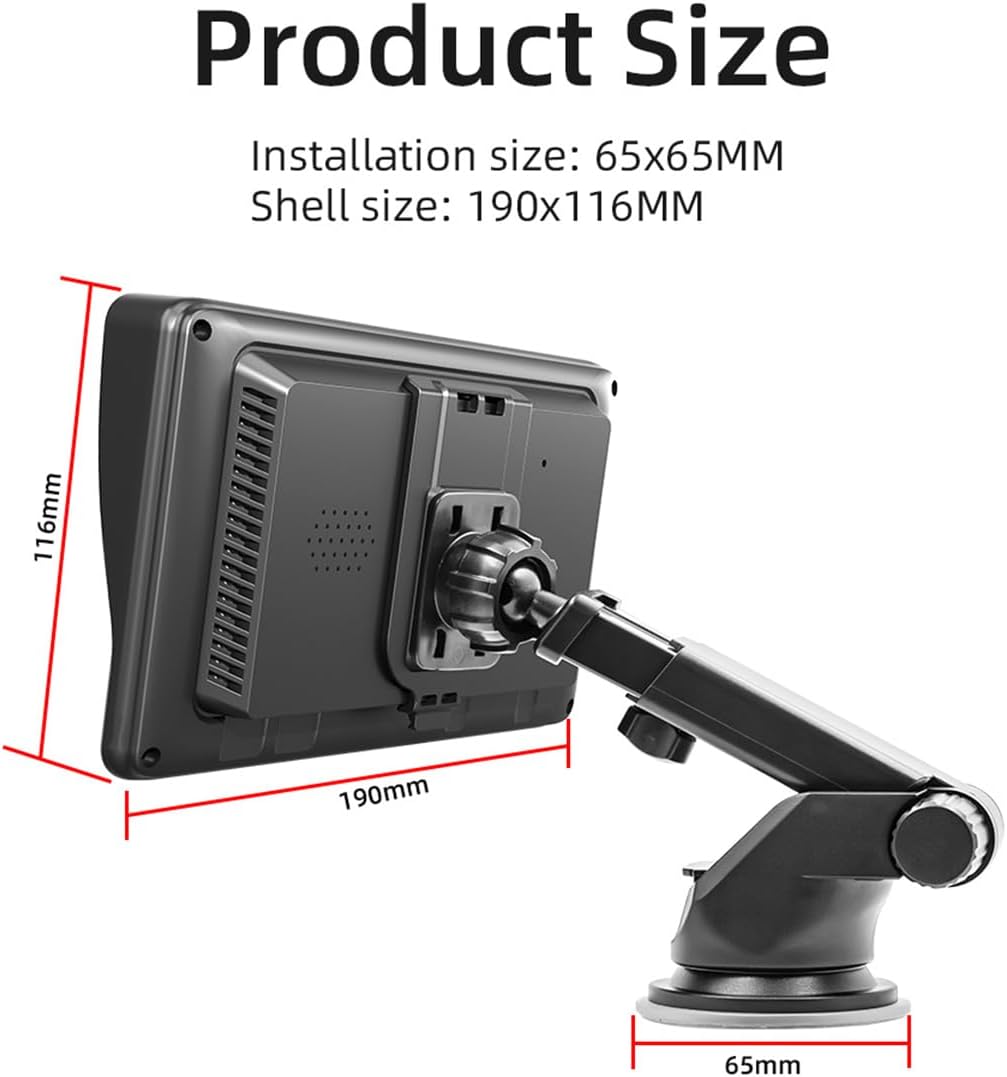
- Adjust Viewing Angle: Attach the main unit to the mount. The mount allows for 360-degree rotation and angle adjustments for optimal viewing.

4.2 Power Connection
- Insert the car charger end of the power cable into your vehicle's 12V/24V power outlet (cigarette lighter socket).
- Connect the other end of the power cable to the designated power input port on the MP5 player.
4.3 Optional Connections
- Reversing Camera: If using an optional reversing camera, connect its video output to the 2.5mm video input port on the MP5 player using the provided cable.
- External Microphone: An external microphone can be connected to the 3.5mm MIC hole for improved call quality.
5. Operating Instructions
5.1 Basic Operation
- Power On/Off: The device will power on automatically when the car's ignition is turned on. To manually power off, press and hold the power button.
- Touch Screen: Navigate the interface by tapping, swiping, and dragging on the 7-inch touch screen.
- Home Screen: The home screen displays various application icons such as PhoneLink, BT Music, Radio, BT, Apps, USB, and Setup.
- Volume Control: Adjust volume using the on-screen controls or the steering wheel remote control.
5.2 CarPlay (Wired/Wireless)
CarPlay allows you to use your iPhone's features safely while driving.
- Wireless Connection: Enable Bluetooth and Wi-Fi on your iPhone. On the MP5 player, select the CarPlay icon. Follow the on-screen prompts to pair your iPhone via Bluetooth. Once paired, CarPlay will connect wirelessly.
- Wired Connection: Connect your iPhone to the MP5 player's USB port using a certified USB cable. CarPlay will launch automatically.

5.3 Android Auto (Wired/Wireless)
Android Auto extends your Android phone's functionality to your car's display.
- Wireless Connection: Ensure Bluetooth and Wi-Fi are enabled on your Android phone. On the MP5 player, select the Android Auto icon. Follow the on-screen instructions to pair your phone via Bluetooth. Android Auto will then connect wirelessly.
- Wired Connection: Connect your Android phone to the MP5 player's USB port using a certified USB cable. Android Auto will launch automatically.

5.4 Mirrorlink (Wired)
Mirrorlink allows you to mirror your mobile phone's screen directly onto the MP5 player's display via a wired USB connection.
- Connect your smartphone to the MP5 player's USB port using a USB cable.
- Select the 'PhoneLink' or 'Mirrorlink' icon on the MP5 player's home screen.
- Follow any on-screen prompts on both your phone and the player to establish the connection.
5.5 FM Transmitter
The FM transmitter allows you to output the audio from the MP5 player to your car's existing FM radio system.
- On the MP5 player, navigate to the FM Transmitter settings.
- Select an unused FM frequency from the available options (e.g., 88.60 MHz, 89.20 MHz, etc.).
- Tune your car's FM radio to the exact same frequency.
- Audio from the MP5 player will now play through your car's speakers.
5.6 Reversing Camera Input
If an optional reversing camera is connected, the player will automatically display the camera feed when the vehicle is shifted into reverse gear.

5.7 Multimedia Playback
The device supports playback of audio and video files from TF cards and USB drives.
- Insert a TF card into the designated slot or a USB drive into one of the USB ports.
- Navigate to the 'USB' or 'Apps' section on the home screen and select the media player application.
- Browse and select your desired audio or video files for playback.
5.8 Button Lighting
The physical buttons on the player feature customizable LED backlighting.
- Access the 'Setup' menu on the home screen.
- Locate the 'Button Light' or 'LED Color' settings.
- Choose from 7 available colors: Red, Green, Blue, Yellow, Cyan, Purple, or White.

6. Maintenance
- Cleaning the Screen: Use a soft, lint-free cloth to gently wipe the screen. For stubborn smudges, slightly dampen the cloth with water or a screen-cleaning solution. Avoid harsh chemicals or abrasive materials.
- General Cleaning: Wipe the exterior of the device with a dry or slightly damp cloth. Do not allow liquids to enter the device.
- Temperature: Avoid exposing the device to extreme temperatures, direct sunlight for prolonged periods, or high humidity.
- Storage: If storing the device for an extended period, disconnect it from power and store it in a cool, dry place.
7. Troubleshooting
If you encounter issues with your Kenntsh B5310, refer to the following common problems and solutions:
- No Power: Ensure the power cable is securely connected to both the player and the car's 12V/24V outlet. Check if the car's outlet is functioning.
- No Sound: Check the volume settings on the player and your car's audio system. Ensure the FM transmitter is correctly configured and your car radio is tuned to the correct frequency.
- CarPlay/Android Auto Not Connecting: Verify Bluetooth and Wi-Fi are enabled on your phone. For wired connections, ensure the USB cable is functional and properly connected. Try restarting both the player and your phone.
- Touch Screen Unresponsive: Try restarting the device. If the issue persists, use the reset button (if available, typically a small pinhole) to perform a factory reset. Note that a reset will erase custom settings.
- Poor FM Transmission Quality: Try selecting a different FM frequency on the player and tuning your car radio to match. Avoid frequencies used by strong local radio stations.
For persistent issues not covered here, please contact customer support.
8. Specifications
| Feature | Specification |
|---|---|
| Model | 500410819 |
| Working Voltage | 12-36V |
| Working Temperature | -10°C to 60°C |
| Bluetooth Version | 5.0 (Default Name: CarPlay) |
| WiFi Frequency | 2.4G/5G Dual Frequency |
| Display Resolution | 1024x600 |
| Screen Size | 7 inches HD |
| Built-in Speaker | 1W |
| TF Card Support | Yes |
| USB Interface | USB1 + USB2 + Type-C |
| MIC Hole | 3.5mm |
| Audio Formats | MP3/AAC/APE/OGG/M4A/RA/WAV |
| Video Formats | H263/H264/H265/AVI/MKV/MPEG/MP4/WMV9/MOV/FLV/QT |
| Picture Formats | JPEG/PNG/BMP/GIF |
| FM Transmitter Frequencies | 88.60/89.20/89.50/89.80/91.50/91.80/93.00/93.60/93.90/94.50/95.10/95.70MHz |
| Product Dimensions | 9.84 x 7.87 x 5.91 inches |
| Item Weight | 1.95 pounds |
9. Warranty and Support
This product comes with a standard manufacturer's warranty. Please refer to the warranty card included in your package or contact your retailer for specific warranty terms and conditions.
For technical support, troubleshooting assistance, or inquiries about replacement parts, please contact Kenntsh customer service through the contact information provided with your purchase or on the official Kenntsh website.