
Product Overview
The Kenntsh M54 CAA 360° Degree Rotator Camera Angle Adjuster is a precision-engineered gyratory device designed for astronomical telescope photography. It allows for precise 360-degree rotation and camera angle adjustment, enhancing flexibility and alignment for imaging setups. The device features a robust modular combination structure, ensuring durability and stable performance.
Key Features:
- Modular combination structure for versatile assembly.
- Handle fluctuation screws made of stainless steel for increased strength and aesthetic appeal.
- Silicone damping ring integrated into the rotating structure to prevent damping oil leakage and reduce contamination.
- Aesthetically pleasing red and black color combination.
- External structure designed with anti-slip teeth for secure handling.
Package Contents
Please verify that all items listed below are present in your package:
- 1x M54 CAA 360° Degree Rotator Camera Angle Adjuster (main assembly)
- 2x M54 x 0.75 Adapter Rings (one external thread, one internal thread)
- 5x Stainless Steel Screws with Screw Rings
- 1x Hex Key (for assembly)

Image: All components included in the package, laid out for inspection. This includes the main red and black rotator body, two black adapter rings, a set of small screws, and a hex key.
Setup and Installation
The M54 CAA Rotator is designed for straightforward assembly and integration into your astronomical imaging train. Follow these steps for proper setup:
- Identify Components: Familiarize yourself with the main rotator body, the two M54 adapter rings (one with M54 x 0.75 external thread and one with M54 x 0.75 internal thread), the stainless steel screws, and the hex key.
- Attach Adapter Rings: The main rotator body has an internal structure designed to accept the M54 adapter rings. Select the appropriate M54 adapter ring (external or internal thread) based on your telescope or camera connection requirements.
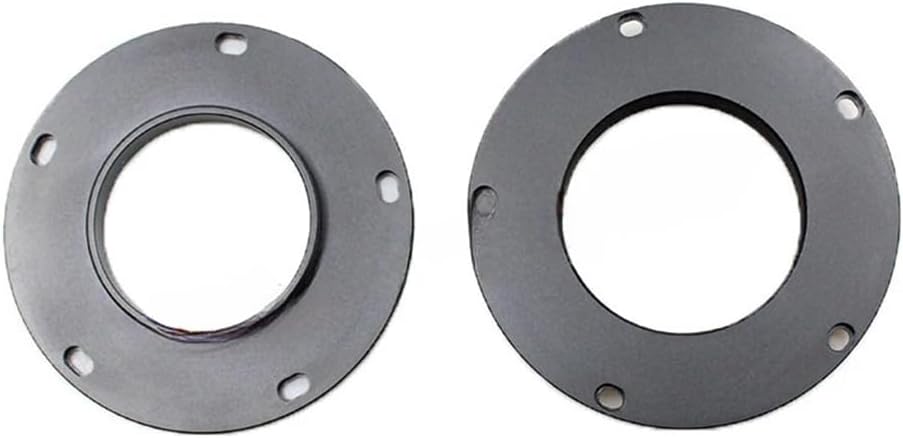
Image: A close-up view of the main rotator body, highlighting the internal threading where adapter rings are attached.

Image: Two M54 adapter rings, one with an external thread and one with an internal thread, demonstrating the different connection types.
- Secure with Screws: The assembly structure is connected using 5 stainless steel screws. Align the chosen adapter ring with the screw holes on the main rotator body. Use the provided hex key to securely fasten the 5 stainless steel screws, ensuring a firm connection. Do not overtighten.
- Connect to Equipment: Once assembled, connect the M54 CAA Rotator to your astronomical telescope and camera using the M54 x 0.75 threads. The external thread is 3MM and the internal thread is 5MM.

Image: The M54 CAA Rotator fully assembled, ready for integration into a telescope and camera setup.
Operating Instructions
The M54 CAA Rotator provides precise control over your camera's orientation for optimal framing in astrophotography.
- Rotation: The device allows for a full 360-degree rotation of your camera. Gently rotate the outer red ring of the adjuster to achieve the desired camera angle. The internal silicone damping ring ensures smooth movement and prevents unwanted shifts.

Image: Top-down view of the assembled rotator, showing the outer red ring and the three adjustment screws used for securing the rotation.
- Securing Position: Once the desired camera angle is achieved, use the three stainless steel handle fluctuation screws located on the outer red ring to lock the rotator in place. Tighten them gently but firmly to prevent accidental rotation during long exposures.
- Anti-slip Design: The external structure features anti-slip teeth, providing a secure grip during adjustment and handling.
Maintenance
Proper maintenance will ensure the longevity and optimal performance of your M54 CAA Rotator.
- Cleaning: Use a soft, lint-free cloth to wipe down the metal surfaces. For stubborn smudges, a slightly damp cloth with mild soap can be used, followed by immediate drying. Avoid abrasive cleaners or solvents.
- Storage: Store the rotator in a clean, dry environment, away from extreme temperatures and humidity. Keep it protected from dust and direct sunlight when not in use.
- Screw Check: Periodically check the tightness of the 5 stainless steel screws connecting the assembly and the three handle fluctuation screws. Retighten if necessary, but do not overtighten.
- Damping Ring: The silicone damping ring is designed to be maintenance-free. Avoid disassembling the rotating mechanism unless absolutely necessary, as this could compromise the damping system.
Troubleshooting
This section addresses common issues you might encounter with your M54 CAA Rotator.
- Difficulty Rotating:
- Ensure the three handle fluctuation screws are loosened sufficiently.
- Check for any debris or foreign objects obstructing the rotation mechanism.
- Loose Connection to Telescope/Camera:
- Verify that the M54 x 0.75 threads on both the rotator and your equipment are clean and undamaged.
- Ensure the adapter rings are correctly installed and the 5 stainless steel screws are tightened.
- Wobble or Play in Rotation:
- Confirm that all 5 assembly screws are securely tightened.
- Ensure the three handle fluctuation screws are tightened after adjusting the angle.
- If the issue persists, contact customer support.
Specifications
| Feature | Detail |
|---|---|
| Product Dimensions | 5.12 x 2.76 x 1.57 inches |
| Item Weight | 12 ounces (341 Grams) |
| ASIN | B0CVVX47K8 |
| Item Model Number | 500423020A2 |
| Manufacturer | Kenntsh |
| Color | Red & Black |
| Compatible Devices | Camera (with M54 threads) |
| Thickness Extension | 12.5MM |
| M54 x 0.75 External Thread | 3MM |
| M54 x 0.75 Internal Thread | 5MM |
| Material | Metal |
Warranty and Support
For warranty information or technical support regarding your Kenntsh M54 CAA 360° Degree Rotator, please refer to the documentation included with your purchase or contact Kenntsh customer service directly. Keep your purchase receipt as proof of purchase for any warranty claims.
For further assistance, please visit the official Kenntsh website or contact their support team through the contact information provided on their product packaging or website.