1. Introduction
This manual provides essential information for the safe and effective use of your Generic Mobile Electrical Circuit Breaker. Please read this manual thoroughly before installation and operation, and retain it for future reference. This device is designed to monitor and control household appliances, offering both remote and manual control capabilities.
2. Safety Information
WARNING: Electrical shock hazard. Installation and maintenance should only be performed by qualified personnel.
- Always disconnect power before installing or servicing the circuit breaker.
- Ensure the voltage and current ratings of the circuit breaker match your application requirements. This model is rated for 90-240V and 10A.
- Do not operate the device if it appears damaged.
- The PA66 shell is high temperature resistant and flame retardant, but proper ventilation is still required.
- This device provides short circuit and overload protection. However, it is not a substitute for proper electrical wiring and safety practices.
3. Product Overview
The Generic Mobile Electrical Circuit Breaker is a smart device designed for efficient power management and safety in your home. It features robust construction and intelligent control options.
Key Features:
- Main Purpose: Monitors and controls household appliances, enabling remote and scheduled operation.
- Material: Utilizes copper for excellent conductivity and a durable PA66 flame-retardant shell.
- Timing Modes: Offers three distinct timing modes: timing, countdown, and cycle timing for advanced scheduling.
- Color Indicator: Equipped with a color indicator for easy monitoring of operational status.
- Protection: Includes built-in short circuit and overload protection.
- Installation: Designed for rail installation with a secure positioning clip.
- Control: Supports both remote (via mobile phone) and manual control.
Product Components:

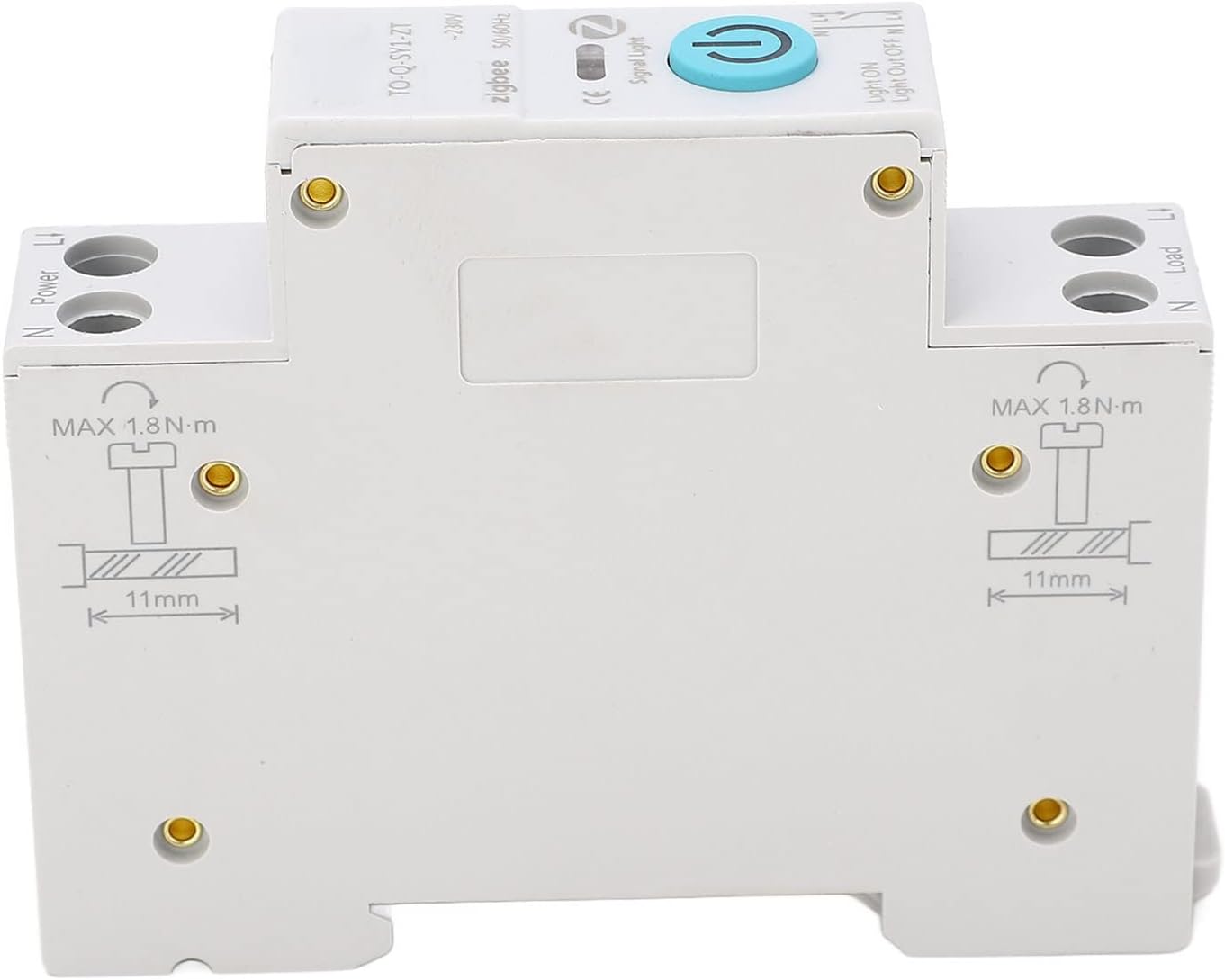
4. Setup and Installation
The circuit breaker is designed for rail installation. Follow these steps carefully for proper setup.
- Power Disconnection: Before beginning installation, ensure that the main power supply to the circuit where the breaker will be installed is completely disconnected. Verify with a voltage tester.
- Mounting: Securely attach the circuit breaker to a standard DIN rail. The device features a positioning clip design for a firm and reliable connection.
- Wiring:
- Connect the incoming power supply to the "Power" terminals (N and L1) at the top of the circuit breaker.
- Connect the appliance or load to the "Load" terminals (N and L1) at the bottom of the circuit breaker.
- Ensure all wire connections are tight and secure. The recommended maximum torque for terminal screws is 1.8 N·m.
- Strip wires to approximately 11mm before inserting into terminals for optimal contact.
- Verification: Double-check all connections to ensure they are correct and secure.
- Power Restoration: Once installation is complete and verified, restore power to the circuit.

5. Operating Instructions
The circuit breaker supports both manual and remote control operations.
5.1 Manual Control
To manually switch the circuit breaker ON or OFF, press the blue power button located on the front of the device. The color indicator light will change to reflect the current status (e.g., "Light ON" or "Light Out OFF").
5.2 Remote Control (Mobile Phone)
This circuit breaker is designed for remote control via a mobile phone application. While the specific app is not detailed here, the general process involves:
- App Installation: Download and install the compatible mobile application on your smartphone. (Refer to the separate user manual provided with the product for app details and QR codes if available).
- Device Pairing: Follow the app's instructions to pair the circuit breaker with your mobile device. This typically involves a discovery mode on the breaker and a pairing process within the app.
- Remote Operation: Once paired, you can remotely switch the connected appliances ON or OFF through the app interface.
- Timing Modes: Utilize the app to set up the three timing modes:
- Timing: Schedule specific ON/OFF times for the appliance.
- Countdown: Set a countdown timer for the appliance to switch ON or OFF after a specified duration.
- Cycle Timing: Program repetitive ON/OFF cycles for automated control.
The mobile phone control simplifies appliance management, making daily life more convenient.
6. Maintenance
The Generic Mobile Electrical Circuit Breaker requires minimal maintenance. Regular checks can ensure its longevity and safe operation.
- Cleaning: Periodically clean the exterior of the device with a dry, soft cloth. Do not use liquid cleaners or solvents.
- Connection Checks: Annually, or as needed, verify that all wire connections are still tight and secure. Loose connections can lead to overheating or malfunction.
- Environmental Conditions: Ensure the operating environment remains within suitable temperature and humidity ranges to prevent damage to the internal components.
- No User-Serviceable Parts: Do not attempt to open or repair the circuit breaker yourself. There are no user-serviceable parts inside. Unauthorized opening will void any warranty.
7. Troubleshooting
If you encounter issues with your circuit breaker, refer to the following common problems and solutions:
| Problem | Possible Cause | Solution |
|---|---|---|
| Device does not power on. | No power supply; loose wiring; internal fault. | Check main power supply. Verify all wire connections are secure. If problem persists, contact support. |
| Circuit breaker trips frequently. | Overload; short circuit; faulty appliance. | Reduce load on the circuit. Check connected appliances for faults. Consult an electrician if tripping continues. |
| Remote control not working. | App not paired; poor Wi-Fi/Zigbee signal; app malfunction. | Ensure device is paired correctly in the app. Check network connectivity. Restart the app or your mobile device. |
| Timing functions are inaccurate. | Incorrect settings in app; network synchronization issues. | Verify timing settings in the mobile application. Ensure stable network connection for time synchronization. |
If the issue is not resolved by the above steps, please contact customer support.
8. Specifications
| Attribute | Detail |
|---|---|
| Model Number | Generic57erpqmvgc-11 |
| Item Type | Mini Circuit Breaker |
| Brand | Generic |
| Material | PA66 (Shell), Copper (Conductivity) |
| Voltage Rating | 90-240V |
| Current Rating | 10 Amps (for this variant) |
| Control Type | Remote Control, Manual Control |
| Electrode | 1P+N (N pole channel) |
| Circuit Breaker Type | Standard |
| Number of Poles | 1 |
| Item Weight | 3.88 ounces |
| Package Dimensions | 3.54 x 2.76 x 0.79 inches |
| Date First Available | February 18, 2024 |
9. Warranty and Support
For warranty information and customer support, please refer to the contact details provided at the point of purchase or on the product packaging. Typically, the manufacturer offers a limited warranty against defects in materials and workmanship from the date of purchase.
For technical assistance or troubleshooting beyond what is covered in this manual, please contact the seller or manufacturer directly. Keep your purchase receipt as proof of purchase for warranty claims.
Seller: Zwenyn
Return Policy: 30 days (refund/replacement)


