
Kenwood KHC29A.X0SI
KENWOOD KHC29A.X0SI Food Processor User Manual
Model: KHC29A.X0SI
1. Introduction
Thank you for choosing the KENWOOD KHC29A.X0SI Food Processor. This versatile kitchen appliance is designed to simplify your cooking and baking tasks, offering a range of functions from mixing and kneading to blending and grinding. Please read this manual carefully before first use to ensure safe and optimal operation of your appliance.
2. Important Safety Instructions
Always follow basic safety precautions when using electrical appliances to reduce the risk of fire, electric shock, and/or injury to persons, including the following:
- Read all instructions.
- Do not immerse the motor unit in water or other liquids.
- Unplug from outlet when not in use, before putting on or taking off parts, and before cleaning.
- Avoid contact with moving parts.
- Do not operate any appliance with a damaged cord or plug, or after the appliance malfunctions or has been dropped or damaged in any manner.
- The use of attachments not recommended or sold by the manufacturer may cause fire, electric shock, or injury.
- Do not use outdoors.
- Do not let cord hang over edge of table or counter.
- Do not let cord contact hot surfaces.
- This appliance is not intended for use by persons (including children) with reduced physical, sensory or mental capabilities, or lack of experience and knowledge, unless they have been given supervision or instruction concerning use of the appliance by a person responsible for their safety.
- Children should be supervised to ensure that they do not play with the appliance.
3. Product Overview and Components
Your KENWOOD KHC29A.X0SI Food Processor comes with various components designed for different culinary tasks. Familiarize yourself with the main unit and its attachments.
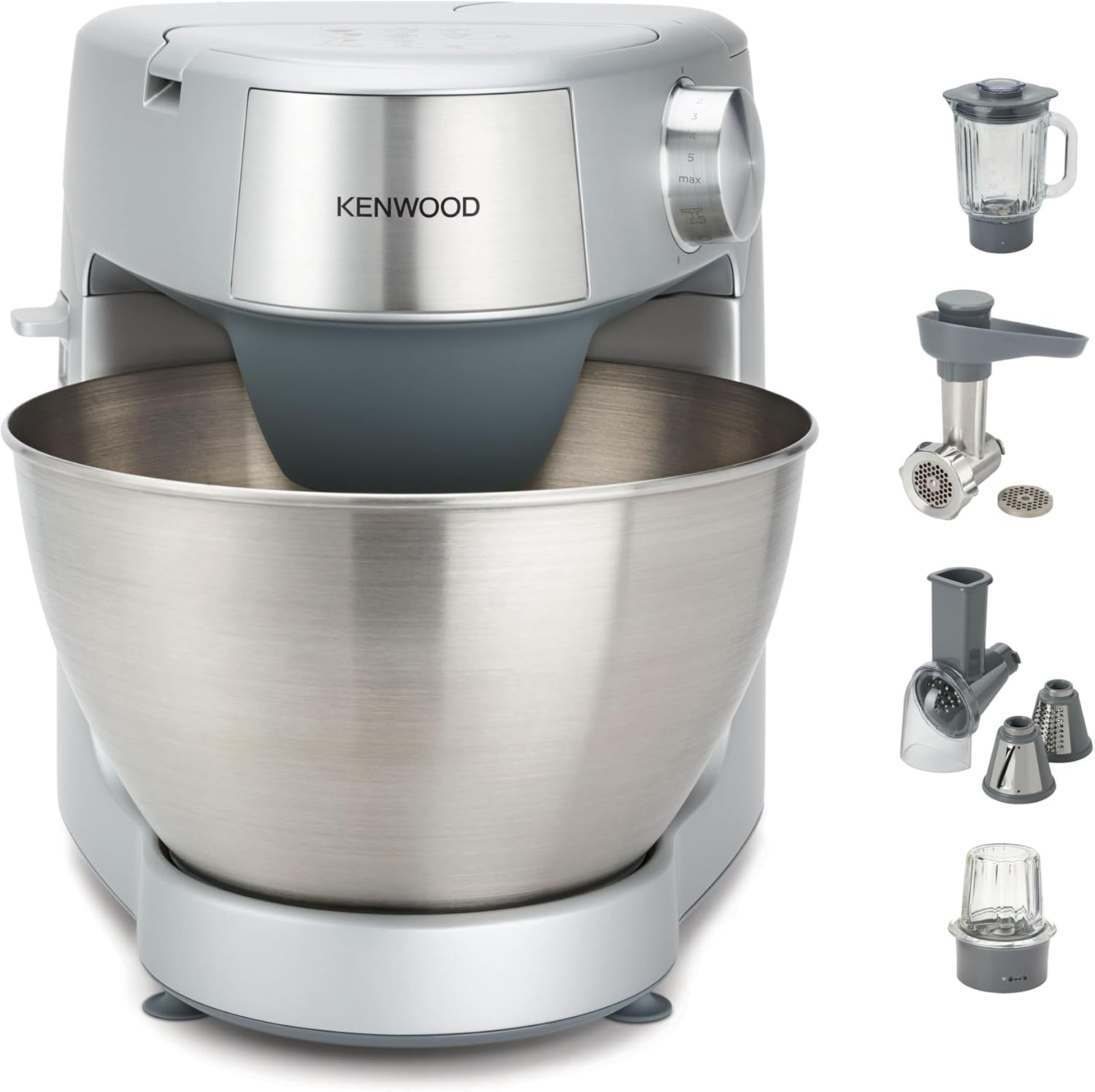
Figure 3.1: Main unit and included attachments. This image displays the primary food processor unit in a metallic silver finish, featuring a large stainless steel mixing bowl. To the right, several accessories are shown: a glass blender jug, a meat grinder attachment, a vegetable slicer/shredder with different cones, and a small mill/grinder attachment.

Figure 3.2: Detailed view of mixing tools and other attachments with food examples. This image showcases the three primary mixing tools (K-beater, whisk, dough hook) with examples of dishes they can prepare (cake, meringue, bread). Below, the blender, meat grinder, and slicer/shredder attachments are displayed with corresponding food items (sauce, pasta with meatballs, shredded cabbage, curry), illustrating the versatility of the appliance.

Figure 3.3: Kenwood KHC29A.X0SI Food Processor in a kitchen setting. This image shows the silver food processor positioned on a wooden kitchen countertop, demonstrating its compact size and aesthetic integration into a typical kitchen environment.
Main Components:
- Motor Unit: The main body housing the motor and control dial.
- Mixing Bowl: Large stainless steel bowl for mixing and kneading.
- K-Beater: For general mixing, creaming, and beating.
- Whisk: For whipping eggs, cream, and light mixtures.
- Dough Hook: For kneading bread and pastry dough.
- Blender Attachment: For blending liquids, smoothies, and soups.
- Meat Grinder Attachment: For grinding various types of meat.
- Slicer/Shredder Attachment: For slicing and shredding vegetables and cheese.
4. Setup and First Use
Before using your food processor for the first time, please follow these steps:
- Unpacking: Carefully remove all components from the packaging. Retain packaging for future storage or transport.
- Cleaning: Wash the mixing bowl, K-beater, whisk, dough hook, and all removable parts of the blender, grinder, and slicer/shredder attachments in warm soapy water. Rinse thoroughly and dry. Wipe the motor unit with a damp cloth.
- Placement: Place the motor unit on a clean, dry, and stable surface. Ensure there is adequate ventilation around the appliance.
- Attaching the Mixing Bowl:
- Lift the head of the food processor by pressing the head release lever.
- Place the mixing bowl onto the base, aligning the tabs on the bowl with the slots on the base. Twist clockwise until it locks securely in place.
- Attaching Mixing Tools:
- Select the desired mixing tool (K-beater, whisk, or dough hook).
- Insert the shaft of the tool into the attachment port on the underside of the head. Twist to secure.
- Lower the head until it clicks into place.

Figure 4.1: Food processor head in the raised position, ready for tool attachment or bowl removal. This image shows the main unit, in silver, with its head tilted upwards, revealing the attachment point for the mixing tools and the stainless steel bowl securely in place. A K-beater is visible, partially inserted.
- Power Connection: Plug the power cord into a grounded electrical outlet.
5. Operating Instructions
The KENWOOD KHC29A.X0SI offers various functions controlled by the speed dial and attachment ports.

Figure 5.1: Control panel and speed dial. This close-up shows the top of the silver-colored food processor with various embossed icons indicating recommended speed settings for different functions (e.g., mixing, blending, grinding) and a prominent rotary dial for speed control, ranging from 'min' to 'max' with numbered increments.
5.1. Using the Mixer (Main Bowl)
This function is ideal for baking and general mixing tasks.
- Ensure the mixing bowl and desired tool (K-beater, whisk, or dough hook) are correctly installed.
- Add ingredients to the mixing bowl. Do not overfill.
- Turn the speed dial to the desired setting. Start with a low speed and gradually increase as needed. Refer to the icons on the top panel for guidance on appropriate speeds for different tasks (e.g., 'min' for folding, 'max' for whipping).
- To stop, turn the dial to '0' (off).

Figure 5.2: Food processor in operation, whisking ingredients. The image shows the Kenwood food processor, in its silver finish, actively mixing a light-colored batter in its stainless steel bowl using the whisk attachment, demonstrating its mixing capability for light mixtures.
5.2. Using the Blender Attachment
The blender attachment is suitable for smoothies, soups, and sauces.
- Ensure the main unit is unplugged.
- Assemble the blender jug with its blade assembly and lid.
- Add ingredients to the blender jug. Do not exceed the maximum fill line.
- Attach the assembled blender jug to the high-speed outlet on the top of the motor unit (usually covered by a cap). Twist to lock.
- Plug in the appliance and turn the speed dial to the recommended blender setting (often indicated by a blender icon on the control panel).
- Process until desired consistency is achieved.
- Turn the dial to '0' before removing the blender.
5.3. Using the Meat Grinder Attachment
For fresh ground meat for various recipes.
- Ensure the main unit is unplugged.
- Assemble the meat grinder components (screw, blade, plate, ring nut).
- Attach the assembled grinder to the slow-speed outlet on the front of the motor unit (usually covered by a cap). Twist to lock.
- Prepare meat by cutting it into strips or cubes that fit the feed tube.
- Place a bowl under the grinder outlet to collect the ground meat.
- Plug in the appliance and turn the speed dial to the recommended grinder setting.
- Feed meat into the tube using the food pusher. Never use your fingers.
- Turn the dial to '0' before disassembling.
5.4. Using the Slicer/Shredder Attachment
For quickly slicing or shredding vegetables, fruits, and cheese.
- Ensure the main unit is unplugged.
- Select the desired cone (slicing, fine shredding, coarse shredding) and insert it into the attachment housing.
- Attach the assembled slicer/shredder to the slow-speed outlet on the front of the motor unit. Twist to lock.
- Place a bowl under the outlet to collect processed food.
- Prepare food by cutting it into pieces that fit the feed tube.
- Plug in the appliance and turn the speed dial to the recommended setting.
- Feed food into the tube using the food pusher. Never use your fingers.
- Turn the dial to '0' before disassembling.
6. Maintenance and Cleaning
Proper maintenance ensures the longevity and optimal performance of your KENWOOD KHC29A.X0SI Food Processor.
- Always Unplug: Before cleaning, always ensure the appliance is unplugged from the power outlet.
- Motor Unit: Wipe the motor unit with a damp cloth. Do not immerse it in water or any other liquid.
- Mixing Bowl and Tools: The stainless steel mixing bowl, K-beater, whisk, and dough hook are generally dishwasher safe, but hand washing with warm soapy water is recommended to preserve their finish. Rinse thoroughly and dry immediately.
- Blender Attachment: Disassemble the jug, blade assembly, and lid. Wash all parts in warm soapy water. The jug may be dishwasher safe, but check specific instructions for your model.
- Meat Grinder and Slicer/Shredder: Disassemble all parts. Wash immediately after use in warm soapy water to prevent food from drying on components. Use a brush for hard-to-reach areas. Dry thoroughly.
- Storage: Store the appliance and its attachments in a clean, dry place.
Important: Do not use abrasive cleaners, scouring pads, or harsh chemicals on any part of the appliance, as this may damage the surfaces.
7. Troubleshooting
If you encounter issues with your food processor, refer to the following common problems and solutions:
| Problem | Possible Cause | Solution |
|---|---|---|
| Appliance does not start. | Not plugged in; power switch off; head not fully lowered; attachment not correctly fitted. | Ensure plug is securely in outlet; turn speed dial to a setting other than '0'; lower head until it clicks; ensure attachments are locked in place. |
| Motor stops during operation. | Overload protection activated; ingredients too tough or quantity too large. | Turn off and unplug. Remove some ingredients. Let the motor cool down for 15-30 minutes before restarting. Reduce load for future use. |
| Loud noise or vibration. | Appliance not on a stable surface; bowl or attachment not properly secured. | Place on a flat, stable surface. Ensure mixing bowl and attachments are securely locked. |
| Ingredients not mixing properly. | Wrong attachment used; insufficient liquid; too much dry ingredient. | Ensure correct tool for the task. Add more liquid if necessary. Adjust ingredient ratios. |
If the problem persists after trying these solutions, please contact customer support.
8. Specifications
- Model: KHC29A.X0SI
- Brand: Kenwood
- Product Dimensions: 9.84 x 11.02 x 9.45 inches
- Item Weight: 9.9 pounds
- Manufacturer: Kenwood
- ASIN: B0CVVSX29C
- Color: Black
- Product Care Instructions: Hand Wash
- Included Components: 1 package
9. Warranty and Support
For warranty information and customer support, please refer to the warranty card included with your product or visit the official Kenwood website. Keep your purchase receipt as proof of purchase for any warranty claims.
For technical assistance, spare parts, or service inquiries, please contact Kenwood customer service through their official channels.