1. Product Overview
The iCopy5 is a versatile handheld device designed for the decryption, reading, writing, and duplication of various RFID, NFC, IC, and ID cards and tags. It features a full decode function, making it a comprehensive tool for managing access control cards, key fobs, and other compatible transponders. Its compact design and intuitive interface facilitate easy operation for both professionals and advanced users.
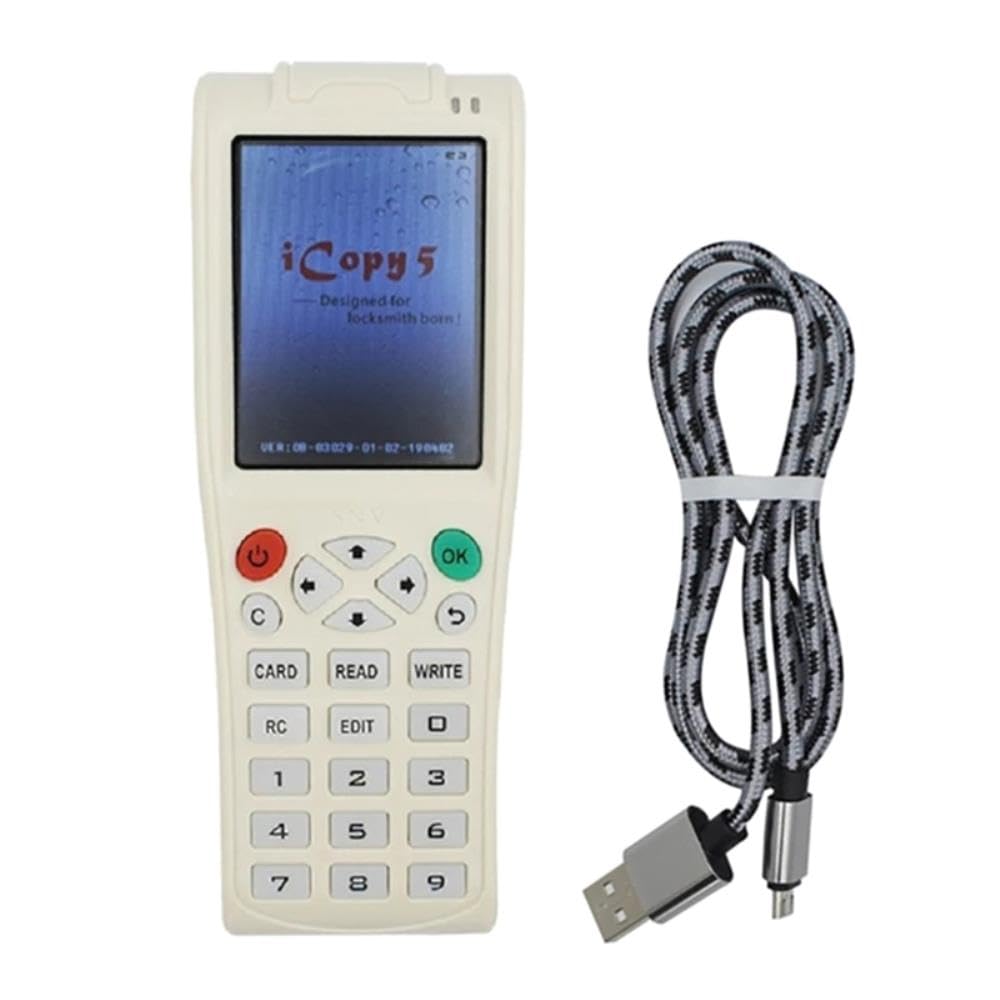
Figure 1: The iCopy5 device (left) showing its screen and keypad, alongside its accompanying USB charging/data cable (right).
2. Package Contents
- 1 x iCopy5 RFID NFC IC ID Duplicator Device
- 1 x USB Charging/Data Cable
- (Optional) Blank writable cards/tags (may vary by package)
3. Setup
3.1 Initial Charging
Before first use, ensure the iCopy5 device is fully charged. Connect the provided USB cable to the device's charging port and the other end to a standard USB power adapter (not included) or a computer's USB port. The device's screen or indicator light will show charging status.
3.2 Powering On/Off
- To power on: Press and hold the Power button (red button with power symbol) until the screen illuminates.
- To power off: Press and hold the Power button until the device shuts down.
3.3 Initial Screen Display
Upon powering on, the device will display the "iCopy 5" logo, followed by "Designed for locksmith born!" and the firmware version (e.g., "VER:00-63029-01-02-190402"). This indicates the device is ready for operation.
4. Operating Instructions
4.1 Keypad Functions
- Power Button: Powers the device on/off.
- OK Button: Confirms selections or actions.
- Arrow Keys (Up, Down, Left, Right): Navigates through menus and options.
- 'C' Button: Clears current input or cancels an operation.
- 'CARD' Button: Initiates card detection or selection mode.
- 'READ' Button: Reads data from a source card/tag.
- 'WRITE' Button: Writes data to a target card/tag.
- 'RC' Button: Likely for "Read Card" or related function.
- 'EDIT' Button: Allows modification of read data.
- Numeric Keypad (0-9): For entering specific data or selecting options.
4.2 Basic Duplication Process (Read & Write)
- Power On: Ensure the iCopy5 is powered on.
- Place Source Card: Position the card or tag you wish to copy onto the designated sensing area of the iCopy5 (usually the back or top of the device, refer to on-screen prompts).
- Read Data: Press the 'READ' button. The device will attempt to read the data from the source card. The screen will display the reading progress and success/failure.
- Remove Source Card: Once reading is complete, remove the source card.
- Place Target Card: Place a blank, writable card or tag onto the sensing area. Ensure it is compatible with the read data type.
- Write Data: Press the 'WRITE' button. The device will transfer the stored data to the target card. The screen will indicate writing progress.
- Verification: After writing, you may optionally press 'READ' again with the newly written card to verify the data.
4.3 Decryption and Full Decode Function
The iCopy5 features advanced decryption capabilities for encrypted cards. When attempting to read an encrypted card, the device may prompt for decryption. Follow the on-screen instructions, which may involve connecting to a network (if supported by the specific firmware version) or using specific decryption modes. The "Full Decode Function" aims to extract all accessible data from complex card structures.
Note: Decryption capabilities and success rates can vary depending on the card's encryption type and the device's firmware version. Ensure your device has the latest firmware for optimal performance.
5. Maintenance
5.1 Cleaning
To maintain the device's performance and appearance, wipe the exterior with a soft, dry, lint-free cloth. Do not use abrasive cleaners, solvents, or strong chemicals, as these can damage the device's surface or internal components.
5.2 Software Updates
Periodically check for firmware updates to enhance functionality, improve compatibility, and address potential issues. If the device supports network connectivity, updates may be available directly through the device's menu. Otherwise, updates might require connecting the device to a computer and using specific software provided by the manufacturer (refer to manufacturer's website for details).
5.3 Storage
Store the iCopy5 in a cool, dry place away from direct sunlight, extreme temperatures, and high humidity. Keep it away from strong magnetic fields, which could interfere with its operation.
6. Troubleshooting
- Device Not Powering On:
Ensure the device is fully charged. Connect it to a power source using the provided USB cable and allow it to charge for at least 30 minutes before attempting to power on again.
- Unable to Read Card:
Verify the card is placed correctly on the sensing area. Ensure the card type (RFID, NFC, IC, ID) is supported by the iCopy5. Some cards may have strong encryption or be damaged, preventing successful reading.
- Unable to Write to Card:
Confirm that the target card is a blank, writable type and compatible with the data being written. Some cards are read-only. Ensure the card is placed correctly on the sensing area.
- Decryption Fails:
Decryption success depends on the card's encryption complexity and the device's capabilities. Ensure you are following all on-screen prompts. Firmware updates may improve decryption success for certain card types.
- Screen Freezes or Device Unresponsive:
Press and hold the Power button for approximately 10-15 seconds to force a restart. If the issue persists, ensure the device is fully charged.
7. Specifications
| Product Name | iCopy5 RFID NFC IC ID Duplicator |
| Model Number | 8012111417259 |
| Brand | Generic |
| ASIN | B0CVTSBGC5 |
| Supported Card Types | RFID, NFC, IC, ID (specific frequencies/protocols may vary by firmware) |
| Functions | Read, Write, Copy, Decrypt, Full Decode |
| Connectivity | USB (for charging/data), Network (if supported by firmware) |
8. Warranty Information
This product is covered by a standard limited warranty against defects in materials and workmanship from the date of purchase. The warranty period and terms may vary by region and retailer. Please retain your proof of purchase for warranty claims. This warranty does not cover damage caused by misuse, accident, unauthorized modification, or normal wear and tear.
9. Support
For technical support, troubleshooting assistance, or warranty inquiries, please contact the retailer or manufacturer directly. Refer to the product packaging or the seller's information for specific contact details. You may also visit the manufacturer's official website for FAQs, updated drivers, and firmware.