1. Important Safety Information
Before operating the TV, please read this manual thoroughly and retain it for future reference. Observe all warnings and instructions marked on the product and in the manual.
- Power Source: Connect the TV to an AC 100-240V, 50/60Hz power outlet.
- Ventilation: Ensure proper ventilation around the TV. Do not block ventilation openings.
- Cleaning: Unplug the TV from the wall outlet before cleaning. Use a soft, dry cloth. Do not use liquid cleaners or aerosol cleaners.
- Water and Moisture: Do not use the TV near water.
- Accessories: Use only accessories specified by the manufacturer.
- Mounting: When mounting the TV on a wall, follow the instructions provided by the wall mount manufacturer.
2. Product Overview
The LG 75QNED99TUA is a 75-inch Class QNED99T Series 8K Mini LED Smart TV. It features an 8K Quantum Dot NanoCell Display, MiniLED backlighting with Precision Dimming Pro+, and is powered by an α9 AI Processor Gen7. The TV includes webOS for smart functionality, a Magic Remote with NFC, and integrated AI-powered features including Alexa Built-in.

Front view of the LG 75QNED99TUA 75-Inch QNED99T Series 8K Mini LED Smart TV.
3. Setup
3.1 Unpacking and Inspection
Carefully remove the TV and all accessories from the packaging. It is recommended that two people handle the TV due to its size and weight. Inspect the TV for any damage during transit. Keep the packaging materials for future transport or service.
3.2 What's in the Box
- LG 75QNED99TUA TV
- Magic Remote MR24 with NFC
- 2 x AA Batteries for Remote Control
- Power Cable (attached)
- Quick Start Guide
- E-Manual (accessible via TV)
- TV Stand components

Diagram illustrating the TV dimensions and a list of items included in the box.
3.3 Stand Installation
- Place the TV screen-down on a soft, flat surface to prevent damage.
- Attach the stand components to the TV using the provided screws, following the instructions in the Quick Start Guide.
- Ensure the stand is securely fastened before placing the TV upright.

Front view of the LG 75QNED99TUA TV with its stand attached.
3.4 Connecting External Devices
The TV offers various connectivity options for external devices.
- HDMI: Connect Blu-ray players, game consoles, and other HDMI-enabled devices. The TV features multiple HDMI ports, including HDMI 2.1 for 8K content and high refresh rates.
- USB: Connect USB storage devices for media playback.
- Ethernet (LAN): For a stable wired internet connection.
- Optical Digital Audio Out: For connecting to external sound systems.
- Antenna/Cable In: For connecting an antenna or cable TV signal.

Rear view of the LG 75QNED99TUA TV, highlighting the various input and output ports.

Detailed view of the rear input ports, including HDMI, USB, LAN, and optical audio out.

Detailed view of the side input ports, typically including additional HDMI and USB ports for easy access.
3.5 Initial Power On and Network Setup
- Connect the power cable to the TV and a wall outlet.
- Press the power button on the TV or the Magic Remote.
- Follow the on-screen instructions to complete the initial setup, including language selection, country, and network connection.
- For Wi-Fi, select your network and enter the password. For wired connection, ensure the Ethernet cable is connected.
4. Operating the TV
4.1 Magic Remote Functions
The LG Magic Remote MR24 provides intuitive control over your TV. It features a pointer, scroll wheel, and voice recognition.

The LG Magic Remote MR24, featuring a directional pad, scroll wheel, voice button, and dedicated app buttons.
- Pointing and Clicking: Move the remote to control the on-screen pointer. Click the scroll wheel to select items.
- Scroll Wheel: Use to scroll through menus and web pages.
- Voice Recognition: Press the microphone button and speak commands or search queries.
- NFC: Tap an NFC-enabled smartphone to the remote for quick content sharing or device pairing.
4.2 Smart TV Features (webOS)
The TV runs on LG's webOS platform, providing access to various streaming services and smart features.
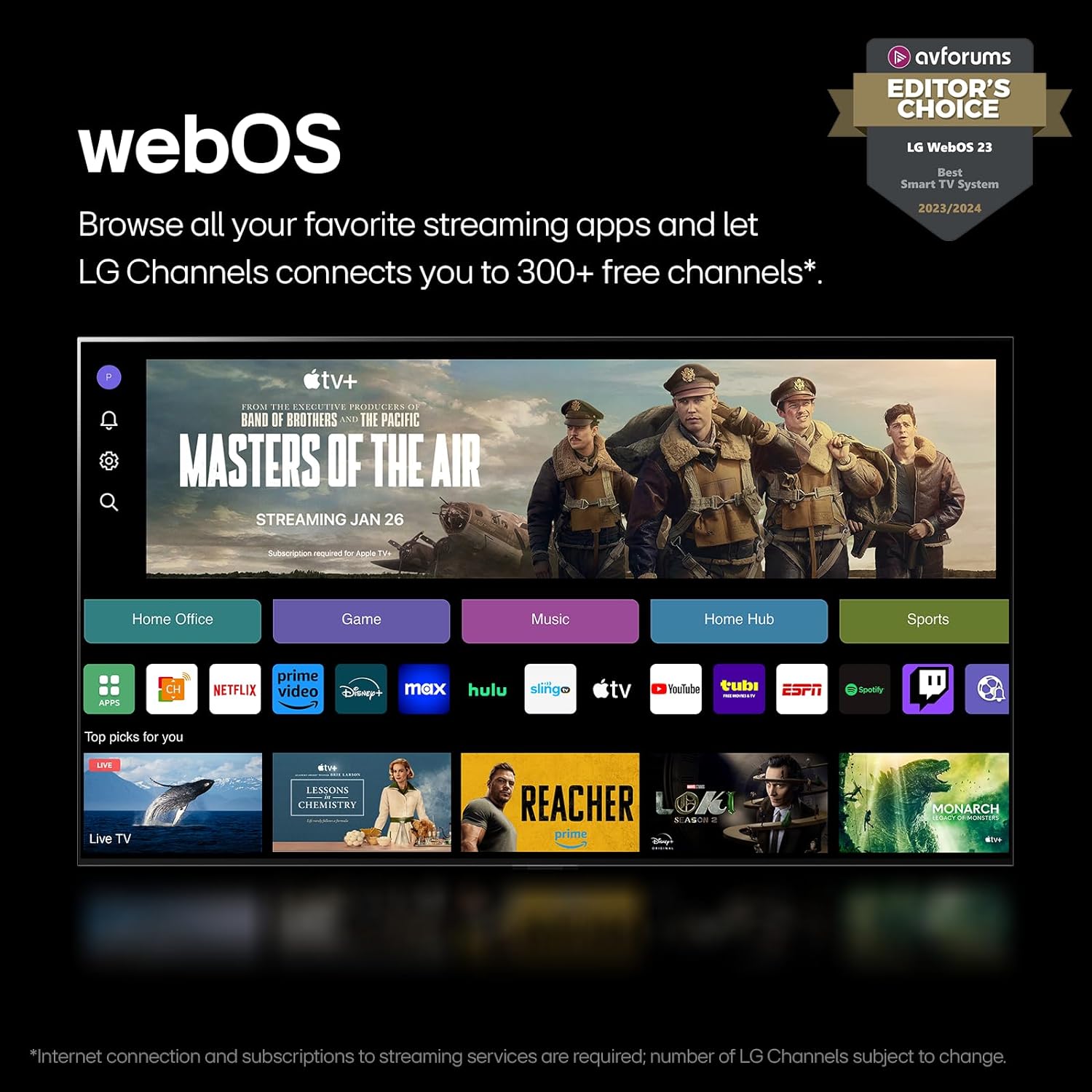
Screenshot of the LG webOS interface, displaying a selection of streaming applications and content recommendations.
- Home Screen: Access apps, inputs, and settings from the customizable home screen.
- LG Channels: Enjoy free streaming channels provided by LG.
- App Store: Download and install additional applications.
4.3 Picture and Sound Settings
Optimize your viewing and listening experience through the TV's advanced settings.
- QNED Contrast: Mini LED technology with hundreds of miniature LED backlight zones provides precise control for deep blacks and bright colors.
- Quantum Dot NanoCell Color: Enhances color accuracy and vibrancy by filtering unwanted light.
- Precision Dimming Pro+: Controls MiniLEDs with thousands of dimming zones for improved black levels and brightness.
- 8K Resolution: The TV upscales lower resolution content to an 8K-like viewing experience.
- Dolby Vision: Provides extraordinary color, contrast, and brightness for compatible content.
- FILMMAKER MODE: Adjusts picture settings to preserve the director's original vision.
- Dolby Atmos: Delivers immersive, multi-dimensional sound.
- WOW Orchestra: Integrates TV speakers with compatible LG Soundbars for an expanded soundstage.

Visual representation of Dolby Vision, Filmmaker Mode, and Dolby Atmos technologies enhancing the viewing experience.

Diagram showing how LG WOW Orchestra integrates TV and soundbar speakers for an immersive audio experience.
4.4 Gaming Features
The TV is equipped with features designed to enhance the gaming experience.
- 0.1ms Response Time: Provides crisp, smooth imagery during fast-paced gaming.
- Native 120Hz Refresh Rate: Ensures fluid motion for compatible games.
- AMD FreeSync Premium & NVIDIA G-SYNC: Reduces screen tearing and stuttering for smoother gameplay.

Image highlighting the TV's gaming capabilities, including support for AMD FreeSync Premium and NVIDIA G-SYNC.
4.5 AI Processor and Voice Assistance
The α9 AI Processor Gen7 optimizes picture and sound, while integrated voice assistants offer convenient control.

Close-up image of the LG α9 AI Processor Gen7 chip, emphasizing its role in picture and sound enhancement.
- α9 AI Processor Gen7: Utilizes artificial intelligence to enhance picture quality, sound, and overall performance.
- Alexa Built-in: Use voice commands for TV control, smart home devices, and information.
- Google Assistant: Compatible with Google Assistant for voice control.
- Apple AirPlay & Apple Home: Stream content from Apple devices and integrate with Apple Home ecosystem.
5. Maintenance
5.1 Cleaning the TV
- Screen: Gently wipe the screen with a soft, dry, lint-free cloth. For stubborn marks, lightly dampen the cloth with water or a specialized screen cleaner (ensure it's TV-safe). Do not spray liquid directly onto the screen.
- Frame and Stand: Use a soft, dry cloth to wipe dust.
- Remote Control: Wipe with a soft, dry cloth. Avoid moisture.
5.2 Software Updates
The TV may receive software updates to improve performance and add new features. It is recommended to enable automatic updates or check for updates periodically through the TV's settings menu (Settings > Support > Software Update).
6. Troubleshooting
If you encounter issues with your TV, refer to the following common solutions:
| Problem | Possible Solution |
|---|---|
| No Power | Check if the power cable is securely connected to the TV and the wall outlet. Ensure the outlet has power. Try a different outlet. |
| No Picture, but Sound is Present | Check the input source. Ensure external devices are powered on and connected correctly. Try a different HDMI cable. |
| No Sound, but Picture is Present | Check the volume level. Ensure the TV is not muted. Check audio output settings (e.g., internal speakers, optical out). |
| Magic Remote Not Working | Replace the batteries (2 x AA). Re-pair the remote by pointing it at the TV and pressing the Wheel (OK) button. |
| Cannot Connect to Wi-Fi | Check your router and modem. Restart them. Ensure the Wi-Fi password is correct. Try a wired Ethernet connection if possible. |
| Picture Quality Issues (e.g., blurry, distorted) | Check the source content resolution. Adjust picture settings (e.g., Picture Mode, Sharpness). Ensure cables are securely connected. |
For more detailed troubleshooting, refer to the E-Manual accessible through the TV's settings or visit the LG support website.
7. Specifications
| Feature | Detail |
|---|---|
| Brand | LG |
| Model Number | 75QNED99TUA |
| Screen Size | 75 Inches (75.1" Diagonal) |
| Display Technology | Mini LED, QNED, Quantum Dot NanoCell |
| Resolution | 8K (7680 x 4320) |
| Refresh Rate | 120 Hz Native |
| Processor | α9 AI Processor Gen7 8K |
| Operating System | webOS |
| Special Features | AMD FreeSync, Built-In Speaker, Flat Screen, Game Mode, Multiple Voice Assistance (Alexa Built-in, Google Assistant, Apple AirPlay, Apple Home) |
| Connectivity Technology | Bluetooth, Ethernet, HDMI (multiple, including HDMI 2.1), USB, Wi-Fi |
| Audio Features | Dolby Atmos, WOW Orchestra |
| Video Features | Dolby Vision, FILMMAKER MODE |
| Product Dimensions (W x H x D) without stand | 65.6 x 37.7 x 1.2 inches |
| Product Dimensions (W x H x D) with stand | 65.6 x 40.2 x 14.1 inches |
| Item Weight | 106.8 pounds |
| On-mode Power Consumption | 265 watts |
| Annual Energy Consumption | 486 Kilowatt Hours Per Year (based on 4 hours/day) |
8. Warranty and Support
For warranty information and technical support, please refer to the warranty card included with your product or visit the official LG website. You can also access the full E-Manual directly from your TV's settings menu for comprehensive support and detailed instructions.
LG Customer Service: For assistance, please contact LG customer support through their official channels.