
1. Product Overview
The Generic Megabass Jobsite Speaker V3 is a portable audio device designed for various environments. It features multiple connectivity options, integrated LED lighting, and a built-in rechargeable battery for cordless operation. The speaker includes an integrated handle for easy transport and supports microphone input for karaoke functions.

Image: The 8-inch subwoofer provides powerful sound output.

Image: The speaker offers versatile connectivity including Bluetooth, AUX, USB, and Micro-SD, suitable for various activities.

Image: The integrated carry handle allows for easy transportation of the speaker.
2. Setup
2.1 Charging the Battery
Before initial use, fully charge the speaker's built-in battery. Use the included Micro-USB charging cable to connect the speaker to a compatible USB power source (e.g., wall adapter, computer USB port). The charging indicator light will illuminate during charging and turn off or change color when fully charged. A full charge provides up to 3 hours of playtime.

Image: The speaker can be charged via the Micro-USB port for cordless operation.
2.2 Powering On/Off
Locate the Power button on the control panel. Press and hold the Power button for a few seconds to turn the speaker on or off.
2.3 Bluetooth Pairing
- Turn on the speaker. It will automatically enter Bluetooth pairing mode, indicated by a flashing LED light or an audible prompt.
- On your smartphone or other Bluetooth-enabled device, navigate to the Bluetooth settings.
- Search for available devices and select "Megabass V3" from the list.
- Once connected, the speaker will provide an audible confirmation, and the LED indicator will stop flashing.
3. Operating Instructions

Image: Detailed view of the speaker's control panel and input ports.
3.1 Basic Controls
- Volume Knob: Rotate to adjust the overall speaker volume.
- Play/Pause Button: Press to play or pause audio playback.
- Rewind/Previous Track Button: Press to go to the previous track. Hold to rewind.
- Fast Forward/Next Track Button: Press to go to the next track. Hold to fast forward.
- Mode Button: Press to cycle through input modes: Bluetooth, AUX, USB, Micro-SD, FM Radio.
3.2 Input Modes
- Bluetooth Mode: After pairing (see Section 2.3), audio will stream wirelessly from your connected device.
- AUX Input: Connect an external audio device using a 3.5mm AUX cable (not included) to the AUX input port. Select AUX mode using the Mode button.
- USB Input: Insert a USB flash drive containing MP3 audio files into the USB port. Select USB mode using the Mode button.
- Micro-SD Input: Insert a Micro-SD card containing MP3 audio files into the Micro-SD card slot. Select Micro-SD mode using the Mode button.
- FM Radio Mode: Select FM Radio mode using the Mode button. The speaker will automatically scan and save available radio stations. Use the Rewind/Fast Forward buttons to navigate between stations.
3.3 Microphone Usage
- Connect a microphone (not included) to the Mic Input port.
- Adjust the microphone volume using the dedicated Mic Volume knob.
- Adjust the echo effect for the microphone using the dedicated Echo knob.
3.4 LED Lights
The speaker features color-changing LED lights. These lights activate automatically when the speaker is powered on. There is no specific control to turn them off or change patterns manually.

Image: The speaker's color-changing LED lights enhance the ambiance.
4. Maintenance
4.1 Cleaning
Wipe the speaker's exterior with a soft, dry cloth. Do not use abrasive cleaners, solvents, or harsh chemicals, as these can damage the finish. Avoid getting moisture into any ports or openings.
4.2 Storage
When not in use for extended periods, store the speaker in a cool, dry place away from direct sunlight and extreme temperatures. Ensure the battery is partially charged before storing to maintain battery health.
5. Troubleshooting
- No Power: Ensure the speaker is charged. Connect the Micro-USB charging cable and allow it to charge for at least 30 minutes before attempting to power on again.
- No Sound:
- Check the speaker's volume level and the volume level of the connected audio source.
- Ensure the correct input mode (Bluetooth, AUX, USB, Micro-SD, FM) is selected.
- If using Bluetooth, ensure the device is properly paired and within range.
- Bluetooth Connection Issues:
- Ensure the speaker is in Bluetooth pairing mode.
- Turn off and on the Bluetooth function on your device and the speaker.
- Move your device closer to the speaker.
- Forget the speaker from your device's Bluetooth list and attempt to pair again.
- Charging Issues: Ensure the Micro-USB cable is securely connected to both the speaker and the power source. Try a different USB cable or power adapter if issues persist.
6. Specifications
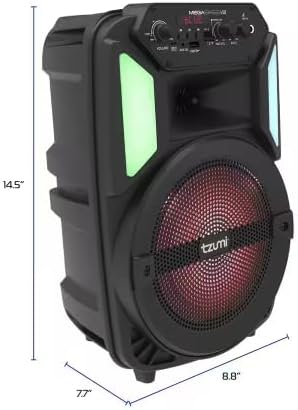
Image: Dimensions of the Megabass V3 speaker.
| Feature | Detail |
|---|---|
| Model Number | 52031101 |
| Output Power | 10 Watts |
| Subwoofer Size | 8 inches |
| Battery | 1200mAh (Rechargeable, Built-in) |
| Playtime | Up to 3 hours on a single charge |
| Connectivity | Bluetooth, AUX, Micro-SD, USB, FM Radio |
| Item Dimensions (L x W x H) | 14 x 7 x 8 inches (approx. 14.5" H, 8.8" W, 7.7" D as per image) |
| Color | Black |
| Enclosure Material | Plastic |
7. Warranty Information
This product is covered by a 12-month limited warranty from the date of purchase. Please retain your proof of purchase for warranty claims. The warranty covers manufacturing defects and does not cover damage caused by misuse, accidents, or unauthorized modifications.
8. Support
For further assistance, technical support, or warranty inquiries, please refer to the contact information provided with your purchase documentation or contact the retailer where the product was acquired.