
1. Introduction
This manual provides detailed instructions for the proper use and maintenance of the Chainway SR160, a versatile data collection device. The SR160 integrates both UHF RFID tag reading/writing and 2D/1D/QR barcode scanning capabilities, designed to enhance efficiency and accuracy in various applications.
2. Product Overview
The Chainway SR160 is engineered for multi-mode functionality, allowing seamless transitions between different data capture methods. It features a robust design suitable for diverse operational environments.

The Chainway SR160 device, featuring a black body with yellow accents, designed for ergonomic handling. It integrates both RFID and barcode scanning capabilities.
Key Features:
- Multi-Mode Efficiency: Seamlessly transitions between UHF RFID tag reading/writing and 2D/1D/QR barcode scanning.
- Powerful Performance: Equipped with an Impinj E310 UHF RFID reader, ensuring high-speed and accurate RFID tag detection for inventory management. Features an integrated RFID antenna with a maximum read range of 30cm.
- Comprehensive Data Capture: Capable of capturing a wide range of barcode types, including 2D, 1D, and QR codes, enhancing versatility for diverse scanning needs.
- Dynamic for Many Applications: An all-purpose multi-tool ideal for various applications, ranging from retail and inventory management to warehouse logistics and manufacturing.

An internal view of the Chainway SR160, illustrating the integration of the Impinj E310 UHF RFID chip and the 2D/1D/QR barcode scanner for high-performance data capture.
3. Setup
3.1 Unpacking
Carefully remove the Chainway SR160 device and all accessories from the packaging. Verify that all components are present according to the packing list.
3.2 Charging the Device
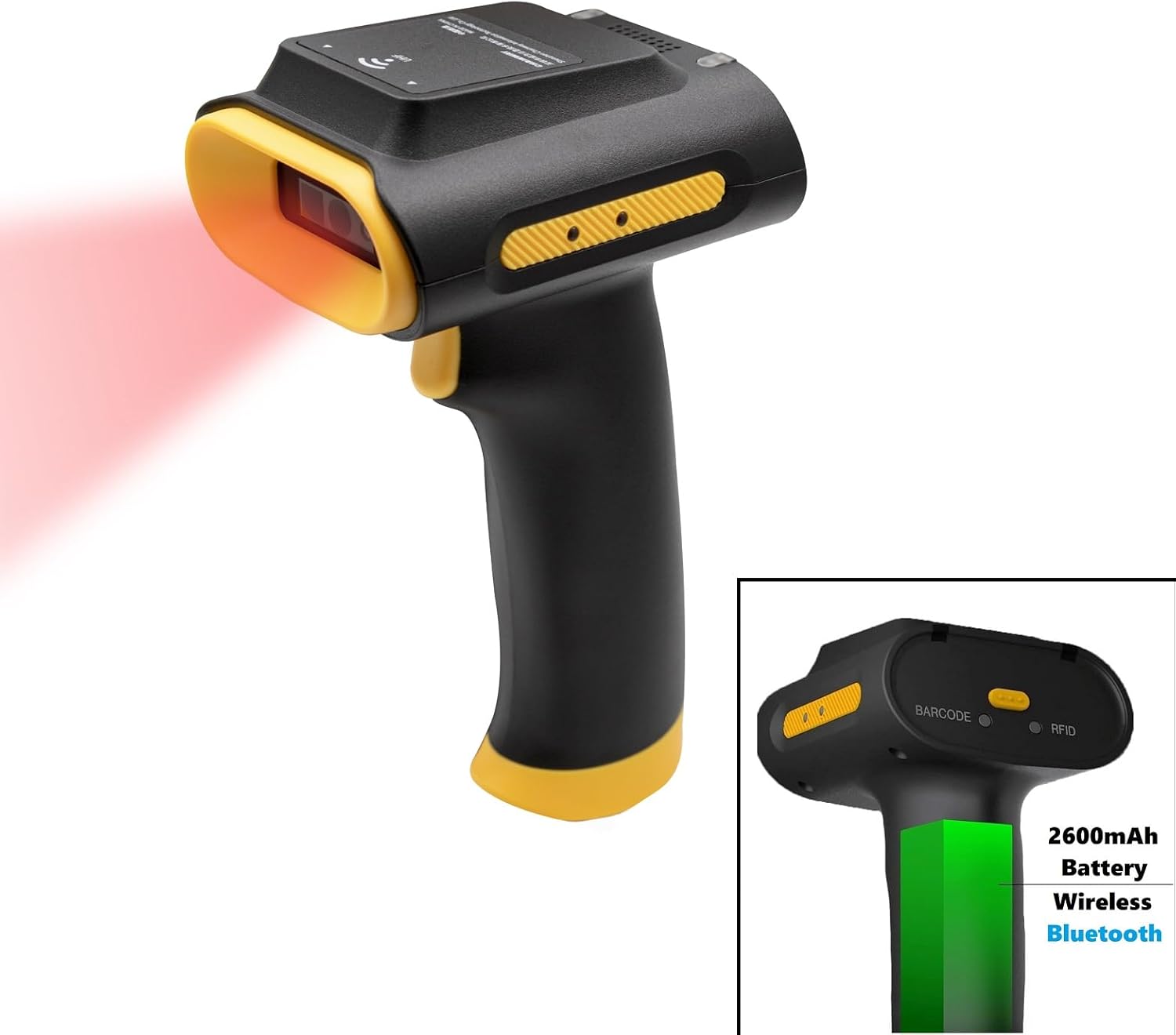
The SR160 is powered by a 2600mAh battery. Before initial use, fully charge the device using the provided USB cable and a compatible power adapter. Connect the USB cable to the device's charging port and then to the power adapter. The charging indicator will illuminate during charging and change status when fully charged.
3.3 Initial Power On
To power on the device, press and hold the power button located on the side of the scanner for a few seconds until the device activates. The device will perform a self-test and then be ready for operation.
4. Operating Modes
The Chainway SR160 offers three distinct operating modes: UHF RFID, Barcode, and Hybrid. These modes can be selected via a physical switch on the device.

An illustration of the Chainway SR160 handheld scanner, highlighting the physical switch on the device that allows users to select between 1D/2D/QR barcode scanning mode, UHF RFID mode, or a hybrid mode for combined functionality.
4.1 UHF RFID Mode
In UHF RFID mode, the SR160 functions as an RFID tag reader and writer. To activate this mode, slide the mode switch to the 'RFID' position. Point the device towards the RFID tags you wish to read or write. Press the trigger button to initiate the RFID scanning process. Data will be captured and transmitted according to your configured settings.

A hand holding the Chainway SR160 scanner, demonstrating its UHF RFID scanning capability with concentric circles indicating the wireless signal. The device is black with yellow accents.
4.2 Barcode Scanning Mode (1D/2D/QR)
To scan barcodes, set the mode switch to the 'Barcode' position. Aim the scanner's light beam at the barcode you intend to read. Ensure the entire barcode is within the scanning area. Press the trigger button to capture the barcode data. The device supports 1D, 2D, and QR codes.

A user operating the Chainway SR160 scanner, which emits a red scanning light, to read a 2D barcode on a package. A laptop is visible in the background, suggesting data integration.
4.3 Hybrid Mode
Hybrid mode allows the device to seamlessly switch between RFID and barcode scanning based on the detected item or user configuration. Consult the device's software application for specific settings and functionalities available in hybrid mode.
5. Connectivity
The Chainway SR160 offers flexible connectivity options to integrate with various host devices.
5.1 USB Corded Connection
For a direct and reliable connection, use the provided USB cable. Connect one end of the USB cable to the SR160's USB port and the other end to an available USB port on your computer or host device. The device will be recognized as a HID (Human Interface Device) or a virtual COM port, depending on the configuration.
The Chainway SR160 scanner shown with a USB cable connected, illustrating its corded operation mode. The cable is black and coiled.
5.2 Wireless Bluetooth Connection
The SR160 supports wireless communication via Bluetooth. To pair with a host device (e.g., Android Phone, iPhone, Laptop, PC, Windows 10/11, iPad, Tablet, Mac OS, iOS, Mobile Phone):
- Ensure Bluetooth is enabled on your host device.
- Put the SR160 into Bluetooth pairing mode (refer to the device's indicator lights for confirmation).
- On your host device, search for available Bluetooth devices and select 'Chainway SR160' from the list.
- Follow any on-screen prompts to complete the pairing process.

The Chainway SR160 scanner depicted in wireless mode, indicating its Bluetooth connectivity and internal 2600mAh battery. A green bar visually represents the battery level.
6. Maintenance
6.1 Cleaning
To clean the device, use a soft, damp cloth. Avoid using abrasive cleaners, solvents, or harsh chemicals, as these can damage the device's surface or internal components. Ensure the device is powered off and disconnected from any power source before cleaning.
6.2 Battery Care
To prolong battery life, avoid exposing the device to extreme temperatures. If the device will not be used for an extended period, store it with a partial charge (around 50%) and recharge it periodically to prevent deep discharge.
7. Troubleshooting
This section addresses common issues you might encounter with the Chainway SR160.
- Device not powering on:
Ensure the battery is sufficiently charged. Connect the device to a power source using the USB cable and try powering it on again. If the issue persists, the battery may need replacement or further inspection. - RFID tags not reading:
Verify that the device is in UHF RFID mode. Ensure the tags are within the 30cm read range. Check for any obstructions between the device and the tags. Ensure the RFID tags are compliant with the device's specifications. - Barcodes not scanning:
Confirm the device is in Barcode Scanning mode. Ensure the barcode is clean, undamaged, and properly illuminated. Adjust the distance and angle of the scanner to the barcode. - Bluetooth connectivity issues:
Make sure Bluetooth is enabled on both the SR160 and the host device. Ensure the devices are within Bluetooth range. Try unpairing and re-pairing the devices. Restart both the SR160 and the host device. - USB connection problems:
Try a different USB port on your host device or a different USB cable. Ensure the cable is securely connected to both the SR160 and the host device. Check if the necessary drivers are installed on your computer (if required for specific functionalities beyond HID).
8. Specifications
| Item Model Number | SR160 |
| Manufacturer | Chainway |
| Brand | BARCODE-USA |
| Connectivity Technology | USB Corded, Wireless Bluetooth, UHF RFID |
| Power Source | Battery Powered |
| Compatible Devices | Android Phone, iPhone, Laptop, PC, Windows 10/11, iPad, Tablet, Mac OS, iOS, Mobile Phone |
| UHF RFID Reader | Impinj E310 |
| Integrated RFID Antenna | Maximum Read Range: 30cm |
| Battery Capacity | 2600mAh |
| UPC | 198168472484 |
9. Warranty and Support
The Chainway SR160 is covered by a manufacturer's warranty. For specific warranty terms and conditions, please refer to the documentation included with your purchase or contact BARCODE-USA customer service. For technical support, troubleshooting assistance, or any product-related inquiries, please reach out to BARCODE-USA customer support through their official channels.
