
Tapo Tapo C425(2-pack)
User Manual: Tapo C425 Wireless Battery Security Camera
Model: Tapo C425(2-pack)
1. Introduction
Thank you for choosing the Tapo C425 Wireless Battery Security Camera. This manual provides detailed instructions for setting up, operating, maintaining, and troubleshooting your camera to ensure optimal performance and security for your home or business. The Tapo C425 offers 2K QHD resolution, intelligent AI detection, and a wide 150° viewing angle, all in a wire-free design.
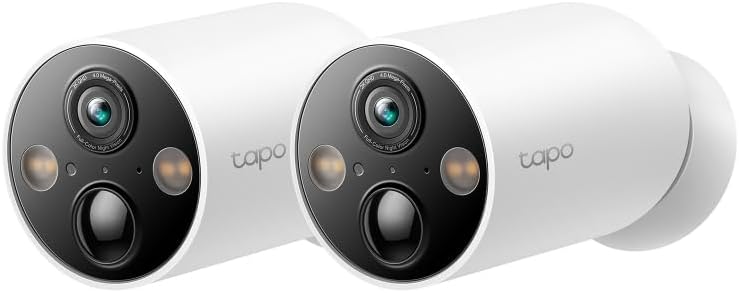
Image: Two Tapo C425 wireless security cameras, showcasing their compact, white design suitable for outdoor installation.
2. Package Contents
Please check the package carefully to ensure all items are present and in good condition. If any item is missing or damaged, please contact customer support.
- 2 x Tapo C425 Wireless Battery Security Camera
- 2 x Magnetic Base
- 2 x Mounting Template
- 2 x Mounting Screws and Anchors
- 1 x USB Charging Cable
- 1 x Quick Start Guide
3. Product Overview
Familiarize yourself with the components of your Tapo C425 camera.

Image: A detailed view of the Tapo C425 camera's front, highlighting the 2K QHD lens, full-color night vision sensors, and status LED.
Key Features:
- 2K QHD Resolution: Captures clear and detailed video footage.
- Intelligent AI Detection: Distinguishes between people, pets, and vehicles, reducing false alerts.
- 150° Wide Angle: Provides a broad field of view to cover more area.
- Color Night Vision: Built-in spotlights and starlight sensor enable full-color images even in low-light conditions.
- IP66 Weatherproof: Designed to withstand rain and dust for outdoor use.
- Long Battery Life: Up to 300 days of battery life on a single charge (based on typical usage).
- Flexible Installation: Magnetic base allows for easy mounting and adjustment.
- Local & Cloud Storage: Supports microSD card storage up to 512GB and optional cloud storage.

Image: An infographic illustrating the Tapo C425's main features, including its long battery life, AI capabilities, high resolution, and weather resistance.
4. Setup Guide
4.1 Initial Charging
Before first use, fully charge the camera using the provided USB cable. The LED indicator will show charging status.

Image: A visual representation of the Tapo C425's internal battery, emphasizing its 10000mAh capacity and up to 300 days of battery life.
4.2 Download the Tapo App
Download the Tapo app from the App Store (iOS) or Google Play Store (Android). Create a Tapo ID or log in with an existing one.
4.3 Add Your Camera
- Open the Tapo app and tap the "+" icon in the top right corner.
- Select your camera model (Tapo C425).
- Follow the in-app instructions to connect your camera to your Wi-Fi network. Ensure your Wi-Fi is 2.4 GHz.
4.4 Mounting the Camera
The Tapo C425 features a magnetic base for flexible and easy installation. Choose a suitable location, ensuring good Wi-Fi signal strength.
- Choose a Location: Select a flat, stable surface or wall for mounting. Consider the camera's 150° wide-angle view.
- Install Magnetic Base: Use the provided mounting template, screws, and anchors to securely attach the magnetic base to the desired surface.
- Attach Camera: Simply attach the camera to the magnetic base. The strong magnet will hold it in place. Adjust the camera angle as needed.

Image: The Tapo C425 camera attached to a wall via its magnetic base, demonstrating the ease of wire-free installation.
For continuous power, the Tapo C425 is compatible with Tapo solar panels (sold separately).

Image: The Tapo C425 camera connected to a compatible Tapo solar panel, illustrating how to achieve continuous power without frequent recharging.
5. Operating Your Camera
5.1 Live View
Access the live feed of your camera through the Tapo app. You can view real-time footage, take snapshots, and record video manually.
5.2 Recording & Playback
The camera supports continuous recording or event-triggered recording to a microSD card (up to 512GB, not included) or Tapo Cloud Storage (subscription required).
- MicroSD Card: Insert a formatted microSD card into the camera's slot. Configure recording settings in the Tapo app.
- Cloud Storage: Subscribe to Tapo Care for cloud video history and other advanced features.
5.3 Detection Settings
The Tapo C425 utilizes intelligent AI detection to minimize false alarms.
- Motion Detection: Set sensitivity levels and detection zones.
- Person/Vehicle/Pet Detection: Enable specific detection types to receive more relevant alerts.
- Activity Zones: Define specific areas within the camera's view where you want to detect motion.
5.4 Night Vision
The camera features advanced night vision capabilities.
- Color Night Vision: With built-in spotlights and a starlight sensor, the camera can capture full-color video even in extremely low-light conditions.
- Infrared Night Vision: For complete darkness, the camera can switch to black and white infrared mode.

Image: A side-by-side comparison demonstrating the superior clarity and detail of Color Night Vision with starlight sensor compared to traditional black and white night vision.
5.5 Two-Way Audio
Use the built-in microphone and speaker to communicate with visitors or deter intruders directly from the Tapo app.
6. Maintenance
6.1 Battery Management
To maximize battery life:
- Reduce the number of motion detections by adjusting sensitivity or activity zones.
- Limit live view streaming.
- Consider connecting a compatible Tapo solar panel for continuous charging.
6.2 Cleaning
Wipe the camera lens and body with a soft, dry cloth. Do not use liquid cleaners or abrasive materials.
6.3 Firmware Updates
Regularly check for and install firmware updates via the Tapo app. Updates provide new features, bug fixes, and security enhancements.
6.4 Weather Protection
The Tapo C425 is IP66 rated, meaning it is protected against dust ingress and powerful water jets. While robust, avoid submerging the camera in water.

Image: The Tapo C425 camera enduring a water spray, visually confirming its IP66 rating for protection against rain and dust.
7. Troubleshooting
7.1 Camera Offline
- Check Wi-Fi signal strength at the camera's location.
- Ensure the camera battery is charged.
- Restart the camera by pressing the reset button briefly.
- Restart your Wi-Fi router.
7.2 Poor Video Quality
- Clean the camera lens.
- Ensure adequate lighting for optimal image quality.
- Check your internet connection speed.

Image: A visual comparison highlighting the significant improvement in detail and clarity when viewing footage in 2K QHD resolution compared to 1080p.
7.3 False Alarms
- Adjust motion detection sensitivity in the Tapo app.
- Define or refine activity zones to exclude areas with irrelevant motion (e.g., swaying trees).
- Utilize AI detection features (person, vehicle, pet detection) to filter out unwanted alerts.
7.4 Cannot Pair Camera
- Ensure your phone is connected to a 2.4 GHz Wi-Fi network during setup.
- Move the camera closer to your router during the pairing process.
- Reset the camera to factory defaults (refer to the Quick Start Guide for specific instructions).
8. Specifications
| Feature | Detail |
|---|---|
| Model | Tapo C425(2-pack) |
| Video Resolution | 2K QHD (1920p) |
| Field of View | 150° Wide Angle |
| Wireless Connectivity | Wi-Fi (2.4 GHz) |
| Battery Life | Up to 300 days (typical usage) |
| Storage Options | MicroSD card (up to 512GB), Cloud Storage |
| Weather Resistance | IP66 |
| Dimensions (L x W x H) | 6.5 x 11.6 x 6.5 cm |
| Weight | 340 g |
| Manufacturer | TP-Link |
9. Warranty and Support
9.1 Warranty Information
Your Tapo C425 camera comes with a limited warranty from TP-Link. Please refer to the warranty card included in your package or visit the official TP-Link website for detailed warranty terms and conditions specific to your region.
9.2 Technical Support
For technical assistance, troubleshooting, or product inquiries, please contact TP-Link customer support:
- Website: Visit www.tapo.com/support/ for FAQs, user manuals, and firmware downloads.
- Phone: Check the TP-Link support page for regional contact numbers.
- Email: Submit a support ticket through the website.
When contacting support, please have your product model (Tapo C425) and serial number ready.
Related documentsTapo C425(2-pack)


Ask a question about this manual
Ask about setup, troubleshooting, compatibility, parts, safety, or missing instructions. Manuals+ will review the question and use this page’s manual context to help answer it.