
1. Introduction
This manual provides essential information for the safe and efficient operation, installation, and maintenance of your Samsung 11 kg AI Control Front Load Washing Machine (Model WW11CG604DLBTL). Please read this manual thoroughly before using the appliance and retain it for future reference.

Figure 1.1: Front view of the Samsung WW11CG604DLBTL Washing Machine, highlighting Hygiene Steam and AI Ecobubble features.
2. Safety Information
Always follow basic safety precautions when using electrical appliances to reduce the risk of fire, electric shock, and injury to persons. This appliance is intended for household use only.
2.1 General Safety Warnings
- Do not allow children to play on or in the appliance. Close supervision is necessary when the appliance is used near children.
- Ensure the power cord is not damaged. If damaged, it must be replaced by the manufacturer, its service agent, or similarly qualified persons to avoid a hazard.
- Do not install or store this appliance where it will be exposed to the weather or freezing temperatures.
- Do not wash articles that have been previously cleaned in, washed in, soaked in, or spotted with gasoline, dry-cleaning solvents, or other flammable or explosive substances.
2.2 Electrical Safety
- The appliance must be properly grounded.
- Do not use an adapter or extension cord.
- Unplug the appliance before cleaning or performing any maintenance.
3. Setup and Installation
Proper installation is crucial for the optimal performance and longevity of your washing machine. This appliance is designed for freestanding installation.
3.1 Unpacking
- Carefully remove all packaging materials.
- Remove all transit bolts from the rear of the machine. Refer to the assembly manual for detailed instructions on transit bolt removal.
- Ensure all included components are present.
3.2 Included Components
The following items are included with your washing machine:
- 1 Number Assembly Manual Book
- 1 Number Inlet Pipe
- 1 Number Spanner
- 1 Number Pipe Hanger
- 1 Number Shutter
3.3 Location and Leveling
- Place the washing machine on a firm, level surface.
- Adjust the leveling feet to ensure the machine is stable and does not wobble.
3.4 Water and Drain Connections
- Connect the inlet pipe to a cold water tap and to the water inlet valve on the back of the machine.
- Securely attach the drain hose to a standpipe or laundry tub, ensuring it is properly routed to prevent kinks.

Figure 3.1: Rear view of the washing machine, illustrating the rust-proof body, rat mesh protective, and hose connections.
3.5 Electrical Connection
- Connect the power cord to a grounded electrical outlet.
- Ensure the voltage (230 Volts) and wattage (50 Watts) requirements match your household electrical supply.
4. Operating Instructions
Your Samsung washing machine features advanced technologies for efficient and intelligent washing.
4.1 Control Panel Overview
The control panel allows you to select wash cycles, adjust settings, and monitor the washing process. It features a digital display and a remote control option.

Figure 4.1: Close-up of the washing machine's control panel, showing cycle selection and display.
4.2 Loading Laundry
- Open the front load door.
- Load clothes loosely into the drum, ensuring not to exceed the 11 kg capacity. Overloading can affect washing performance.
- Close the door firmly.

Figure 4.2: Washing machine door open, revealing the stainless steel drum interior.
4.3 Adding Detergent and Softener
- Pull out the Stay Clean Drawer.
- Add appropriate amounts of detergent and fabric softener to their respective compartments.
- Push the drawer back in until it clicks.
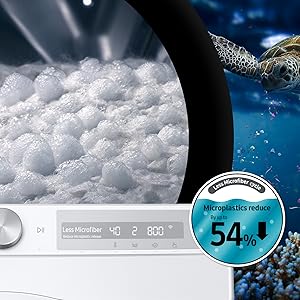
Figure 4.3: The Stay Clean Drawer designed for easy detergent and softener dispensing.
4.4 Selecting a Wash Cycle and Options
Turn the cycle selector to choose your desired wash program. Available features include:
- AI Control: Learns your washing habits and suggests optimal cycles.
- AI Eco Bubble Technology: Generates bubbles to penetrate fabrics faster, improving cleaning efficiency and reducing energy consumption.
- Hygiene Steam: Releases steam from the bottom of the drum to thoroughly saturate every item, removing ingrained dirt and 99.9% of bacteria.
- Super Speed: Completes a daily wash in approximately 59 minutes.
- Inbuilt Heater: Provides hot water for effective cleaning and hygiene.
- Wi-Fi Embedded: Connects to the SmartThings App for remote control and monitoring.
- Spin Speed: Up to 1400 RPM for efficient water extraction.
- Child Lock: Prevents accidental changes to settings during operation.

Figure 4.4: Overview of key technologies including Wi-Fi, Digital Inverter, Super Speed, AI Ecobubble, In-built Heater, and 1400 RPM spin speed.
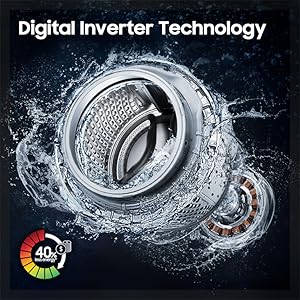
Figure 4.5: Illustration of the Hygiene Steam wash cycle, which removes 99.9% of bacteria.
4.5 SmartThings App Integration
Connect your washing machine to the Samsung SmartThings app for enhanced control and convenience:
- Cycle Suggestion: Receives recommendations for optimal wash cycles based on fabric type and soil level.
- Habits Learning: The machine learns your usage patterns for personalized recommendations.
- Laundry Planner: Schedule washes and manage your laundry tasks.
- Self Diagnoses Error: Receive notifications and troubleshooting guidance for any issues.
- Going out Mode: Remotely start or pause cycles.

Figure 4.6: SmartThings app integration for intelligent washing control and monitoring.
5. Maintenance
Regular maintenance ensures the longevity and optimal performance of your washing machine.
5.1 Cleaning the Drum
- Run a 'Drum Clean' cycle periodically to remove detergent residue and bacteria.
- Wipe the rubber door gasket after each wash to prevent mold and odor buildup.

Figure 5.1: Illustration of water jet cleaning the rubber door gasket, a key area for maintenance.
5.2 Cleaning the Detergent Drawer
- Remove the detergent drawer and rinse it under running water to clear any residue.
- Clean the drawer housing with a soft brush.
5.3 Exterior Cleaning
- Wipe the exterior of the machine with a soft, damp cloth. Do not use abrasive cleaners.
- The machine features a rust-proof body for enhanced durability.
6. Troubleshooting
If you encounter issues with your washing machine, refer to the following common troubleshooting steps. For more complex problems, consult the SmartThings app's Self Diagnoses Error feature or contact customer support.
6.1 Common Issues and Solutions
| Problem | Possible Cause | Solution |
|---|---|---|
| Machine does not start | Power cord unplugged; Door not closed properly; Child Lock activated | Check power connection; Ensure door is latched; Deactivate Child Lock |
| No water supply | Water tap closed; Inlet hose kinked or blocked | Open water tap; Straighten hose; Clean filter if blocked |
| Excessive vibration/noise | Machine not level; Transit bolts not removed; Uneven load | Adjust leveling feet; Remove transit bolts; Redistribute laundry evenly |
| Water leakage | Hose connections loose; Detergent drawer overflowing | Tighten hose connections; Do not overfill detergent drawer |
7. Specifications
Detailed technical specifications for the Samsung WW11CG604DLBTL washing machine.
| Specification | Value |
|---|---|
| Brand | Samsung |
| Model | WW11CG604DLBTL |
| Capacity | 11 Kilograms |
| Maximum Rotational Speed | 1400 RPM |
| Installation Type | Freestanding |
| Special Features | AI Eco Bubble Technology, Hygiene Steam, Inverter, Spin Speed : 1400 rpm, WiFi Embedded |
| Colour | Black Caviar |
| Control Console | Remote |
| Access Location | Front Load |
| Voltage | 230 Volts |
| Wattage | 50 Watts |
| Fuel Type | Electric |
| Certification | Energy Star |
| Item Weight | 71 kg |
| Product Dimensions (LxWxH) | 60 x 60 x 85 Centimeters |
| Country of Origin | Vietnam |
| Date First Available | 14 February 2024 |

Figure 7.1: Dimensions, energy consumption guide, and warranty details for the washing machine.
8. Warranty and Support
Your Samsung washing machine is covered by a comprehensive warranty and dedicated customer support.
8.1 Warranty Information
- Motor Warranty: 20 Years
- Comprehensive Warranty: 2 Years
Please retain your purchase receipt for warranty claims. The warranty covers manufacturing defects under normal household use.
8.2 Customer Support
For any product-related complaints or assistance, please contact Samsung customer support:
- Email: support.india@samsung.com
- Toll-Free (India): 1800 40 7267864 (1800 40 SAMSUNG)
- Alternative Toll-Free (India): 1800-57-267864
Manufacturer: Samsung Electronics HCMC CE Complex Co., Ltd. LOTI-11, D2 ROAD, SAIGON HI-TECH PARK, TANG NHON PHU B WARD, THU DUC CITY, HO CHI MINH CITY, VIETNAM, Samsung India Pvt ltd
Packer: Samsung India Electronics Pvt. Ltd. having its Registered Office at: 6th Floor, DLF Centre, Sansad Marg, New Delhi-110001
Importer: For All Product Related Complaints/assistance, Customer Care Samsung India Electronics Pvt. Ltd., 6th Floor, DLF Centre, Sansad Marg, New Delhi - 110001 Email us at: support.india@samsung.com Tel (Toll Free): 1800 40 7267864 (1800 40 SAMSUNG), Samsung India Electronics Pvt. Ltd. having its Registered Office at: 6th Floor, DLF Centre, Sansad Marg, New Delhi-110001


