Introduction
Thank you for choosing the DEVIA Smart Watch Pro 1. This manual provides essential information for setting up, operating, and maintaining your device. The Smart Watch Pro 1 combines elegant design with advanced technology, featuring a 1.43-inch AMOLED display, IP68 water resistance, and a 290mAh battery designed for extended use. Please read this manual thoroughly to ensure optimal performance and longevity of your smartwatch.
Package Contents
Upon opening the package, please verify that all items are present and in good condition.
- DEVIA Smart Watch Pro 1 (Black)
- Charging Cable
- User Manual (this document)
Product Overview
Familiarize yourself with the components of your DEVIA Smart Watch Pro 1.
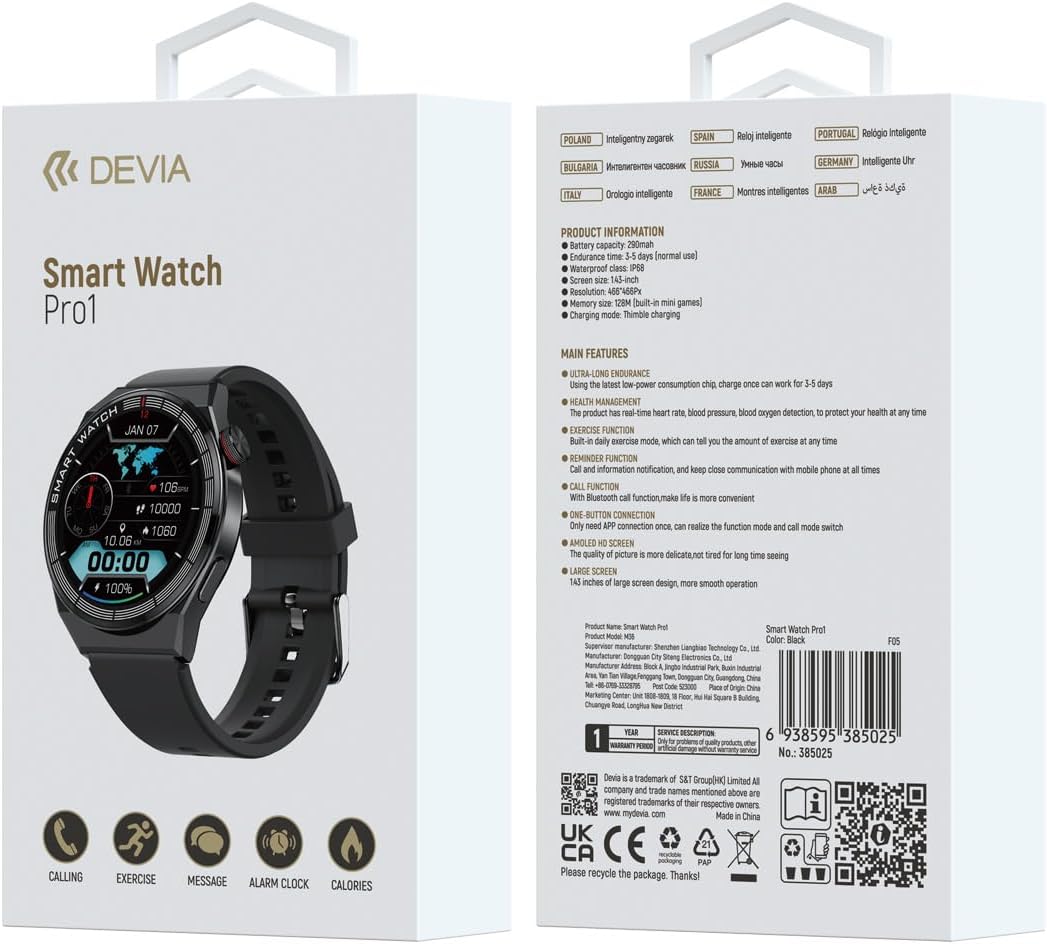
Figure 1: Front view of the DEVIA Smart Watch Pro 1 displaying various application icons on its AMOLED screen.

Figure 2: Side profile of the DEVIA Smart Watch Pro 1, highlighting its slim design and physical button.

Figure 3: Rear view of the DEVIA Smart Watch Pro 1, showing the optical health sensors for heart rate, blood pressure, and blood oxygen monitoring, along with charging contacts.
Setup
1. Charging the Smartwatch
Before initial use, fully charge your DEVIA Smart Watch Pro 1.
- Connect the charging cable to a USB power adapter (not included) or a computer's USB port.
- Align the magnetic charging pins of the cable with the charging contacts on the back of the smartwatch (refer to Figure 3). The watch will vibrate and display a charging indicator.
- Allow approximately 2-3 hours for a full charge. A full charge provides up to 7 days of normal use.
2. Power On/Off
- Power On: Press and hold the side button for a few seconds until the DEVIA logo appears on the screen.
- Power Off: From the watch face, swipe down to access quick settings, or navigate to the settings menu. Select "Power Off" or "Shutdown" and confirm. Alternatively, press and hold the side button and select "Power Off" when prompted.
3. App Installation and Pairing
To unlock the full functionality of your smartwatch, download and install the companion application on your smartphone.
- Scan the QR code provided on the product packaging or in the quick start guide to download the official DEVIA smartwatch app, or search for "DEVIA Smart Watch" in your smartphone's app store (Google Play Store for Android, Apple App Store for iOS).
- Install and open the app. Follow the on-screen instructions to create an account or log in.
- Ensure Bluetooth is enabled on your smartphone.
- In the app, navigate to "Device" or "Add Device" and select your DEVIA Smart Watch Pro 1 from the list of available devices.
- Confirm the pairing request on both your smartphone and the smartwatch. The watch supports one-button connection for simplified pairing.
Operating Instructions
1. Navigation
- Touchscreen: Swipe left, right, up, or down to navigate through menus and screens. Tap to select items.
- Side Button: Press the side button to return to the watch face, or to wake the screen. A long press may access power options or a shortcut depending on context.
2. Key Features
- Call Function: With Bluetooth connectivity, you can make and receive calls directly from your smartwatch. Ensure your watch is paired with your phone and the call function is enabled in the app.
- Health Monitoring: The watch features sensors for heart rate, blood pressure, and blood oxygen monitoring. Access these functions from the main menu. For accurate readings, ensure the watch is worn snugly on your wrist. Data is for reference and not for medical diagnosis.
- Exercise Function: Track various sports activities and daily exercise data. The watch records steps, distance, calories burned, and more. Sync with the app for detailed analysis.
- Reminder Function: Receive notifications for incoming calls, messages, and app alerts directly on your wrist. Configure notification settings within the companion app.
- AMOLED HD Screen: The 1.43-inch AMOLED display provides clear visuals and smooth operation. Adjust brightness and watch faces through the settings menu or companion app.
- Mini Games: The watch includes built-in mini-games. Access them from the app menu.
Maintenance
- Cleaning: Regularly clean your smartwatch and strap with a soft, dry, lint-free cloth. If necessary, use a slightly damp cloth and dry thoroughly. Avoid harsh chemicals or abrasive materials.
- Water Resistance (IP68): The DEVIA Smart Watch Pro 1 is IP68 rated, meaning it is resistant to dust and can withstand immersion in water up to 1.5 meters for up to 30 minutes. It is suitable for daily use, hand washing, and light rain. However, it is not recommended for hot showers, saunas, diving, or high-pressure water activities. Avoid prolonged exposure to saltwater.
- Battery Care: To prolong battery life, avoid fully discharging the watch frequently. Charge the watch when the battery level is low. Store the watch in a cool, dry place when not in use for extended periods.
- Temperature: Avoid exposing the watch to extreme temperatures (hot or cold) as this can affect battery life and overall performance.
Troubleshooting
| Problem | Possible Solution |
|---|---|
| Watch does not power on. | Ensure the watch is fully charged. Connect it to the charging cable and a power source for at least 30 minutes. |
| Cannot pair with smartphone. |
|
| Notifications are not received. |
|
| Inaccurate health data. | Ensure the watch is worn snugly on your wrist, not too loose or too tight. Clean the sensors on the back of the watch. Avoid excessive movement during measurements. Remember, data is for reference only. |
| Screen is unresponsive. | Restart the watch by pressing and holding the side button. If the issue persists, ensure the screen is clean and dry. |
Specifications
| Feature | Detail |
|---|---|
| Model Name | Pro 1 |
| Model Number | P06938595385025 |
| Display | 1.43-inch AMOLED HD Screen |
| Battery Capacity | 290mAh |
| Battery Life | Up to 7 days (normal use); 3-5 days (heavy use) |
| Waterproof Rating | IP68 |
| Connectivity | Bluetooth (for call function and app pairing) |
| Memory | 12MB (for built-in mini games) |
| Charging Type | Magnetic Thimble Charging |
| Product Dimensions | 3 x 10 x 20 cm (packaging); Watch weight: 0.02 g |
| Color | Black |
Warranty and Support
The DEVIA Smart Watch Pro 1 comes with a 1-year warranty from the date of purchase, covering manufacturing defects. This warranty does not cover damage caused by misuse, accidents, unauthorized modifications, or normal wear and tear.
For technical support, warranty claims, or further assistance, please contact DEVIA customer service through the official website or the contact information provided in your purchase documentation.
You can also visit the official DEVIA store on Amazon for more information: DEVIA Mexico Store.
For product authenticity verification and additional information, you may visit: guide4goods.com and use the UPC: 6938595385025.