
1. Product Overview
The Skechers Hinsdale Ana-Digi Watch (Model: SR1162) is a versatile timepiece designed for men, featuring both analog and digital displays. It combines a robust design with practical functionalities, including water resistance up to 100 meters. This manual provides detailed instructions for setting up, operating, maintaining, and troubleshooting your watch.

Figure 1.1: Front view of the Skechers Hinsdale Ana-Digi Watch, showcasing its black polyurethane strap, large case, and combined analog and digital display.
2. Initial Setup
2.1 Unboxing and Inspection
Upon receiving your Skechers Hinsdale watch, carefully remove it from its packaging. Inspect the watch for any signs of damage. Ensure all protective films are removed from the watch face and case back.

Figure 2.1: The Skechers watch box, indicating the product's original packaging.
2.2 Wearing the Watch
Adjust the polyurethane strap to fit comfortably around your wrist. The buckle closure ensures a secure fit. Avoid overtightening the strap, which can restrict circulation.
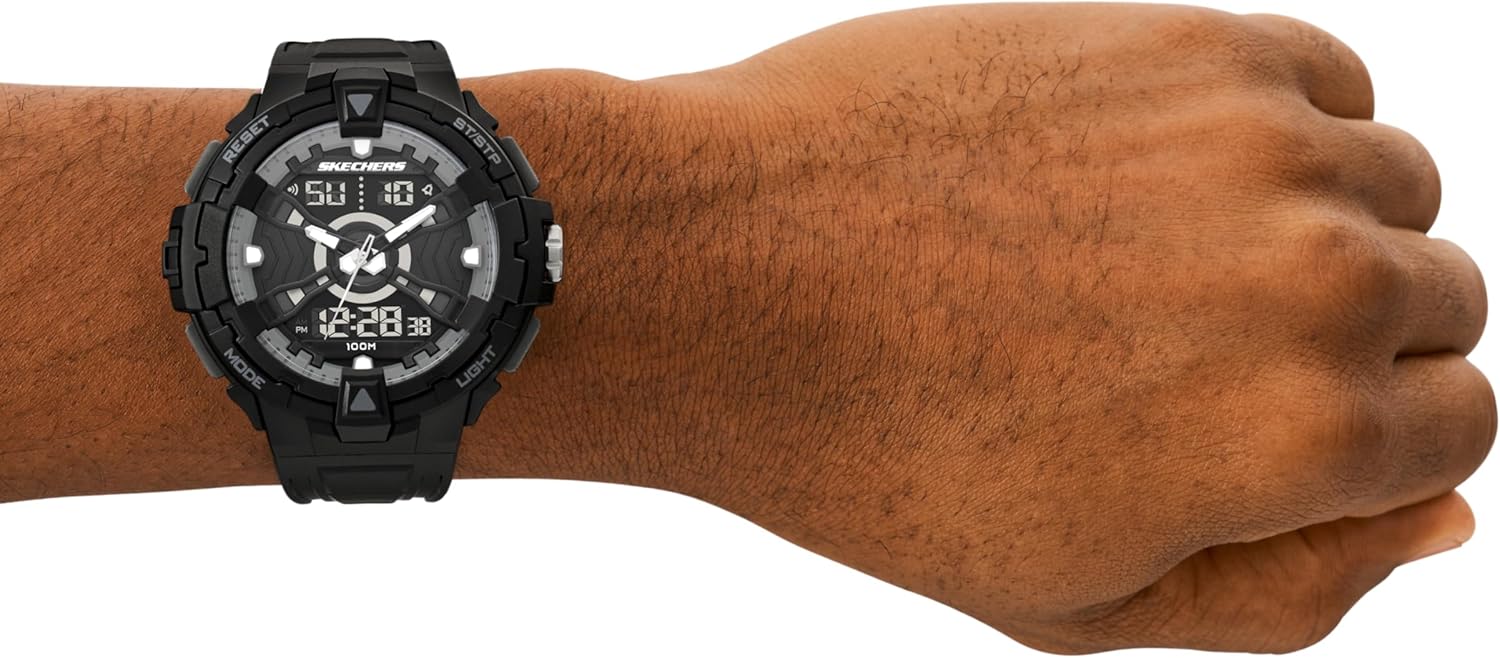
Figure 2.2: The Skechers Hinsdale watch worn on a wrist, demonstrating its size and fit.
3. Operating Your Watch
The Skechers Hinsdale watch features multiple buttons for various functions. Familiarize yourself with their locations and purposes.

Figure 3.1: Side view of the Skechers Hinsdale watch, highlighting the "ST/STP" (Start/Stop) and "LIGHT" buttons on the right side, and "RESET" and "MODE" buttons on the left side. The crown for analog time adjustment is also visible.
3.1 Button Functions
- MODE Button (Bottom Left): Cycles through different digital display modes (e.g., Time, Date, Alarm, Stopwatch).
- RESET Button (Top Left): Used for resetting the stopwatch or adjusting settings in various modes.
- ST/STP Button (Top Right): Starts and stops the stopwatch function. Also used for setting adjustments.
- LIGHT Button (Bottom Right): Illuminates the digital display for visibility in low-light conditions.
- Crown (Right Side, Center): Used to set the analog time. Pull out to adjust, push in to set.
3.2 Setting the Analog Time
- Pull the crown (the knob on the right side of the watch) outwards until it clicks.
- Rotate the crown to move the analog hour and minute hands to the desired time.
- Once the time is set, push the crown back in to secure the setting and start the analog movement.
3.3 Setting the Digital Time and Date
- Press the MODE button repeatedly until the digital display shows the time setting mode (often indicated by flashing digits).
- Use the RESET button to select the digit you wish to adjust (e.g., hours, minutes, year, month, day).
- Use the ST/STP button to increase the selected digit. Hold to rapidly advance.
- Repeat steps 2 and 3 until all desired time and date components are set.
- Press the MODE button again to exit the setting mode.
3.4 Using the Stopwatch
- Press the MODE button until the digital display shows the stopwatch function (usually "00:00:00").
- Press the ST/STP button to start the stopwatch.
- Press the ST/STP button again to pause the stopwatch.
- Press the RESET button to reset the stopwatch to zero.
3.5 Using the Light
Press the LIGHT button (bottom right) to illuminate the digital display. The light will typically stay on for a few seconds.
3.6 Water Resistance
The Skechers Hinsdale watch is water resistant up to 100 meters (10 ATM). This means it is suitable for bathing, swimming, snorkeling, and shallow diving. Important: Do not operate any buttons or the crown while the watch is submerged in water, as this can compromise the water resistance seal.
4. Care and Maintenance
4.1 Cleaning Your Watch
To maintain the appearance of your watch, wipe the case and strap regularly with a soft, damp cloth. For stubborn dirt on the polyurethane strap, a mild soap solution can be used, followed by rinsing with clean water and thorough drying. Avoid using harsh chemicals or abrasive materials.

Figure 4.1: Rear view of the Skechers Hinsdale watch, showing the stainless steel case back and the buckle mechanism of the polyurethane strap. Regular cleaning of these areas is recommended.
4.2 Battery Replacement
The watch is powered by a battery. When the display dims or the watch stops functioning, it may be time for a battery replacement. It is recommended to have the battery replaced by a qualified watch technician to ensure the water resistance seal is properly maintained.
4.3 Storage
When not in use, store your watch in a cool, dry place away from direct sunlight and extreme temperatures. Keeping it in its original box or a watch case can help protect it from dust and scratches.
5. Troubleshooting
| Problem | Possible Cause | Solution |
|---|---|---|
| Digital display is blank or dim. | Low battery. | Replace the battery. |
| Analog hands are not moving. | Crown is pulled out; low battery. | Push the crown in; replace the battery. |
| Digital time is incorrect. | Time not set correctly. | Refer to Section 3.3 to reset the digital time. |
| Water inside the watch. | Buttons operated underwater; seal compromised. | Immediately take the watch to a qualified technician for inspection and repair. Do not attempt to dry it yourself. |
If the problem persists after attempting these solutions, please contact customer support.
6. Product Specifications
- Model Number: SR1162
- Case Diameter: 48mm
- Band Width: 26mm
- Case Material: Polycarbonate
- Band Material: Polyurethane
- Crystal Type: Mineral Crystal
- Display Type: Ana-Digi (Analog and Digital)
- Movement: Digital
- Water Resistance: 100 meters (10 ATM) - Suitable for bathing, swimming, snorkeling, and shallow diving.
- Dial: Negative display
- Manufacturer: Skechers
- Package Dimensions: 10.1 x 8.3 x 7.4 cm
- Item Weight: 190 g

Figure 6.1: Generic watch case size guide, illustrating various watch diameters to help understand the 48mm case size of the Hinsdale model.
7. Warranty and Support
7.1 Warranty Information
Skechers watches typically come with a limited warranty covering manufacturing defects. Please refer to the warranty card included with your purchase for specific terms, conditions, and duration of the warranty. Keep your proof of purchase for warranty claims.
7.2 Customer Support
For technical assistance, warranty claims, or any other inquiries regarding your Skechers Hinsdale watch, please contact Skechers customer support through their official website or the contact information provided in your product packaging. When contacting support, please have your model number (SR1162) and proof of purchase ready.
You can find more information and support resources on the official Skechers website: www.skechers.com


