
Introduction
Welcome to the user manual for your new Braun CareStyle 5 IS5247VI Steam Iron System. This manual provides essential information for the safe and efficient operation, maintenance, and troubleshooting of your appliance. Please read it thoroughly before first use and keep it for future reference.
Important Safety Instructions
Always follow basic safety precautions when using electrical appliances to reduce the risk of fire, electric shock, and injury.
- Read all instructions before use.
- Do not leave the iron unattended while it is connected or on an ironing board.
- Do not immerse the iron or base in water or other liquids.
- Keep out of reach of children.
- Use the iron only for its intended purpose.
- Unplug the iron from the electrical outlet when filling with water or emptying, and when not in use.
- Do not operate the iron with a damaged cord or if the iron has been dropped or damaged.
- Place the iron on a stable, level surface.
- The soleplate can become extremely hot and cause burns. Do not touch hot surfaces.
Product Overview
The Braun CareStyle 5 IS5247VI is a powerful steam iron system designed for efficient and professional ironing results. It features innovative PowerSteam technology, a FreeGlide 3D soleplate, and an iCare mode for fabric protection.
Components
- Steam Iron Unit
- Water Tank (2L removable)
- Base Unit with Control Panel
- Steam Hose
- Power Cord
Key Features
- PowerSteam Technology: Up to 500 g/min steam shot for stubborn creases.
- FreeGlide 3D Soleplate: Curved soleplate for 360-degree gliding over obstacles like buttons and pockets.
- iCare Mode: Smart temperature setting safe for all fabrics.
- Vertical Steam: For curtains and hanging garments.
- Ergonomic Design: Certified 4-star Ergocert handle for comfortable use.
- Fast Heat-up: Quick readiness for ironing.
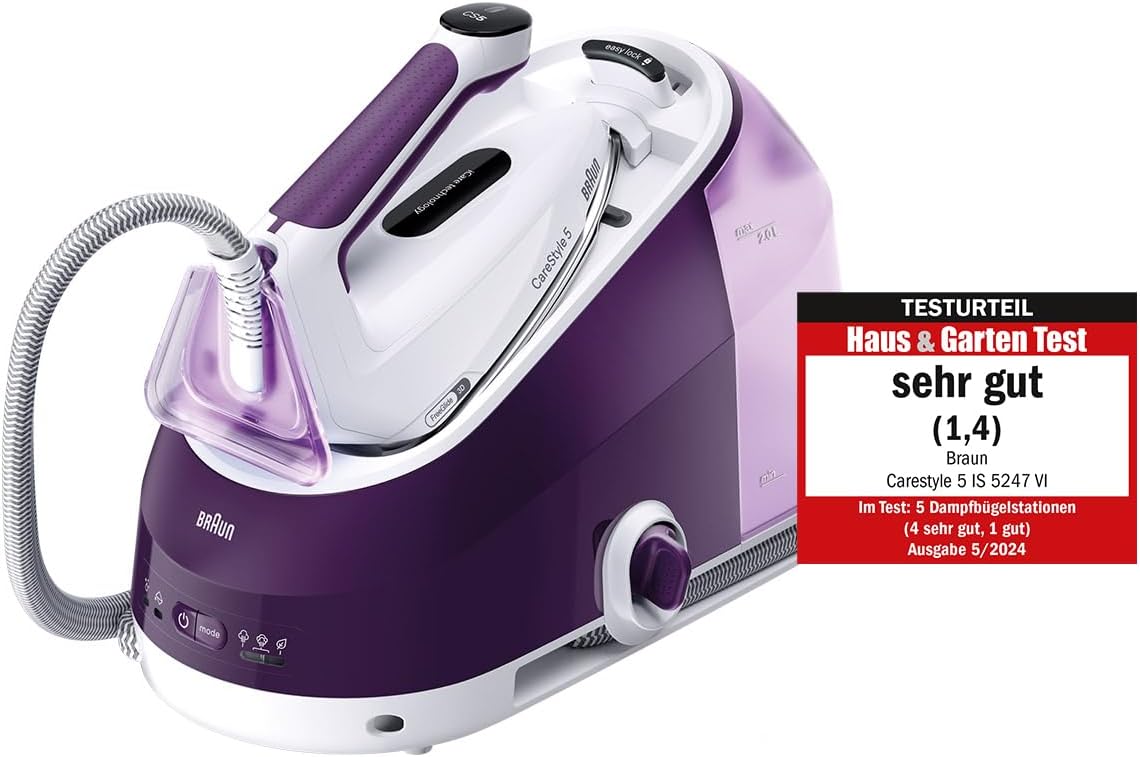
Image: The Braun CareStyle 5 IS5247VI Steam Iron System, showcasing its purple and white design with the base unit and iron. A "Haus & Garten Test" seal indicates a "very good" rating.

Image: Another view of the Braun CareStyle 5 IS5247VI Steam Iron System, highlighting its compact design and the "Haus & Garten Test" seal.
Setup
Unpacking
Carefully remove all components from the packaging. Retain the packaging for storage or future transport.
Water Tank Filling
- Ensure the appliance is unplugged from the power outlet.
- Remove the 2-liter water tank from the base unit.
- Fill the tank with tap water up to the "max" indicator. Distilled or demineralized water is recommended to prolong the life of the appliance, especially in areas with hard water. Do not use perfumed water or additives.
- Reinsert the water tank securely into the base unit.

Image: A close-up view of the Braun CareStyle 5 IS5247VI's removable 2-liter water tank, showing its capacity and ease of access for refilling.
Initial Setup
- Place the base unit on a stable, heat-resistant surface.
- Connect the steam iron unit to the base unit via the steam hose.
- Plug the power cord into a suitable grounded electrical outlet (240V).
- Press the power button to turn on the appliance. The iron will begin to heat up.
Operating Instructions
Powering On and Heating
Once plugged in and powered on, the iron will heat up quickly. The indicator light will stop flashing when the iron is ready for use.
Selecting Ironing Mode (iCare Technology)
The Smart iCare mode automatically sets a safe temperature for all types of fabrics, eliminating the need for manual temperature adjustments.
- iCare Mode: Default setting, safe for all ironable fabrics.
- Eco Mode: For delicate fabrics or energy saving, reduces steam output.
- Turbo Mode: For maximum steam performance on stubborn creases.

Image: Diagram illustrating the iCare Technology settings: Vertical Steam, Turbo Setting (Maximum Steam Performance), iCare Setting (Safe Temperature for all Textiles), and Eco Setting (For delicate fabrics).
Ironing Techniques
Dry Ironing
For dry ironing, ensure the steam button is not pressed. The iron will function as a traditional dry iron.
Steam Ironing
Press and hold the steam button on the iron handle to release continuous steam. For an extra burst of steam, press the steam shot button (if available on your model).
Vertical Steaming
The powerful continuous steam allows for vertical ironing of hanging garments or curtains. Hold the iron a few centimeters away from the fabric and press the steam button.

Image: A person ironing a striped fabric with the Braun CareStyle 5 IS5247VI, demonstrating the PowerSteam Technology for professional ironing results.
FreeGlide 3D Soleplate
The unique FreeGlide 3D soleplate, curved upwards, allows for 360-degree gliding over any obstacles like buttons, pockets, and zippers, making ironing effortless in all directions.

Image: A close-up view of the Braun CareStyle 5 IS5247VI's FreeGlide 3D soleplate, illustrating its ability to glide smoothly over buttons and other fabric details.
Maintenance and Cleaning
Descaling System
The appliance features a fast and efficient descaling system to ensure lasting performance. Refer to the indicator light for descaling alerts.
- Ensure the iron is unplugged and cooled down.
- Place a container under the descaling valve (usually located on the side or back of the base unit).
- Open the descaling valve and allow the water and scale to drain out.
- Close the valve securely.
- For detailed descaling instructions, consult the full manual or Braun's official website.
Cleaning the Soleplate
To clean the soleplate, use a damp cloth and a non-abrasive liquid cleaner. Do not use abrasive pads or harsh chemicals as they can damage the soleplate.
Storing the Appliance
After use, allow the iron to cool completely. Empty any remaining water from the tank. Secure the iron to the base unit using the "easy-lock" system (if available). Store the appliance in a dry, safe place.
Troubleshooting
| Problem | Possible Cause | Solution |
|---|---|---|
| No steam produced. | Water tank empty; iron not hot enough; steam button not pressed. | Fill water tank; wait for iron to heat up; press steam button. |
| Water leaking from soleplate. | Temperature too low for steam; overfilled water tank. | Increase temperature setting; do not overfill water tank. |
| Iron not heating up. | Not plugged in; power button not pressed; faulty outlet. | Check power connection; press power button; try a different outlet. |
| Scale residue on clothes. | Appliance needs descaling. | Perform descaling procedure as per maintenance section. |
If the problem persists after attempting these solutions, please contact Braun customer support.
Specifications
- Model: IS5247VI
- Power: 2400 Watts
- Voltage: 240 Volts
- Steam Pressure: 7.5 bar
- Continuous Steam Output: 145 g/min
- Steam Shot: 500 g/min
- Water Tank Capacity: 2 Liters (removable)
- Product Dimensions (L x W x H): 38 x 22 x 0.1 cm
- Item Weight: 4.3 Kilograms
- Color: Purple
- Special Features: FreeGlide 3D Technology, Fast Heating, iCare Mode

Image: Visual representation of key specifications for the Braun CareStyle 5 IS5247VI, including 2400W power, 145 g/min continuous steam, 7.5 bar / 500 g/min steam shot, and 1.8m cable length.

Image: Diagram showing the approximate dimensions of the Braun CareStyle 5 IS5247VI: 38.0 cm length, 22.0 cm width, and heights of 29.0 cm (iron unit) / 24.5 cm (base unit).
Warranty and Support
Braun offers a 5-year warranty for this product. This includes an additional 3 years beyond the legal warranty. Please refer to Braunhousehold.com for full terms and conditions and to register your product.
For customer support, technical assistance, or spare parts availability, please visit the official Braun website or contact their authorized service centers.
Spare Parts Availability: 2 Years (as per product specifications).