Important Safety Information
Please read all instructions carefully before using the appliances. Keep this manual for future reference.
- Always ensure the power supply matches the appliance's requirements.
- Do not immerse the appliance body, cord, or plug in water or other liquids.
- Keep out of reach of children.
- Do not operate if the power cord or plug is damaged.
- Place appliances on a stable, level, heat-resistant surface.
- Ensure adequate ventilation around the appliances during operation.
Product Overview
This manual covers the operation of the IRIS OHYAMA RC-MGA30 Rice Cooker and the IRIS OHYAMA PMG-T179 Microwave Oven, provided as a set.

Image: IRIS OHYAMA Rice Cooker (RC-MGA30) and Microwave Oven (PMG-T179) set. The rice cooker is on the left, and the microwave is on the right.
IRIS OHYAMA RC-MGA30 Rice Cooker

Image: The IRIS OHYAMA RC-MGA30 rice cooker, shown in various colors to highlight its compact and modern design. The product included in this set is white.
1. Setup
- Unpacking: Carefully remove the rice cooker and all accessories from the packaging.
- Initial Cleaning: Wash the inner pot, inner lid, measuring cup, and rice paddle with warm soapy water. Rinse thoroughly and dry completely before first use.
- Placement: Place the rice cooker on a stable, level, and heat-resistant surface, away from direct sunlight or heat sources. Ensure there is adequate space around the unit for ventilation.
2. Operating Instructions
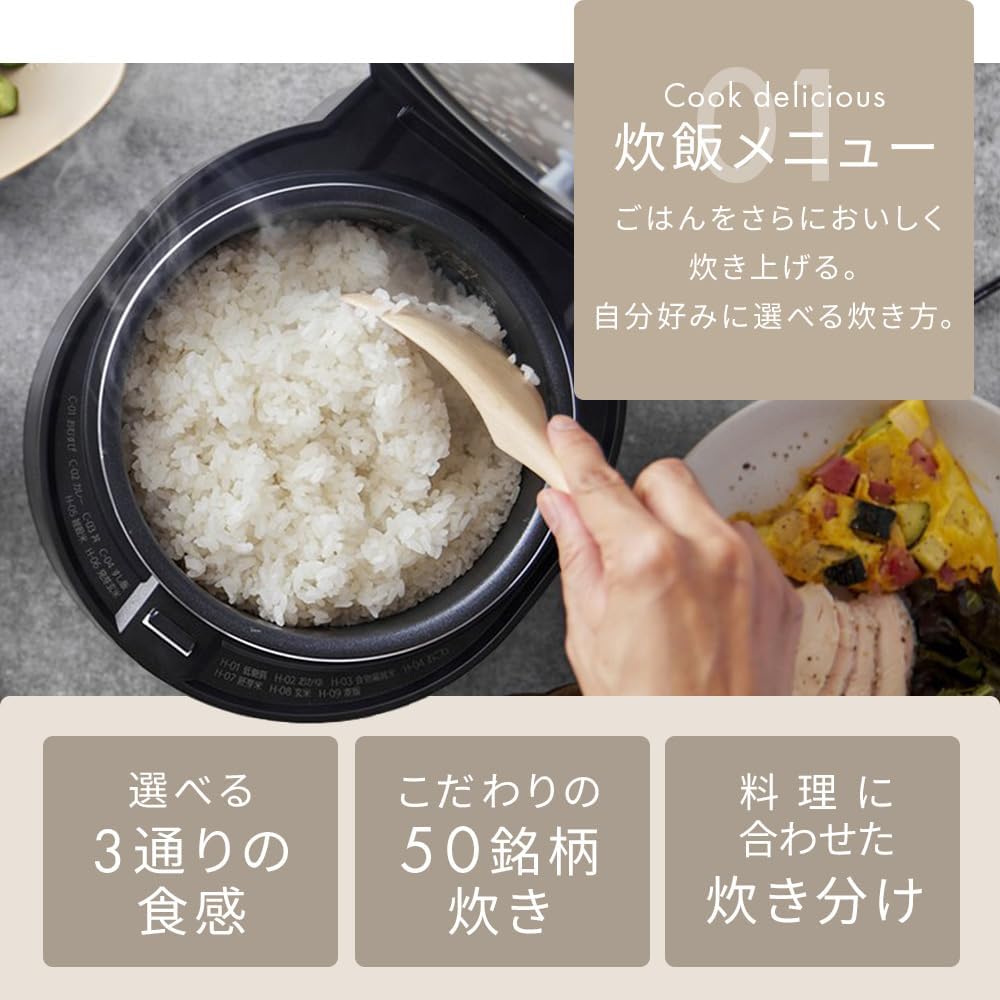
Image: Close-up of the IRIS OHYAMA RC-MGA30 rice cooker's inner pot with cooked rice, illustrating various cooking menu options and texture choices.
- Measure Rice: Use the provided measuring cup to measure the desired amount of rice. Rinse the rice thoroughly until the water runs clear.
- Add Water: Place the rinsed rice into the inner pot. Add water according to the water level markings inside the pot, corresponding to the amount of rice and desired rice type (e.g., white rice, brown rice).
- Select Cooking Menu: Close the lid securely. Use the control panel to select the desired cooking menu. Options include:
- White Rice: Standard cooking for white rice.
- Brown Rice: Optimized for brown rice.
- Sticky Rice: For a chewier texture.
- Healthy Menus: Includes options for various healthy grains.
- 50 Brand Cooking: Specific settings for different rice brands to optimize taste.
- Texture Selection: Depending on the menu, you may be able to select from 3 different texture options (e.g., firm, regular, soft).
- Start Cooking: Press the 'Start' button to begin the cooking process. The display will show the remaining cooking time.
- Keep Warm: After cooking is complete, the rice cooker will automatically switch to 'Keep Warm' mode.
Automatic Menu Functions

Image: Various dishes prepared using the IRIS OHYAMA RC-MGA30 rice cooker's automatic menu functions, demonstrating its versatility beyond just rice.
The RC-MGA30 rice cooker includes automatic menu settings for various dishes beyond rice, such as stews, cakes, and other recipes. Refer to the recipe book or manufacturer's website for detailed instructions on using these functions.
3. Maintenance
- Inner Pot: After each use, wash the inner pot with a soft sponge and mild dish soap. Do not use abrasive cleaners or metal scrubbers.
- Inner Lid: Remove the inner lid and wash it thoroughly. Ensure all food residue is removed.
- Exterior: Wipe the exterior of the rice cooker with a damp cloth. Do not use harsh chemicals.
- Storage: Ensure all parts are dry before reassembling and storing the rice cooker.
4. Troubleshooting
| Problem | Possible Cause | Solution |
|---|
| Rice is undercooked/hard | Insufficient water; incorrect cooking mode; old rice. | Add correct amount of water; select appropriate cooking mode; use fresh rice. |
| Rice is mushy/sticky | Too much water; incorrect cooking mode. | Reduce water amount; select appropriate cooking mode. |
| Rice cooker does not turn on | Power cord not plugged in; power outage. | Check power connection; verify power supply. |
5. Specifications (RC-MGA30)
- Model: RC-MGA30
- Capacity: 3-go (approx. 0.54 liters)
- Type: Mycom Rice Cooker
- Power Source: Corded Electric
- Features: 50 brand cooking functions, healthy menus (brown rice, sticky rice), 3 texture selections, thick inner pot.
IRIS OHYAMA PMG-T179 Microwave Oven

Image: The IRIS OHYAMA PMG-T179 microwave oven, showcasing its simple design, 17L capacity, and 600W maximum output.
1. Setup
- Unpacking: Carefully remove the microwave oven and all accessories from the packaging.
- Placement: Place the microwave oven on a stable, level, and heat-resistant surface. Ensure there is at least 10 cm of space on the back and sides, and 20 cm above the unit for proper ventilation. Do not block ventilation openings.
- Turntable Installation: Place the roller ring in the center of the microwave oven cavity. Place the glass turntable plate on top of the roller ring, ensuring it sits securely.
- Power Connection: Plug the power cord into a grounded electrical outlet.
2. Operating Instructions
One-Touch Reheating

Image: Close-up of the IRIS OHYAMA PMG-T179 microwave oven's control panel, detailing the one-touch reheating and finish adjustment functions.
This function allows for quick reheating of common items.
- Place food in a microwave-safe container inside the oven.
- Press the corresponding one-touch button for 'Drinks', 'Rice', or 'Automatic Cooking'. The microwave will automatically set the heating time.
- Finish Adjustment: After selecting a one-touch option, you can adjust the heating strength (Weak/Strong) to fine-tune the result.
Manual Menu (Power and Time Setting)

Image: Illustration of the manual menu options of the IRIS OHYAMA PMG-T179 microwave oven, including different power levels for cooking and defrosting.
For precise control over cooking, use the manual settings.
- Place food in a microwave-safe container inside the oven.
- Select Power Level: Choose from three power levels:
- 600W: Suitable for general cooking and reheating of side dishes or drinks.
- 500W: Ideal for bento boxes or frozen foods.
- 200W: Used for defrosting.
- Set Time: Use the timer buttons to set the desired cooking duration. The timer can be set up to 15 minutes in 10-second increments.
- Start Cooking: Press the 'Start' button.
Defrosting
The defrost function allows you to thaw frozen foods by weight.
- Place frozen food in a microwave-safe container.
- Select the 'Defrost' function.
- Set the weight of the food from 100g to 500g in 10g increments.
- Press 'Start'.
3. Maintenance
- Interior: After each use, wipe the interior with a damp cloth and mild detergent. For stubborn stains, use a microwave-safe cleaner.
- Turntable: Remove the glass turntable and roller ring. Wash them with warm soapy water, rinse, and dry thoroughly.
- Exterior: Wipe the exterior surfaces with a soft, damp cloth. Do not use abrasive cleaners.
- Door Seal: Regularly clean the door seal and adjacent parts to ensure proper closure.
4. Troubleshooting
| Problem | Possible Cause | Solution |
|---|
| Microwave does not heat | Door not closed properly; power outage; incorrect settings. | Ensure door is latched; check power supply; verify cooking settings. |
| Turntable does not rotate | Turntable not correctly placed; roller ring obstructed. | Re-position turntable and roller ring; clear any obstructions. |
| Unusual noise during operation | Food container touching cavity walls; turntable not centered. | Ensure proper placement of food and turntable. |
5. Specifications (PMG-T179)
- Model: PMG-T179
- Capacity: 17 Liters
- Maximum Output: 600W (Note: 50Hz regions may have a maximum output of 500W)
- Frequency: Hertz-free (Nationwide compatible)
- Type: Turntable Microwave Oven
- Power Source: Corded Electric
- Timer: Up to 15 minutes (in 10-second increments)
Warranty and Support
For warranty information, product registration, or technical support, please refer to the documentation included with your purchase or visit the official IRIS OHYAMA website. Contact details for customer service can typically be found on the manufacturer's website or on the product packaging.


