
1. Introduction
This manual provides essential information for the safe and effective installation, operation, and maintenance of your Generic MPA-V645-SMM Infinite Switch. This infinite switch is designed as a compatible replacement for Robertshaw - Wells MPA-V645-SMM models, providing variable heat control for various appliances. Please read this manual thoroughly before installation or use.
2. Safety Information
WARNING: Electrical shock hazard. Improper installation or use can result in serious injury or death.
- Always disconnect power to the appliance at the circuit breaker or fuse box before attempting any installation, maintenance, or repair.
- Installation should only be performed by a qualified electrician or appliance service technician.
- Ensure the replacement switch matches the specifications (voltage, current) of the original switch and the appliance. This switch is rated for 15A, 240VAC.
- Verify all wiring connections are secure and correct before restoring power.
- Do not operate the switch if it appears damaged or has been exposed to moisture.
3. Product Overview
The MPA-V645-SMM is an infinite switch, also known as a simmerstat, designed to provide continuous variable control over heating elements in appliances such as ovens, cooktops, or griddles. It features a rotary shaft for manual adjustment and multiple terminals for electrical connections.
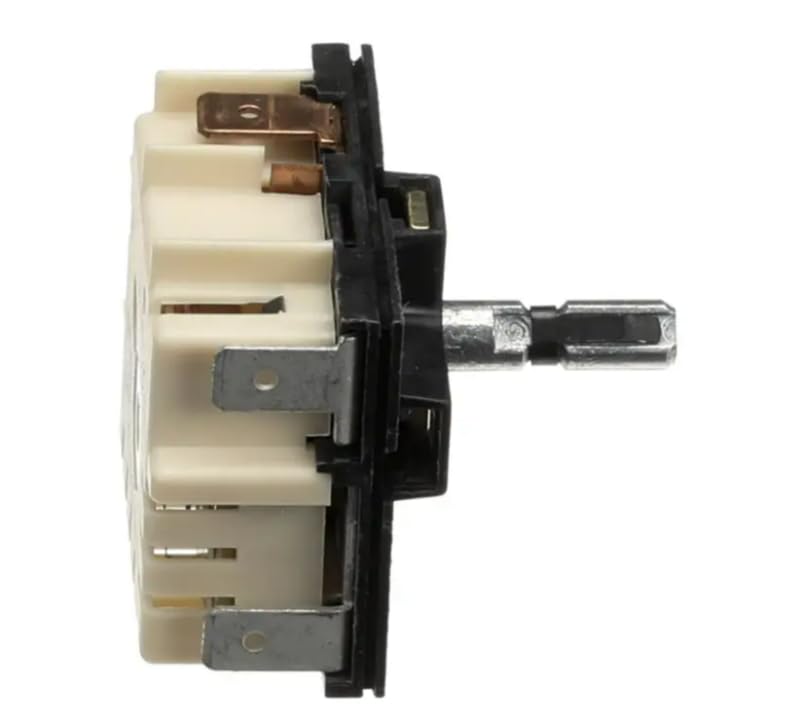
Figure 3.1: Side view of the MPA-V645-SMM Infinite Switch, showing the main body, electrical terminals, and the control shaft for knob attachment.
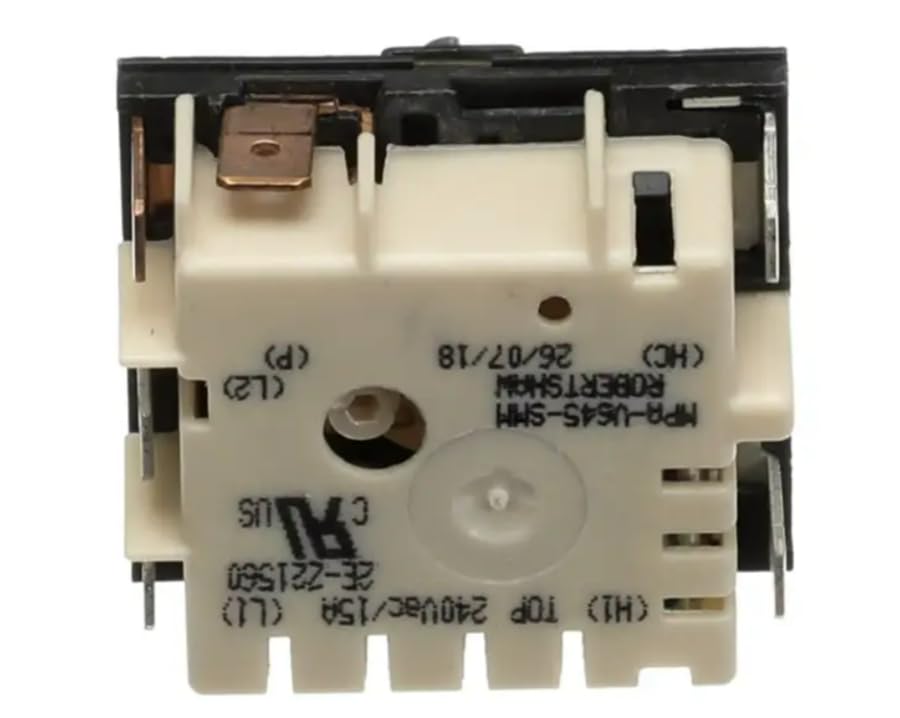
Figure 3.2: Rear view of the MPA-V645-SMM Infinite Switch, clearly displaying the terminal connections (L1, L2, H1, HC, P) and product identification markings.
Key Components:
- Control Shaft: The part where the control knob attaches, allowing for manual adjustment.
- Terminal Connections: Labeled points for electrical wiring (e.g., L1, L2 for line voltage, H1, HC for heating elements, P for pilot light/indicator).
- Mounting Tabs: Used to secure the switch within the appliance control panel.
4. Setup and Installation
This section outlines the general procedure for replacing an infinite switch. Always refer to your appliance's specific service manual for detailed instructions.
Installation Steps:
- Disconnect Power: Crucially, turn off the power supply to the appliance at the main circuit breaker or fuse box. Verify power is off using a voltage tester.
- Access the Switch: Depending on your appliance, you may need to remove control knobs, a control panel, or other components to gain access to the existing infinite switch.
- Document Wiring: Before disconnecting any wires, take clear photos or draw a diagram of the existing wiring connections to each terminal on the old switch. Note the color and position of each wire.
- Disconnect Old Switch: Carefully disconnect all wires from the old switch. Remove any mounting screws or clips holding the old switch in place.
- Install New Switch: Position the new MPA-V645-SMM switch in the same location as the old one. Secure it using the original mounting hardware.
- Connect Wiring: Refer to your documented wiring diagram and connect each wire to the corresponding terminal on the new switch. Ensure connections are tight and secure. The terminals are typically labeled (e.g., L1, L2, H1, HC, P).
- Reassemble Appliance: Reattach any control panels, knobs, or other components that were removed.
- Restore Power: Turn the power supply back on at the circuit breaker.
- Test Operation: Test the switch to ensure it functions correctly and provides variable heat control.
5. Operating Instructions
The MPA-V645-SMM infinite switch operates manually to control the power supplied to a heating element, allowing for a range of heat settings from low to high.
Basic Operation:
- Ensure the appliance is connected to a power source.
- Attach the appropriate control knob (not included with the switch) to the control shaft of the infinite switch.
- Rotate the knob clockwise to increase the heat setting and counter-clockwise to decrease it. The switch provides a continuous range of power output, not discrete steps.
- Turn the knob to the 'OFF' position (usually fully counter-clockwise) to completely shut off power to the heating element.
6. Maintenance
The MPA-V645-SMM infinite switch is designed for durability and typically requires minimal maintenance. Regular inspection can help ensure its longevity and safe operation.
Maintenance Tips:
- Periodic Inspection: Annually, or if issues arise, disconnect power and visually inspect the switch and its wiring connections for any signs of wear, corrosion, or loose terminals.
- Cleaning: If the switch or surrounding area becomes dusty or dirty, disconnect power and gently clean with a dry, soft cloth. Do not use liquid cleaners directly on the switch.
- Knob Condition: Ensure the control knob is securely attached to the shaft and is not cracked or damaged, as this can affect proper operation.
7. Troubleshooting
If you experience issues with your appliance's heating element after installing the infinite switch, consider the following troubleshooting steps. Always disconnect power before inspecting internal components.
Common Issues and Solutions:
- No Heat or Element Not Turning On:
- Check if the appliance has power (circuit breaker tripped, fuse blown).
- Verify all wiring connections to the switch are secure and correctly matched to the terminals.
- Inspect the heating element itself for damage or breaks.
- Element Only Heats on High or Low, No Variable Control:
- This often indicates a faulty infinite switch. The internal mechanism responsible for variable control may be damaged.
- Ensure the control knob is properly seated and not slipping on the shaft.
- Switch Feels Loose or Stiff:
- Check mounting hardware to ensure the switch is securely fastened.
- If the shaft is stiff, it may indicate internal damage to the switch.
If troubleshooting does not resolve the issue, it is recommended to consult a qualified appliance service technician.
8. Specifications
| Specification | Detail |
|---|---|
| Model Number | MPA-V645-SMM |
| Operating Voltage | 240 Volts AC |
| Current Rating | 15 Amperes |
| Operation Mode | Manual |
| Actuator Type | Push Button (Rotary Shaft) |
| Circuit Type | Multi-way |
| Connector Type | Molex |
| International Protection Rating | IP30 |
| Number of Positions | 1 (Continuous Variable) |
| Manufacturer | Fits Robertshaw - Wells |
| Brand | Generic |
9. Warranty Information
Specific warranty details for this Generic replacement part are typically provided by the seller at the time of purchase. Please retain your proof of purchase and contact the retailer or seller directly for information regarding warranty coverage, terms, and conditions.
10. Support
For technical assistance, installation questions, or troubleshooting beyond the scope of this manual, please contact the seller or a qualified appliance service technician. Always provide the model number (MPA-V645-SMM) when seeking support.


