1. Product Overview
The Generic Wireless Bluetooth Headphones AH-806 are designed to provide a high-fidelity audio experience with the convenience of wireless connectivity. Featuring a foldable design for portability and a built-in microphone for calls, these headphones are suitable for various uses including gaming, music, and sports.
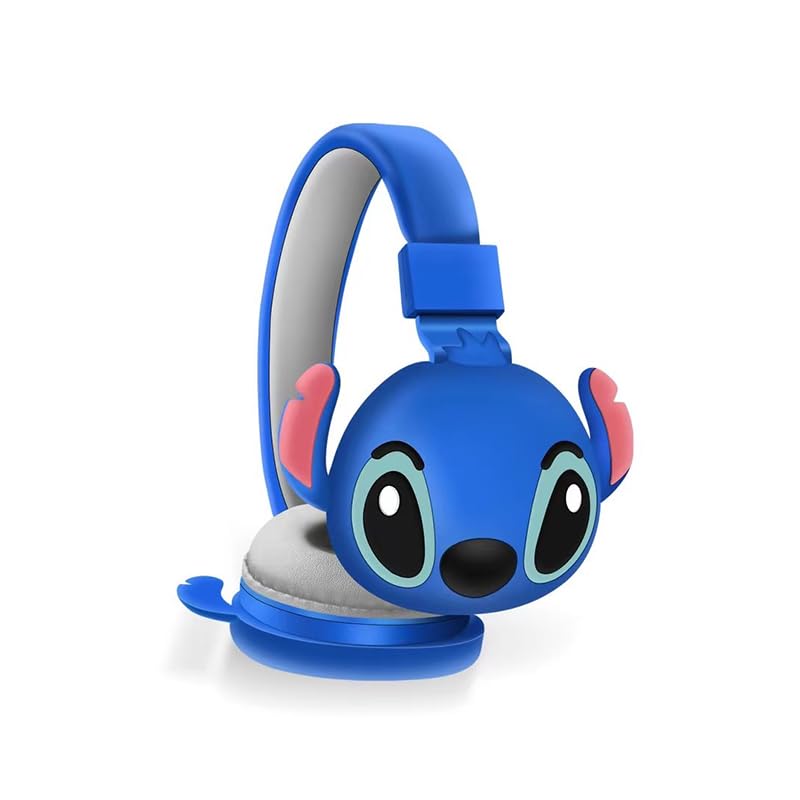
Image 1.1: Front view of the AH-806 Wireless Bluetooth Headphones, featuring a blue color and a Stitch character design on the earcups.
Key Features:
- Folding Design: Conveniently folds for easy portability and storage in bags or suitcases, making it an ideal companion for travel.
- HIFI Stereo Sound: Equipped with a 13mm driver diameter for high-fidelity stereo sound, suitable for various audio content.
- Built-in Microphone: Enables hands-free calling and communication.
- Passive Noise Cancellation: Oversize earcups provide passive noise reduction for an immersive listening experience.
- Versatile Use: Designed for video games, general audio listening, HiFi audio, and sports activities.
2. Package Contents
Please check the box for the following items:
- 1 x Wireless Bluetooth Headphones AH-806
- 1 x User Manual (this document)
- 1 x Charging Cover
- 1 x USB Type-C Adapter

Image 2.1: Packaging of the AH-806 Headphones, illustrating the product and its accessories.
3. Setup Guide
3.1. Charging the Headphones
- Locate the USB Type-C charging port on the headphones.
- Connect the provided USB Type-C adapter to the charging port.
- Plug the other end of the USB cable into a compatible USB power source (e.g., computer USB port, wall adapter).
- The LED indicator on the headphones will illuminate to show charging status. It will typically turn off or change color once fully charged.
Note: For optimal battery life, fully charge the headphones before first use.
3.2. Bluetooth Pairing
- Ensure the headphones are fully charged.
- Power On: Press and hold the Power button on the headphones until the LED indicator flashes, indicating pairing mode.
- Activate Bluetooth: On your device (smartphone, tablet, laptop), go to the Bluetooth settings and ensure Bluetooth is turned on.
- Search for Devices: Your device will scan for available Bluetooth devices. Look for "AH-806" or a similar name in the list.
- Connect: Select "AH-806" from the list to initiate the connection. Once connected, the LED indicator on the headphones may change to a solid light or flash slowly.
- You are now ready to use your headphones.
If prompted for a password, enter "0000" (four zeros).
4. Operating Instructions
4.1. Power On/Off
- Power On: Press and hold the Power button for approximately 3 seconds until the LED indicator lights up.
- Power Off: Press and hold the Power button for approximately 5 seconds until the LED indicator turns off.
4.2. Music Playback
- Play/Pause: Press the Multi-function button (often the Power button or a dedicated Play/Pause button) once.
- Next Track: Press and hold the Volume Up button or a dedicated Next Track button.
- Previous Track: Press and hold the Volume Down button or a dedicated Previous Track button.
- Volume Up: Short press the Volume Up button.
- Volume Down: Short press the Volume Down button.
4.3. Call Management
- Answer/End Call: Press the Multi-function button once during an incoming call to answer, and once again to end the call.
- Reject Call: Press and hold the Multi-function button for approximately 2 seconds during an incoming call to reject it.
- Redial Last Number: Double-press the Multi-function button.
4.4. Folding Design
The headphones feature a foldable design for enhanced portability. Gently fold the earcups inwards towards the headband until they are compact. This reduces the overall size of the headphones, making them easier to store and carry.
5. Maintenance and Care
- Cleaning: Use a soft, dry, lint-free cloth to clean the headphones. Do not use abrasive cleaners, alcohol, or chemical solvents, as these may damage the surface.
- Storage: When not in use, store the headphones in a cool, dry place, away from direct sunlight and extreme temperatures. Utilize the folding feature to save space.
- Avoid Water: These headphones are not waterproof. Avoid exposure to water, moisture, or excessive humidity.
- Handle with Care: Do not drop, disassemble, or attempt to repair the headphones yourself. This may void the warranty and cause damage.
6. Troubleshooting
| Problem | Possible Solution |
|---|---|
| Headphones do not power on. | Ensure the headphones are fully charged. Connect them to a power source using the provided USB Type-C adapter. |
| Cannot pair with Bluetooth device. |
|
| No sound or low volume. |
|
| Sound is distorted or intermittent. |
|
7. Specifications
| Feature | Detail |
|---|---|
| Model Name | AH-806 |
| Connectivity Technology | Wireless |
| Wireless Communication Technology | Bluetooth |
| Material | Plastic, Fabric |
| Specific Uses For Product | Gaming, Music, Sport |
| Compatible Devices | Smartphones, Tablets, Laptops, Desktops, Gaming Consoles |
| Cable Feature | Without Cable |
| Control Method | Remote |
| Number of Items | 1 |
| Audio Driver Type | Dynamic Driver (13mm) |
| Earpiece Shape | Over Ear |
| Manufacturer | MOPIKI |
| Special Features | Noise Cancellation (Passive) |
| Color | r.blue |
| Ear Placement | Over Ear |
| Form Factor | Over Ear |
8. Warranty and Support
This product is manufactured by MOPIKI. For specific warranty information, please refer to the documentation provided at the time of purchase or contact your retailer.
For technical support or inquiries, please contact the retailer or manufacturer directly. Keep your purchase receipt as proof of purchase.
Note: As per the provided product information, specific warranty details are not available in this manual.


