
1. Introduction
This manual provides detailed instructions for the installation, operation, and maintenance of your Hilitand MPPT Solar Controller. This intelligent regulator is designed to optimize power generation from solar panels and efficiently charge various battery types in 12V or 24V automatic systems. Please read this manual thoroughly before use to ensure proper function and longevity of the device.
Product Features:
- Maximum Power Point Tracking (MPPT): Detects real-time power generation of solar panels and tracks the highest voltage current value (V1) for maximum power charging.
- Versatile Battery Compatibility: Supports colloidal, sealed, open, and lithium batteries.
- Comprehensive Protection: Includes high input terminal voltage, short circuit, overpower, backcharge, TVS thunder, and overtemperature protection.
- Efficient Heat Dissipation: Features a dual fan system to manage charging power and ensure stable operation.
- User-Friendly LCD Display: Shows operating status, parameters, and control settings for easy monitoring and modification.
- Dual USB Port: Provides 5V 3A output for charging external devices.
2. Safety Information
Always observe the following safety precautions to prevent personal injury and damage to the controller or other components:
- Ensure all wiring is correctly connected before powering on the system. Incorrect wiring can cause damage.
- Do not attempt to disassemble or repair the controller yourself. Refer to qualified personnel for service.
- Install the controller in a well-ventilated area, away from flammable materials and direct sunlight.
- Wear appropriate personal protective equipment (PPE) when working with electrical systems.
- Ensure the battery voltage matches the system voltage (12V or 24V) before connection.
3. Product Overview and Components
The Hilitand MPPT Solar Controller is designed for robust performance in off-grid photovoltaic systems. Below is an overview of its physical characteristics and included components.

Figure 3.1: Front view of the Hilitand MPPT Solar Controller, showing the LCD screen and control buttons.

Figure 3.2: Dimensions of the Hilitand MPPT Solar Controller, measuring approximately 135 x 135 x 54mm.
Package Contents:
- 1 x MPPT Solar Controller
- 4 x Installation Screws
- 4 x Wall Plugs
- 1 x User Manual (this document)
4. Setup and Installation
Follow these steps for proper installation of your MPPT Solar Controller.
4.1 Mounting the Controller
Mount the controller in a dry, well-ventilated indoor location. Ensure there is sufficient space around the unit for heat dissipation. The controller features mounting holes for secure wall installation.

Figure 4.1: Example of controller installation, highlighting the dual USB interface.
4.2 Wiring Connections
Connect the components in the following order to prevent damage:
- Connect the Battery: Connect the battery to the controller's battery terminals. Ensure correct polarity (+ to + and - to -). The LCD display should light up.
- Connect the Solar Panel: Connect the solar panel to the controller's solar panel terminals. Ensure correct polarity. The controller will begin charging the battery.
- Connect the Load (Optional): Connect your DC load to the controller's load terminals. Ensure correct polarity.
Important: Always connect the battery first, then the solar panel, and finally the load. Disconnect in the reverse order: load, then solar panel, then battery.

Figure 4.2: System connection diagram illustrating the wiring order for solar panel, battery, and DC load.

Figure 4.3: Comprehensive system diagram showing the MPPT solar charging controller integrated into a larger solar power system with AC output.
5. Operating Instructions
The controller features an LCD display and control buttons for easy operation and monitoring.
5.1 LCD Display and Buttons
The LCD screen displays real-time system status, including battery voltage, charging current, load current, and various parameters. The buttons (SET, UP, DOWN, ESC) allow you to navigate menus and adjust settings.
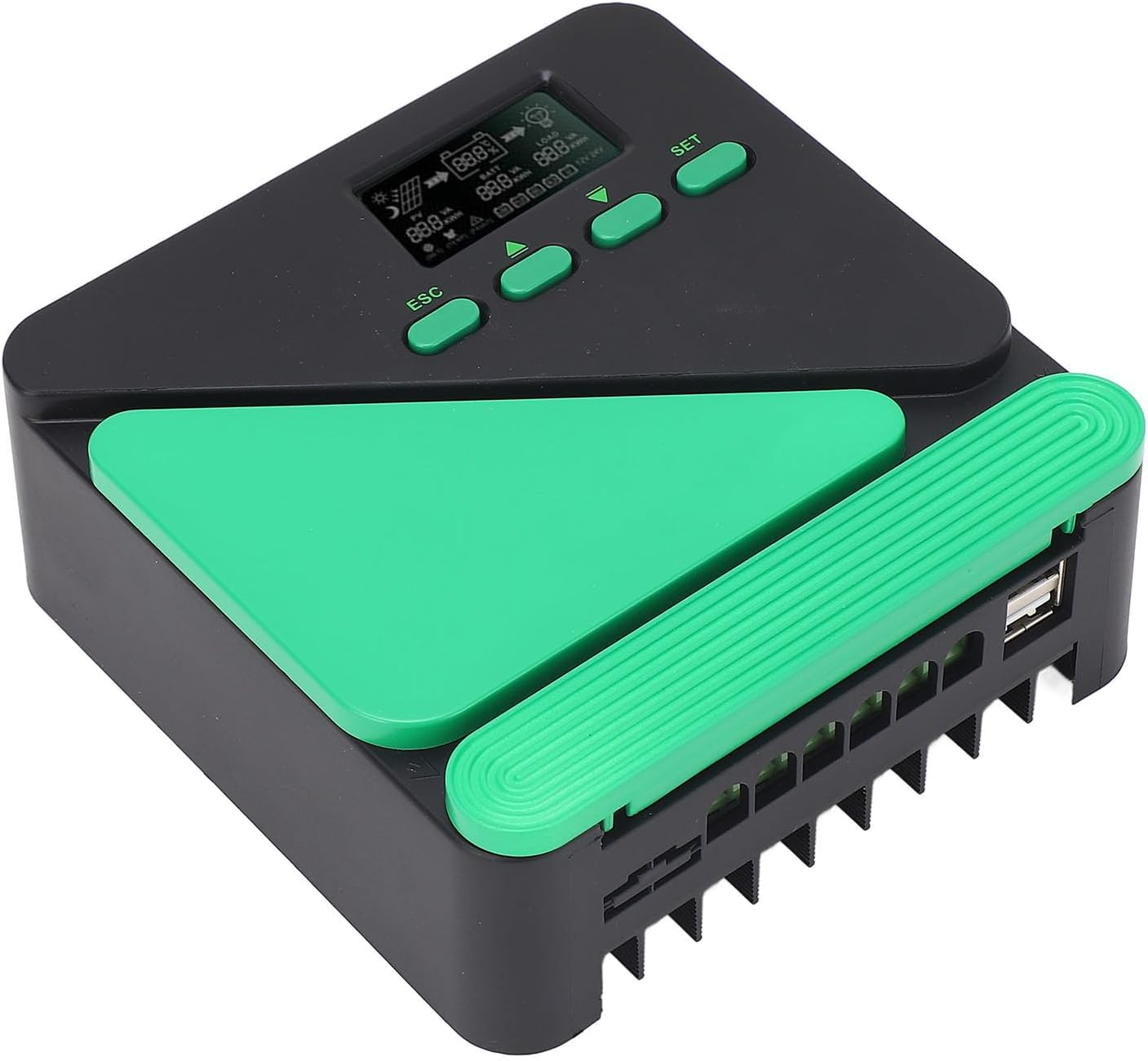
Figure 5.1: Close-up of the LCD display and control buttons (SET, UP, DOWN, ESC).
5.2 Parameter Settings
Press the SET button to enter the parameter setting menu. Use the UP and DOWN buttons to navigate through different parameters (e.g., battery type, load control mode). Press SET again to confirm a selection or enter edit mode. Use UP/DOWN to change values, then SET to save. Press ESC to exit the menu without saving changes.
5.3 USB Output
The controller is equipped with dual 5V 3A USB ports. These ports can be used to charge compatible electronic devices directly from the controller.
6. Maintenance
Regular maintenance ensures optimal performance and extends the lifespan of your solar controller.
6.1 Cleaning
Periodically clean the controller's exterior with a dry cloth. Do not use liquid cleaners or solvents. Ensure ventilation openings are free from dust and debris.
6.2 Heat Dissipation
The controller features a dual fan system for efficient heat dissipation. Ensure that the fans are not obstructed and operate correctly. If the controller consistently runs hot, verify proper ventilation and ensure the solar panel power does not exceed the controller's rated current for extended periods.

Figure 6.1: The controller's dual fan system for enhanced heat dissipation.

Figure 6.2: Bottom view of the controller, revealing the heat sink fins for cooling.
6.3 Connection Checks
Periodically inspect all wiring connections for tightness and corrosion. Loose or corroded connections can lead to power loss or system malfunction.
7. Troubleshooting
This section outlines common issues and their potential solutions.
7.1 Protection Functions
The controller incorporates several protection mechanisms to safeguard the system:
- Input Power Limit Protection: Prevents damage if solar panel power exceeds the controller's rated capacity.
- High Photovoltaic Input Terminal Voltage Protection: Protects against excessive voltage from solar panels.
- Short Circuit Protection: Automatically disconnects in case of a short circuit in the photovoltaic input or load.
- Photovoltaic Input Reverse Protection: Prevents damage from incorrect solar panel polarity.
- Load Overpower Protection: Disconnects the load if its power consumption exceeds the controller's limit.
- Load Short Circuit Protection: Disconnects the load in case of a short circuit.
- Night Prevent Backcharge Protection: Prevents battery discharge back into the solar panels at night.
- TVS Thunder Protection: Provides protection against lightning surges.
- Overtemperature Protection: Reduces charging power or shuts down if the internal temperature becomes too high.

Figure 7.1: Overview of the controller's comprehensive protection functions.
7.2 Common Issues
| Problem | Possible Cause | Solution |
|---|---|---|
| LCD display is off | Battery not connected or low voltage | Check battery connections and voltage. Ensure battery is charged. |
| Battery not charging | Solar panel not connected, insufficient sunlight, or reverse polarity | Check solar panel connections and polarity. Ensure adequate sunlight. |
| Load not working | Load not connected, overload protection active, or short circuit | Check load connections. Reduce load. Check for short circuits. |
| Controller is hot | Poor ventilation or excessive solar input | Ensure proper airflow around the controller. Verify solar panel wattage is within limits. |
8. Specifications
| Parameter | Value |
|---|---|
| System Voltage | 12V / 24V AUTO |
| No Load Loss | ≤0.4W |
| Maximum Solar Input Voltage | 50V VOC |
| Battery Voltage Range | 9~32V |
| Maximum Power Point Voltage Range | Battery voltage +2V to 50V |
| USB Output | 5V 3A (Dual Port) |
| Conversion Efficiency | ≤98% |
| MPPT Tracking Efficiency | >99% |
| Temperature Compensation Coefficient | -2mv/℃/2V (default) |
| Operating Temperature | -10℃ to +65℃ |
| Protection Level | IP21 |
| Electromagnetic Compatibility | EN61000, EN55022, EN55024 |
| Altitude | ≤3000 meters |
| Dimensions (LxWxH) | Approx. 135 x 135 x 54mm / 5.31 x 5.31 x 2.13in |
| Model Number | Hilitandt1sged9y2q-12 |
9. Warranty and Support
9.1 Manufacturer Warranty
This Hilitand MPPT Solar Controller comes with a manufacturer warranty for 90 days from the date of purchase. This warranty covers defects in materials and workmanship under normal use. It does not cover damage caused by improper installation, misuse, accidents, or unauthorized modifications.
9.2 Technical Support
For technical assistance, troubleshooting beyond this manual, or warranty claims, please contact your retailer or visit the official Hilitand website for support information.