
1. Introduction
This manual provides comprehensive instructions for the Kalobee GW9 MAX Smart Watch, featuring a 2.06-inch AMOLED display and wireless charging capabilities. It covers setup, operation, maintenance, and troubleshooting to ensure optimal use of your device. Please read this manual carefully before using your smartwatch.
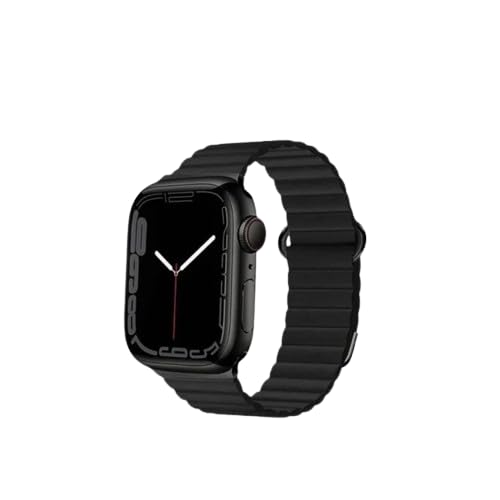
Image 1: Kalobee GW9 MAX Smart Watch
2. What's in the Box
Verify that all items are present in your product packaging:
- Kalobee GW9 MAX Smart Watch
- 2X Straps (one pre-attached, one spare)
- Wireless Charging Cable
- User Manual (this document)
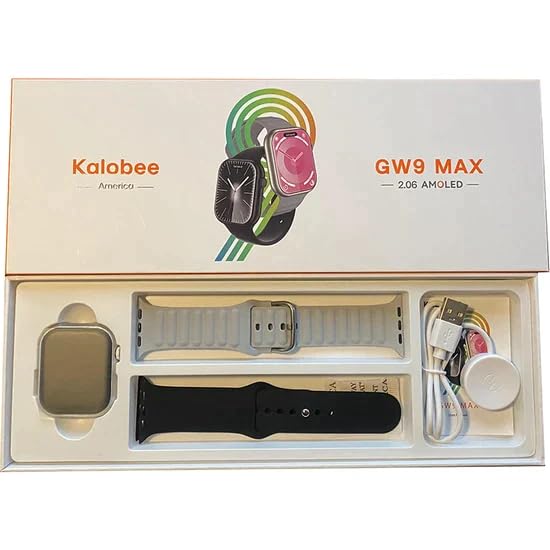
Image 2: Box Contents of Kalobee GW9 MAX Smart Watch
3. Setup
3.1 Charging the Smart Watch
Before first use, fully charge your GW9 MAX Smart Watch using the provided wireless charging cable. Connect the USB end of the cable to a compatible power adapter (not included) or a computer USB port. Place the watch on the charging pad, ensuring proper alignment. The watch display will indicate the charging status. A full charge typically takes approximately 2 hours.
3.2 Pairing with Your Smartphone
To unlock the full functionality of your smartwatch, pair it with your smartphone:
- Ensure your smartphone's Bluetooth is enabled.
- Download the companion application for the Kalobee GW9 MAX (refer to the watch screen or included quick start guide for app name/QR code).
- Open the application on your smartphone and follow the on-screen instructions to create an account or log in.
- Within the app, navigate to the device pairing section and select your GW9 MAX from the list of available devices.
- Confirm the pairing request on both your watch and smartphone.
The GW9 MAX is compatible with Android 4.4 and above, and iOS 10.0 or above.
4. Operating Instructions
4.1 Basic Navigation
The GW9 MAX features a touch screen and a side button/crown for navigation. Swipe gestures allow you to access different menus, notifications, and quick settings. Press the side button to return to the home screen or access the app menu.
4.2 Communication Features
- Bluetooth Call: Once paired, you can make and receive calls directly from your watch. Access the call log and dial pad through the phone icon on the watch.
- Notifications: Receive real-time notifications for calls, messages, and app alerts from your paired smartphone. Manage notification settings via the companion app.
4.3 Health and Fitness Tracking
- Heart Rate Monitoring: The watch continuously monitors your heart rate. View your current heart rate on the watch or detailed historical data in the app.
- Sleep Tracking: Automatically tracks your sleep patterns, including deep sleep, light sleep, and wake times.
- Multi-sport Mode: Select from various sports modes (e.g., walking, running, cycling) to track specific workout data such as steps, distance, calories burned, and duration.
- Breathing Training: Follow guided breathing exercises to help reduce stress and improve relaxation.
4.4 Utility and Smart Features
- Remote Photo Taking: Control your smartphone's camera remotely from your watch.
- Remote Music Control: Play, pause, skip tracks, and adjust volume for music playing on your paired phone.
- Voice Assistant: Access your phone's voice assistant directly from the watch.
- Find Phone: Use this feature to make your paired smartphone ring, helping you locate it.
- Password Protection: Set a password for your watch to protect your data and privacy.
- Other Tools: Access built-in stopwatch, calculator, alarm clock, flashlight, and voice recorder.
- Weather: View current weather conditions and forecasts (requires internet connection on paired phone).
5. Specifications
- Model: GW9 MAX
- Screen Size: 2.06 Inches
- Display Type: AMOLED
- Case Diameter: 47 mm
- Compatible System: Android 4.4 and above, iOS 10.0 and above
- Wireless Type: Bluetooth
- Special Features: Wireless Charging, Bluetooth Call, Heart Rate, Sleep Tracking, Multi-sport Mode, Voice Assistant, Password Protection
- Item Weight: 242 g
- Package Dimensions: 28 x 10 x 2 cm
6. Maintenance
6.1 Cleaning
Regularly clean your smartwatch to ensure optimal performance and hygiene. Wipe the watch screen and body with a soft, lint-free cloth. For the straps, use a damp cloth and mild soap if necessary, then dry thoroughly. Avoid using harsh chemicals, abrasive materials, or strong detergents, as these can damage the watch's finish or components.
6.2 Water Resistance
The Kalobee GW9 MAX Smart Watch is designed for daily wear and is resistant to splashes and sweat. However, it is not waterproof. Avoid submerging the watch in water, wearing it while swimming or showering, or exposing it to high-pressure water jets. Damage due to water immersion is not covered under warranty.
6.3 Storage
When not in use for extended periods, store the watch in a cool, dry place away from direct sunlight and extreme temperatures. Ensure the watch has some charge to prevent battery degradation.
7. Troubleshooting
7.1 Watch Not Turning On or Charging
- Ensure the wireless charging cable is properly connected to a working power source (e.g., USB wall adapter, computer USB port).
- Verify that the watch is correctly placed on the charging pad and aligned for wireless charging.
- Try using a different USB port or power adapter.
- If the watch has been completely discharged, it may take a few minutes for the charging indicator to appear.
7.2 Unable to Pair with Smartphone
- Confirm that Bluetooth is enabled on both your GW9 MAX Smart Watch and your smartphone.
- Ensure the companion application is installed and open on your smartphone.
- Move the watch closer to your smartphone to ensure they are within Bluetooth range.
- Try restarting both your watch and smartphone, then attempt the pairing process again.
- If previously paired, try unpairing the device from your phone's Bluetooth settings and then re-pairing.
7.3 Notifications Not Appearing
- Check that your watch is successfully paired and connected to your smartphone via Bluetooth.
- Verify notification permissions for the companion app in your smartphone's settings. Ensure the app has access to notifications.
- Check the notification settings within the companion app itself to ensure desired apps are enabled for watch notifications.
- Ensure 'Do Not Disturb' mode is not active on either your watch or smartphone.
7.4 Inaccurate Health Data Readings
- Ensure the watch is worn snugly on your wrist, not too tight or too loose. It should be about one finger's width above your wrist bone.
- Clean the sensor area on the back of the watch regularly to remove dirt or debris that might interfere with readings.
- Avoid excessive movement during readings, especially for heart rate.
8. Warranty and Support
The Kalobee GW9 MAX Smart Watch comes with a 3-month warranty from the date of purchase. This warranty covers manufacturing defects under normal use. It does not cover damage caused by misuse, accidents, unauthorized modifications, or failure to follow the instructions in this manual.
For warranty claims, technical support, or any inquiries regarding your product, please contact your original retailer or the manufacturer's customer service. Please have your proof of purchase and product model number (GW9 MAX) ready when contacting support.
