
1. Introduction
Thank you for choosing the Kenwood MultiPro OneTouch FDM73.480SS Food Processor. This appliance is designed to simplify your food preparation tasks with its powerful 1000W motor, integrated EasyWeigh scale, and versatile accessories. This manual provides essential information for safe operation, proper assembly, effective use, and maintenance of your food processor. Please read these instructions thoroughly before first use and retain them for future reference.
2. Important Safety Instructions
- Always ensure the appliance is switched off and unplugged from the power outlet before assembling, disassembling, or cleaning.
- Keep hands and utensils away from moving blades and discs during operation to prevent injury.
- Do not process hot liquids in the blender or main bowl as they may cause scalding. Allow hot ingredients to cool before processing.
- Never operate the appliance with a damaged cord or plug, or if it has been dropped or damaged in any way. Contact customer service for repair.
- This appliance is not intended for use by persons with reduced physical, sensory, or mental capabilities, or lack of experience and knowledge, unless they have been given supervision or instruction concerning use of the appliance by a person responsible for their safety.
- Children should be supervised to ensure they do not play with the appliance.
- Do not immerse the motor unit in water or any other liquid. Wipe with a damp cloth.
- Use only Kenwood recommended attachments and accessories.
- Ensure the lid is securely locked in place before operating the appliance.
3. Product Overview
The Kenwood MultiPro OneTouch FDM73.480SS Food Processor is a versatile kitchen tool designed for various food preparation tasks.
3.1 Main Unit and Control Panel

Figure 1: The main unit of the Kenwood MultiPro OneTouch FDM73.480SS Food Processor, featuring the control panel with preset programs and an integrated digital scale. A weighing tray is positioned on top, holding nuts and dried fruits.
The main unit houses the powerful 1000W motor and the intuitive control panel. The control panel features six preset programs for common tasks, manual speed control (High, Med, Low, Pulse), and the EasyWeigh digital scale display.
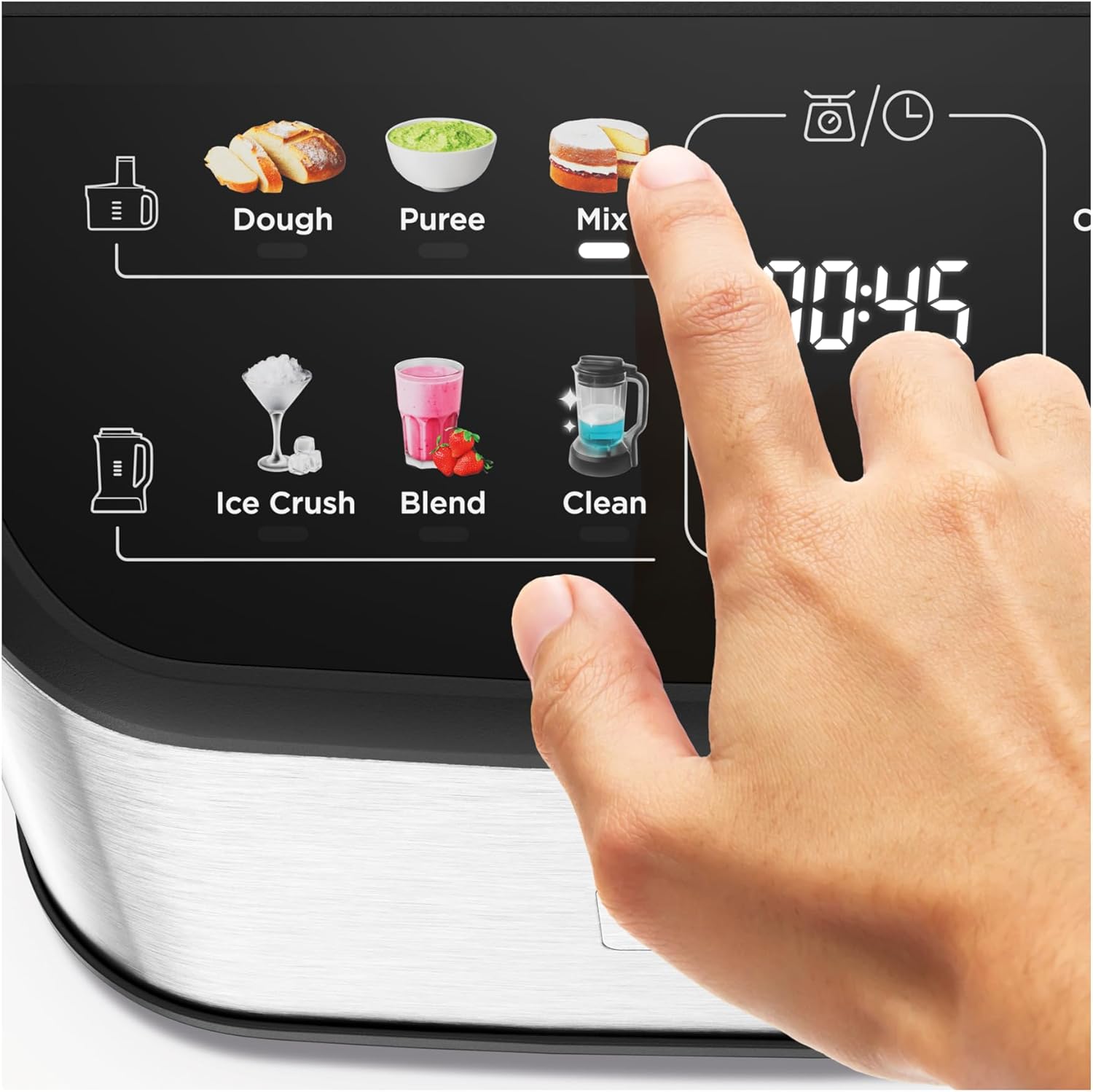
Figure 2: A close-up view of the control panel, showing a finger pressing the 'Mix' preset program button. Other programs visible include Dough, Puree, Ice Crush, Blend, and Clean. The digital scale display is also visible.
3.2 Included Accessories
- 3L Processing Bowl: For chopping, kneading, mixing, and grating.
- 1.5L Blender: Ideal for smoothies, soups, and sauces.
- Express Serve Accessory: Allows direct slicing and grating into a serving dish.
- Kneading Blade: For dough preparation.
- Weighing Plate: For use with the integrated digital scale.
- 4mm Reversible Grating Disc: For fine and coarse grating.
- Micro-Serrated Blade: For chopping and processing.
- Spatula: For scraping and mixing.
4. Setup and Assembly
- Unpacking: Carefully remove all components from the packaging. Wash all removable parts (bowl, lid, blades, accessories) in warm soapy water, rinse, and dry thoroughly before first use. Wipe the motor unit with a damp cloth.
- Main Bowl Assembly:
- Place the processing bowl onto the motor unit, aligning the handle with the locking mechanism. Twist clockwise until it locks securely.
- Insert the desired blade or disc onto the central spindle in the bowl. Ensure it is seated correctly.
- Place the lid onto the bowl, aligning the feed tube with the handle. Twist clockwise until it locks. The appliance will not operate unless the lid is correctly locked.
- Insert the pusher into the feed tube.
- Blender Assembly:
- Ensure the blender blade unit is securely attached to the blender jug.
- Place the blender jug onto the motor unit, aligning it with the drive shaft. Twist clockwise until it locks.
- Secure the blender lid onto the jug.

Figure 3: The Kenwood MultiPro OneTouch FDM73.480SS Food Processor fully assembled with the 3L processing bowl and lid, containing dough. This illustrates a typical setup for kneading or mixing tasks.
5. Operating Instructions
5.1 General Operation
- Ensure the appliance is correctly assembled with the desired attachment and ingredients.
- Plug the appliance into a suitable power outlet.
- Select a preset program or choose a manual speed setting (Low, Med, High, Pulse) using the control panel.
- For manual operation, press the desired speed button. For pulse, press and hold the 'Pulse' button. Release to stop.
- To stop operation, press the 'Off' button or unplug the appliance.
5.2 Preset Programs
The MultiPro OneTouch features six optimized preset programs for convenience:
- Dough: Optimized for kneading various types of dough.
- Puree: Ideal for creating smooth purees from cooked vegetables or fruits.
- Mix: Suitable for general mixing tasks, such as cake batters or sauces.
- Ice Crush: Specifically designed to crush ice cubes effectively.
- Blend: Perfect for blending liquids, making smoothies, or milkshakes.
- Clean: A self-cleaning function for the blender or bowl (refer to cleaning section for details).
5.3 Using the EasyWeigh Digital Scale
- Ensure the main unit is on a flat, stable surface.
- You can weigh directly into the processing bowl or use the provided weighing plate on top of the motor unit.
- Press the 'On/Zero' button to turn on the scale and zero the display.
- Press the 'kg/lb' button to switch between kilograms and pounds.
- Add ingredients. The weight will be displayed. Press 'Zero' again to tare the scale for additional ingredients.
5.4 Using the Blender Attachment

Figure 4: The Kenwood MultiPro OneTouch FDM73.480SS Food Processor with the 1.5L blender attachment in use, blending green ingredients like kale and kiwi. Pineapple chunks are visible on the counter, suggesting smoothie preparation.
- Assemble the blender attachment as described in Section 4.
- Add ingredients to the blender jug. Do not exceed the maximum fill line.
- Select the 'Blend' preset program or use a manual speed setting (e.g., High for smoothies).
- For best results with thick mixtures, use the 'Pulse' function or add a small amount of liquid.
5.5 Using the Express Serve Accessory
The Express Serve accessory allows you to slice or grate ingredients directly into a separate bowl or serving dish, minimizing cleanup.
- Attach the Express Serve accessory to the motor unit according to the specific instructions provided with the accessory.
- Insert the desired slicing or grating disc into the accessory.
- Position a serving bowl directly under the output chute.
- Turn on the appliance to a medium or high speed. Feed ingredients through the feed tube using the pusher.
6. Maintenance and Cleaning
Regular cleaning and maintenance will ensure the longevity and optimal performance of your Kenwood MultiPro OneTouch Food Processor.
- Always unplug the appliance before cleaning.
- Motor Unit: Wipe the motor unit with a damp cloth. Do not immerse it in water or any other liquid.
- Bowls, Lids, Blades, and Discs:
- Wash immediately after use to prevent food from drying on.
- Hand washing is recommended for all removable parts to preserve their condition and sharpness. Use warm soapy water and a brush for hard-to-reach areas. Handle blades with extreme care as they are very sharp.
- While some plastic parts may be dishwasher safe, frequent dishwasher use, especially at high temperatures, can cause discoloration or damage over time.
- Clean Program: For quick cleaning of the blender or main bowl after light use, add warm water and a drop of dish soap, then select the 'Clean' preset program. Rinse thoroughly afterward.
- Drying and Storage: Ensure all parts are completely dry before storing. Store attachments safely to prevent damage to blades.

Figure 5: The processing bowl and lid of the Kenwood food processor placed in a dishwasher rack, indicating that some components may be suitable for machine washing, though hand washing is generally recommended for longevity.
7. Troubleshooting
If you encounter any issues with your food processor, refer to the following common problems and solutions:
| Problem | Possible Cause | Solution |
|---|---|---|
| Appliance does not start. | Not plugged in; bowl/lid not correctly locked; power outage. | Ensure power cord is securely plugged in. Check that the bowl and lid are fully locked into position. Verify power supply. |
| Motor stops during operation. | Overload protection activated; ingredients too large/hard. | Unplug the appliance, remove some ingredients, and allow the motor to cool for 15-20 minutes. Cut ingredients into smaller pieces. |
| Ingredients are not processed evenly. | Too many ingredients; incorrect blade/speed; ingredients stuck. | Process smaller batches. Ensure the correct blade is used for the task. Stop the appliance, scrape down sides with a spatula, and restart. |
| Loud noise or vibration. | Improper assembly; unstable surface; foreign object. | Check that all parts are correctly assembled and locked. Place the appliance on a stable, flat surface. Ensure no foreign objects are in the bowl/blender. |
If the problem persists after attempting these solutions, please contact Kenwood customer support.
8. Technical Specifications
| Feature | Detail |
|---|---|
| Brand | Kenwood |
| Model Number | FDM73.480SS |
| Power | 1000 Watts |
| Voltage | 240 Volts |
| Processing Bowl Capacity | 3 Litres |
| Blender Capacity | 1.5 Litres |
| Material | Plastic (main body and bowls) |
| Color | Silver |
| Dimensions (Product) | 27.7P x 22.2l x 42.9H cm |
| Item Weight | 4.85 Kilograms |
| Special Features | 6 Preset Programs, EasyWeigh Digital Scale, Express Serve, EverSharp Blades |
| Care Instructions | Hand wash recommended |
9. Warranty and Support
Kenwood products are manufactured to high-quality standards and are designed for durability.
- Spare Parts Availability: Spare parts for this model are available for a period of 2 years from the date of purchase.
- Customer Support: For technical assistance, warranty claims, or to purchase spare parts, please contact your local Kenwood customer service center. Refer to the Kenwood website or product packaging for contact details.
- Proof of Purchase: Retain your proof of purchase for any warranty claims.


