
1. Introduction
This manual provides essential instructions for the installation, operation, maintenance, and troubleshooting of your ORALOCK replacement carburetor. This carburetor is designed for compatibility with the Predator Harbor Freight 62323 Chipper Shredder. Please read this manual thoroughly before attempting any installation or operation to ensure proper function and safety.
Important: Always ensure the engine is off and cooled down, and disconnect the spark plug wire before performing any maintenance or installation procedures.
2. Included Components
Before beginning installation, verify that all components are present and undamaged. The typical kit includes:
- Carburetor assembly
- Gaskets (various sizes for mounting)
- Spark plug
- Fuel filter
- Fuel line
- Other small accessories (e.g., clamps, levers)

Figure 2.1: Complete ORALOCK Carburetor replacement kit, including the carburetor, various gaskets, a spark plug, fuel filter, and fuel line.
3. Setup and Installation
This section outlines the general steps for replacing the carburetor. Specific procedures may vary slightly depending on your chipper shredder model. Refer to your chipper shredder's original service manual for detailed instructions on removing the old carburetor.
3.1 Pre-Installation Check
- Compatibility Verification: Carefully compare the appearance of the new ORALOCK carburetor with your original carburetor. Cross-reference dimensions and mounting points to ensure a perfect fit for your Predator Harbor Freight 62323 Chipper Shredder.
- Safety First: Ensure the chipper shredder engine is completely cool and the spark plug wire is disconnected to prevent accidental starting.
- Fuel Drainage: Drain all fuel from the fuel tank and carburetor bowl into an approved container.
3.2 Removal of Old Carburetor
- Locate and disconnect the fuel line from the carburetor.
- Disconnect any throttle linkage, choke linkage, and governor springs attached to the carburetor. Note their positions for reassembly.
- Remove the mounting bolts or nuts securing the carburetor to the engine intake manifold.
- Carefully remove the old carburetor and any old gaskets.
3.3 Installation of New Carburetor
- Clean the mounting surfaces on the engine intake manifold.
- Place new gaskets in their correct positions between the carburetor and the engine.
- Mount the new ORALOCK carburetor onto the engine, securing it with the original mounting bolts/nuts. Do not overtighten.
- Reconnect the throttle linkage, choke linkage, and governor springs. Ensure they move freely and correctly.
- Install the new fuel filter into the fuel line, if applicable, and connect the fuel line to the carburetor. Secure with clamps.
- Replace the spark plug with the new one provided in the kit, if desired.
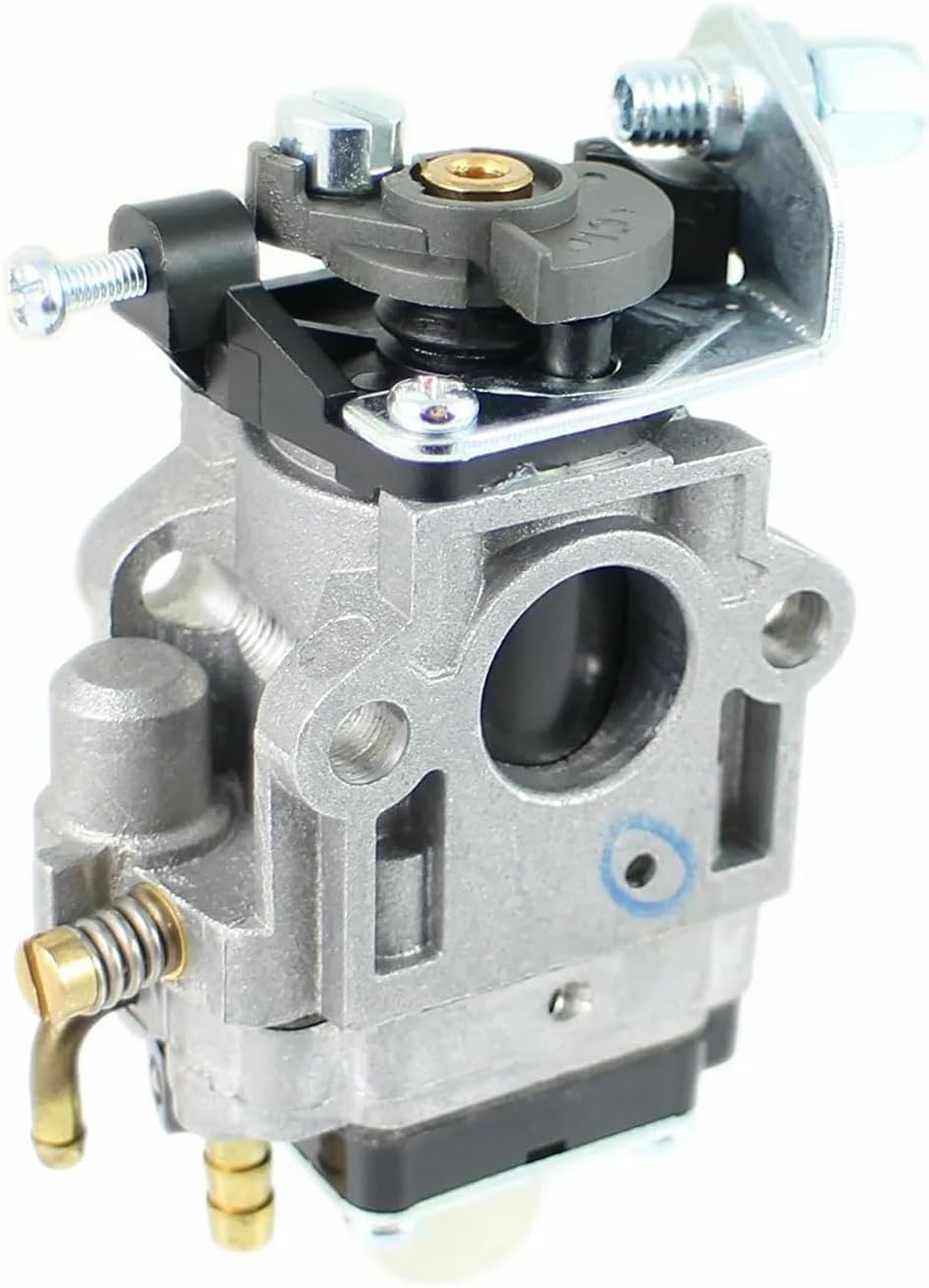

Figure 3.1: Front and side views of the ORALOCK carburetor, showing various connection points for fuel lines and linkages.
4. Operating Instructions (Post-Installation)
After successful installation of the ORALOCK carburetor, follow these general steps for initial engine startup and operation.
4.1 Initial Startup
- Refill the fuel tank with fresh, appropriate fuel for your chipper shredder.
- Reconnect the spark plug wire.
- Set the choke lever to the "CHOKE" position (if applicable).
- Set the throttle to the "FAST" or "START" position.
- Pull the starter rope firmly until the engine attempts to start or starts briefly.
- Once the engine fires or starts, gradually move the choke lever to the "RUN" position.
- Allow the engine to warm up for a few minutes before operating under load.
4.2 Adjustments (if necessary)
The ORALOCK carburetor is typically pre-adjusted for optimal performance. However, minor adjustments may be needed for specific environmental conditions or engine wear.
- Idle Speed: If the engine idles too fast or too slow, locate the idle speed screw (usually a small screw with a spring) and turn it clockwise to increase idle speed or counter-clockwise to decrease it.
- Mixture Screws: Some carburetors may have high-speed and low-speed mixture screws. Adjust these in small increments (e.g., 1/8 turn at a time) to achieve smooth operation and optimal power. Consult your chipper shredder's service manual for specific adjustment procedures.
5. Maintenance
Regular maintenance ensures the longevity and optimal performance of your carburetor and chipper shredder.
- Fuel System Cleanliness: Always use fresh, clean fuel. Stale or contaminated fuel is a primary cause of carburetor issues. Consider using a fuel stabilizer if the equipment will be stored for extended periods.
- Fuel Filter Replacement: Replace the fuel filter annually or more frequently if operating in dusty conditions or with questionable fuel quality.
- Carburetor Cleaning: If performance issues arise, the carburetor may need cleaning. This involves disassembling the carburetor, cleaning jets and passages with carburetor cleaner, and replacing gaskets. This procedure is recommended for experienced users or professional technicians.
- Air Filter: Ensure the engine's air filter is clean and properly installed. A dirty air filter can affect carburetor performance.
6. Troubleshooting
Refer to this section for common issues and potential solutions related to carburetor performance.
| Problem | Possible Cause | Solution |
|---|---|---|
| Engine will not start | No fuel reaching carburetor; clogged fuel filter; incorrect choke setting; fouled spark plug. | Check fuel level; replace fuel filter; ensure choke is set correctly; inspect/replace spark plug. |
| Engine runs rough or stalls | Dirty carburetor jets; incorrect idle adjustment; stale fuel; air leak. | Clean carburetor; adjust idle speed; drain and replace fuel; check for loose connections. |
| Loss of power during operation | Clogged fuel filter; dirty air filter; carburetor mixture too lean or rich. | Replace fuel filter; clean/replace air filter; adjust carburetor mixture screws (if applicable). |
| Fuel leaks from carburetor | Damaged float needle or seat; cracked fuel line; loose bowl screw. | Inspect and replace float needle/seat; replace fuel line; tighten bowl screw. |
If these steps do not resolve the issue, it is recommended to consult a qualified service technician.
7. Specifications
| Feature | Detail |
|---|---|
| Brand | ORALOCK |
| Model Number (Carburetor) | ORALOCK |
| Compatibility | Predator Harbor Freight 62323 Chipper Shredder |
| UPC | 696971406998 |
| ASIN | B0CV7H88B |
8. Warranty and Support
For warranty information or technical support regarding your ORALOCK carburetor, please contact the manufacturer directly through their official channels. Keep your purchase receipt as proof of purchase.
Manufacturer: ORALOCK
Note: Specific warranty terms and conditions may apply.