
B0CV5YS63Y
Generic RoHS Standard UIM SIM Card Male to Female Extension Flat FPC Cable Extender 15cm User Manual
Model: B0CV5YS63Y
Product Overview
The Generic RoHS SIM card Extender is a specialized tool designed for debugging and testing SIM card interfaces. It features a flexible FPC (Flexible Printed Circuit) cable, allowing a standard SIM card to be extended from its host slot. This design aims to streamline testing processes and protect the device's internal SIM slot from wear during frequent insertions and removals.
Key features include:
- Allows a SIM Card to be extended from the host slot for internal SIM interface.
- Designed as a debug and test tool, with a flexible FPC cable for versatile use.
- Cable Length: approximately 15cm (not including connectors).
- Plug and play functionality, no driver needed.
- Important Note: This extender is designed for Standard SIM cards only. It is not compatible with Nano SIM or Micro SIM cards.
Product Components and Dimensions
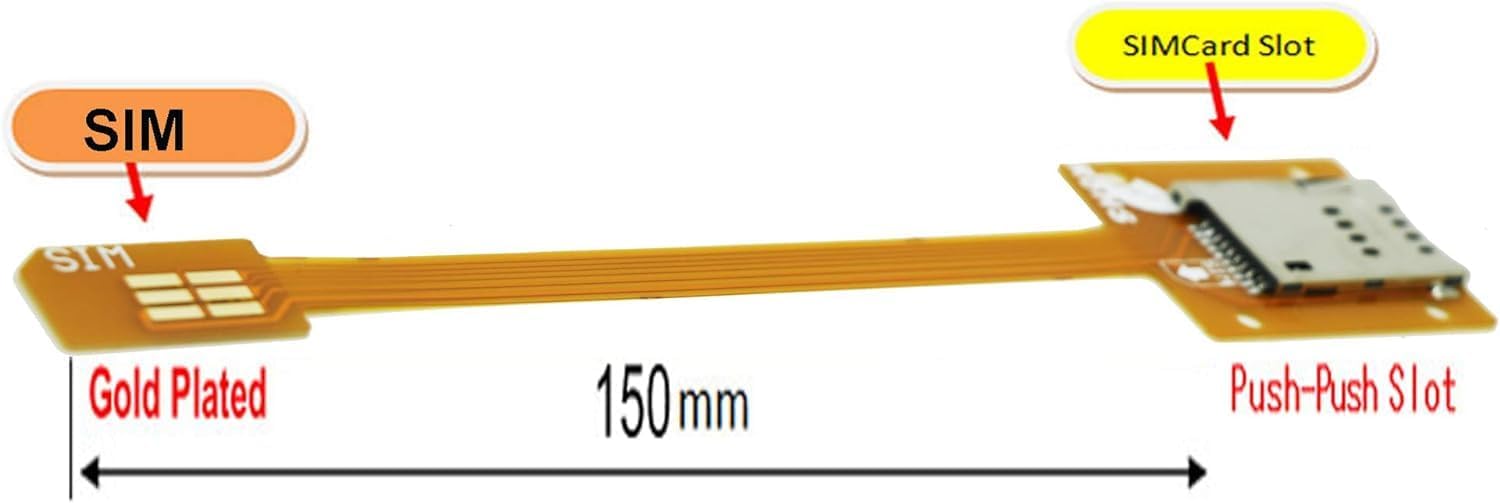
Figure 1: Generic SIM Card Extender showing its components and approximate length. The image highlights the "SIM" end (male connector), the "SIMCard Slot" end (female push-push slot), and the overall length of 150mm. The contacts are gold-plated for reliable connection.

Figure 2: A top-down perspective of the SIM card extender, illustrating the flexible flat cable connecting the male SIM connector to the female SIM card slot. This view emphasizes the compact design and the RoHS compliance marking on the circuit board.

Figure 3: An angled view of the SIM card extender, providing a clear look at both the male SIM connector and the female SIM card slot. This perspective helps visualize the product's form factor and the flexibility of the FPC cable.
Setup Instructions
The Generic SIM Card Extender is designed for simple plug-and-play operation. No software drivers or complex configurations are required.
- Identify SIM Card Type: Ensure you are using a Standard SIM card. This extender is not compatible with Micro SIM or Nano SIM cards.
- Insert SIM Card into Extender: Gently insert your Standard SIM card into the female "Push-Push Slot" on the extender. Ensure it is seated correctly and securely.
- Insert Extender into Device: Insert the male "SIM" end of the extender into the Standard SIM card slot of your device (e.g., mobile phone, router, test equipment). Ensure it is fully inserted.
- Verify Connection: Once connected, your device should recognize the SIM card as if it were directly inserted.
Operating the Extender
Once properly set up, the SIM card extender functions as a pass-through for the SIM card's signals. It allows for convenient access to the SIM card without repeatedly inserting and removing it directly from the device's internal slot. This is particularly useful for:
- Debugging: Facilitates easier access for testing SIM card functionality or signal integrity.
- Testing: Ideal for environments where multiple SIM cards need to be swapped frequently for testing purposes.
- Protection: Reduces wear and tear on the device's internal SIM card slot, extending its lifespan.
The extender maintains the electrical connection between the SIM card and the device, ensuring normal operation of cellular services (e.g., calls, SMS, data) as long as the SIM card and device are functioning correctly.
Maintenance
The Generic SIM Card Extender requires minimal maintenance. Follow these guidelines to ensure its longevity:
- Cleaning: If necessary, gently wipe the FPC cable and connectors with a dry, lint-free cloth. Avoid using liquid cleaners or abrasive materials.
- Storage: Store the extender in a clean, dry environment, away from extreme temperatures and direct sunlight. Avoid bending or creasing the FPC cable sharply.
- Handling: Always handle the extender by its connectors rather than pulling on the cable itself to prevent damage to the internal wiring.
Troubleshooting
If you encounter issues while using the SIM card extender, consider the following common solutions:
- SIM Card Not Recognized:
- Ensure the SIM card inserted into the extender is a Standard SIM card. This extender is not compatible with Micro SIM or Nano SIM cards.
- Verify that the SIM card is correctly and fully seated in the extender's slot.
- Ensure the extender's male end is fully inserted into your device's SIM slot.
- Test the SIM card directly in the device's slot to confirm the SIM card itself is functional.
- Intermittent Connection:
- Check for any visible damage to the extender's cable or connectors.
- Ensure there is no dust or debris in the extender's SIM slot or your device's SIM slot.
- Avoid excessive bending or twisting of the FPC cable during use.
- Physical Damage:
- If the extender shows signs of physical damage (e.g., frayed cable, bent pins), it may need to be replaced.
Specifications
| Product Name | Generic RoHS Standard UIM SIM Card Male to Female Extension Flat FPC Cable Extender |
| Model Number | B0CV5YS63Y |
| Brand | Generic |
| Cable Length | Approx. 15 cm (150 mm) |
| Compatibility | Standard SIM cards only (Not compatible with Micro SIM / Nano SIM) |
| Function | Debug and Test Tool, SIM Card Extension |
| Product Dimensions | 8 x 6 x 0.1 inches (Product packaging dimensions) |
| Item Weight | 0.352 ounces |
| Compliance | RoHS Standard |
Warranty and Support
Information regarding specific warranty terms or direct customer support contacts for this "Generic" branded product is not provided within this manual or the product's available specifications. For any issues or inquiries, please refer to the retailer or platform from which the product was purchased for their return, exchange, or support policies.
Ask a question about this manual
Ask about setup, troubleshooting, compatibility, parts, safety, or missing instructions. Manuals+ will review the question and use this page’s manual context to help answer it.